

Figma is the global industry standard for a product design tool. Its toolkit includes Figma Design, Figma Make, Figma Draw, Figma Sites, Dev Mode, FigJam, Figma Slides, and Figma Buzz. And in Config 2026, it added Figma Agent, and Figma Weave as well expanding Figma AI ecosystem. I, as an AI product designer, find Figma fantastic, but at times have also found myself questioning if Figma is too costly because of the way they bundle their tools; especially their dev mode cost. If you, too, question this and are curious how exactly Figma pricing compares with Adobe (and other alternatives), read on.
tl;dr: Figma Pricing Overview
Figma Free Plan | $0/month. Limited to 3 files + 2 editors. Good for individuals and learning. |
Figma Paid Plans | Ranging from $16 → $90/month per Full seat. Unlock unlimited files, collaboration, and Dev Mode. |
Figma AI Credits | Free tier has 500 AI credits/mo. Paid plans have higher limits. |
Figma Discounts | Free Professional plan for verified students/educators via Figma Education. |
Figma Competitor Pricing |
Figma Plans & Features in 2026
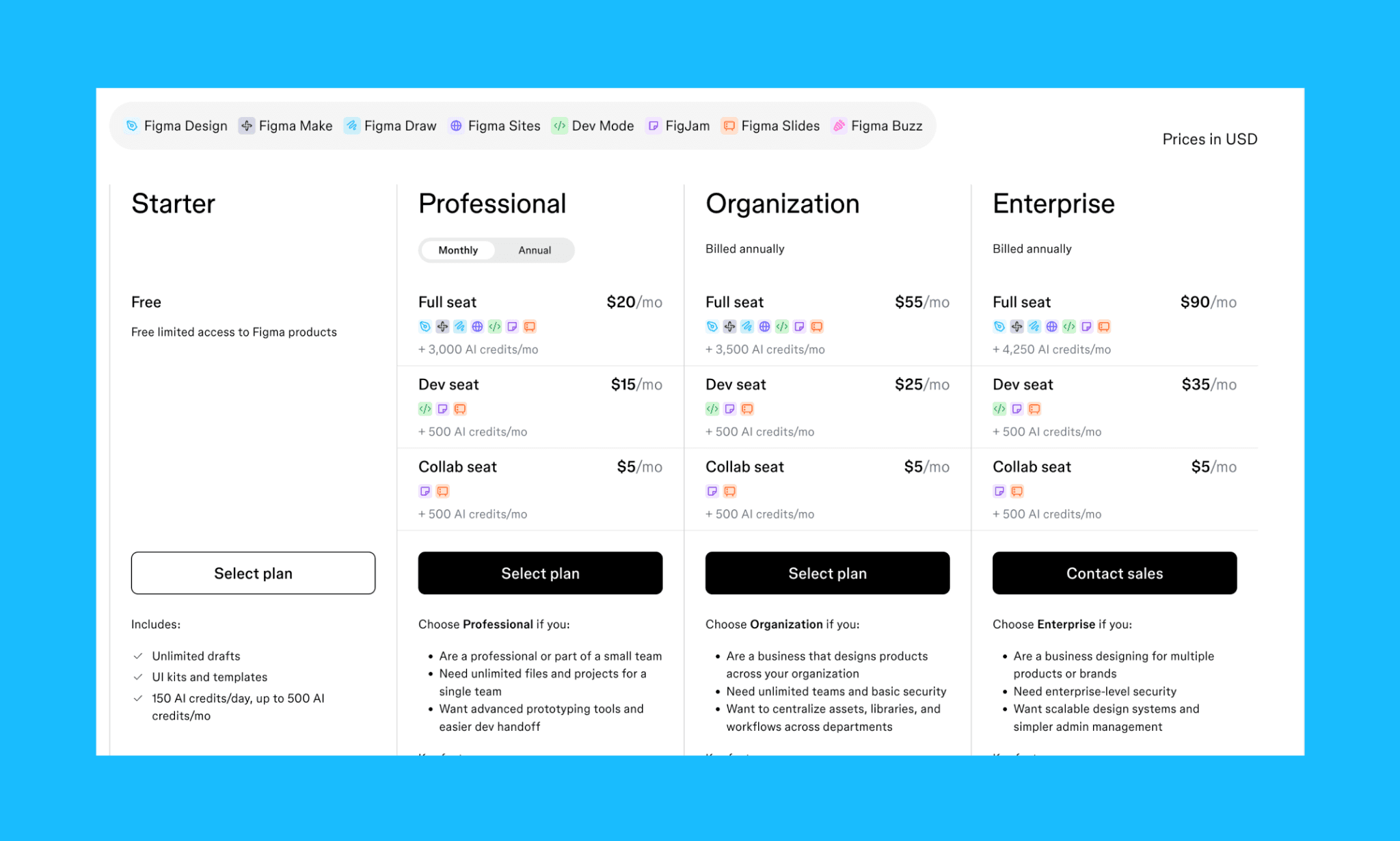
In 2026, Figma offers 4 different subscription plans ranging from $0 (Starter) to $90/mo (Enterprise) with, of course, a range of features, credits, tools, and seats. You cannot purchase a standalone Figma tool like Figma Make or Figma Site; have to go for the subscription plan that bundles them with the right access (Full, Dev, or Collab seats), and the option of AI credits top-up. While some are in closed beta e.g. Agent & Weave Tools with no deductions from your AI credit pool.
Figma Starter Plan
Cost: $0/mo.
Figma’s Starter Plan is completely free with no hidden fees or trial expiration. Just sign up and go; no credit card required either.
What is included in Figma’s free plan in 2026?
Limits: Up to 2 editors, 3 Figma files + 3 FigJam files, with 3 pages per file
Collaboration: Unlimited drafts, real-time editing, and guest access
AI credits: 150/day, capped at 500/month
Version history: 30 days
Core tools: Auto layout, components, vector editing, and access to Figma plugins and UI templates
Ideal for:
Individuals and students building portfolios or learning design.
PMs and founders validating ideas before committing to paid plans.
Is Figma fully free?
Figma is fully free in its Starter Plan only. There is no time limit, nor is a credit card required. However, some premium features like Dev Mode, AI prototyping, and design system tools require paid plans.
Is Figma free for personal projects?
Yes, you can use Figma for free for personal projects with their Starter Plan.
How many editors are allowed in the Figma free plan?
The Figma free plan allows unlimited editors or collaborators. But it limits teamwork to 3 Figma files and 3 FigJam files (with 3 pages each). Personal drafts remain unlimited.
What is Figma AI Credit?
Figma AI credits are tokens powering Figma’s AI features like image editing, auto-rename layers, interactive components, content generation in Slides/FigJam.
Each action costs variable credits based on task complexity. Figma AI credits are credited monthly, and unused credits don't roll over. Overages require paid add-on credits ($150/month for 5,000 shared credits).
Figma Professional Plan
Cost (when billed annually):
Full seat: $16/editor/month
Dev seat: $12/month
Collab seat: $3/month
*In its monthly billing, Figma Professional Plan gives ~20% discount.
Key features:
Unlimited files & projects (Figma + FigJam)
Unlimited version history
Team libraries for shared components
Advanced prototyping + private sharing controls
Dev Mode for better developer handoff
3,000 AI credits/month (Full Seat), and 500 (Dev & Collab Seats)
Access to full suite: Design, FigJam, Make, Draw, Sites, Slides
Selective access to AIs in beta: Agent, Weave
Ideal for:
Freelancers & small teams looking to manage multiple clients/projects with unlimited collaborators.
Startups & product teams building MVPs with Figma as a versatile design-to-code tool.
Design system owners to scale component libraries for consistent, growing teams.
What is the difference between Full, Dev, and Collab Seats in Figma?
Figma splits access by role rather than just plans. A Full seat gives complete control—design, prototyping, Dev Mode, and AI features across the entire product suite. While a Dev seat is built for developers, allowing them to inspect design files as code; but not create or edit designs. Lastly, a Collab seat is for stakeholders offering viewing, commenting, and full access to FigJam and Slides (but no design editing or developer tools).
How much is the Figma professional plan price per editor per month?
Figam Professional Plan is priced at $16 per editor/mo for a full seat when billed annually ($20/mo for monthly billing). As an editor with Full Seat access, that member can edit the design, export code, and use all AI features.
Figma Organization Plan
Cost:
Full seat: $55/editor/month
Dev seat: $25/month
Collab seat: $5/month
*This plan comes with annual billing only.
Key features:
Unlimited teams with centralized file management
Org-wide libraries & shared fonts for consistency
Admin controls for billing, access, and file recovery
Design system analytics + branching/merging
Org ownership of files for better security
AI credits: 3,500/month (Full), 500 (Dev & Collab)
Ideal for:
Large enterprises looking for centralized design systems across teams and departments
Governance-heavy orgs seeking asset control, permissions, and admin oversight
Figma Enterprise Plan
Cost:
Full seat: $90/editor/month
Dev seat: $35/month
Collab seat: $5/month
*This plan comes with annual billing only.
Key features:
Enterprise security: SAML SSO, SCIM provisioning
Advanced governance: Session controls, guest permissions, secure sharing
Scalable setup: Custom workspaces, design system APIs, theming
Data control: Regional hosting + audit logs
Add-ons: Governance+ for compliance needs
AI credits: 4,250/month (Full), 500 (Dev & Collab)
Ideal for:
Multi-brand orgs with separate workspaces and workflows
Regulated industries requiring compliance with data residency and identity management
Large-scale teams looking for automated workflows and API-driven design systems
Price of Individual Tools in Figma
First off, I must state that you cannot buy individual tools in Figma in 2026. Instead, access to tools like Dev Mode, Make, FigJam, etc., is managed through bundled subscription plans and specific seat types. This forced bundling is a common complaint of most individual users of Figma, but apparently, it makes sense at the team level. So I try to look at the least possible cost of the major tools of Figma from the POV of both.
Figma Dev Mode Price
Figma Dev Mode bridges design and development by allowing developers to inspect files, view code snippets, and manage handoffs directly on the design canvas.
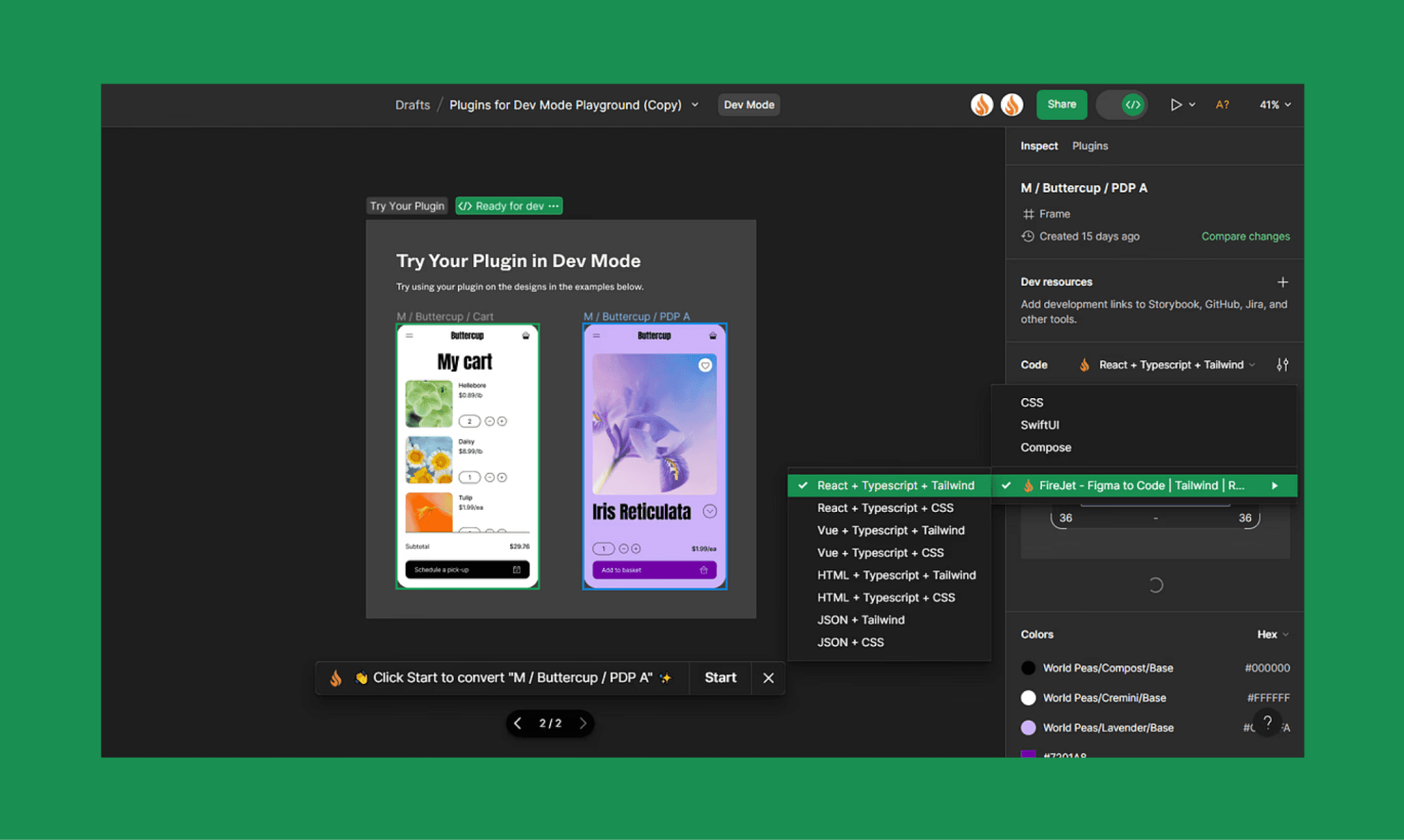
Cost for Individual: Free on the Starter plan for basic inspection, or $15–$20 per month for full access via a Professional seat.
Cost for Team: Billed annually per Dev seat at $12 (Professional), $25 (Organization), or $35 (Enterprise) per month.
I Shut Figma Dev vs Design-to-Code AI Debate >
Figma Make Price
Figma Make is an AI prototype generator that allows users to generate functional, interactive UI for mobile or web apps/landing pages from text prompts – in minutes.
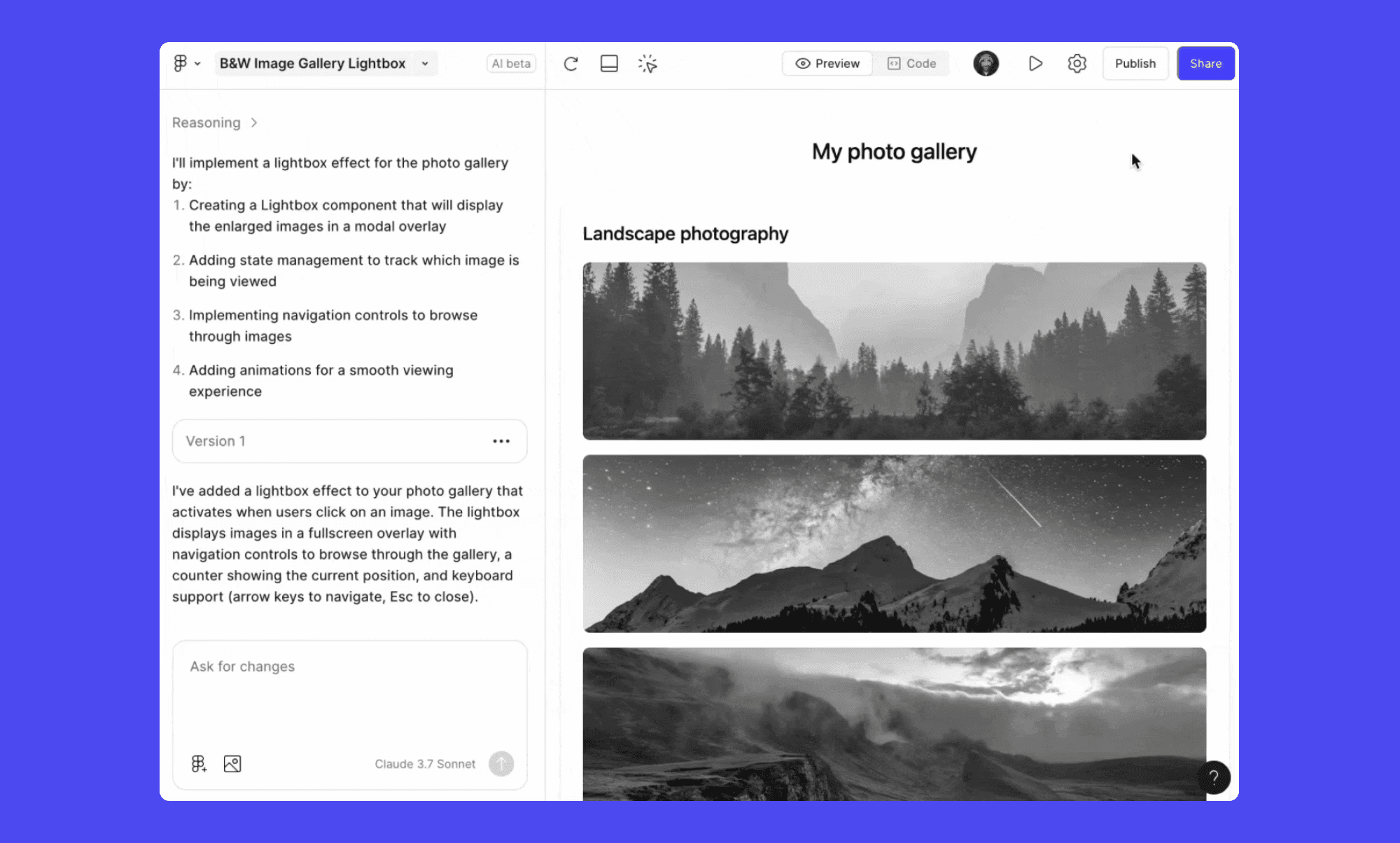
Cost for Individual: Free on the Starter plan (with 500 AI credits/mo) or included in the Professional plan at $20/month (or $16/mo, if billed annually) for 3k+ AI credits.
Cost for Team: Comes with the Full Seat at $16 (Professional), $55 (Organization), or $90 (Enterprise) per month.
How to Use Figma Make AI like a Pro >
Figma Design Agent Price
Announced in Config 2026, Figma Agent is an autonomous AI design agent that lives inside Figma design canvas. It can design entire user interfaces from natural language descriptions, make bulk edits, and use all comments as context to make edits.
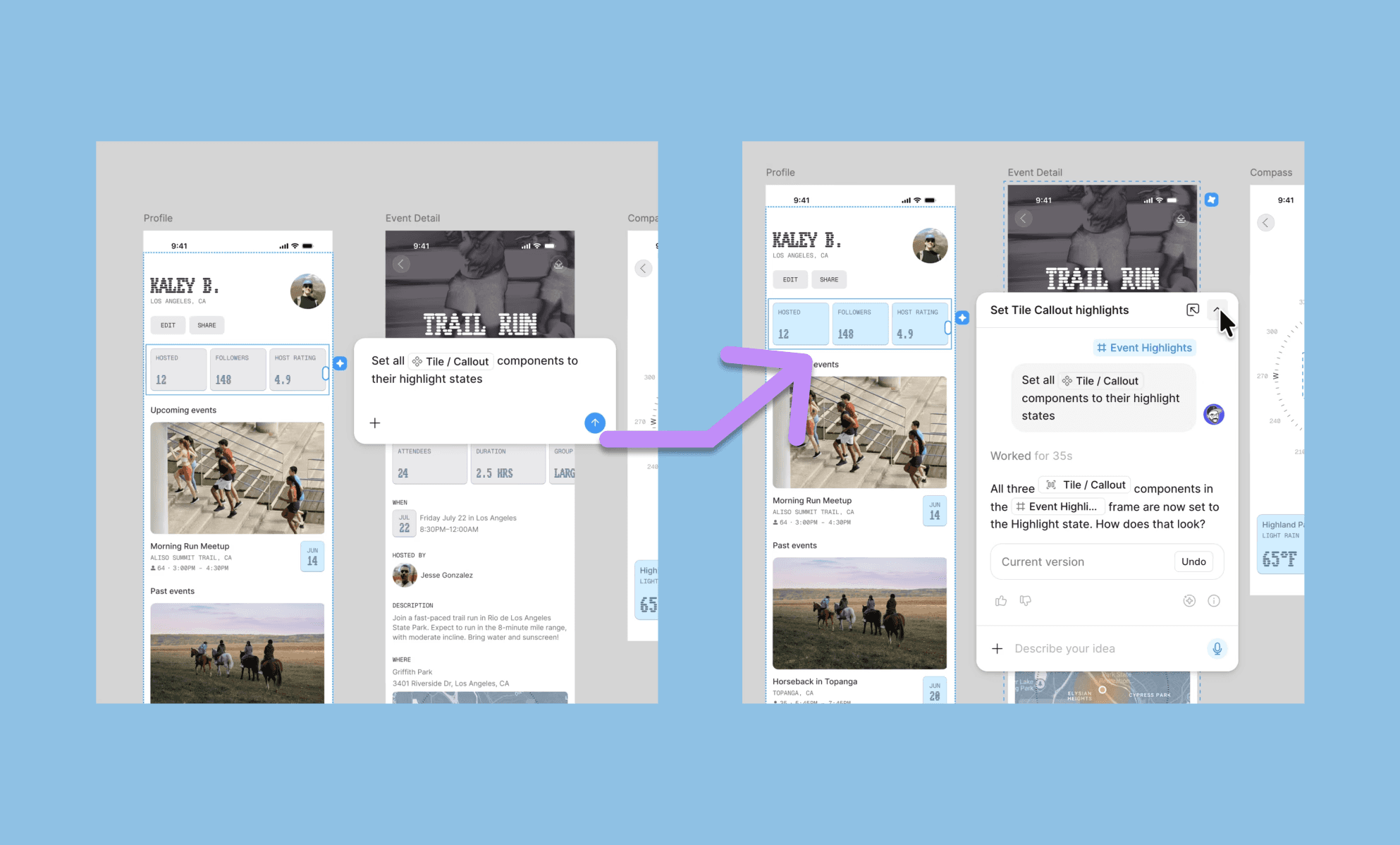
Pricing: As of mid-2026 it is in closed beta and only selectively accessible even to paid users. However, the good thing is that once they grant it to you, you can run it for free. No AI credit is deducted from your free/paid plan’s pool. (But you can see the credit consumed per action.)
How to Access Figma AI Agent >
Figma Weave Price
Figma Weave (previously Weavy AI) is a node-based AI creative platform (like Flora AI) for generating and editing images or videos through multi-model workflows. Some of these workflows are available directly inside Figma design under ‘Tools’ on the left panel.
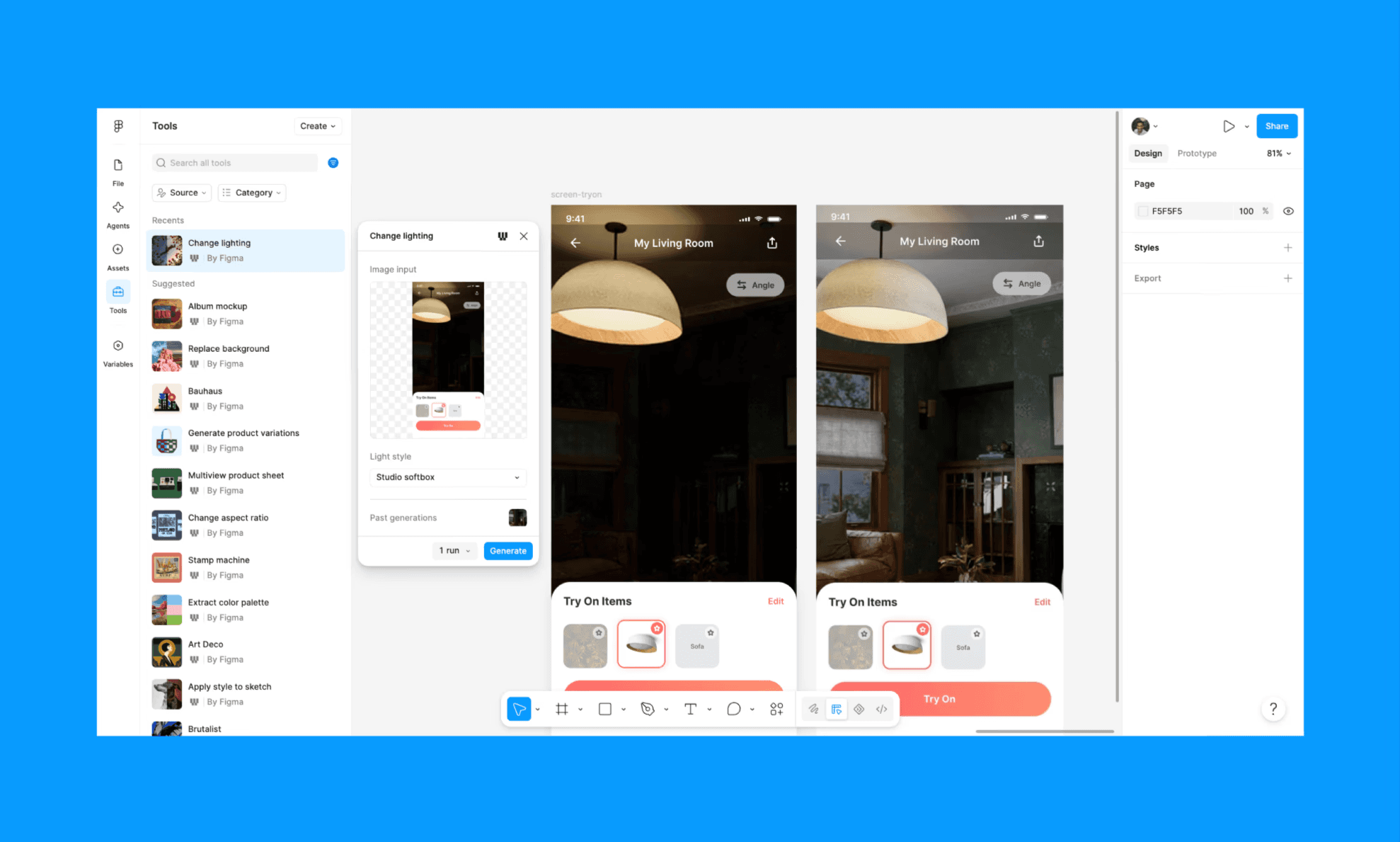
Price for standalone Figma Weave AI: Free plan includes 150 monthly credits with full model library access. And paid plans start at $19/month for 1,500 credits or $36–$48/user/month for teams.
Price for Weave tools inside Figma Design: Free during open beta for all paid Figma subscribers (Professional, Organization, Enterprise). No separate subscription required to access Weave editing tools from the design canvas.
How to Use Figma Weave Node-based Canvas >
FigJam Price
FigJam is Figma’s collaborative whiteboard for brainstorming, diagrams, and planning using sticky notes, connectors, and templates.
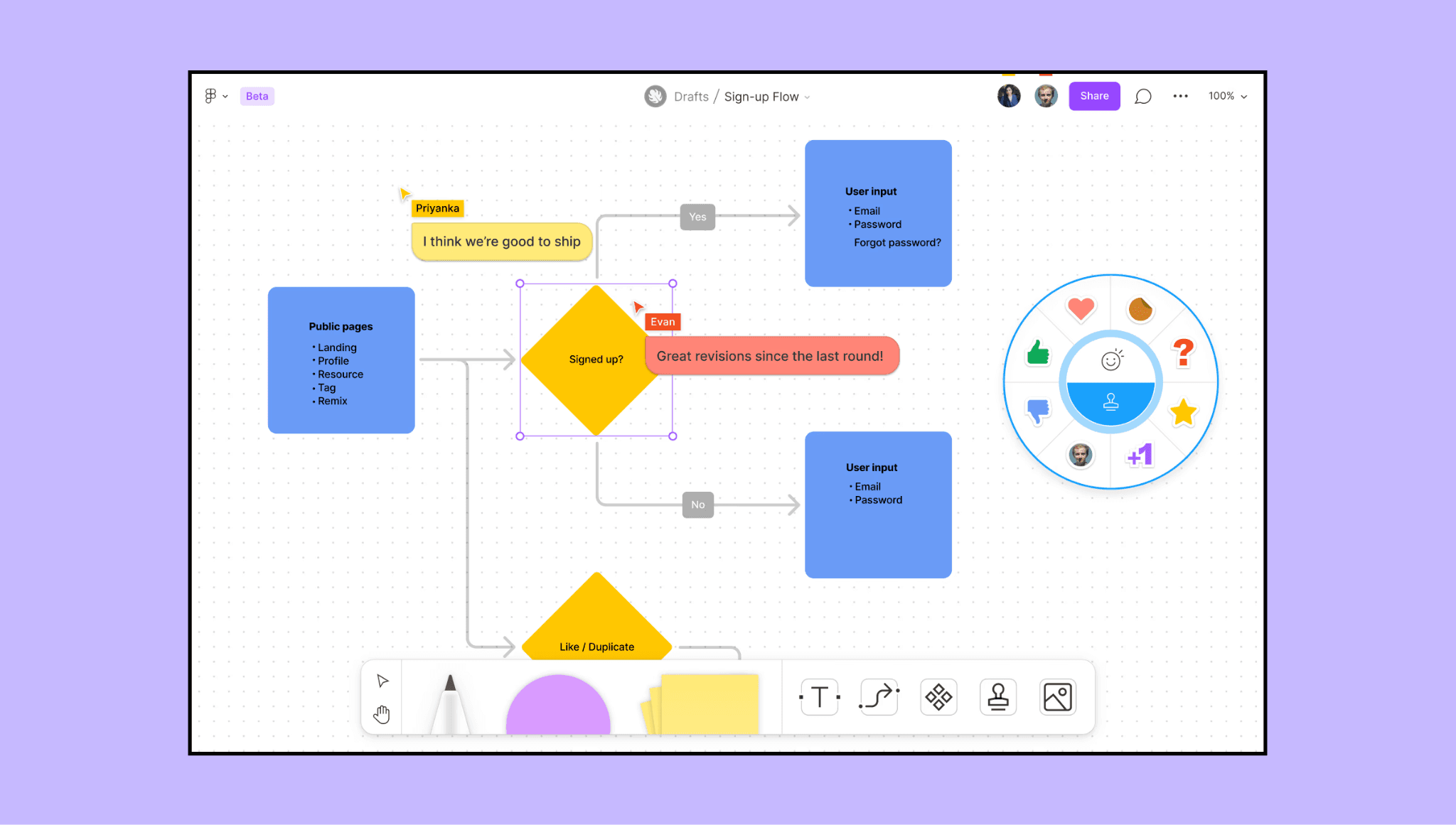
Cost for Individual: Free on Starter (up to 3 files) or $3–$5/month on Professional for unlimited use.
Cost for Team: Available via Collab seats—$5/month (Professional) or $5/month (Organization & Enterprise), typically billed annually.
Any Hidden Costs in Figma?
In my experience, Figma doesn’t have obvious hidden fees, but costs can creep up in practice. The biggest one is seat sprawl. Meaning, teams upgrade access organically, and suddenly your bill grows faster than your team.
Then there’s AI credits guzzling. Since credits in Figma are used basis task complexity, it is nearly impossible to budget for it in advance. Also, it is still in beta where limits are relaxed, but Figma is expected to monetize usage through top-ups or add-ons, turning AI credits into a variable cost.
Finally, some essentials are quietly paywalled at higher tiers. These include features like SSO, SCIM, and even full Dev Mode access, which require pricier plans, especially as teams scale.
What are the Hidden Costs in Lovable >
Choosing the Right Figma Plan
Again, since Figma bundles Design, FigJam, and AI tools like Make & Agent into role-based access, your choice depends on how you work and collaborate. I have figured out the following questions to self-assess which Figma subscription is right for you:
Am I working solo or with a single partner on just a few personal projects?
Figma Free Starter plan is enough with basic limits for portfolios and small work.
Is my process focused on high-frequency AI generation or “vibe coding”?
You’ll likely need Professional—500 AI credits on free runs out quickly, vs 3,000 on paid.
Does my team need to maintain design consistency across unlimited files?
Go with Professional for unlimited projects, version history, and shared libraries.
Does my organization require advanced security and centralized admin control?
Choose Organization or Enterprise for SSO, SCIM, and admin governance.
How much “Dev Mode” access do my developers actually need?
Full handoff requires paid Dev seats ($12–$35/month)—free access is limited.
Which Figma subscription plan benefits small businesses the most?
Professional plan. Unlimited files, team libraries, advanced prototyping, Dev Mode access, and affordable pricing ($20/mo) make it ideal for growing teams without enterprise overhead.
Which Figma plan includes admin tools and usage analytics?
The Organization plan includes centralized admin tools and design system analytics, allowing larger businesses to track adoption metrics and manage billing across multiple departments and teams.
My Checklist to Find the Best AI Prototyping Tool in 2026 >
Figma Competitor’s Pricing
The answer to ‘How much is a Figma subscription?’ is not over until one has looked at ‘What is Figma’s cost relative to other design tools?’.
Adobe vs Figma Pricing
Adobe XD is Figma’s closest alternative, but as of 2026, it is being phased out. Use case overlap exists for design work, but Adobe targets photographers, video editors, and illustrators, while Figma targets product designers and design teams.
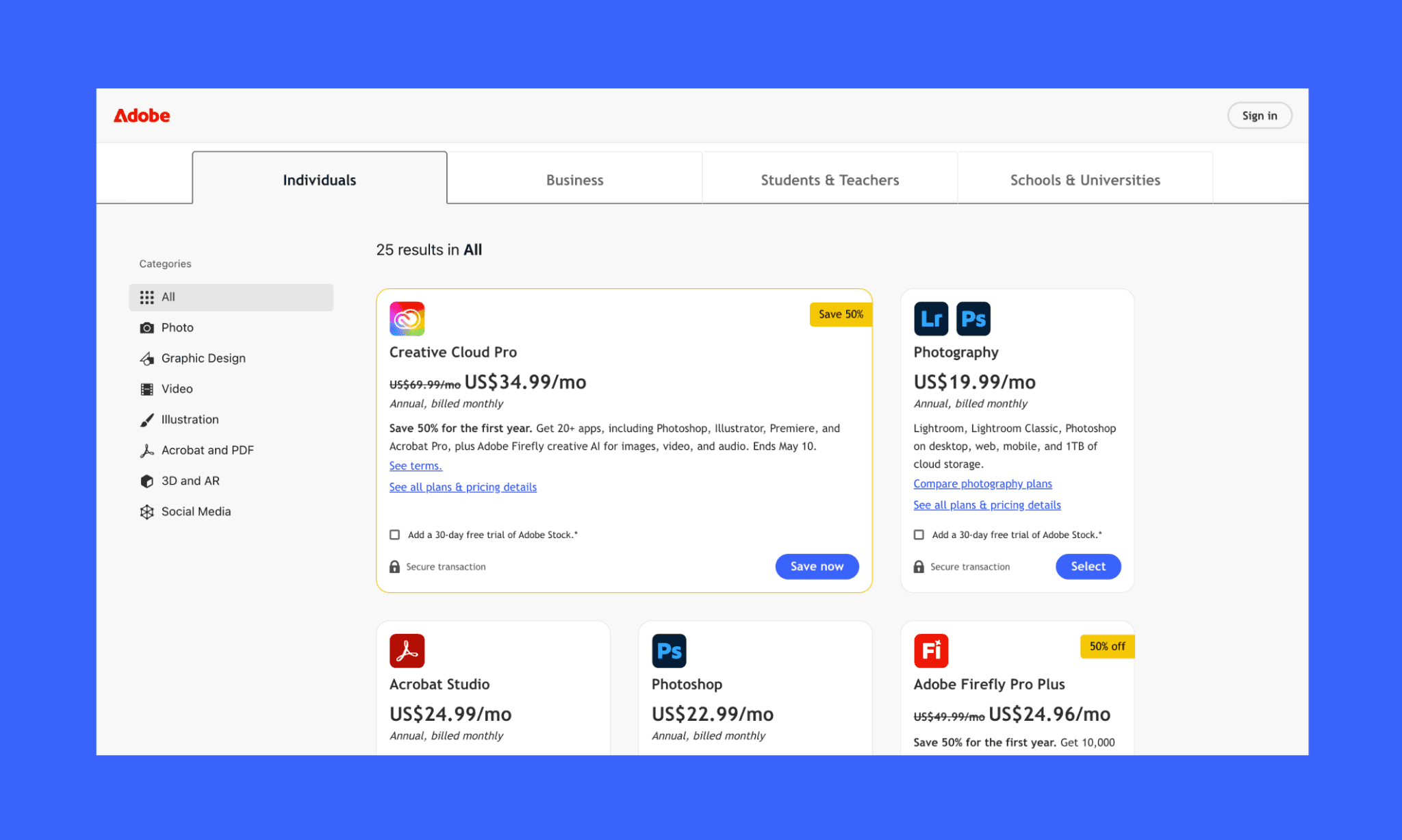
Starter Plan: No true free plan. Only trials or limited tools like Adobe Express
Paid Plans: Paid plans for individuals include Creative Cloud Pro at roughly $69.99/month. Business/Team plans for the full suite are typically $99.99/month per license.
Is Figma cheaper than Adobe?
Yes. In fact, even one Adobe app can cost more than Figma’s Professional plan, with collaboration baked into Figma at no extra cost.
Check Out 10 Best Figma Make Alternatives >
Canva vs Figma Pricing
Canva is a user-friendly design tool featuring a drag-and-drop interface and thousands of pre-made templates. Canva and Figma overlap in basic graphic creation, but the former is primarily used for social media and presentations, whereas the latter for UI/UX.
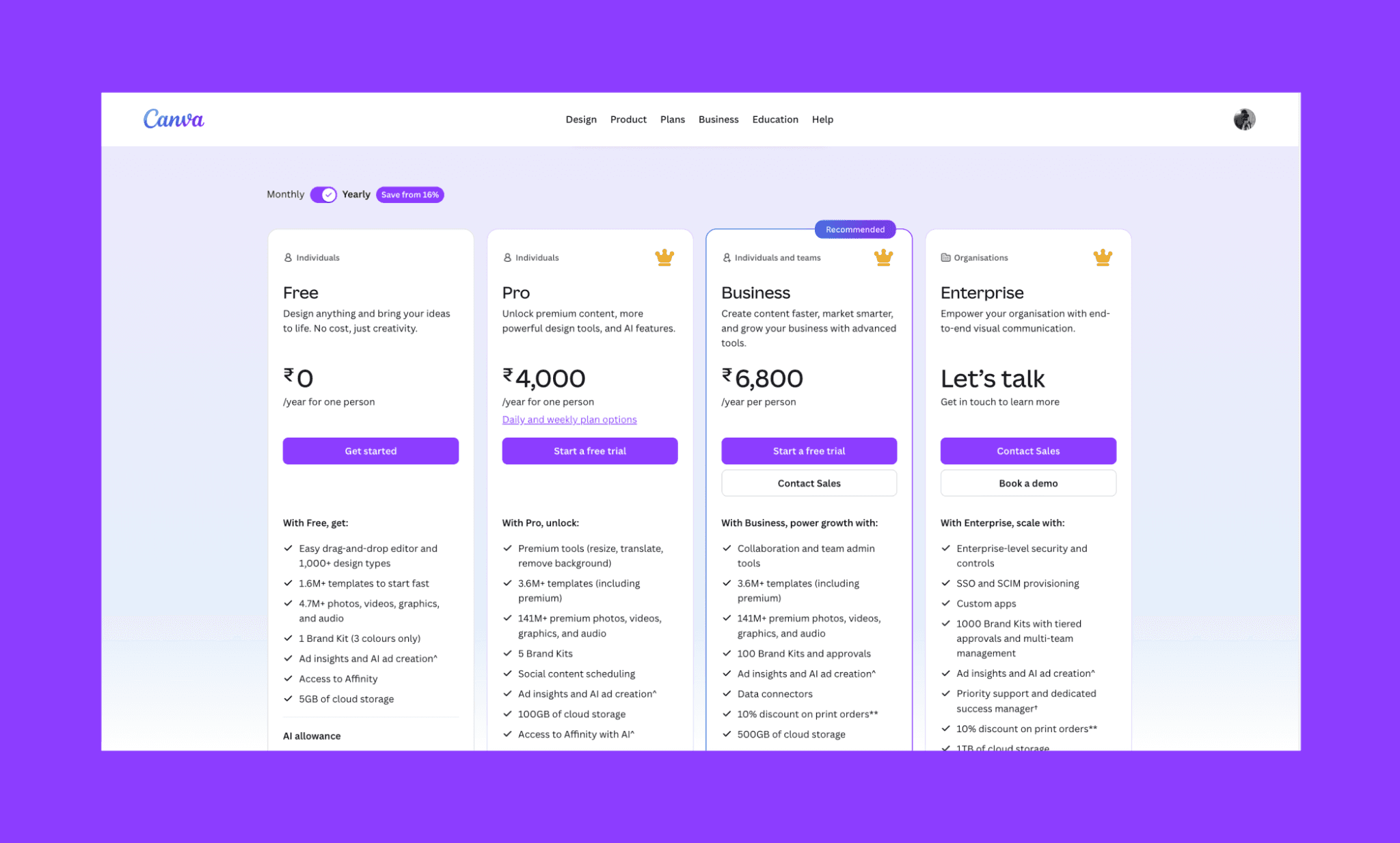
Starter Plan: Free ($0/mo) with 250,000+ templates, 5GB storage, basic AI tools, no credit card needed.
Paid Plans: $15/mo monthly ($120/year = $10/mo annual). 1TB storage, 140M+ premium assets, Brand Kit, Background Remover, Magic Resize, 500 AI credits/month.
Is Figma cheaper than Canva?
No. Canva is more affordable than Figma. But Figma justifies higher pricing with advanced design systems, dev handoff, and team workflows.
Truth of UI Design with Canva >
Banani: An affordable Figma AI alternative
Banani is an AI-powered UI design tool and copilot that creates high-fidelity, interactive prototypes from text descriptions. You can export the design to Figma, even copy-paste clean HTML/CSS code of your UI, or connect to an AI coder via MCP.
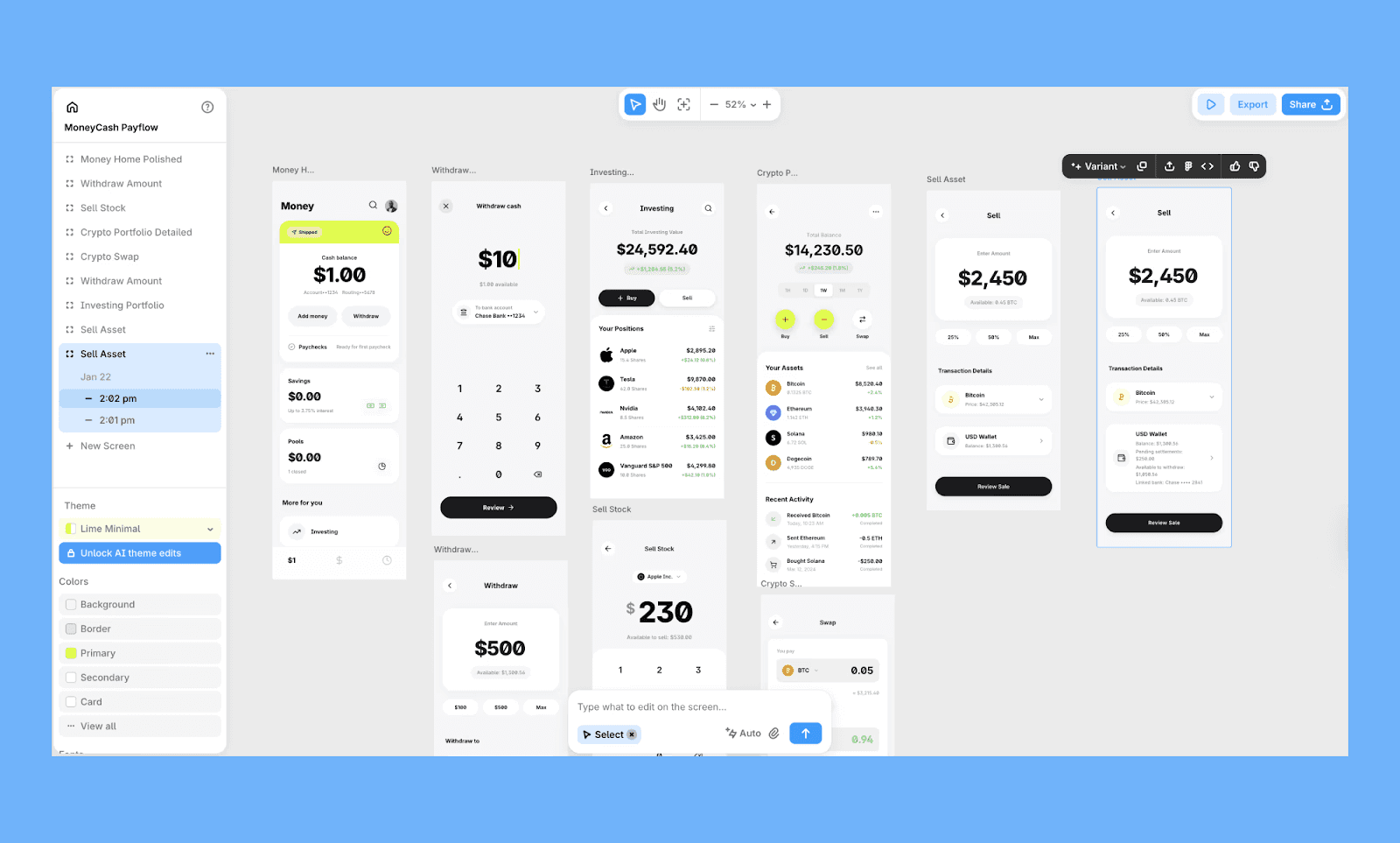
Banani has a free-forever free tier with ~170 credits/month, where 1 credit equals 1 generation/edit. And its paid plan starts from $12/mo (billed annually) for ~400 credits, and at $30, you get unlimited credits for a month.
At a fraction of Figma's AI credit costs, Banani generates production-ready code directly, eliminating design-to-code handoff delays. Perfect for non-designers and developers bypassing expensive Figma Make workflows.
Generate UI with Banani AI free >
Is Figma Really Overpriced in 2026?
After my full pricing review of Figma, I realized that it is not exactly overpriced but certainly feels that way because of tool bunding. Figma IPO documentation revealed that 2/3rd of their 13 million active users are non-designers[2]. So it's understandable for them to cater to product teams instead of product designers. Yet, in most cases, you'd be good with Figma Professional or Organisation plans.
For individuals and teams needing high-volume AI-powered UI generation, Banani offers better value—lower credit costs, faster iteration, and production-ready code output without the design handoff delays.
FAQs on Figma Pricing
How much does Figma cost per month?
Figma costs nothing on Starter. Its Paid plans range from $16–$90/month per Full seat (Professional → Enterprise). Dev seats cost $12–$35/month, Collab seats $3–$5/month.
What is the cost of Figma’s unlimited plan?
There is no unlimited plan in Figma for all its features. Yet, the cheapest, the Professional plan by Figma, offers unlimited files and projects at $16/mo for a full seat. Pricing scales by seats, not usage.
How much does Figma Sites cost?
At least, you need a Full seat on Professional for $20/mo, or higher to access Figma Sites. Figma Sites is included in the Full Seat of all paid plans (Professional, Organization, Enterprise) at no additional cost.
How much is Figma AI?
Figma AI is included via AI credits in all plans, including the free one. Starter has 500 AI credits/mo; paid plans offer more. Extra credits may require add-ons.
Which plan includes Figma AI prototyping features?
All Figma plans support the AI prototyping feature via Figma Make, but meaningful usage requires paid plans due to higher AI credit limits.
How can I get Figma for students?
Figma offers free Professional plan access to verified students and educators through Figma Education (‘figma.com/education’). Eligibility may require verification via an educational institution email or a third-party verification service.
Which is the best alternative to Figma AI?
Banani is a strong alternative to Figma’s AI-driven UI design. It turns text into prototypes and code faster, without heavy credit usage.
Reference
[1] https://www.youtube.com/watch?v=QozOtC8AasU
[2] https://sqmagazine.co.uk/figma-statistics/


