
Base44 is an AI app builder. Given its credit-based freemium pricing, it’s hard to put a number on ‘How much does Base44 cost?’. But what’s surprising is online questions like ‘Is Base44 completely free?’. The answer itself is not surprising: it’s not free. Yet flags a need to clarify Base44 credit, free & paid plans, and any hidden costs. My guide on Base44 pricing does exactly that. Along with comparing Base44 costs with its competitors (like Lovable and Bolt.new) to help you make an informed Base44 subscription choice.
tl;dr: Base44 Pricing & Credits 2026
Base44 free plan | $0/mo with 25 message credits, 5 daily cap, and limited integrations |
Base44 paid plans | Paid tiers start at $16/mo annually and scale to $160/mo for higher credits and pro features. |
Base44 credit system | Uses message credits for building and integration credits for live app actions. |
Base44 competitor pricing | Lovable and Bolt start around $25/mo. Banani starts at $12/mo for UI-first workflows. |
Pricing & Features of Base44
Base44 free plan in 2026
Yes, Base44 has a free tier. But no, Base44 is not completely free.
To get started with Base44 for free, simply sign up for it; it does not even need a credit card.
Base44 free plan features
At $0/month, Base44 free features include:
Authentication
Built-in database
Basic analytics
AI app generation tools
Base44 free plan limitations
Although generous, the no-cost plan of Base44 has strict caps:
25 monthly credits, 5 daily credit top-up, and 100 integration credits.
No custom domain support; you get a base44.app subdomain
No GitHub integration or in-app code editing
Base44 branding stays visible
My app created by using Base44 free plan
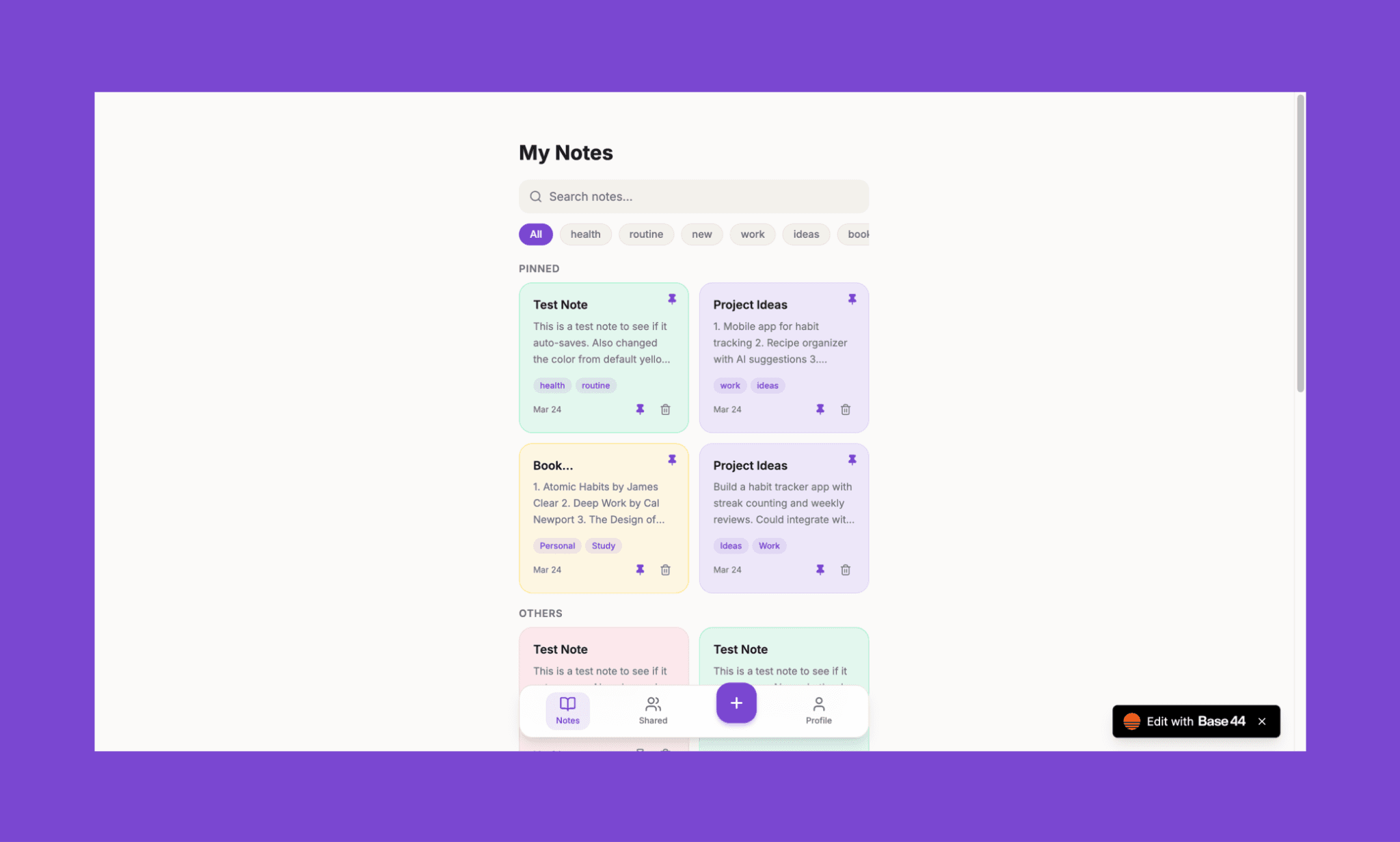
I believe, for tinkering with Base44 core features, its free plan works well. In fact, I created a note-taking app prototype using Base44 for free. You can check it out here >
Base44 paid plans and features in 2026
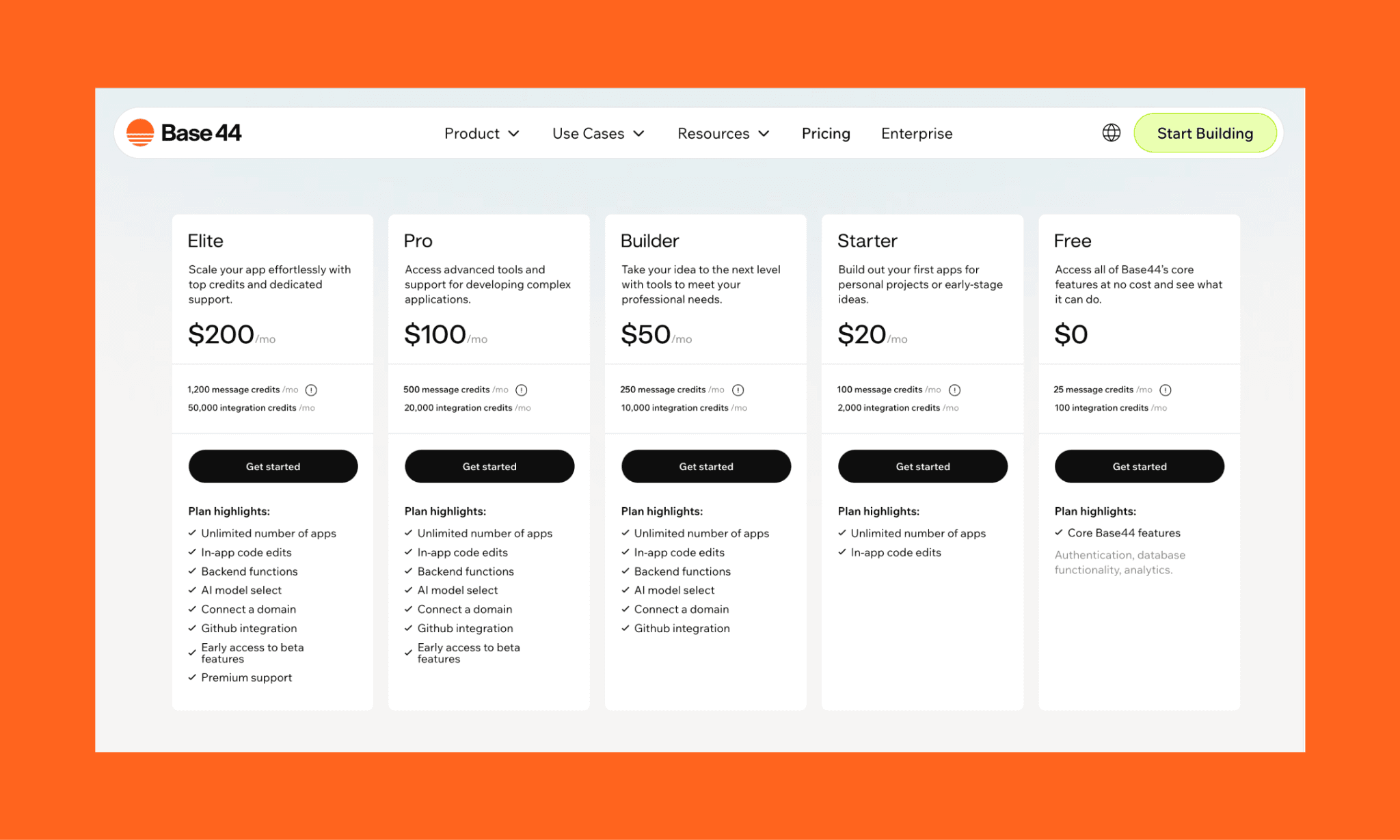
In 2026, Base44 offers five subscription plans that scale from free casual testing to paid production-grade apps.
Feature | Free | Starter | Builder | Pro | Elite |
Price on Annual Billing | $0/mo | $16/mo | $40/mo | $80/mo | $160/mo |
Price on Monthly Billing | $0/mo | $20/mo | $50/mo | $100/mo | $200/mo |
Message Credits / Month | 25 | 100 | 250 | 500 | 1,200 |
Integration Credits / Month | 100 | 2,000 | 10,000 | 20,000 | 50,000 |
Unlimited Number of Apps | ✖ | ✔ | ✔ | ✔ | ✔ |
In-App Code Edits | ✖ | ✔ | ✔ | ✔ | ✔ |
Backend Functions | ✖ | ✖ | ✔ | ✔ | ✔ |
AI Model Select | ✖ | ✖ | ✔ | ✔ | ✔ |
Connect Custom Domain | ✖ | ✖ | ✔ | ✔ | ✔ |
Free Domain for 1 Year | ✖ | ✖ | ✔ | ✔ | ✔ |
GitHub Integration | ✖ | ✖ | ✔ | ✔ | ✔ |
Share 25 Credits with Friend | ✖ | ✖ | ✔ | ✔ | ✔ |
Early Access to Beta Features | ✖ | ✖ | ✖ | ✔ | ✔ |
Premium / Priority Support | ✖ | ✖ | ✖ | ✖ | ✔ |
Remove Base44 Branding | ✖ | ✖ | ✔ | ✔ | ✔ |
Unlimited Collaborators (Shared Credits) | ✖ | ✖ | ✔ | ✔ | ✔ |
Built-in Integrations | Core Only | ✖ | ✔ | ✔ | ✔ |
Automations | ✖ | ✖ | ✔ | ✔ | ✔ |
Private Templates | ✖ | ✖ | ✖ | ✔ | ✔ |
*Note: The yearly billing saves 20% on Base44 costs per month compared to monthly billing
See the complete feature list of Base44 >
Starter Plan
It is the first useful paid upgrade from the Base44 free plan, adding more monthly credits, unlimited apps, and in-app code edits for faster iteration. Best for personal tools, internal dashboards, and side projects.
Builder Plan
It unlocks custom domains, GitHub integration, backend functions, and higher credit limits, making it the first truly production-ready tier. In my view, it is the best Base44 subscription for most users building MVPs or client-facing products.
Pro Plan
Designed for growing SaaS products and teams with active users. It offers larger message and integration credit pools, plus early access to beta features for users scaling beyond MVP stage.
Elite Plan
With this Base44 plan, you are mainly paying for maximum capacity, premium support, and fewer usage bottlenecks at scale. Best for high-traffic production apps, agencies, and businesses running multiple live products.
Enterprise Plan
Taking it all a step further, if you have unique needs for Base44, you can request them for custom plans, a dedicated architect, account support, and more at custom pricing.
Which Base44 subscription is the best?
No one Base44 plan fits all, but one of the plans should fit all you need. So, I think it’s best to see each plan in terms of what you can achieve with them to analyze its fitment for your use case.
Choose Base44 plan… | If you want to... | Because... |
Free | Test the waters | No cost to explore core features. |
Starter | Build a personal tool | The cheapest way to get unlimited apps. |
Builder | Ship an MVP to users | You need a custom domain and GitHub export. |
Pro | Scale a business tool | Higher integration limits and beta features. |
Elite | Run high-traffic apps | Maximum credit pool and premium support. |
*Pro tip for PMs: If you are building for a client, start with the Base44 Builder plan. It offers the best balance of features (especially custom domains) without overcommitting your budget until you hit integration credit limits.
My tips on choosing the best AI App builder >
Base44 Credits Explained
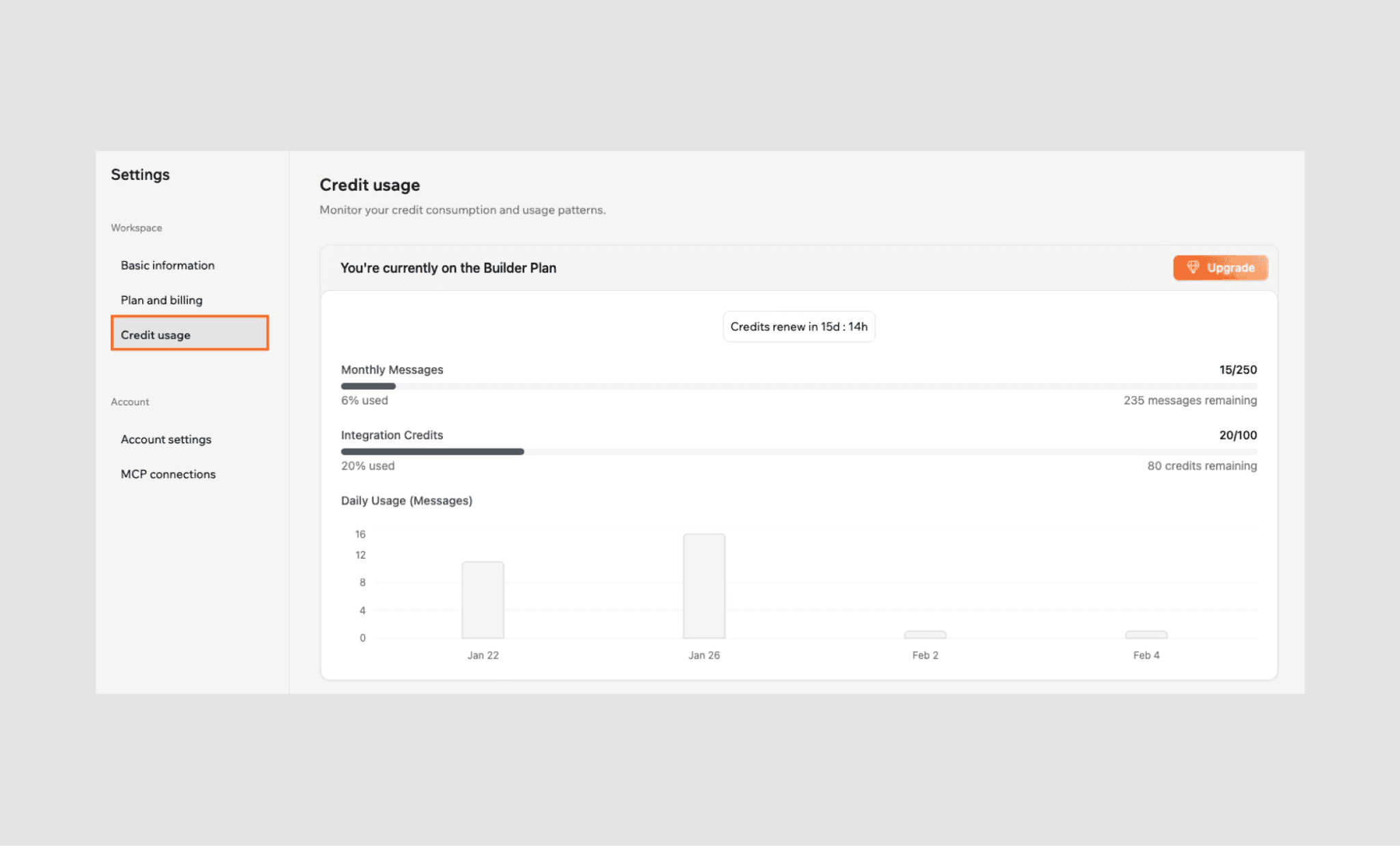
Even after choosing the right subscription of the Base44 AI app builder plan, your real monthly cost depends on how fast you use credits. Credits in Base44 are like currencies you spend on each request (planning, building, integration, UI edits etc.). Each plan comes with a fixed number of credits with limited validity. In Base44, you pay credits both as the creator and as the app owner.
How do credits work in Base44?
Base44 uses a dual-credit system: Message credits and Integrations credits.
Message credits: These are consumed when you interact with the AI to build, edit, or troubleshoot your app. Every time you send a prompt (e.g. "create a pricing page" or "make this header blue") you spend these credits.
Integration credits: These are consumed by your end-users when the live app performs specific tasks. For instance, if your app sends an email, queries a database, or makes an external AI call (like to ChatGPT).
This means even after you stop building, your Base44 app can keep consuming credits.
How are Base44 credits calculated?
Credit calculation in Base44 varies depending on the prompt complexity and mode of your request. While there’s no credit calculator for Base44, nor can you know how much credit will be consumed for a given prompt before running it. Still, some Base44 testing and online discussion revealed the following relation between action and credit cost.
Action Type | Typical Cost | Credit Type |
Standard AI prompt | 1 credit | Message |
Discussion/Plan mode | 0.3 credit | Message |
Standard integration task | 1 credit | Integration |
AI agent interaction | 3 credits | Integration |
A short prompt does not always mean less credit consumption. For example, “Redesign dashboard and connect Stripe” may trigger multiple actions and consume more credits than expected. On the other hand, any manual visual edits made in Base44 are free and do not consume credits.
How many free credits are on Base44?
Typical free credits in Base44 as of April 2026 include a mix of Message and Integration credits:
25 message credits per month
5 daily message cap; it resets every day
100 integration credits monthly
Referral bonus credits in some promotions
Can you buy Base44 credits?
Currently, you cannot purchase Base44 credits "à la carte" or through a pay-as-you-go model. So, if you run out of credits mid-month, you have two choices: upgrade or wait (for the next billing cycle).
By the way, this credit top-up hurdle is a major issue related to Base44 pricing on Reddit and other online forums.
Do Base44 credits rollover?
No. Base44 credits do not roll over. It follows a use-it-or-lose-it model where unused credits (both message credits and integration ones) reset each billing cycle.
Any Hidden Costs in Base44?
This is an interesting one. Because, on paper, Base44 pricing looks simple; even transparent. But many users discover extra costs only while/after building or launching an app. A common one hiding in plain sight is that bad AI outputs still consume credits and increase costs. Similarly, consider other Base44 costs that are not always direct fees:
Two credit limits: Running out of either message or integration credit type can pause building or break live features.
Forced upgrades: No small top-ups means you may need a pricier plan mid-month.
Backend lock-In: Migrating databases and backend logic later may require developer rebuild costs.
Domain renewals: Free domain perks may expire, leaving yearly renewal costs.
Base44 Competitor Price Comparison
Tool | Free Plan | Starting Paid Plan | Best For |
$0/mo • 25 message credits/mo (5 daily cap) • 500 integration credits | Starter: $20/mo • 100 message credits • 2,000 integration credits | Non-technical founders building full-stack SaaS, MVPs, and internal tools with built-in auth, DB, and hosting | |
$0/mo • 5 credits/day • 30 monthly cap | Pro: $25/mo • 100 credits/mo • Private projects, custom domain | Founders and PMs building UI-first web apps quickly | |
$0/mo • 1M tokens/mo • 300K daily cap | Pro: $25/mo • 10M tokens/mo • Custom domain, no branding | Developers wanting browser-based full-stack code generation | |
$0/mo • Limited AI Agent trial • 10 public apps | Core: $20/mo • $20 usage credits • Unlimited apps , autonomous builds | Developers wanting cloud IDE + AI coding + deployment | |
$0/mo • $5 monthly credits • Edit with visual design mode | Premium: $30/mo • $20 credits • Multi-model access, shared workspace | Frontend teams generating React + Tailwind UI | |
$0/mo • 1 project • 100 API calls • 100MB storage | Pro: $20/mo • 100 messages/day • Unlimited builds, code export | Builders creating native mobile apps with React Native | |
$0/mo • basic prototyping | Starter: $20/seat/mo • usage-based credits | Teams generating UI aligned with design systems | |
$0/mo • 20 credits/mo • 5 daily refills • 3 Figma exports/day | Plus: $12/mo annual • 100 credits • Unlimited Figma exports • HTML/CSS export | PMs, founders, and non-designers creating hi-fi UI prototypes fast |
Check out Top Base44 Alternatives in 2026 >
Lovable v/s Base44 pricing
Lovable focuses on generating editable React + TypeScript code with Supabase backend support, while Base44 is more managed and no-code friendly.
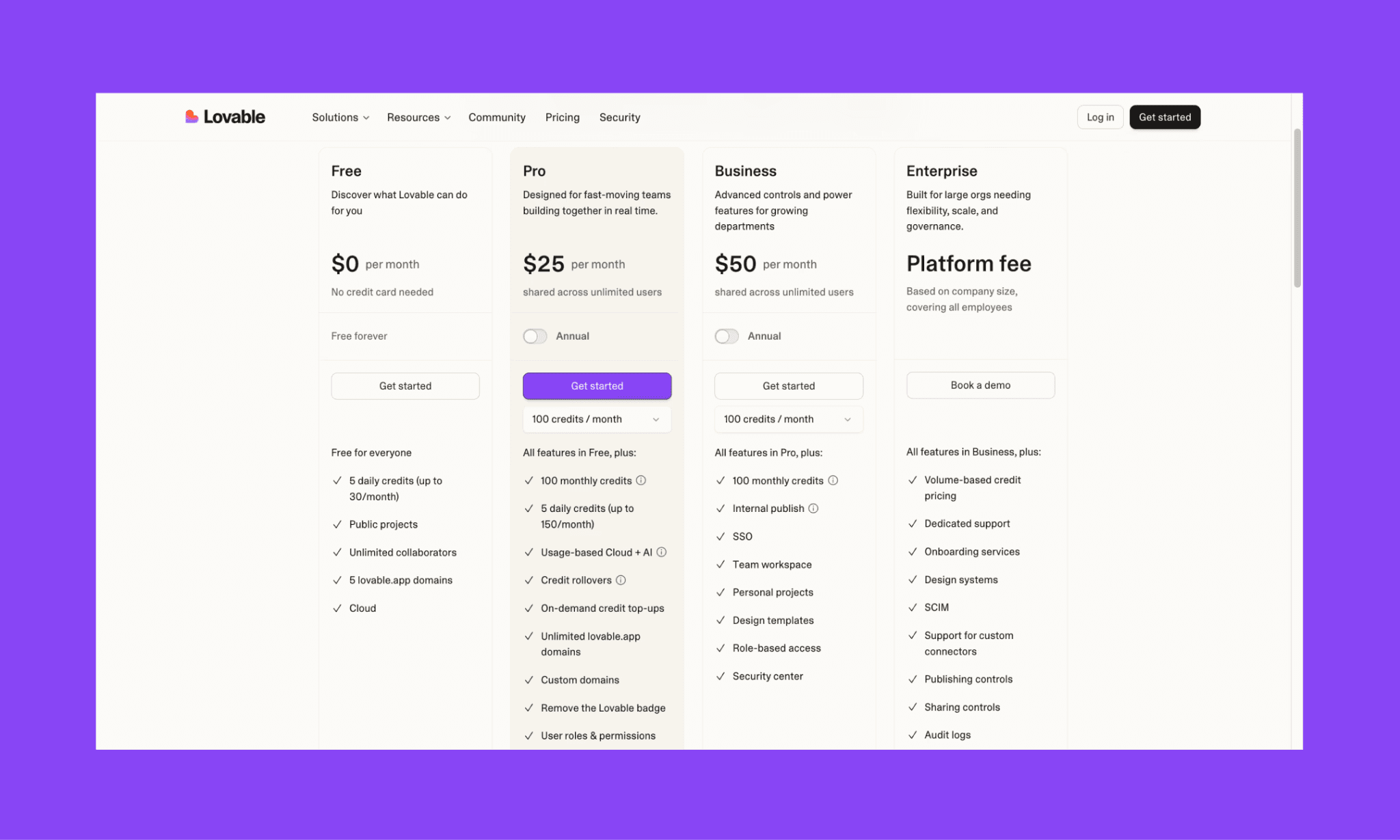
Feature | Lovable | Base44 |
Free Plan | $0 for 5 credits/day (30/mo max) | $0 for 25 message credits/mo |
Starting Paid Plan | $21/mo (annual) for 100 credits/mo | $16/mo (annual) for 100 message credits/mo |
Credits | On-demand credit top-ups and limited rollover | No top-up of rollover |
Key Features | Full code ownership + GitHub | Built-in backend, hosting, auth |
Choose Lovable over Base44 if you want cleaner source code ownership and stronger developer handoff.
Full Base44 vs Lovable Comparison Guide >
Bolt vs Base44 pricing
Bolt (or Bolt.new) is an AI-powered full-stack web and mobile app builder that allows for direct code visibility and supports React Native builds through Expo
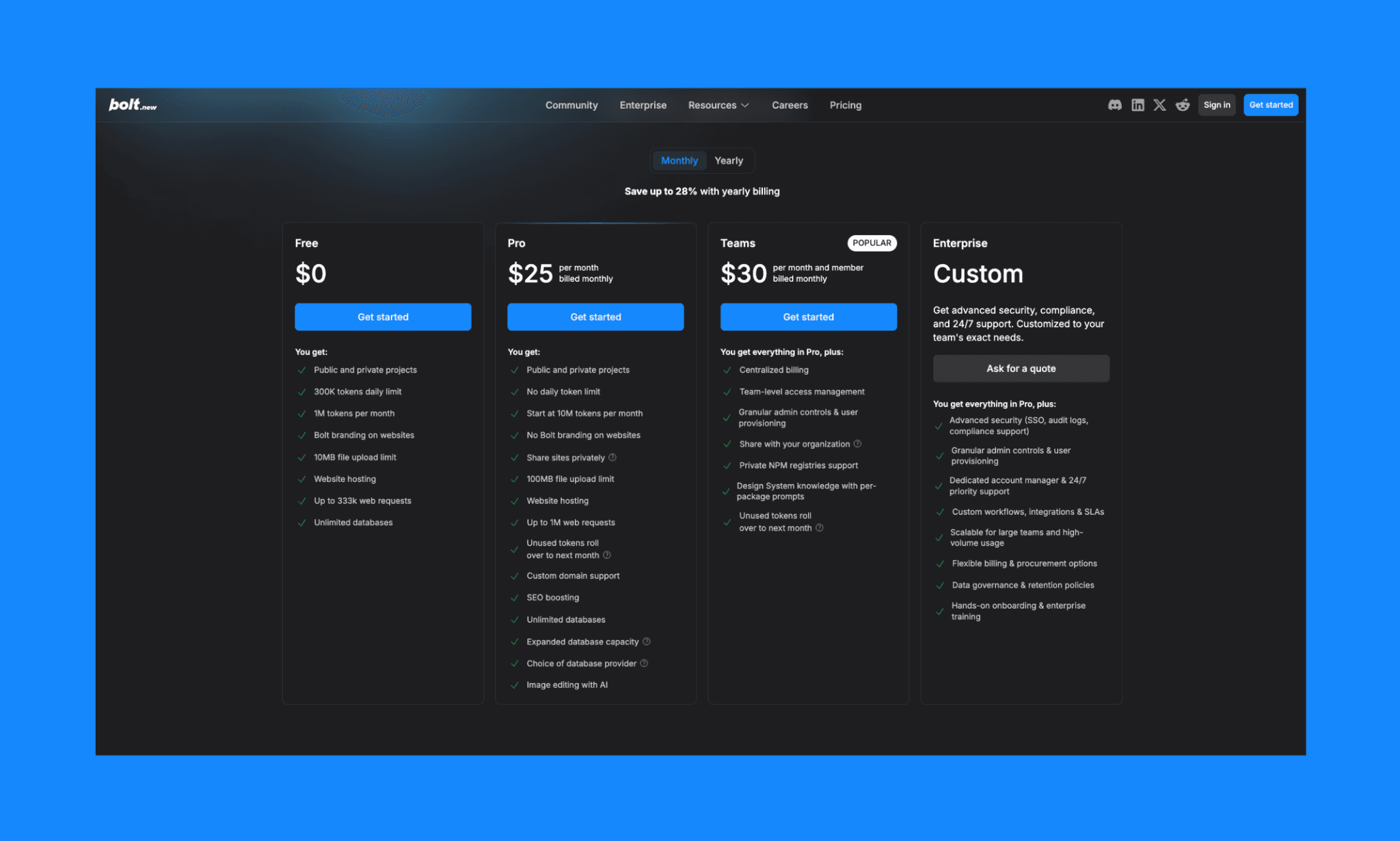
Feature | Bolt.new | Base44 |
Free Plan | $0 for 1M tokens/mo | $0 for 25 message credits/mo |
Starting Paid Plan | $18/mo (annual) for 10M tokens/mo | $16/mo (annual) for 100 message credits/mo |
Usage Model | Token-based system | Message + integration credits |
Key Features | Full-stack code generation | Hosted full-stack simplicity |
Choose Bolt over Base44 if you want code visibility, flexible tokens, or mobile app development.
Full Lovable vs Bolt.new Comparison Guide >
Banani vs Base44 pricing
Banani is an AI-native UI design copilot that generates polished, multi-screen interactive prototypes and editable wireframes for seamless developer handoff.
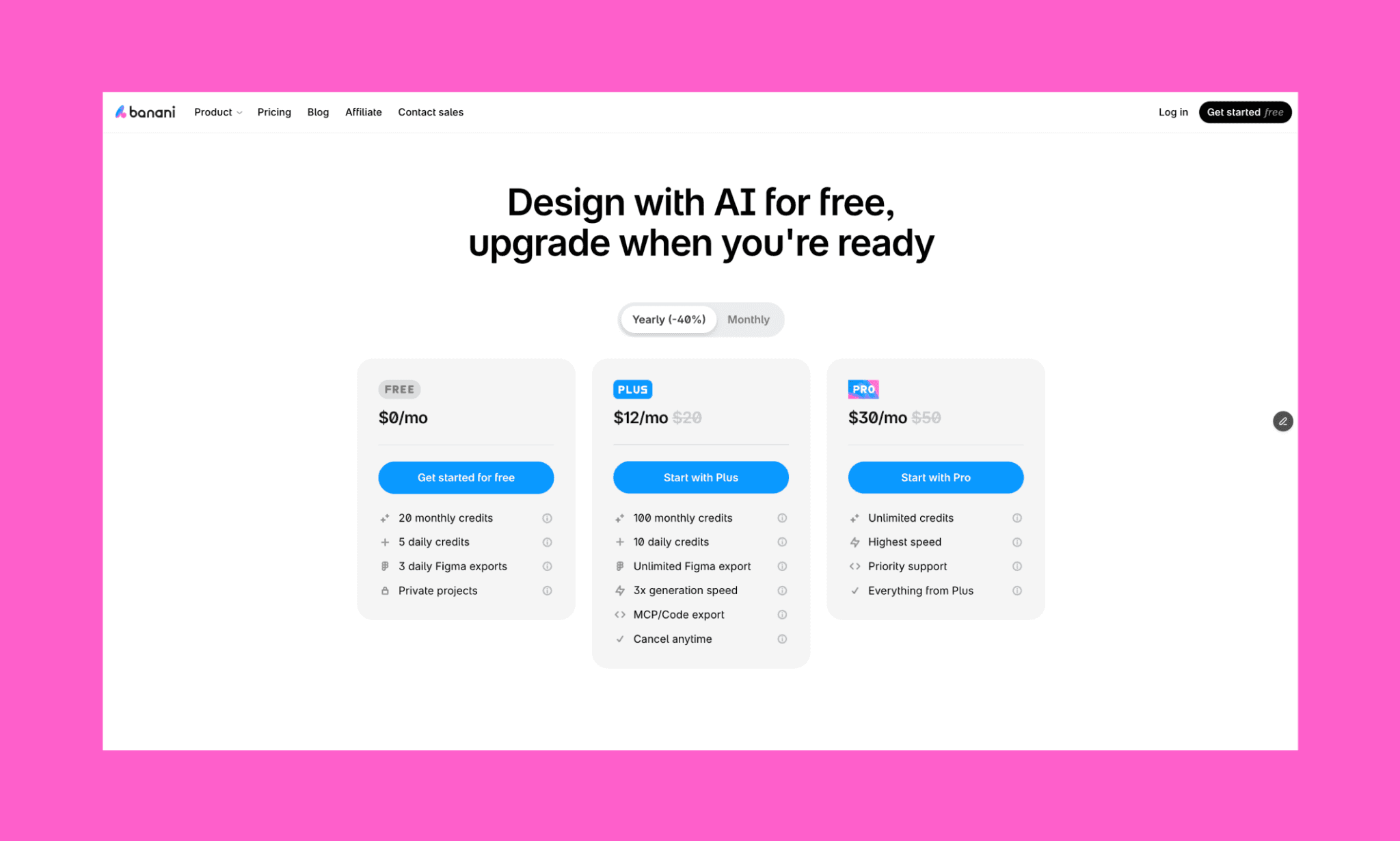
Feature | Banani | Base44 |
Free Plan | $0 for 20 design credits + 5 daily refills | $0 for 25 build credits |
Starting Paid Plan | $12/mo (annual) | $16/mo (annual) |
Focus | UI screens, flows, prototypes | App logic, backend, deployment |
Key Features | Figma export, HTML/CSS export | Hosting, auth, database |
Choose Banani over Base44 if you want to finalize a polished UI with AI before spending credits on development.
Tips to Save Base44 Credits
For the existing subscribers of the Base44 AI app builder, the good news is that there are practical tricks to make the most of Base44 credits. Some of these are suggested by Base44 itself, and some are from my experiments with Base44 credit calculation.
Smart app building inside Base44
Use Plan Mode first: Brainstorm ideas or troubleshoot in Base44 Plan / Discuss Mode before getting into vibe coding.
Write focused prompts: Ask for one change at a time. Specific requests usually cost less than broad rebuild commands.
Keep AI model on Auto: Automatic routing often balances quality and efficiency better than manually choosing heavier models.
Revert instead of reprompting: If output is wrong, revert changes instead of spending more prompts trying to repair bad results.
Leverage free manual edits: Manual visual edits (dragging elements or changing text directly) do not consume credits.
Moreover, getting into the habit of credit counting can help you be self-aware of your credit usage with Base44, and consequently plan and execute your app building efficiently.
Hybrid app building with Base44
I have observed that Base44 credits melt away the most when the AI has to guess your design intent through repeated iterations. (Backend logic is mostly a one-and-done case.) To avoid this, I recommend vibe designing before vibe coding.
Use an AI UI designer like Banani to finalize a high-fidelity UI design and multi-screen wireframes first. It’s cheaper, faster, and meant for it. Bringing a finished visual target to Base44 allows you to provide precise prompts that the AI can execute correctly. This hybrid approach ensures you don't waste building credits on UI experimentation, saving them for complex backend logic and database integration.
Is Base44 Subscription Worth it?
Yes, Base44 is worth it if you want to launch apps quickly without managing hosting, auth, or backend setup yourself. In my view, the Builder plan ($40/mo) offers the best balance for most users. But if you spend lots of credits on UI experimentation, Base44 costs rise prohibitively fast. An economical route is to vibe design first with Banani, finalize screens and flows, and then use Base44 credits for logic, integrations, and shipping faster.
FAQs on 2026 Base44 Pricing & Credits
Does Base44 cost money?
Of course, Base44 costs money to build a web/mobile app. However, it comes with a generous free tier (25 message credits and 100 integration credits per month) to get started without paying anything.
How much does it cost to use Base44?
Base44 can cost anywhere from $0 to $200+ per month, depending on your plan and credit usage. The free plan works for testing, but most serious projects usually need at least the Builder ($50/mo) or Pro plan ($100/mo).
Is Base44 completely free?
No, Base44 is not completely free in 2026. The platform offers a Free plan, but it is designed for testing rather than production.
Is there a Base44 credit coupon code?
There may be some Base44 coupon codes offered from time to time by the company, but not one that is publicly available for all.
However, you can get a discount on Base44 if you are a student or a teacher. Verified personnel can avail up to 50% discount on the Base44 Starter Plan.
Can I cancel my Base44 subscription anytime?
Yes, you can cancel your Base44 subscription at any time through your billing dashboard. Users generally retain access to their plan's features until the end of the current billing period, though annual plans typically do not offer prorated refunds.
What are Base44 pricing plans?
In 2026, Base44 offers five pricing tiers:
Free: $0 (curiosity and testing).
Starter: $16/mo (personal projects and MVPs).
Builder: $40/mo (professional apps with custom domains).
Pro: $80/mo (scaling startups).
Elite: $160/mo (high-volume production apps)
*The price mentioned is for a month when billed annually; sole monthly billing is 20% costlier.
What is the best free alternative to Base44?
There is no completely free alternative to Base44. Its closest competitor, Lovable, is also priced similarly. But if your priority is faster UI creation and prototyping without burning usage credits, Banani is a strong choice to replace Base44. It is especially useful for designing high-fidelity app screens first, then moving into development once your product direction is clear.


