
Key Features | Endless scroll UI generation, Style Dropper, Shuffle Layout, Remix Colors, Vary Strong/Subtle |
Pros | Large template directory, Built-in style variations, Consistent image remix |
Cons | Defaults to 6 credits per action, no point-and-edit |
Pricing | Free (300 designs/mo) · Pro $20/mo · Business: Custom |
Alternatives |
What is Variant AI?
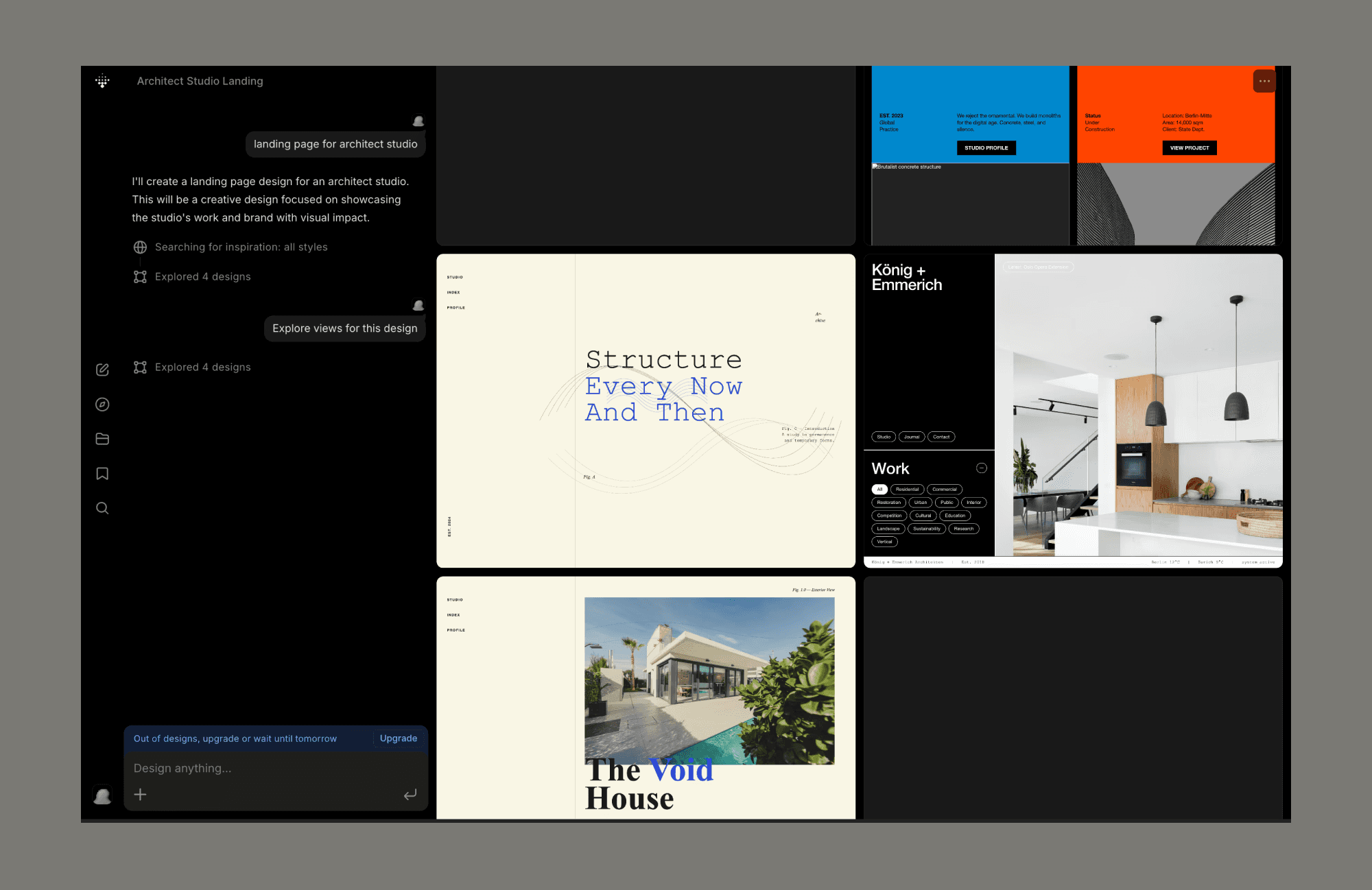
Variant is an AI UI design tool that helps you generate a feed of design variations from a single idea.
It's positioned as a tool that generates "actually well-designed" software, and wants to solve the problem of repetitive or poorly structured UI generated often by current AI coding agents.
Testing Variant AI Design Features
My review of Variant AI revolves around designing an imaginary app, Stax, a swipeable video essay/audio snippet feed. (Imagine Substack UI meets Tinder’s interface.) I’ll create it from scratch, edit it, and also keep an eye out on Variant AI’s credit consumption. So, this section will also double up as how to use Variant AI.
How to Design UI with AI Like a Pro >
Scroll, sign up, scroll more & ‘See Other Views’
Unlike popular AI UI tools of 2026 that tend to open with an inviting prompt box, Variant AI opens with templates you can scroll. 100s of them, on an endless screen. And of various kinds e.g., from a typical mobile app for note-taking, fintech dashboard, and e-shop website to a top-notch interactive web tool, audio-video player, and homepage with animation.
Sign up is straightforward and free on Variant.com; it requires no credit card.
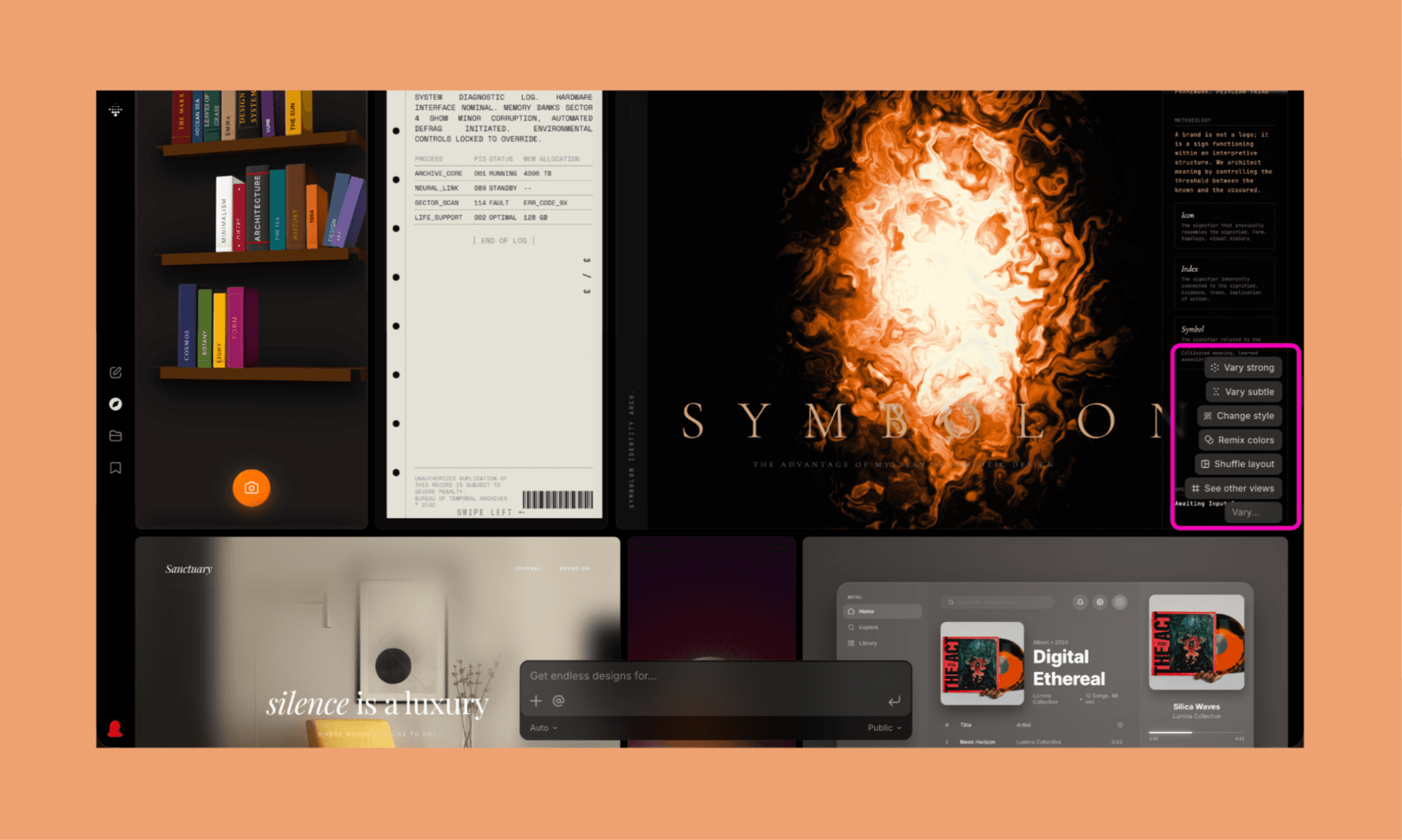
After signing up, you land on their community page, which is, again, templates scrolling. Hover over any, and you’ll see the various options to get standard variables or describe one. These in themselves tell the full picture of Variant AI design features and process both.
Running the ‘See other views’ on a design, generated 3 variations of it in ~3 minutes, costing 1 credit each. Each of them is editable, of course.
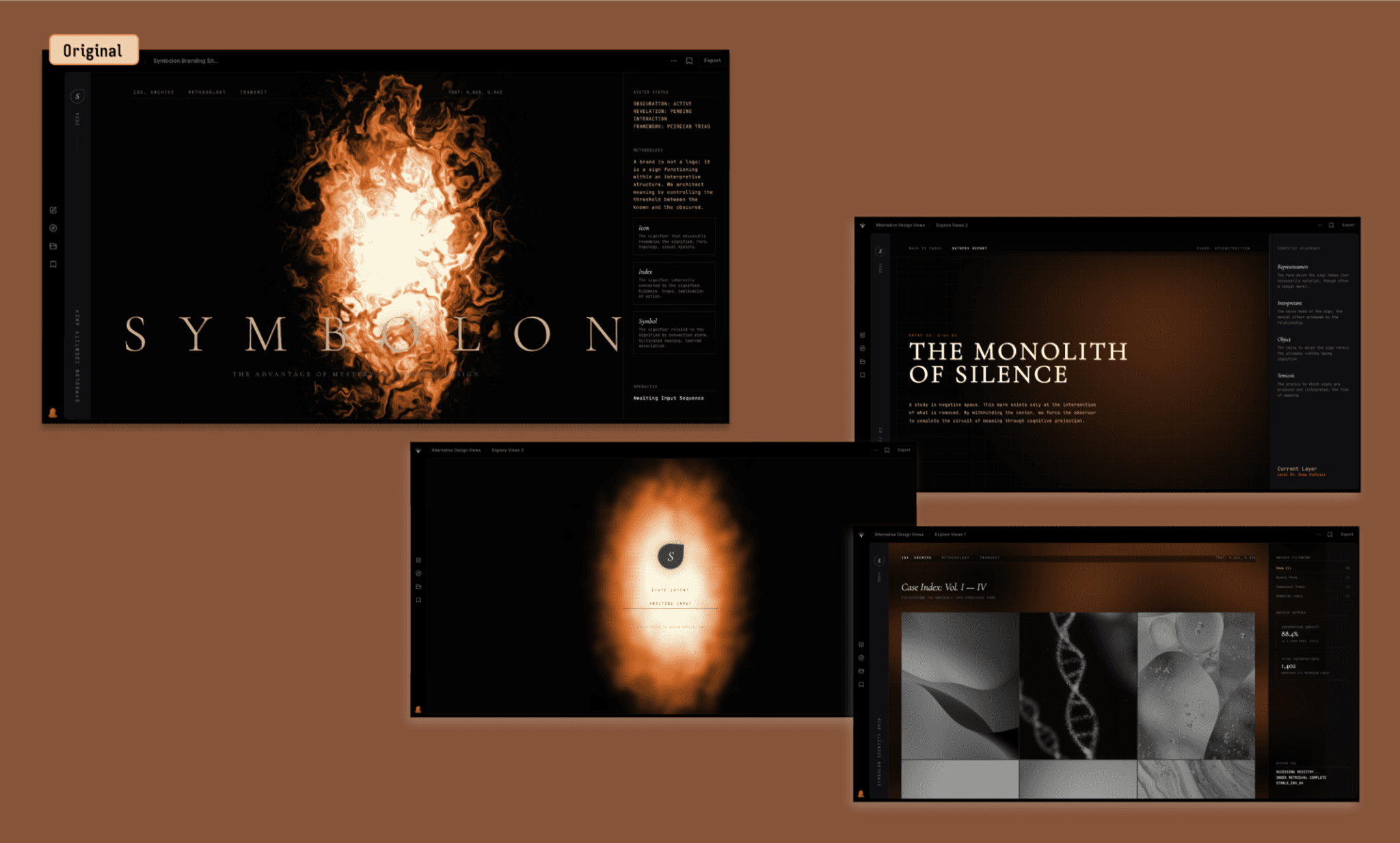
And what I liked the most was that it was not simply a design variation, but it understood the context of the original design and showed three disparate directions to convey the same.
Start from scratch or an existing screen
Although I had a particular design in mind for the Stax app, I intuitively scrolled to browse for inspiration. At this point, I wished it had a search bar or filters to go through them, but I did not see any. Inconvenient despite the impressive directory. So, I decided to put remixing an existing screen vs creating from a blank screen head-on to see the Variant AI design capabilities.
a. Design using an existing screen
I found a multi-fold page whose top screen seemed interesting. So I prompted it with specifics:
"Mobile hero screen for 'Stax', a swipeable video essay app. Single fold, no scroll.
Top bar: 'STAX' wordmark left, dark pill button 'Explore' right.
Bold headline: 'Ideas worth your swipe.'
Large rounded image card below — creator mid-recording, moody studio/mic setup — with a small circular 'Our Picks' badge overlapping its top-right corner.
One-line muted gray description under the image: 'Swipe through video essays from the sharpest minds online.'
Style: editorial, off-white background, black/gray palette, generous whitespace, mobile aspect ratio."
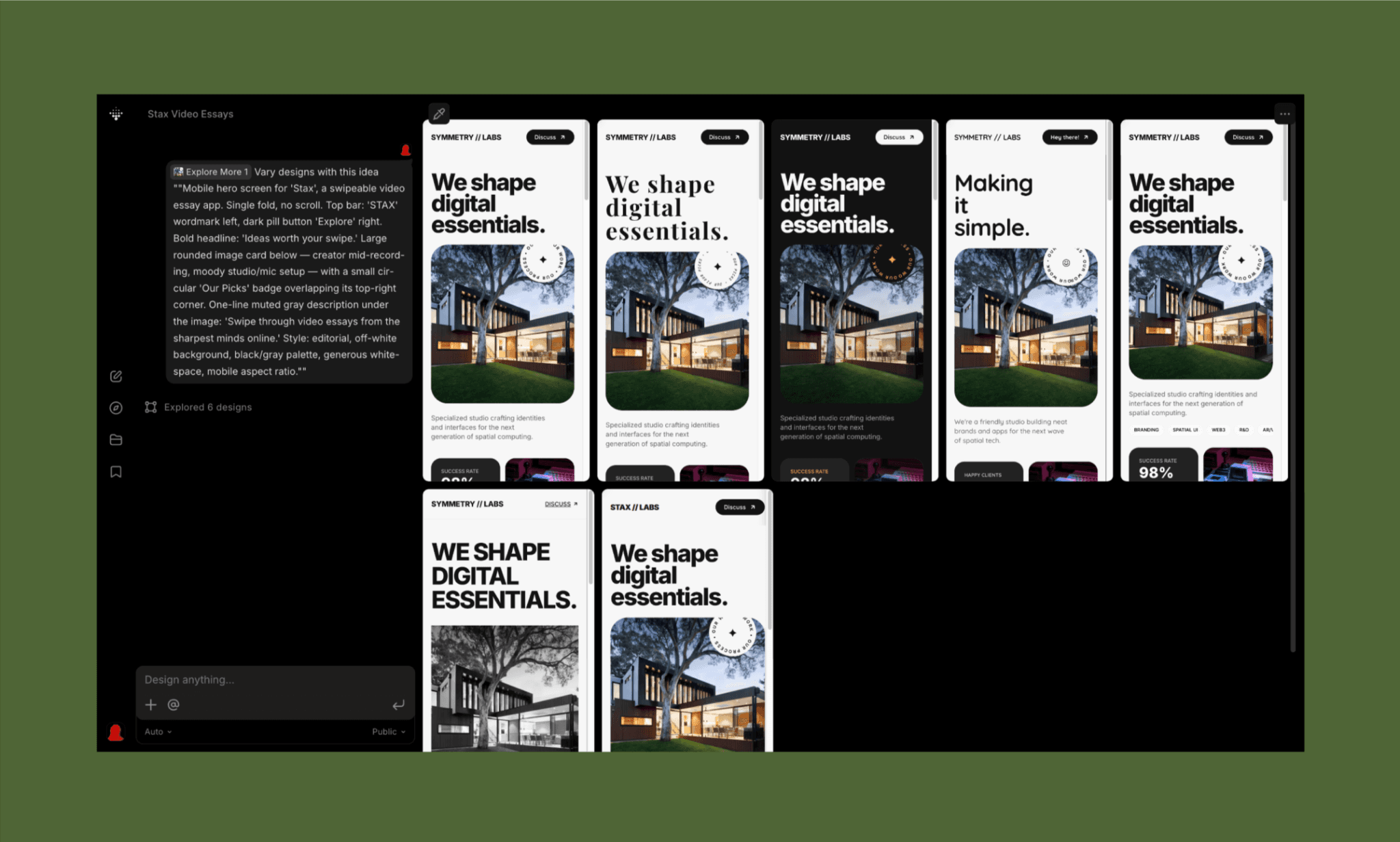
I was a little confused to see 6 variations being generated. I sure did not ask for it. But in ~2 minutes or so and 6 credits later, I got the variations of my original design (the very first one in the screenshot above) – all of which are beautiful, but none, frankly, useful.
b. Designing on a blank screen
The previous test had me wondering whether Variant AI is only meant for design inspiration, like Pinterest, or is it a functional AI UI Designer. So, I was really excited to see what it generates for Stax when starting directly with a prompt:
"Mobile hero screen for 'Stax', a swipeable video essay app. Single fold, no scroll. Top bar: 'STAX' wordmark left, dark pill 'Explore' button right. Bold headline: 'Ideas worth your swipe.' Large, rounded image card below — creator mid-recording, moody studio/mic setup — with a circular 'Our Picks' badge overlapping its top-right corner. One-line muted gray caption under image: 'Swipe through video essays from the sharpest minds online.' Style: editorial, off-white background, black/gray palette, generous whitespace, mobile aspect ratio."
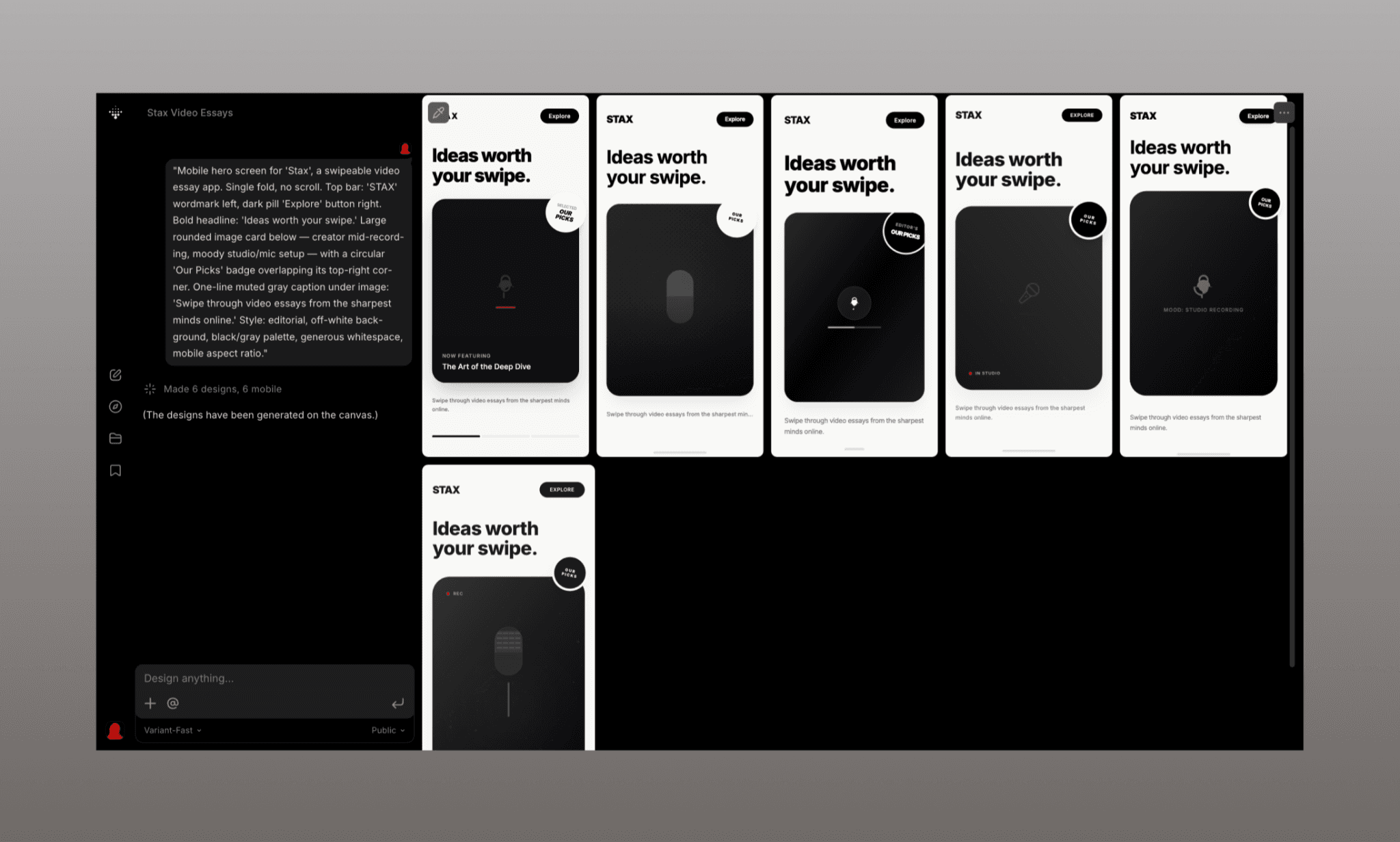
One minute and 6 credits later, I got these 6 designs. This time it got the brief right across all variations. But they are not wildly different, and the hero image is missing.
Nevertheless, between designing from a template or from scratch, the latter is the winner for me. And I’ll proceed with testing other Variant AI features on it.
Change Style without a prompt, edit with one
Out of the 6 designs generated from scratch, I liked the very first one, and clicked the ‘Change Style’ option from its pre-built designs. Again within a minute, it generated 6 design variations of the same.
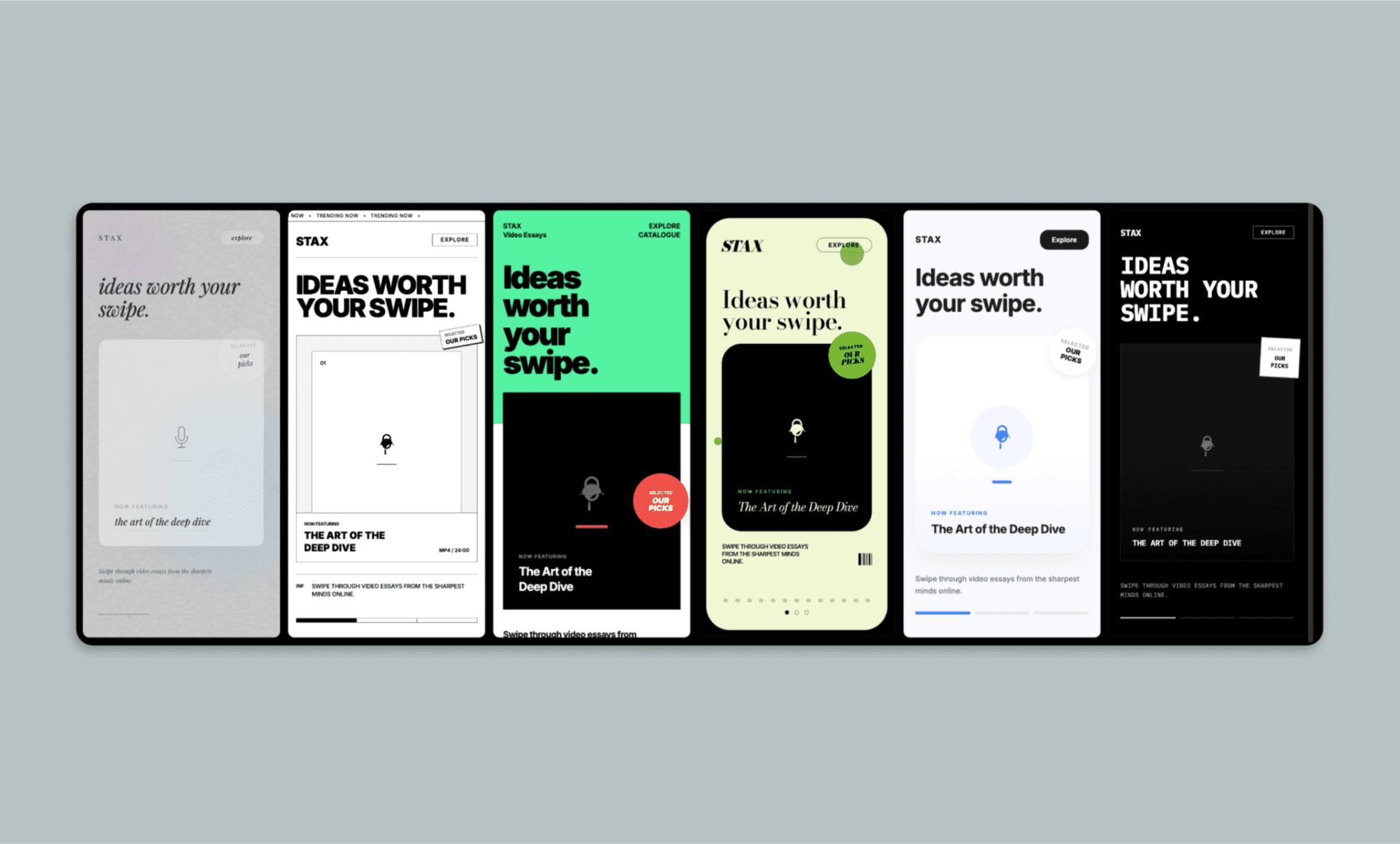
This time, though, the variations are quite different and need deliberation before choosing. In a positive way. All designs are really fantastic, and I liked the very first option the most for its minimalism, subtle gradient, and trendy texture.
But I still wanted my image of the creator as a hero image. So selected the first frame, asked for it, and also included a negative prompt to NOT generate 6 variations but only 1 (else it eats up a lot of credit):
“In the central image, add a moody studio photo of a creator — a young Black woman, mid-recording at a mic, headphones on, expressive hands mid-gesture – shallow depth of field, dim studio lighting in contrast to the UI’s slaty palette."
Create only 1 variation; not 6."
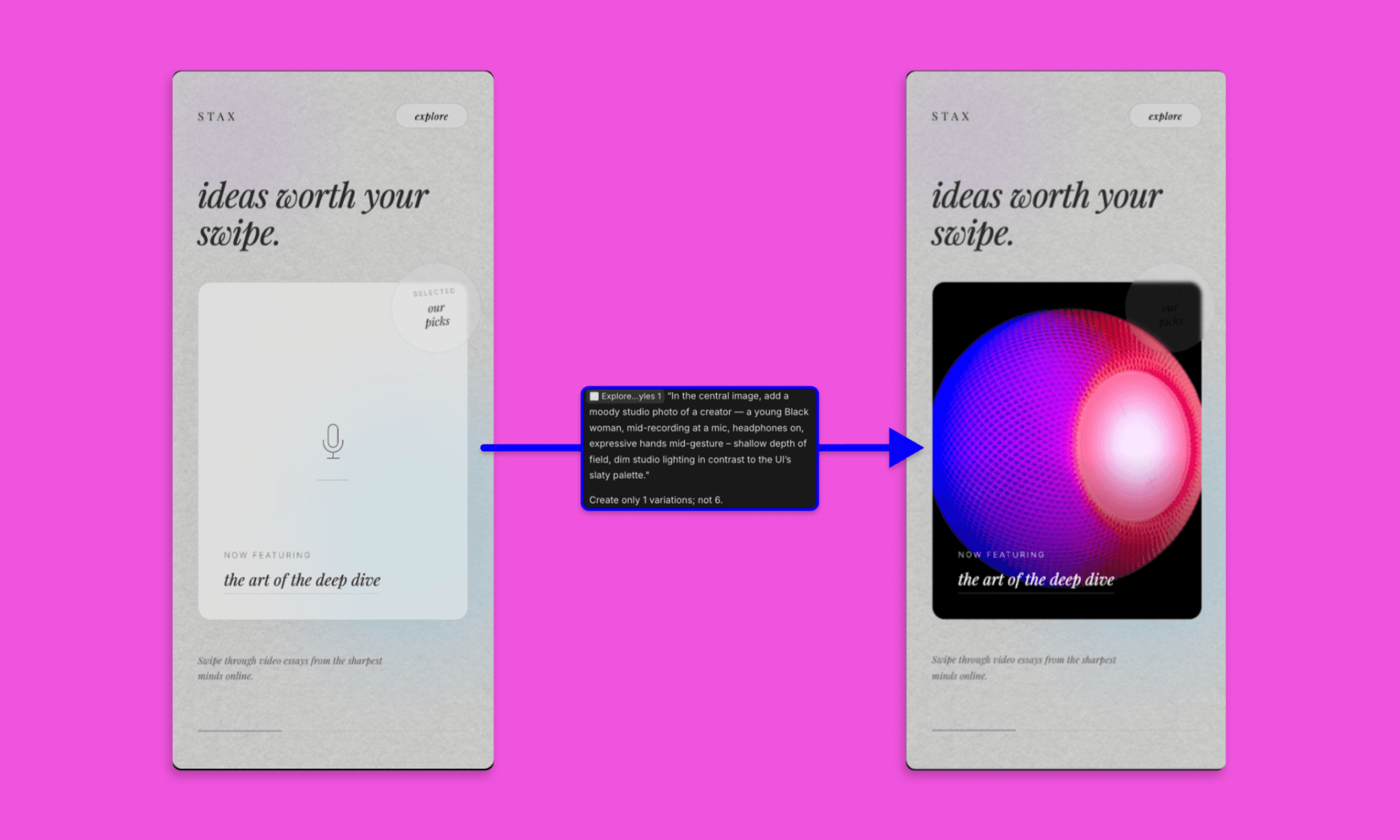
This time it took ~ 5 minutes to process my request. Had me in suspense first, but when the result came, it was a total letdown. And a clarity that Variant AI cannot be prompted to create an image, apparently (unlike Banani AI UI Designer). Yet must give credit for choosing a beautiful artifact nonetheless.
There was a silver lining, though: it understood my request to generate only one variation which saved me credit.
How to Spend Less Credits on Lovable AI >
Shuffle Layout, Remix Colors & Others
I still liked the layout of the design, but quickly wanted to test the Shuffle Layout and Remix Colors Features – both built-in options.
Shuffle Layout
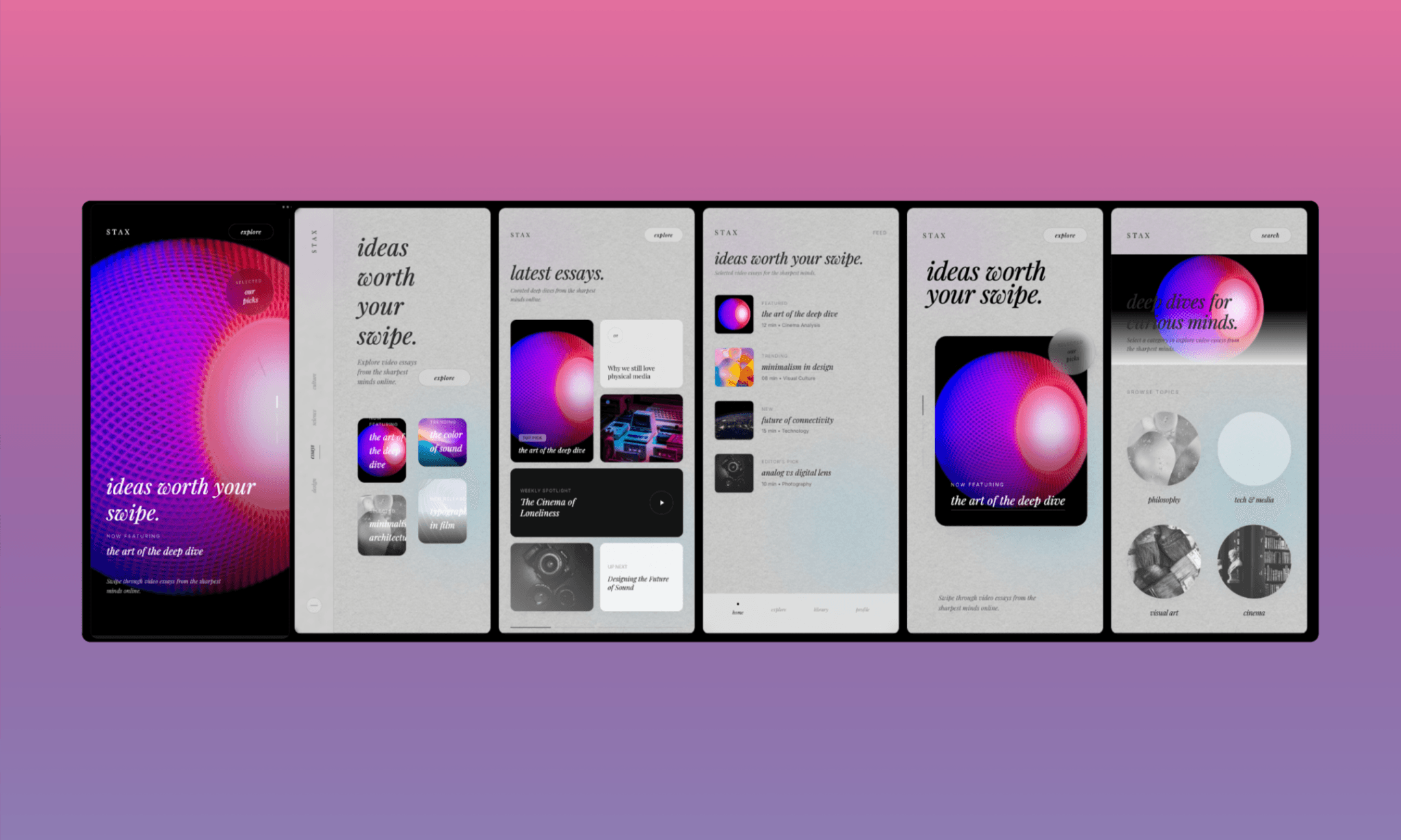
Time taken: ~30s | Credits: 6 (1 each screen)
It was fast and surpassed my expectations. Because there were few elements to play around with, but it did a great job of shuffling them around. And it also generated images as placeholders.
Remix Colors
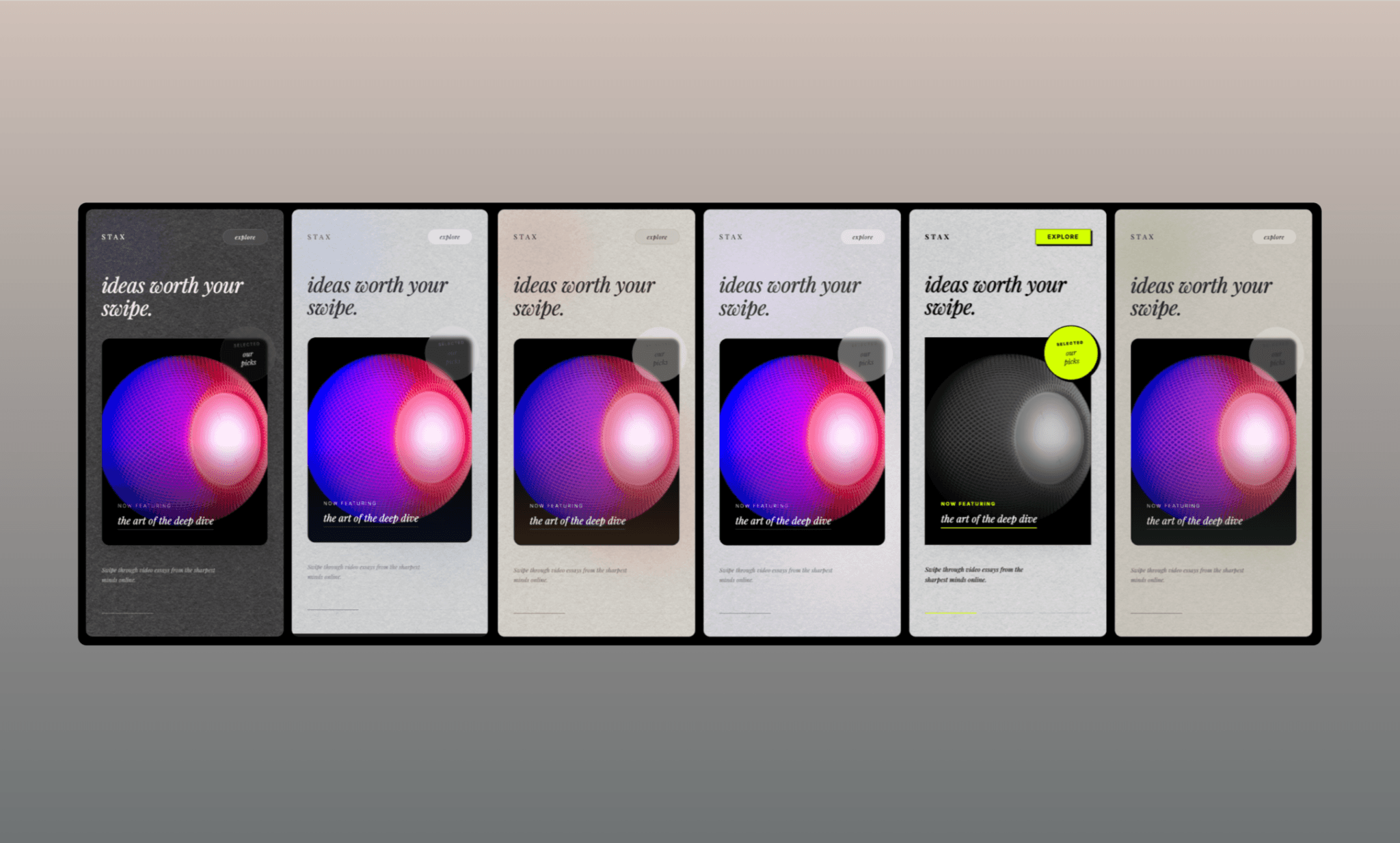
Time taken: ~1 minute | Credits: 6 (1 each screen)
This time, too, the various outputs have a certain consistency of color correction that only an AI that understands the design language would pick. It gave a mix of dark, light, and pop color variations. Full marks to Variant AI for this.
Vary Strong vs Vary Subtle
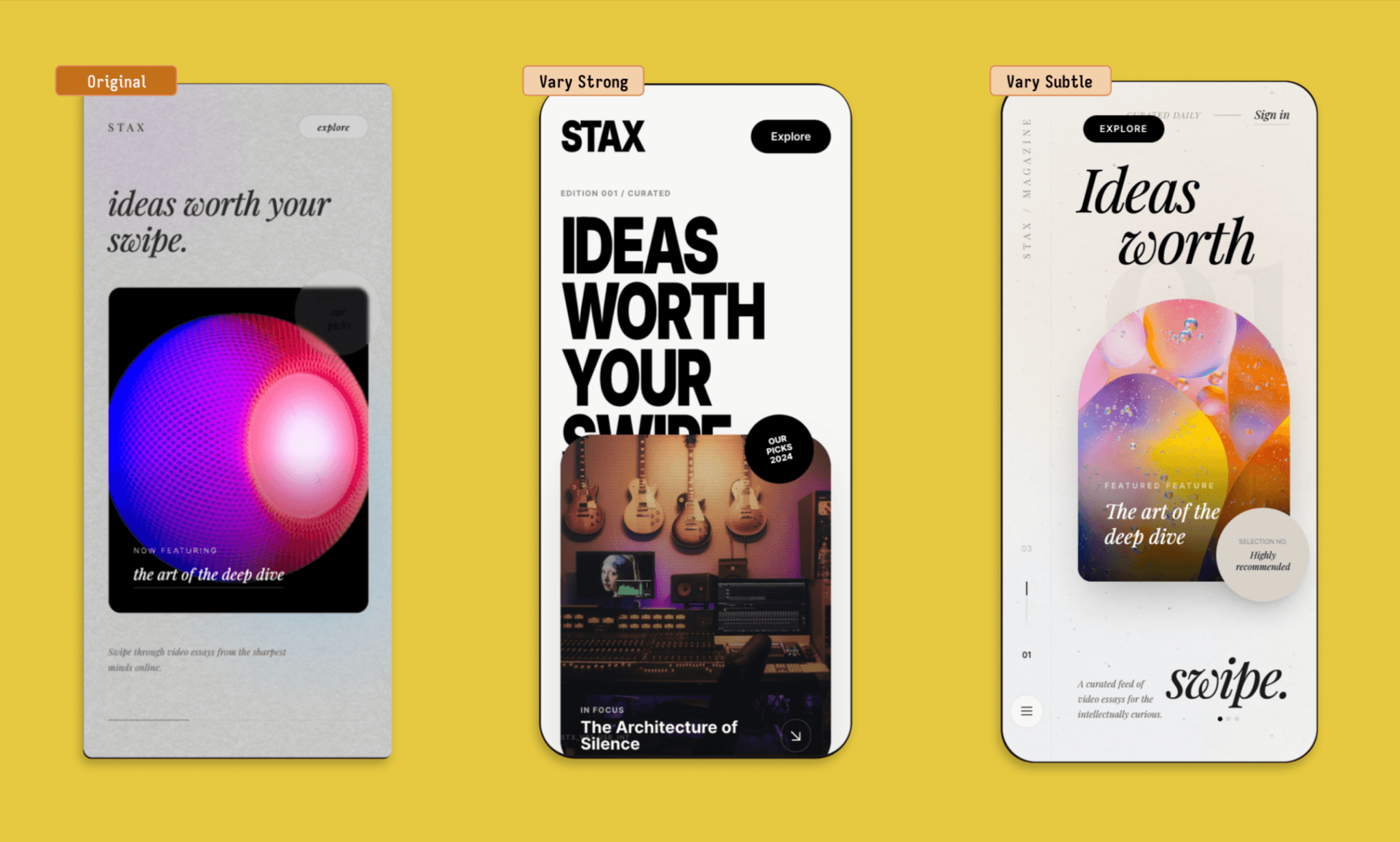
Time taken: ~1 minute each | Credits: 1 each
Both the variations gave what it said on the tin, and I happen to like ‘Vary Subtle’ the most. In fact, the best among dozens of variations was generated since the beginning. I see it as a testament that one can start from any design in Variant AI and by trying out variations there’s a good chance to come across one that fits all the bill and imagination. It might take time and a lot of credits, though.
UI Asset Design Variations by Flora AI >
Asking AI to add elements
By now, I was in the groove of Variant AI, but still lost on its capability of useful UI generation as my initial idea of Stax could not proceed beyond the first screen. So I decided to give another try by using the ‘Vary Subtle’ design variation from the previous test as a reference to create another screen altogether, that of a dashboard.
"Design a 'My Stax' dashboard screen, following the style of the attached 'Vary Subtle' reference. Show: a greeting header, a 'swipe streak' counter (e.g. '12 day streak'), a row of topic tags the user follows, a grid or stacked list of saved/queued essays with thumbnails, and total watch time this week."
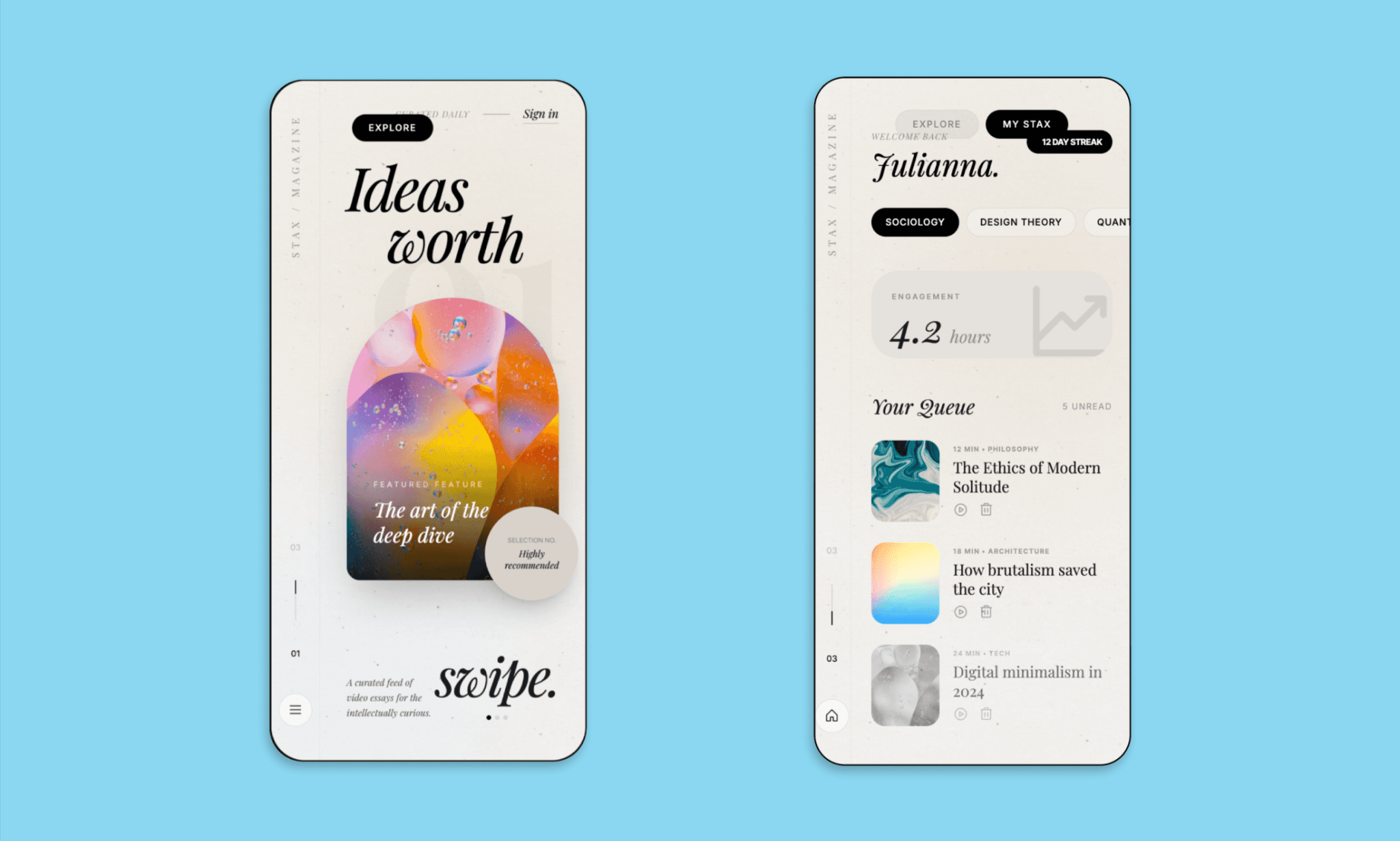
This one was interesting but with mixed feelings. On one hand, it rightly followed the original style, colors, and also included elements asked for in the prompt. However, on examining closely, I see pills overlapping, the left bar out of context, and padding mistakes. Additionally, AI UI tools like Banani have a point and edit feature (both manual and chat-based), but Variant.com does not, so editing further is a hassle.
My Experience with MagicPath 2.0 >
Pros & Cons of Variant AI
Pros | Cons |
Easy, intuitive sign-up and onboarding | No search or filters on the templates/community page |
Strong, consistent design quality across all features | Can't generate or insert specific custom images accurately |
Shuffle Layout and Remix Colors are fast and design-coherent | No point-and-edit feature, manual or chat-based |
Reliable when starting fresh vs. remixing existing screens | Editing mistakes (overlaps, padding) means re-rolling, not fixing |
"See other views" understands context, not random remixes | Must manually type a negative prompt every time to limit output |
Generous free plan, no credit card required | Defaults to 6 variations per request, draining credits fast |
Price of Variant.com
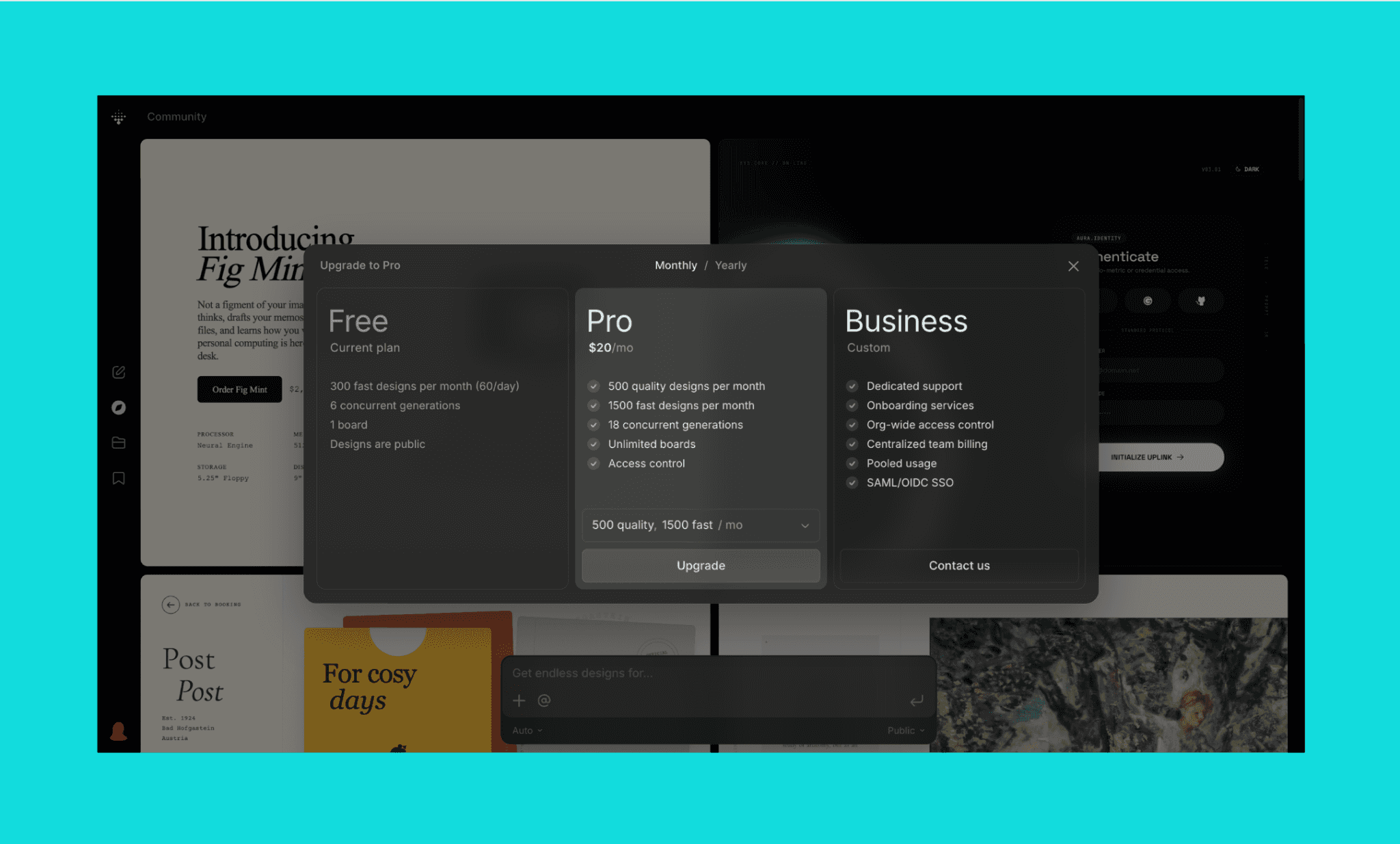
Variant AI Free Plan
Variant AI runs on a freemium model, where its free plan gives you enough room to test the tool properly before committing to anything paid. Here, the default model is Variant Fast which consumes 1 credit per variation.
300 fast designs per month (60/day)
6 concurrent generations
1 board
Designs are public
Variant AI Paid Plans
Pro (monthly) | Business | |
Price | $20/mo | Custom |
Quality designs | 500/mo | — |
Fast designs | 1,500/mo | — |
Concurrent generations | 18 | — |
Boards | Unlimited | Unlimited |
Access control | Yes | Org-wide |
Other | — | Pooled usage, SAML/OIDC SSO |
Best for | Solo designers, high-volume exploration | Teams needing a bespoke solution, |
*Note: Yearly plan of Variant AI costs $16/mo viz. 20% cheaper than the month-on-month plan.
Top AI UI Tools’ Cost Comparison >
Alternatives to Variant UI AI
Despite its unique workflow and use case, when it comes to UI design, there are several competitors to Variant AI. I have listed the most popular, free(-mium) 3 names for comparison, along with their production of the same Stax app.
Free Alternatives to Claude Design >
Banani AI vs Variant AI
Banani is an AI UI design tool that generates multi-screen, editable prototypes from text prompts, reference images, or screenshots, with direct Figma and HTML/CSS export. Unlike Variant's single-screen scroll-and-vary model, Banani builds connected flows in one go and lets you point-and-edit specific elements without re-rolling the whole design.
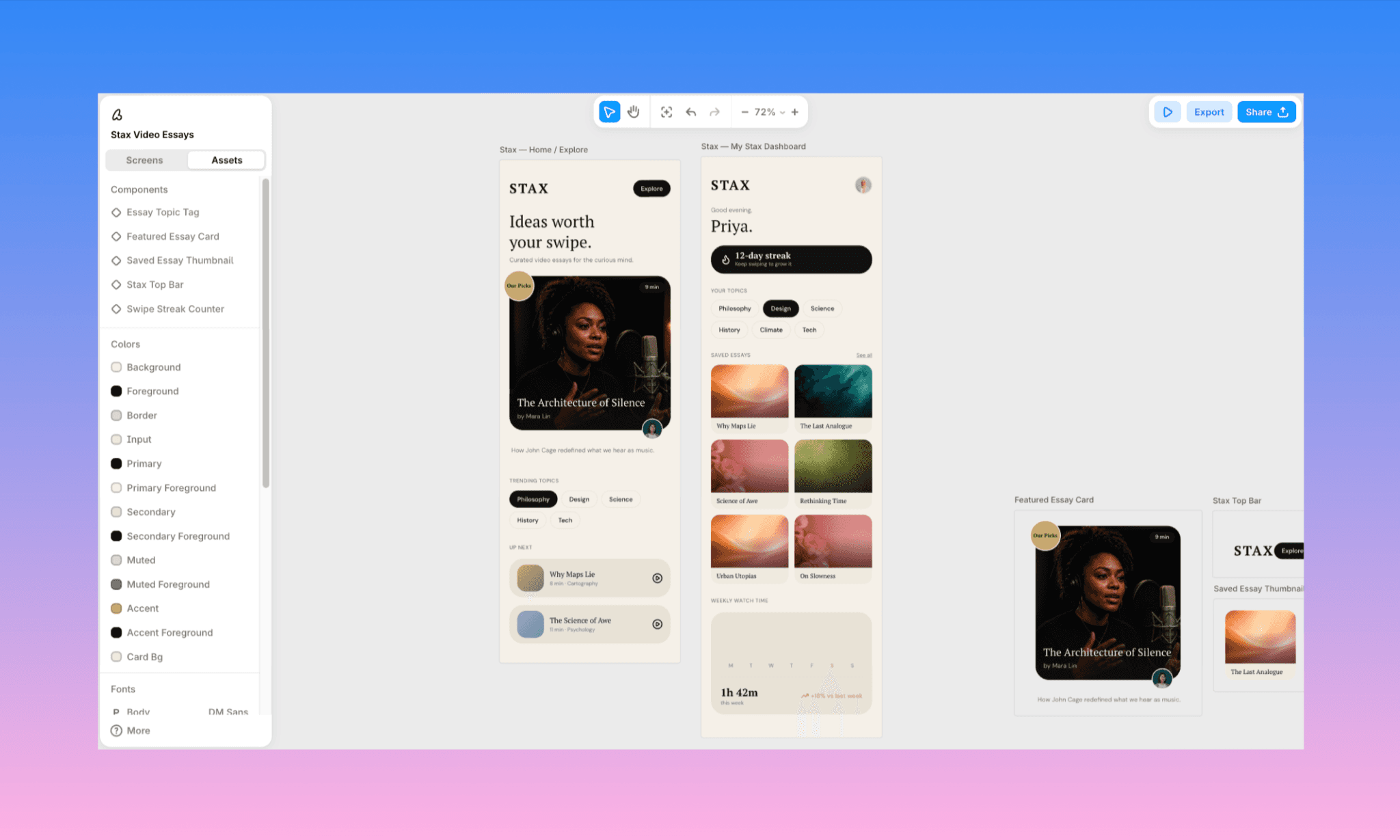
Output Analysis: The output nailed both the home and dashboard screens in one pass, including the requested creator photo, topic tags, and watch-time summary.
Why choose Banani over Variant AI: Multi-screen flows, accurate image generation, point-and-edit without re-rolling.
Figma Agent (beta) vs Variant AI
Figma Agent (not to be confused with Figma Make) is an AI design assistant built into Figma that generates and edits screens through conversational prompts, working directly within native Figma files and components. It's aimed at designers already in the Figma AI ecosystem, working with a cross-functional, large-scale product team.
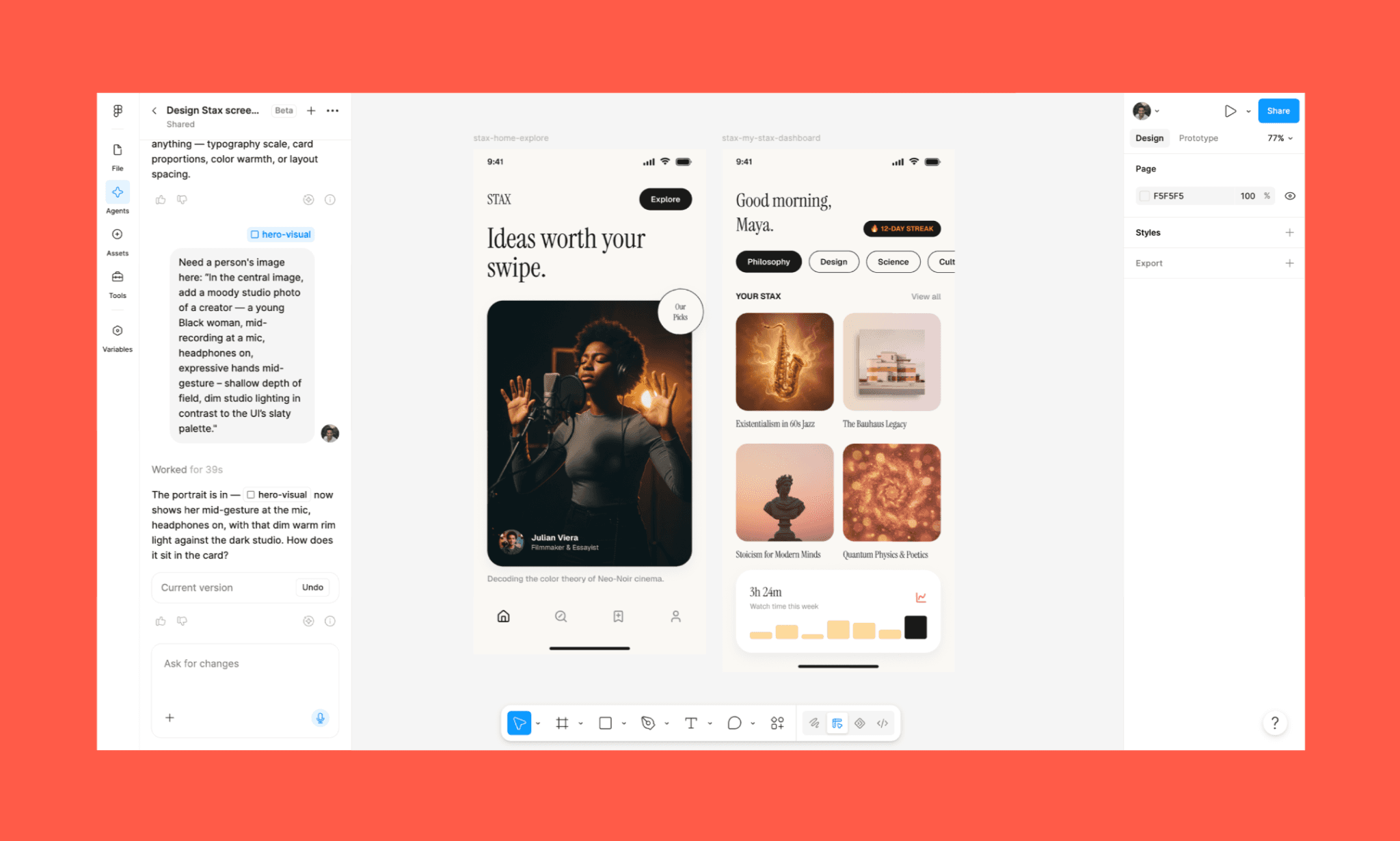
Output Analysis: Closest to Variant AI output, Figma Agent chat clearly tracked each element in the prompt with no overlaps and neat placeholder images.
Why choose Figma Agent over Variant AI: Native Figma integration, transparent chat-based editing history.
Google Stitch (beta) vs Variant AI
Google Stitch (previously Galileo AI) is Google Labs' AI UI design tool powered by Gemini, generating complete design systems and exportable code from prompts or images, now with an infinite canvas and chat-based editing.
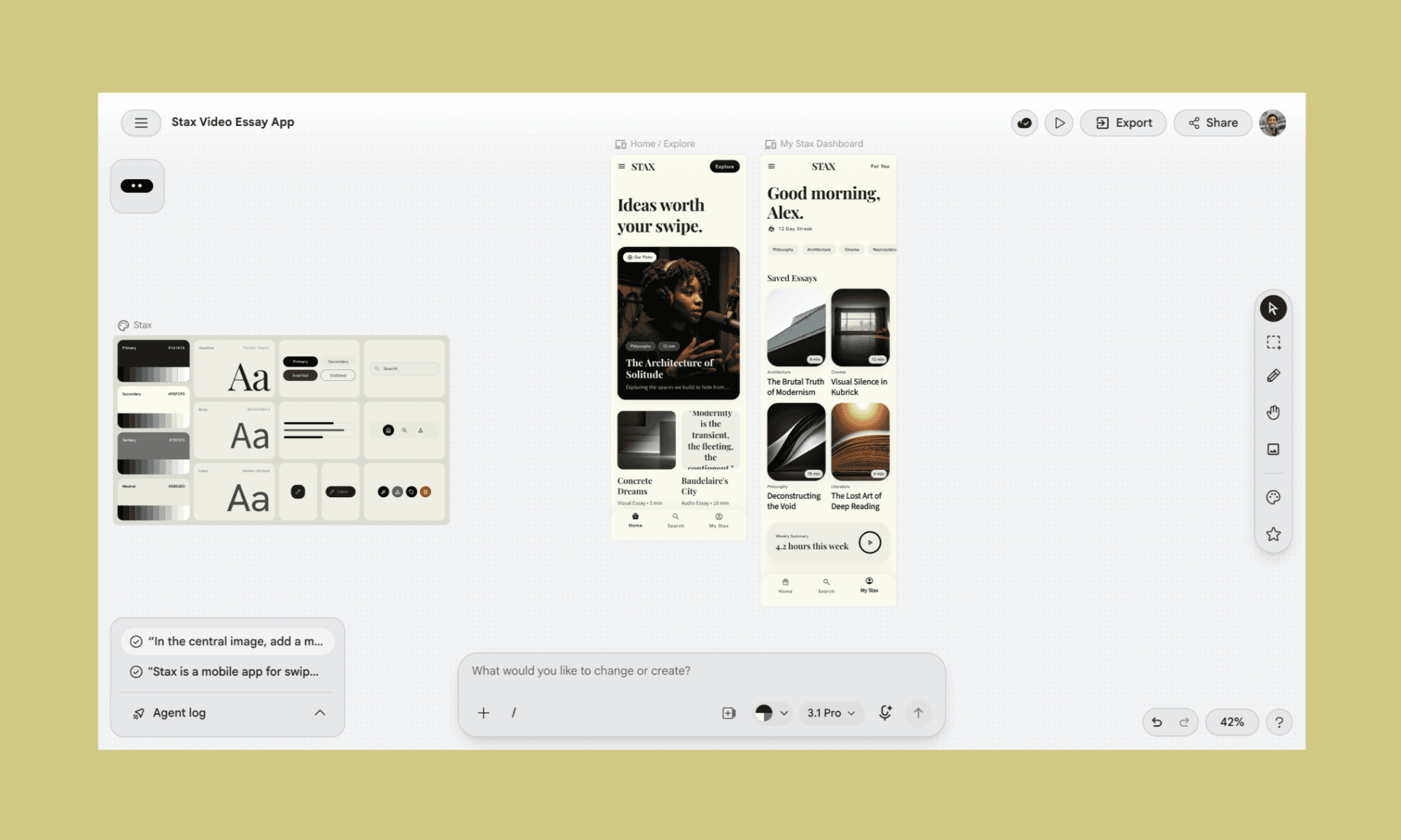
Output Analysis: The UIs have the key elements, and the choice of contextual images to the saved posts in screen 2 is a great touch.
Why choose Figma Agent over Variant AI: Free (with daily limits), infinite canvas, design MD file, and visible prompt-and-edit history.
Is Google Stitch 2.0 Really Free in 2026? >
Is Variant AI Value for Money?
In my view (and review), Variant AI earns the top place among AIs for early-stage design exploration, where aesthetics matter more than accuracy. Shuffle Layout, Remix Colors, and Vary Subtle all deliver fast and beautifully. However, the 6-variation default quietly drains credits, image generation is unreliable, and there's no way to fix small mistakes without re-rolling entirely. Hard to call Variant an AI UI generator, frankly.
For designers who want to actually build and iterate UI with AI, Banani is a better choice. It not only creates style variations but also generates images, exports code, and more. An all-in-one vibe design tool to try for free!
FAQs on Variant AI UI Tool
What does Variant AI do?
Variant AI generates UI design variations of an existing screen or one from scratch. It’s meant more for AI design exploration than AI design generation.
Is Variant free?
Yes, but with limitations. Variant AI has a free plan offering 300 fast designs/month with no credit card required, though designs stay public and you're limited to 1 board. Its paid plan is a minimum of $20/month.
Which is the best alternative to Variant.com for UI generation?
Banani is the best alternative to Variant AI for UI generation. It can generate multi-screen flow, up to 6 variants, and lets point & edit with AI.
References
[1] https://variant.com
[2] https://www.linkedin.com/company/variantui


