

O modelo Fable 5 da Anthropic é lançado, é banido em poucos dias e depois faz um retorno triunfal como uma Fênix[1]. E, com isso, revive a especulação sobre sua espetacular UI/UX e feitiçaria de frontend. Por isso, coloquei à prova sua capacidade de criar designs de primeira com o Claude Design: rodei prompts de interfaces comuns de apps e sites, remixei UIs amplamente referenciadas e analisei a qualidade do código de frontend para avaliar seu espaço no fluxo de trabalho de uma equipe de produto. Você mesmo pode julgar pelos meus exemplos de UI criados pelo Fable 5.
Alerta de Spoiler: No jogo de UI/UX, contra o Gemini 3.1 PRO e o GPT 5.4, o Fable 5 é o chefe final.
Alternativas Gratuitas ao Claude Design >
Text-to-UI com Fable 5
App de Meditação Minimalista (Mobile)
Prompt
"Crie uma tela de app de meditação minimalista para celular: UI calma e espaçosa com gradientes suaves, um CTA principal para iniciar uma sessão, seletor de duração da sessão e rastreador de frequência. Mantenha o design limpo, com poucos estímulos e bastante espaço em branco."
Design Gerado
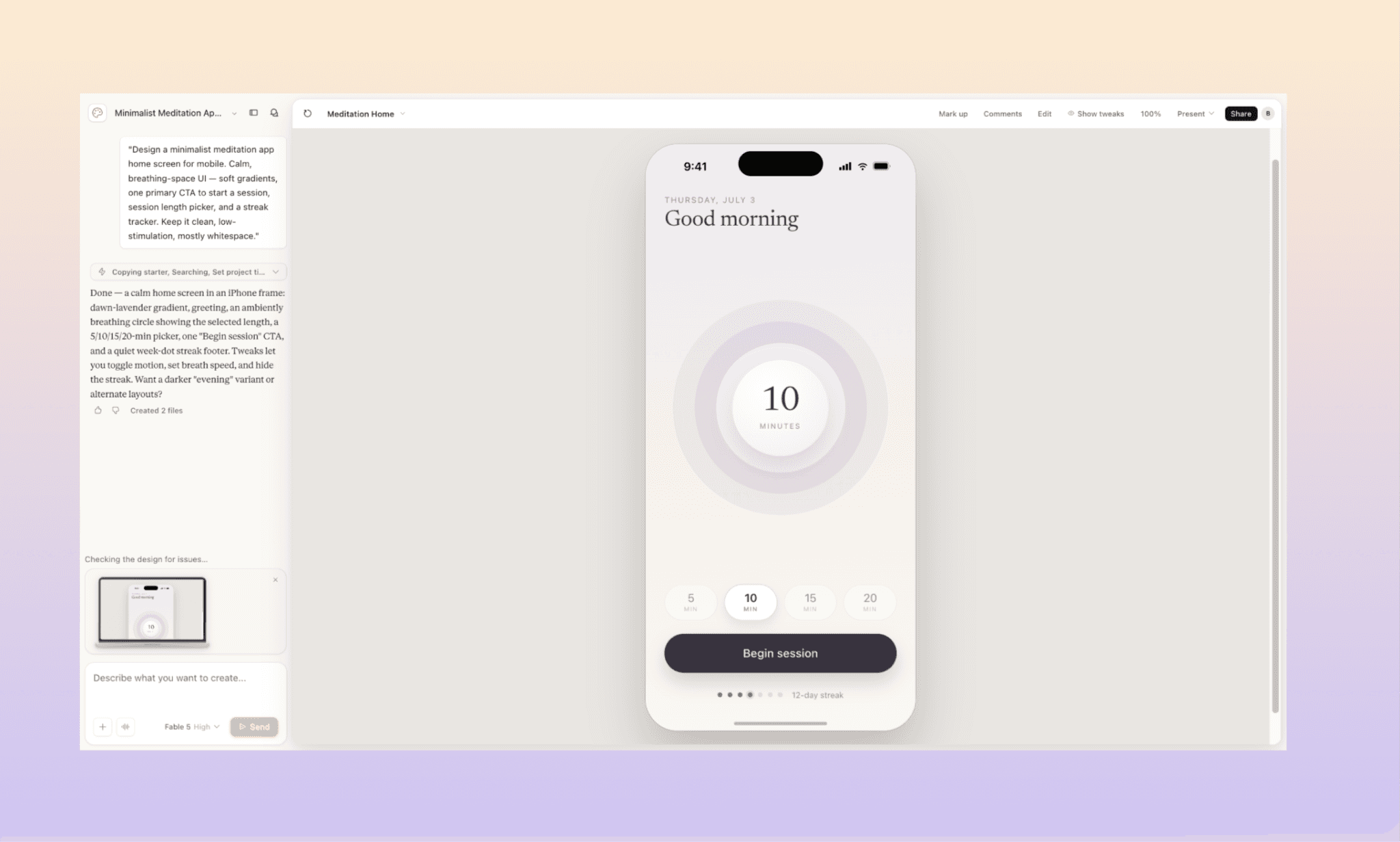
Tempo gasto: ~3 minutos
Enquanto escrevia o prompt, eu tinha a UI do app Calm em mente. Mas o Fable 5 levou o minimalismo a outro nível. Acertou em cheio no briefing — gradiente suave, CTA de círculo de respiração, seletor de tempo e rodapé de frequência estavam lá. A escolha de cores e tipografia bate perfeitamente com a experiência esperada. E ainda foi além ao adicionar uma animação leve. Não pedi por ela, mas caiu super bem.
Navegue e Edite a UI do App Calm com IA >
Dashboard de SaaS Maximalista (Desktop)
Prompt
"Desenhe um dashboard de fintech SaaS denso para desktop. Organizado, mas cheio de informações — menu superior, barra lateral, cards de KPIs (receita, contas ativas, volume de transações, rotatividade), um gráfico grande de receita/fluxo de caixa, tabela de transações recentes e painel de notificações/alertas. Rico em dados, múltiplos widgets, densidade real de ferramenta corporativa."
Design Gerado
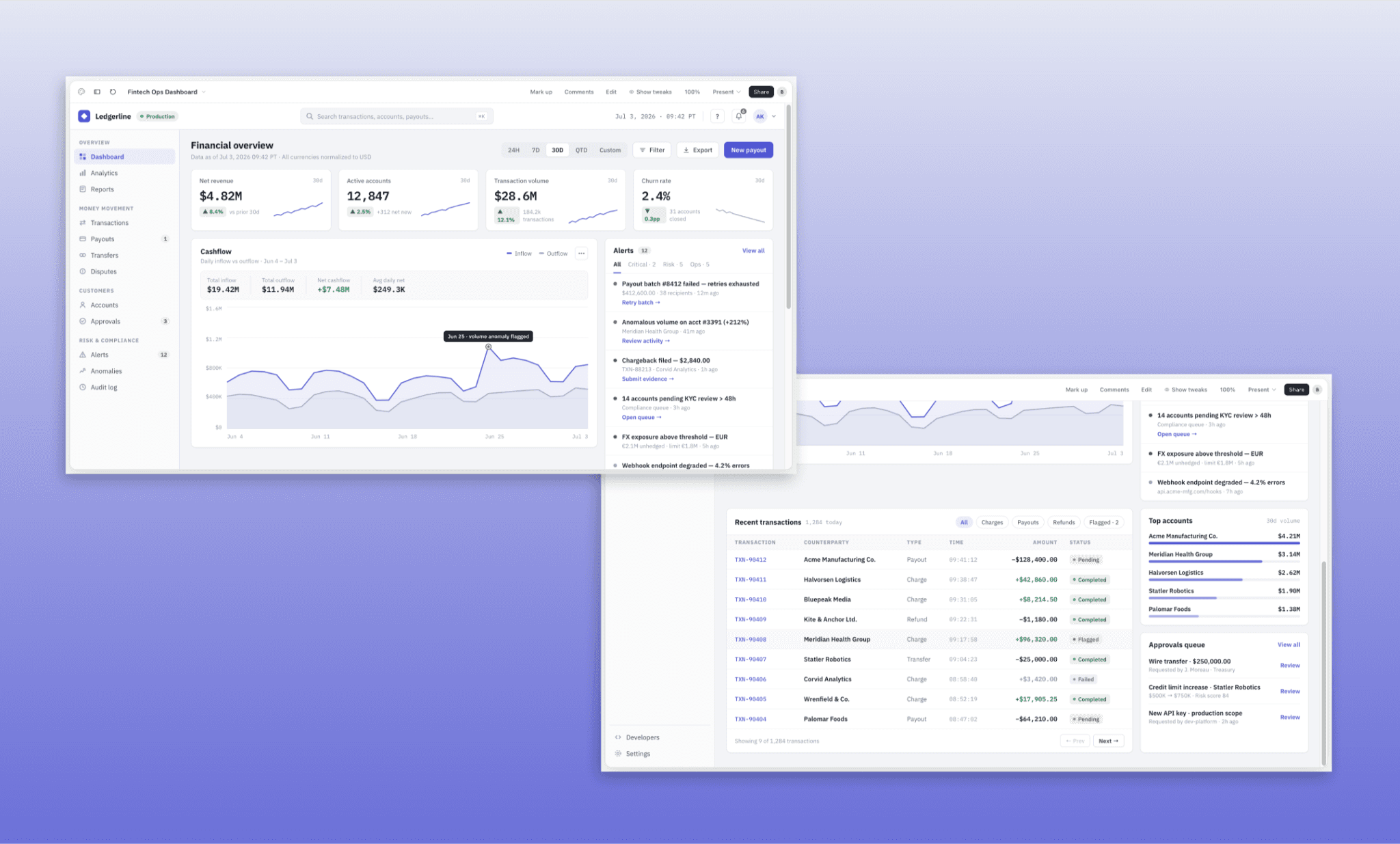
Tempo gasto: ~8 min
Desta vez, o Claude Design me fez algumas perguntas de esclarecimento como um típico AI UI Agent, então preciso fazer uma ressalva: o Fable 5 teve uma ajuda para decidir sua direção criativa.
Quanto ao resultado, é realmente denso e robusto, por isso acho que demorou mais. Tem um visual corporativo bem polido e organizado de forma inteligente, sem parecer poluído. Porém, notei alguns elementos que poderiam ser redimensionados para alinhar melhor com os cards. Além disso, ele não seguiu cada instrução de forma isolada, mas as sintetizou em um produto consistente como um designer de bom gosto faria.
Navegue e Edite UI de App de Fintech pela Banani AI >
Fluxo de Onboarding Multi-telas
Prompt
"Desenhe um fluxo de onboarding de várias telas para um app de paquera no celular. Inclua: tela de boas-vindas/proposta de valor, upload de fotos, informações básicas (nome, idade, localização), seleção de interesses e uma tela final de 'pronto para curtir'. Visual ousado, moderno e vibrante."
Design Gerado
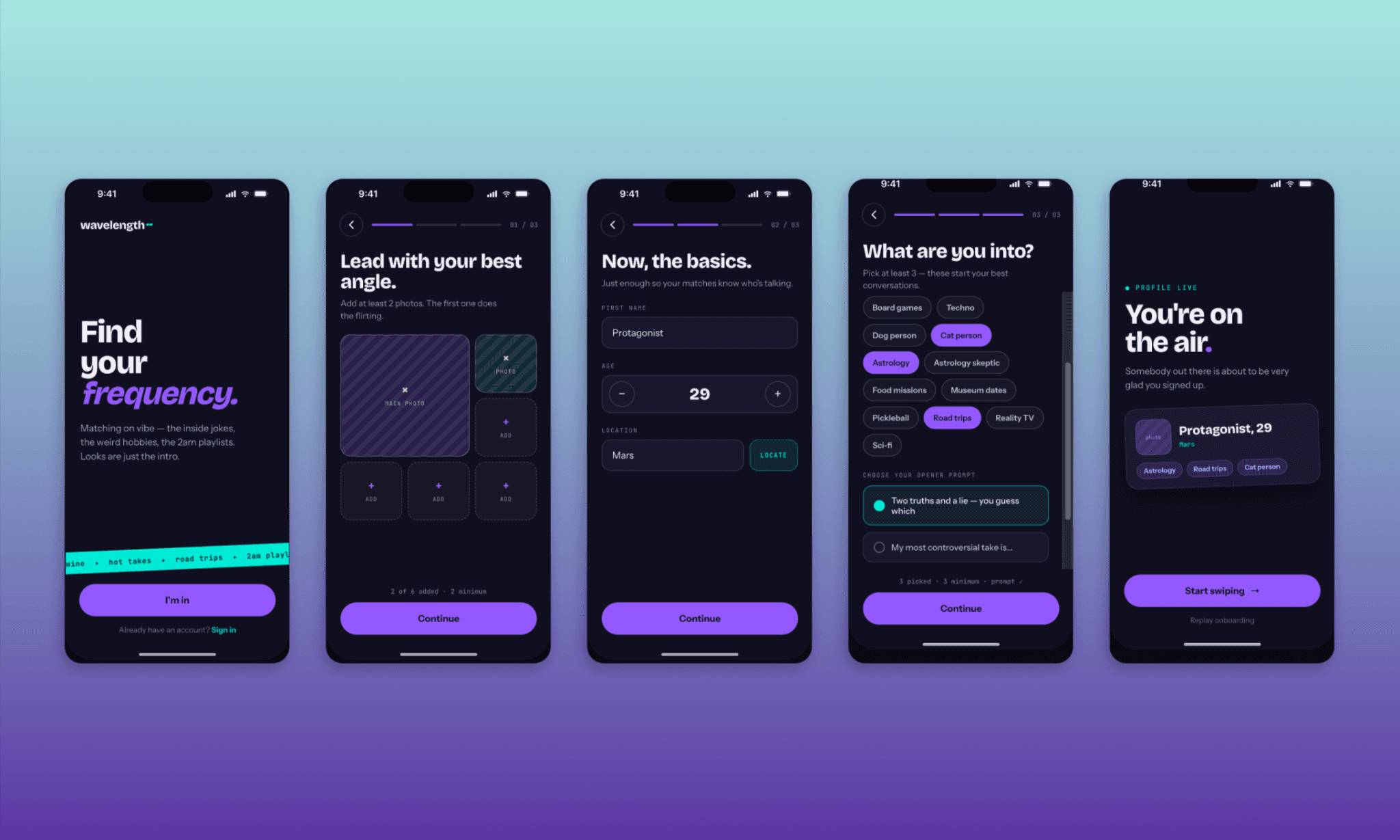
Tempo gasto: ~5 min
Nesta rodada, o Claude Design também fez perguntas criativas que respondi para guiar o Fable 5, mas intencionalmente para evitar que ele seguisse o óbvio e fizesse uma UI parecida com a do Tinder.
O protótipo multi-telas ficou incrível e cheio de microinterações divertidas. Todas as telas e componentes solicitados estão presentes. Cores, tipografia, textos, fluxo e tudo o mais implementados como um profissional. Se eu fosse criar um MVP para este app, talvez precisasse apenas de ferramentas de pesquisa de UX com IA para obter feedbacks reais e pediria ao Fable 5 para refinar o design.
Sendo bem detalhista, acho que para ter um toque criativo a mais, o Fable 5 poderia ter inserido uma imagem de verdade na tela inicial, e o logotipo poderia ser um vetor em vez de apenas uma fonte estilizada.
Screenshot-to-UI com Fable 5
Usar uma inteligência de screenshot-to-UI é comum para editar interfaces que curtimos. Mas, como o objetivo final geralmente é usar esse novo design para criar mais telas, eu quis testar como o Fable 5 entende, edita e recria elementos. Para isso, fiz o upload de prints da UI do Duolingo, pedi para adicionar a tela de um novo recurso e gerar algumas imagens — tudo em duas etapas.
Prompt
“Passo 1 — Troca de ícone na barra de navegação:
Siga exatamente o visual deste print do Duolingo. Substitua o ícone de escudo/ranking no menu por um novo ícone de 'Cultura' — um globo simples ou cartão-postal, mantendo a mesma espessura de linha e estilo dos outros. Não mude mais nada.
Passo 2 — Tela do recurso:
Mantendo a mesma identidade de design, crie a tela de 'Cartões Culturais' que se abre ao tocar no ícone. Deve ter um feed de cartões rolável, cada um com uma foto real de um país que fala a língua estudada, uma legenda curta conectando-a a um termo de vocabulário e o botão 'Praticar esta palavra'. Siga as cores e formas clássicas do Duolingo, mas com destaque total para a foto."
Design Gerado
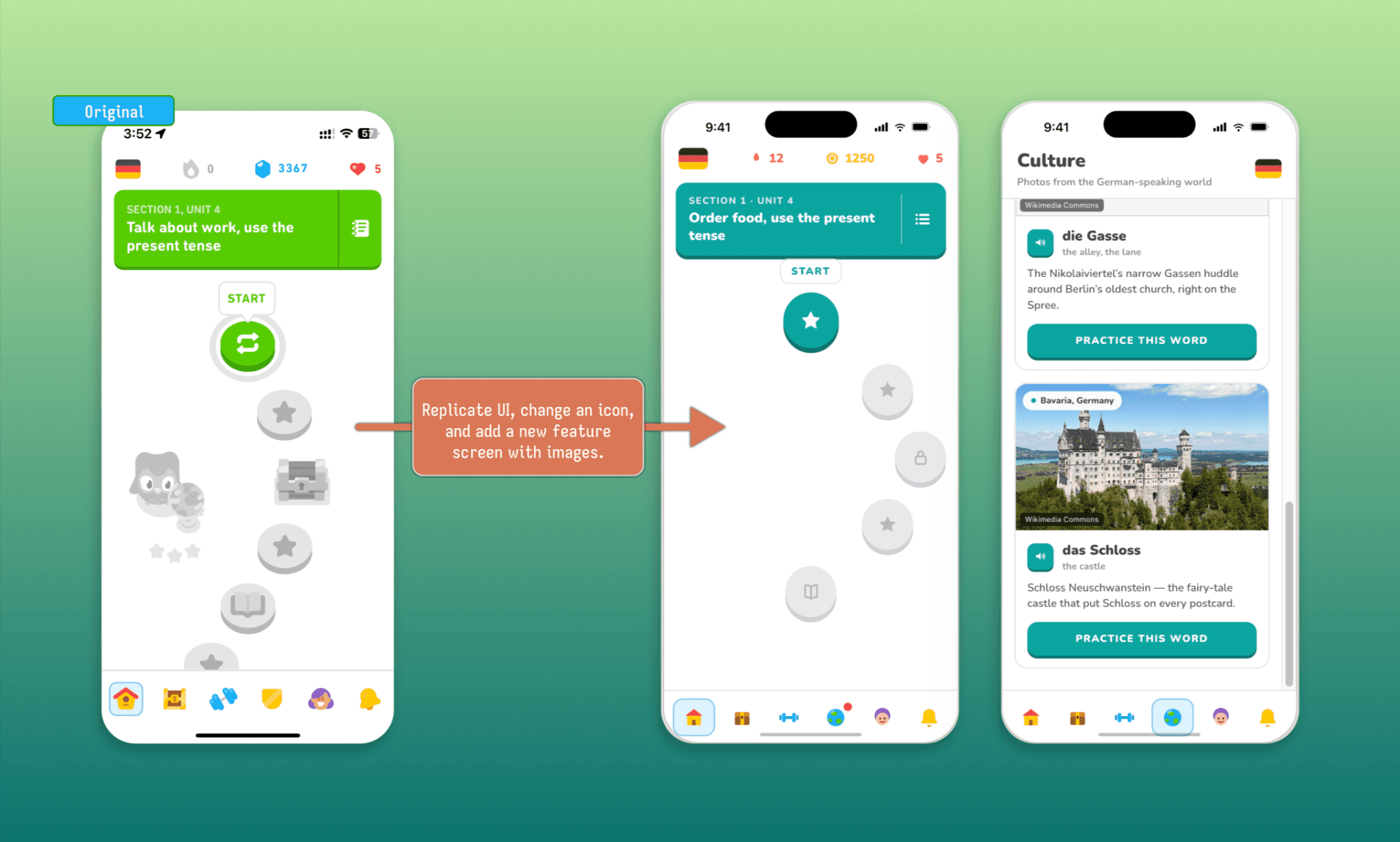
Tempo gasto: ~12 min (em duas tentativas)
A primeira coisa que notei: sem vetores e sem imagens reais de início. Ruim. No entanto, o Fable 5 replicou o layout do Duolingo perfeitamente nas duas telas criadas e escolheu cores consistentes com a identidade da marca. Ao pedir correções explícitas para os detalhes que faltavam, ele levou mais uns 6 minutos para processar e incluiu os vetores e fotos. Curiosamente, ele buscou as imagens do Wikimedia Commons em vez de gerá-las do zero. Como os vetores não ficaram idênticos aos do Duolingo original, entendo que criar esses assets de marca exige o envio de arquivos próprios.
(*Nota: À essa altura, meus créditos diários do Claude se esgotaram. O Fable 5 realmente consome bastantes recursos!)
O Figma Weave vale a pena para gerar assets de UI? >
Fidelidade ao Design System com Fable 5
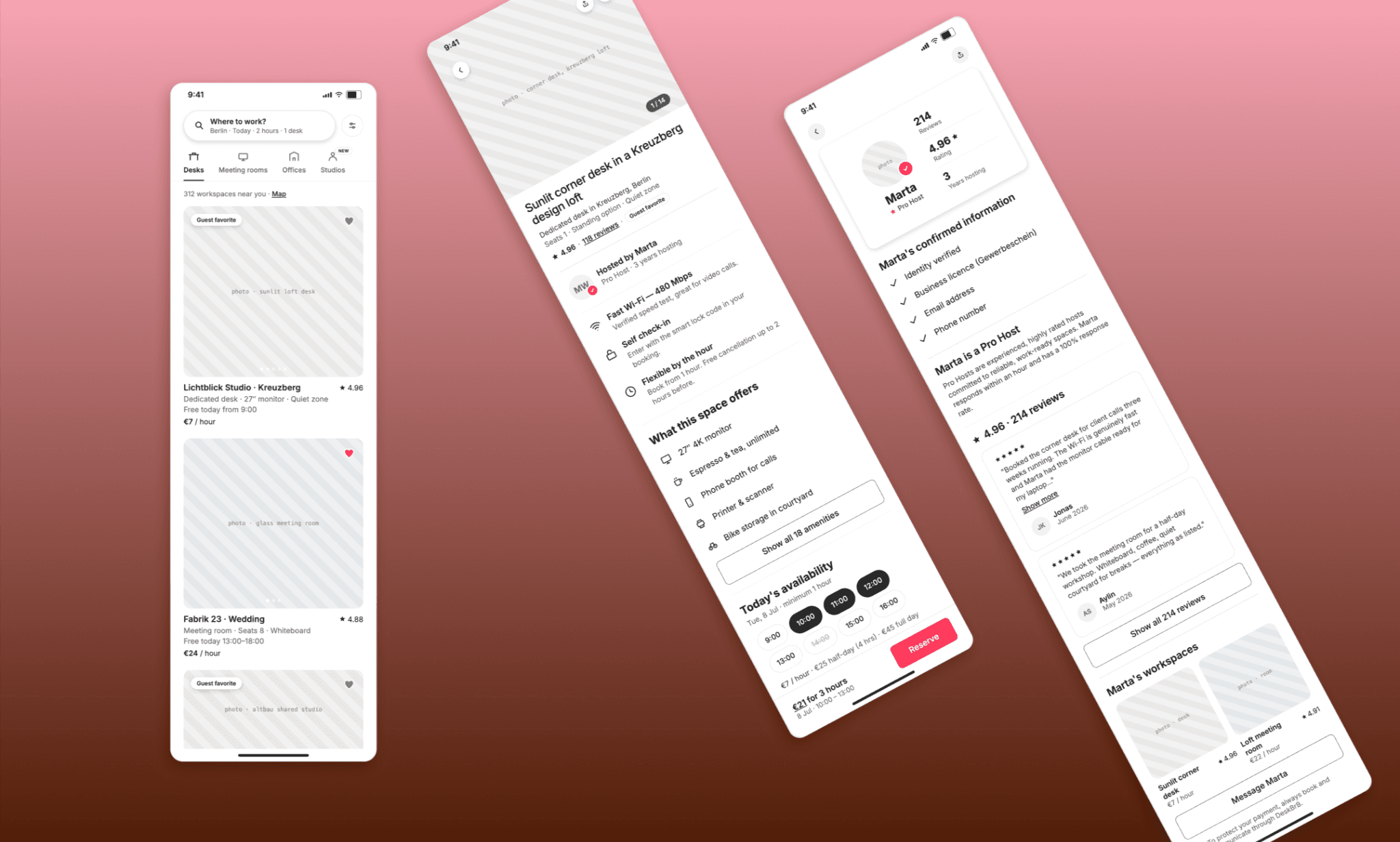
Em 2026, usar arquivos Markdown (Design MD) é a nova convenção de briefing de marcas. Para ver se o Fable 5 consegue seguir uma identidade estritamente, fiz o upload do design MD do Airbnb e pedi para gerar um app fictício chamado ‘Deskbrb’ seguindo a mesma linha.
Prompt
"Usando o guia de estilos do Airbnb em anexo como base, desenhe um app mobile chamado DeskBrB. Ele é um marketplace no estilo do Airbnb para reservar mesas de coworking e salas de reunião por hora. Crie 3 telas: Home/busca com filtros e cards de anúncios, Detalhes do local (fotos, comodidades, preço e disponibilidade) e Perfil do anfitrião (com avaliações, comentários e selos de verificação)."
Design Gerado
Tempo gasto: ~5h30 min
Esse teste foi incrível porque o modelo agiu mais como um PM focado em regras do que um designer artístico. Ele acertou exatamente nos ícones, tipografia e bordas arredondadas. Mais do que isso, a disposição dos elementos ficou tão perfeita que qualquer um poderia confundir com a própria UI do Airbnb. O limite de geração de imagens do Fable 5 foi confirmado, mas a UI/UX final ficou excelente.
Gerador Gratuito de Design Systems com IA >
Qualidade do Código de Frontend do Fable 5
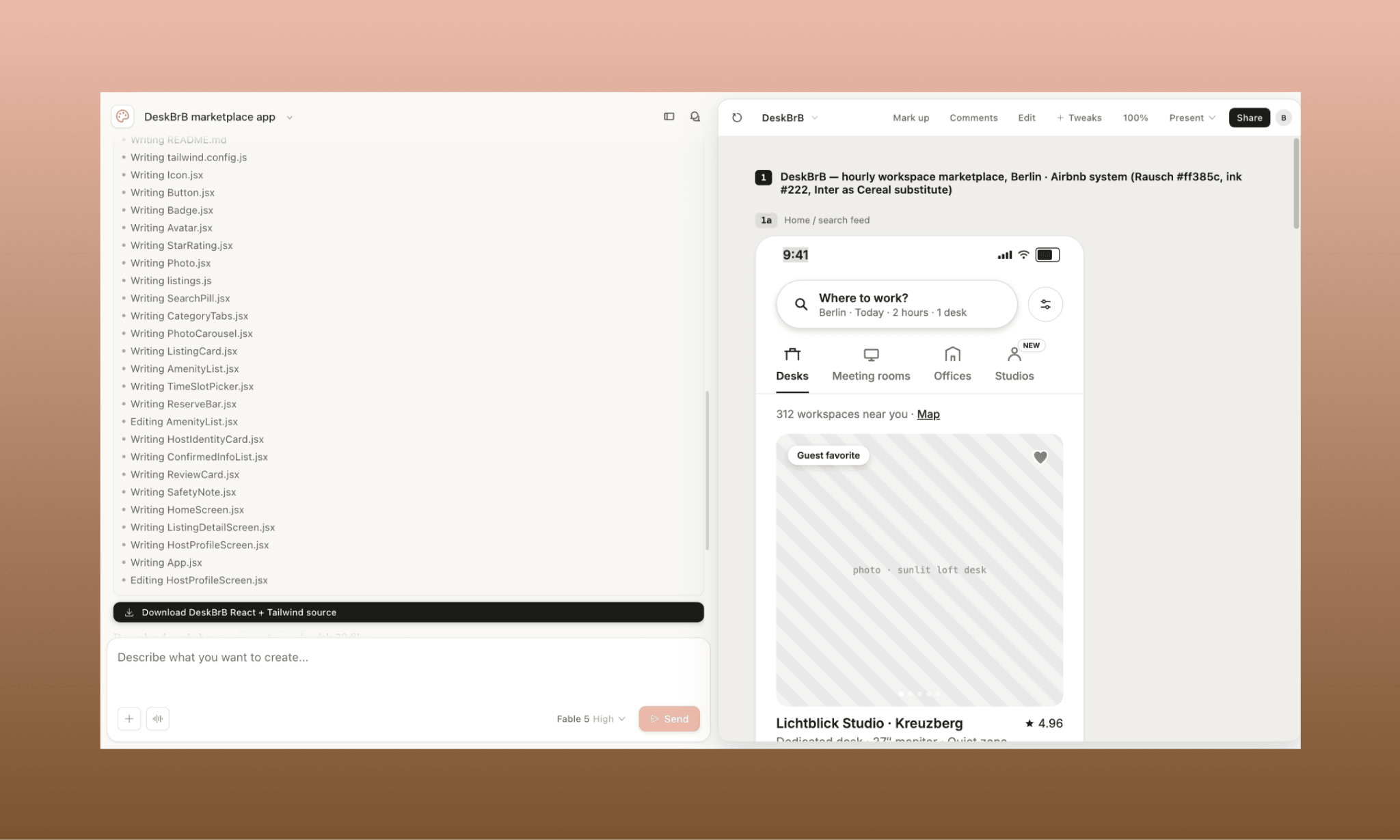
Criar o design visual com o Claude Fable 5 é apenas metade da proposta; a outra incrível vantagem é a qualidade de geração de código. Por isso, extraí o código de dois layouts anteriores: o app de meditação (HTML/CSS/JS tradicional) e o DeskBrB (React + Tailwind modernos).
App de meditação: HTML/CSS/JS em arquivo único
Sem frameworks, tudo direto. Marcação semântica limpa (header, footer, main), variáveis CSS para paleta de cores, controle de estado 'aria-pressed' no seletor e suporte à acessibilidade respeitando a preferência de animação reduzida dos usuários. Parece escrito à mão por um desenvolvedor preocupado com padrões modernos de web.
App DeskBrB: Componentes em React + Tailwind
Aqui o código parou de parecer uma simples exportação de ferramenta de design e virou um repositório real de desenvolvimento. 18 arquivos criados. Componentes reais bem divididos — Button, StarRating, ListingCard, PhotoCarousel — reutilizáveis e orientados por propriedades (props).
A configuração do Tailwind expandiu exatamente as cores e padrões reais do Airbnb (Vermelho Rausch, escala de grafite/cinza e sombreamento exato) extraídos direto do Design MD. Ele ainda gerou um README bem documentado com os passos para rodar via Vite. Como a fonte oficial do Airbnb (Cereal) é corporativa, ele usou de forma inteligente a Inter por padrão avisando no arquivo. Excelente.
Análise do Resultado
Nos dois cenários, o código gerado pelo Fable 5 se destaca pelo rigor técnico, sem importar o tamanho ou tecnologia usada. Há presença constante de atributos de acessibilidade, estruturas semânticas e disciplina em design tokens. A reprodução visual é idêntica ao código. Um trabalho super profissional de handoff, batendo direto de frente com IAs de Design-to-Code de 2026.
Experimente IA de Design-to-Code Grátis >
Fable 5 vs Gemini vs GPT em UI
Em 2026, dois pesos pesados que dominam a geração de interfaces e frontend são o Gemini 3.1 PRO e o GPT-5.4. Para testar o Fable 5, coloquei os três gigantes frente a frente com o exato mesmo prompt. Um desafio complexo: criar uma tela de app financeiro para formatos mobile e desktop simultaneamente.
Usei o Fable 5 no Claude Design e os modelos Gemini e GPT no Banani AI UI Designer.
Prompt (idêntico para todos, sem referências visuais)
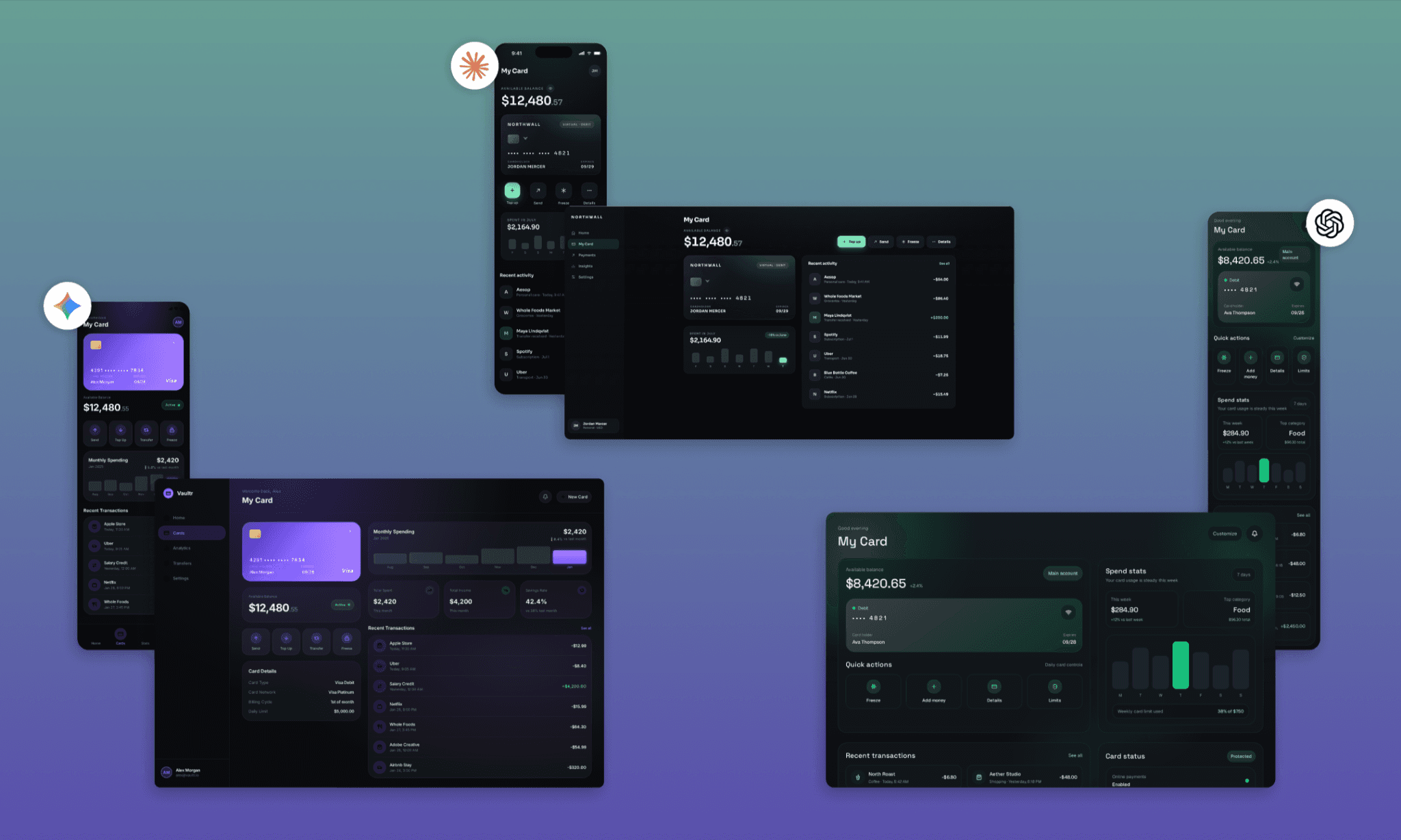
"Crie a tela de usuário de um app de banco chamado 'My Card'. Exiba o cartão de débito virtual, saldo atual, ações rápidas, gráficos de gastos e uma lista de transações recentes. Preencha as informações com dados fictícios convincentes. Siga um estilo escuro, refinado e com visual premium. Use gradientes, áreas translúcidas (efeito glassmorphism), tipografia moderna e uma única cor de destaque dominando o layout."
Design Gerado (comparativo lado a lado)
Ver e Editar design do Gemini 3.1 PRO | Ver e Editar design do GPT 5.4
Todos me fizeram perguntas adicionais (o AI UI Agent do Banani se virou com bem menos ajuda). E os designs das telas no Banani ficaram prontos em menos de 2 minutos (um minuto cada para mobile e desktop), enquanto o Fable 5 no Claude Design levou uns 6 minutos para a mesma tarefa.
Sobre o design final, todos acertaram o formato de tela do dispositivo móvel. Interessante que o Fable 5 e o GPT 5.4 optaram por tons elegantes de preto e verde, enquanto o Gemini 3.1 PRO foi para o preto e roxo. Fontes, ícones e grids ficaram ótimos nas três opções. Porém, para o meu gosto, a translucidez do cartão criado pelo Fable 5 deu um ar mais sofisticado. A versão para desktop dele também aproveita melhor os espaços, consolidando informações em tela cheia. O GPT pecou ao esquecer o menu de navegação lateral, e o Gemini ficou um pouco apertado demais.
Uma decisão difícil entre os três gigantes, mas o Fable 5 leva uma ligeira vantagem no acabamento.
Crie UI com Gemini ou GPT gratuitamente >
Veredito: Vale a pena usar o Fable 5 para UI/UX?
Sim, o Fable 5 é fantástico para design de interfaces. O entendimento lógico de briefings, qualidade visual e o código final são impressionantes. Ele constrói telas estáticas de alto impacto, microanimações e fluxos de protótipos funcionais. No entanto, é bastante pesado em consumo de créditos e pode ser lento comparativamente.
Se você procura por interfaces deslumbrantes com IA aliadas a um fluxo ágil de exportação de código, comece a usar a Banani de graça! Ela traz suporte aos modelos mais recentes (Gemini + Claude), integração nativa com o Figma e exportação do HTML/CSS direto em um clique.
Perguntas Frequentes sobre o Fable 5 para Design de UI/UX
Como acessar o Fable 5 no Claude Design?
Basta entrar no Claude Design e, na caixa onde digita o prompt, abrir o seletor de modelos. Escolha o Fable 5 e configure também o nível de esforço de geração (do mínimo ao máximo).
Como exportar códigos de frontend do Fable 5 no Claude Design?
No chat, você pode pedir diretamente o código limpo das telas na linguagem de sua escolha. Ou, se preferir, clique em "Share → Send to Claude Code" no canto superior direito para gerar uma entrega completa para desenvolvimento.
A qualidade de código do Fable 5 é boa?
Muito boa. Em nossos testes, componentes HTML/CSS/JS básicos vieram semânticos e perfeitamente acessíveis. Em escopos maiores, ele entrega estruturas em React + Tailwind baseadas em design tokens reutilizáveis. Pronto para ser integrado no produto real.
O Fable 5 gera imagens para as interfaces?
Ainda não com tanta eficiência. Em nossos testes rodando no Claude Design, o modelo preferiu colher fotos existentes no Wikimedia Commons ao invés de produzir novas artes. Por outro lado, a criação de ícones em vetor estilizados funciona muito bem.


