
Beste Magic Patterns Alternativen
Kategorie | AI Design Tools |
Insgesamt am besten | |
AI Design-Werkzeuge | |
UX-orientierte AI | |
Entwicklerorientierte Software | |
Experimentelle Apps | Cursor, Balsamiq, Google Labs |
Was ist Magic Patterns AI?
Magic Patterns ist ein AI UI Design-Tool zur Erstellung von editierbaren Web-/App-Interfaces durch Kommunikation mit AI. Es ist speziell für Produktteams entwickelt, um neue Funktionen mithilfe ihrer bestehenden Designsysteme und Produktkontexte zu prototypisieren. Zu den wichtigsten Funktionen gehören eine kollaborative Multiplayer-Leinwand, eine Chrome-Erweiterung zum Erfassen von Webkomponenten und nahtlose Synchronisation mit Figma und GitHub.
Warum Magic Patterns Alternativen suchen?
Zunächst einmal gibt es kein universelles AI Design-Tool. Auch nicht Magic Patterns. Es ist tatsächlich eines der stärkeren AI Design Tools auf dem Markt, ideal für Plug-and-Play-Workflows. Sobald jedoch komplexe Interaktionen (mehrstufige Abläufe, bedingte Logik, Randfälle) hinzukommen, kann die AI ins Wanken geraten. Darüber hinaus macht die jüngste Umstellung vom Kreditsystem auf eine nutzungsbasierte Preisgestaltung die Budgetierung schwieriger.
Die Frage ist also nicht, ob Magic Patterns gut ist. Das ist es. Sondern, ob es für deinen spezifischen Workflow geeignet ist. In dieser Rangliste werden wir jene spezifischen Workflows betrachten. Und um es praktischer zu machen, habe ich einen Prompt (für ein Produktivitäts-Tool-UI) durch jede Alternative zu Magic Patterns laufen lassen, um ihre ersten Entwürfe zu vergleichen.
"Gestalte einen mobilen Produktivitäts-App-Bildschirm für Deep-Work-Sitzungen. Verwende ein gedämpftes dunkles Thema mit sanften blauen Akzenten. Inkludiere eine Aufgabenkarte mit Prioritäts-Tags (Hoch/Mittel/Niedrig), einen 45-minütigen Fokus-Timer, einen Umschalter für Umgebungsgeräusche (nur Symbol) und einen sichtbaren Status des Ablenkungsblockers. Füge einen subtilen Fortschrittsring, minimalistische Linien-Icons und beruhigenden Mikrotext („Bleibe bei dieser Aufgabe“) hinzu. Untere Navigation: Aufgaben, Kalender, Team, Profil. Priorisiere Leerraum und klare visuelle Hierarchie."
Magic Patterns Konkurrenten im Ranking
Rang | Werkzeug | Hauptmerkmale | Am besten für | Preis (Kostenlos, monatlich & jährlich) |
1 | Multi-Screen-Generierung aus Text/Bildern; hochauflösende Mockups; Figma/MCP-Export. | Schnell prototypisieren und Design atmosphärisch gestalten. | - Kostenlos (170 Credits) - Bezahlt ab $12/Monat (400 Credits) | |
2 | Native Figma AI-Generierung; chat-basierte Bearbeitung; nahtlose Übergabe an Entwickler. | Designer, die innen Figma leben und Konsistenz im Designsystem priorisieren. | - Kostenlose begrenzte AI-Credits - Bezahlt ab $16/Monat (3k Credits) | |
3 | Strukturelle UI-Generierung; wiederverwendbare Komponentenbibliotheken; Chrome-Erweiterung für Erfassen. | Erhalten bestehender Designsysteme und strukturierter Layout-Logik. | - Kostenlos (120 Credits) - Bezahlt ab $14/Monat (400 Credits) | |
4 | Autodesigner AI-Agent; Bildschirmaufnahme zu Mockup; Design-Theme-Generierung. | Teams, die Designsysteme mit AI standardisieren; Ideenfindungsphase. | - Kostenlos (3 AI-Generierungen) - Bezahlt ab $12/Monat (500 AI-Generierungen) | |
5 | UX-Architektur Unterstützung; Wireframes und hochauflösende Mockups; vorhersagende Heatmaps. | Designer und PMs, die UX-Architektur gegenüber visuellen Experimenten priorisieren. | - Kostenlos (45 Credits, einmalig) - Bezahlt ab $14/Monat (420 Credits) | |
6 | Multi-Modell Ausgabe; Farbschema Vorschläge; Komponente zum Bearbeiten markieren | Frühe UX-Erkundungen und schnelle Erstellung vollständiger Benutzerflüsse | - Kostenlos: Begrenzte Credits | |
7 | Vibe-Coding AI; Full-Stack App-Entwicklung inklusive Backend-Logik und Bereitstellung. | Funktionale Prototypen oder Konzeptnachweise für Stakeholder erstellen. | - Kostenlos (30 Credits/Monat) - Bezahlt ab $25/Monat (100 Credits) | |
8 | Web-basierte IDE; Prompt-zu-Deploy React-Apps; Echtzeit-Logikvorschau. | Ideen schnell in funktionierende Apps umsetzen, wobei das UI sekundär ist. | Kostenlos (300k Tokens) - Bezahlt ab $18/Monat (10M Tokens) | |
9 | Cloud IDE mit AI-Agent; behandelt UI und serverseitige Projektlogik. | Entwickler, die sich beim UI-Tuning über Code und autonome Agenten wohlfühlen. | - Kostenlos begrenzte AI-Credits - Bezahlt ab $17/Monat ($20 wert an Credits) |
Banani: Beste Gesamtabalternative zu Magic Patterns
Ich finde das Banani AI UI Design-Tool als das nächstgelegene zu Magic Patterns AI, mit einem Vorteil für Vibe-Design. Die Kombination seiner schnellen Text-zu-UI-Design mit einem praktischen AI-Chatbot für Iterationen (muss ich sagen, ist sehr praktisch, um einen ersten Entwurf zum Endprodukt zu bringen) macht es ausgezeichnet für App- oder Webinterface-Prototypisierung von Anfang bis Ende.
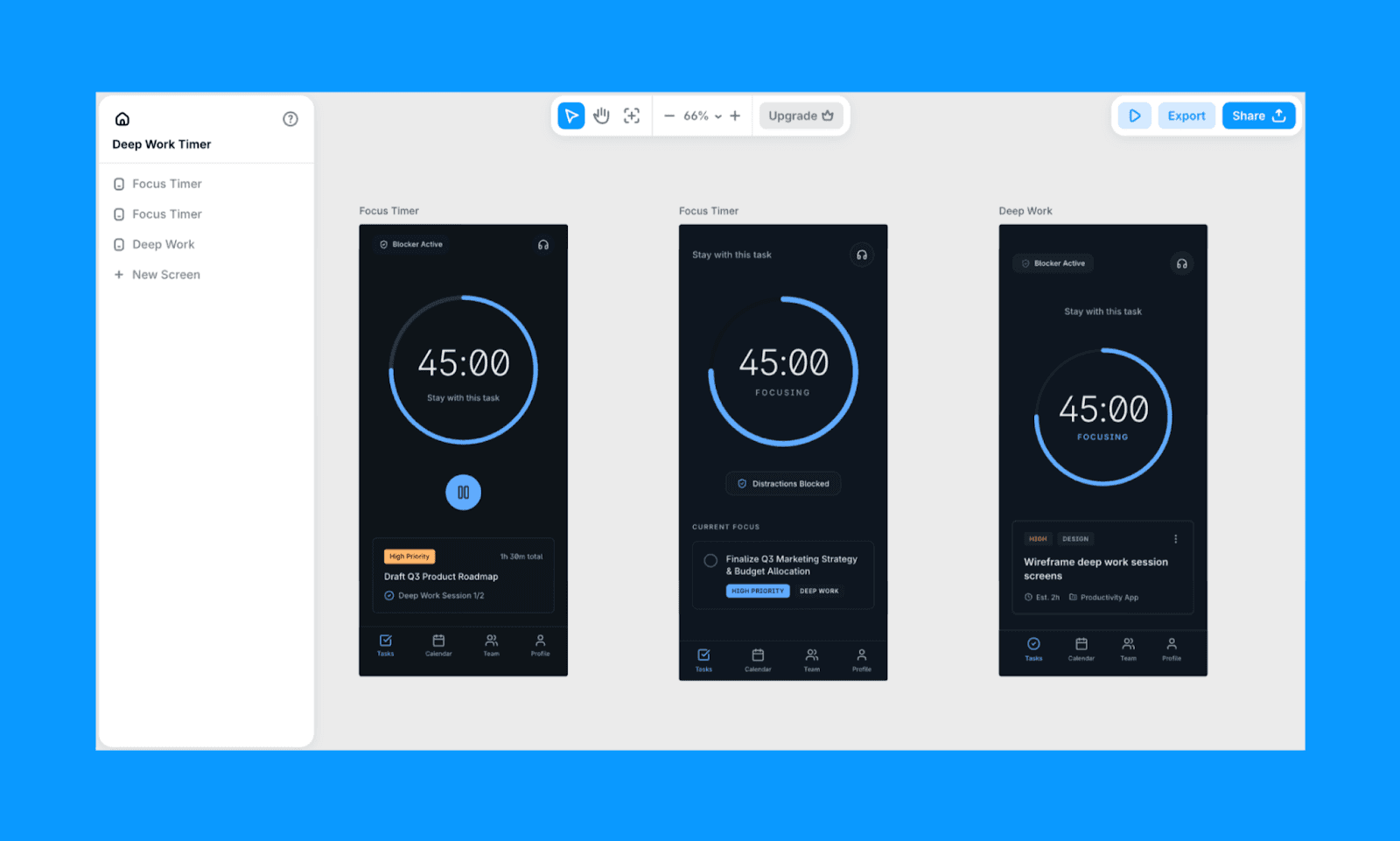
Bei meinem Test-Prompt war Banani dasjenige, das das Konzept des Fokus und der Ruhe am besten verstanden hat, gemäß meinen Erwartungen. Sein Output hat eine klare Hierarchie, viele Leerraum und einige fokussierte Schaltflächen. Es hat auch 3 Designvariationen erzeugt, die ich mit wenigen Klicks weiter erforschen kann.
Hauptmerkmale von Banani AI
Multi-Screen-UI aus Text, Bildern oder Referenzen generieren
Figma-Import, der funktioniert
Editierbare hochauflösende UI-Mockups mit schnellen Variationen
Figma-kompatibler Export (Auto-Layout erhalten) und MCP für Designübergabe
Warum Banani statt Magic Patterns wählen
Wenn dein Ziel darin besteht, wunderschöne Designs zu erstellen, das Designs der System leicht anzupassen und alles schnell zu erledigen, ist Banani eine bessere Wahl als Magic Patterns.
Banani Preisgestaltung
Kostenlose Stufe: Bis zu 170 Credits pro Monat
Zahlplan: $12/Monat für 400 Credits (bei jährlicher Abrechnung)
AI Designer wie Magic Patterns
Figma Make vs Magic Patterns
Figma Make ist im Grunde eine AI-Schicht über dem klassischen Figma Design, die es ermöglicht, UI-Bildschirme aus Prompts zu generieren und in einer vertrauten Designumgebung zu arbeiten. Es wurde für diejenigen entwickelt, die Designsystem-Konsistenz über sofortigen React/Tailwind-Code-Export bevorzugen.
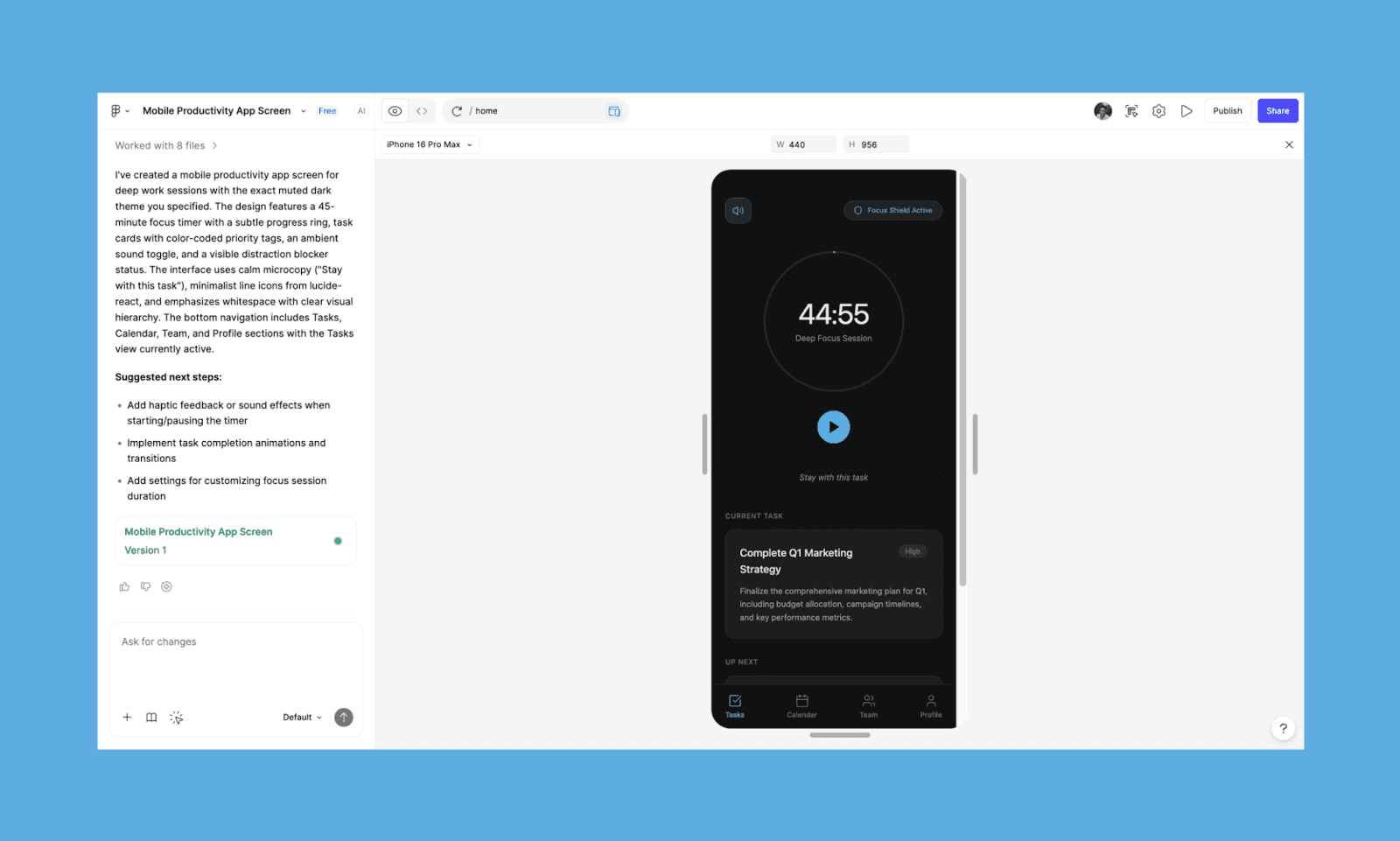
Ich fand die Ergebnisse meines Prompts ziemlich ordentlich mit seinem schichtbereiten Look und der genauen Farbgebung, empfand jedoch, dass es etwas überladen war. Ich war angenehm überrascht, dass der Bildschirm länger als eine Falte ist, da unter „Als Nächstes“ weitere Aufgabenkacheln vorhanden waren (was mich zum Schmunzeln brachte, ob es gut für meinen Fokus war). Eine gute Idee für den nächsten Entwurf.
Hauptmerkmale von Figma Make
UI-Bildschirmanzeige aus Text oder Bildern in Figma generieren
Bearbeiten durch Chat oder ‚Point & Edit‘ für direkte Elementänderungen
Nahtlose Übergabe unter Verwendung der nativen Entwicklertools von Figma
Warum Figma Make statt Magic Patterns wählen
Trotz des Figma-Plugins von Magic Patterns denke ich, dass Figma Make eine klare Wahl für Designer und Teams ist, die bereits in Figma arbeiten.
Figma Make Preisgestaltung
Kostenlose Stufe: Begrenzte AI-Credits und Design bleiben in Figma Make.
Zahlplan: $16/Monat für 3.000 AI-Credits (bei jährlicher Abrechnung) und Design kann zwischen Figma Make und Design verschoben werden.
Magic Path vs Magic Patterns
Magic Path ist eine weitere wunderbare Option für Magic Patterns, die sich darauf konzentriert,
Prompts in ein strukturiertes UI mit starkem Schwerpunkt auf Layoutlogik zu verwandeln. Es bietet eine AI-fokussierte Leinwand, auf der man Skizzen, Screenshots oder Ideen überall hinzufügen kann.
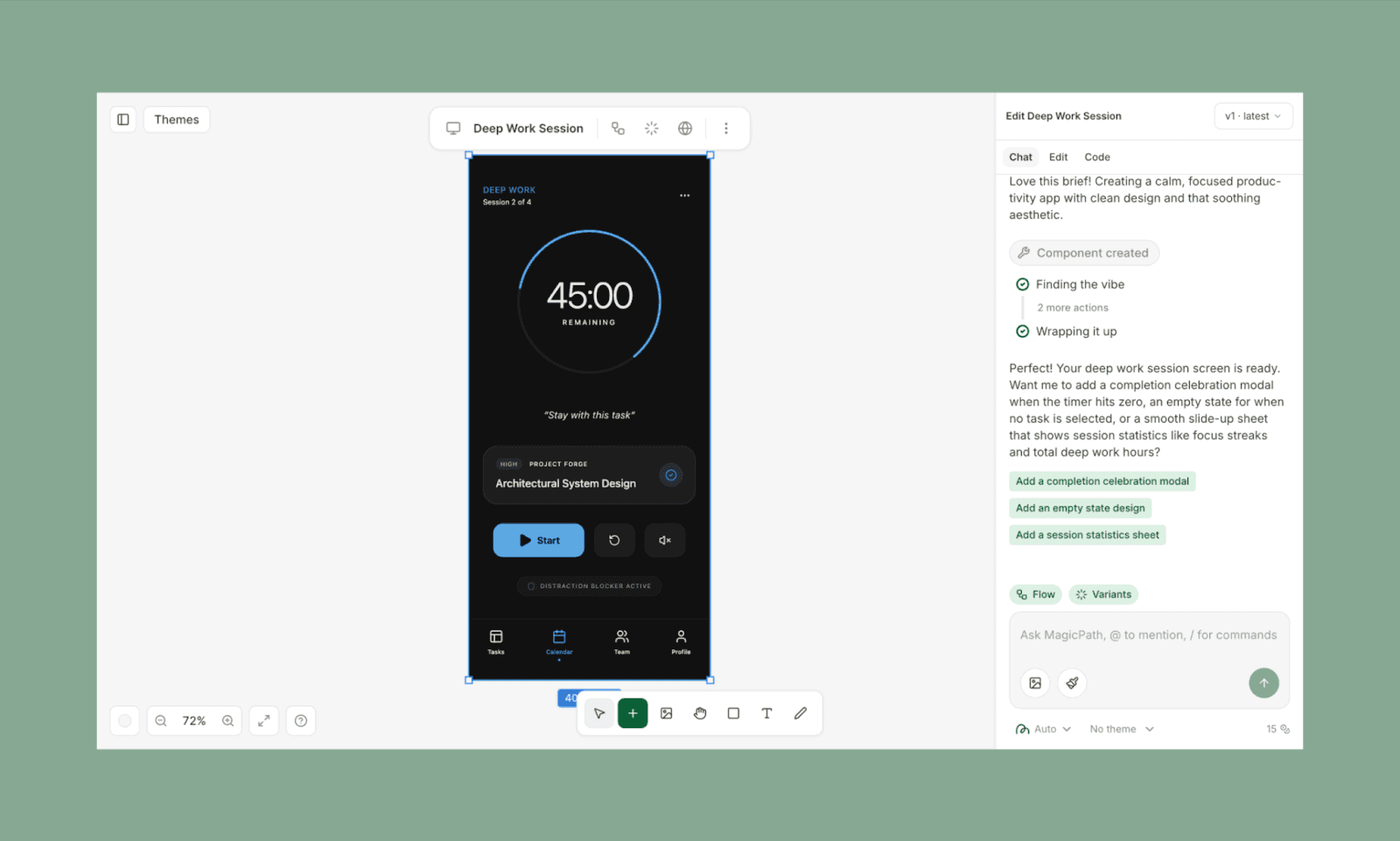
Bei meinem UI-Test lieferte Magic Path ein gut strukturiertes Layout, aber die sekundären Elemente (insbesondere Text und Schaltflächen) wirkten wie Fotobomber. Ich fand sie zu prominent, was für eine minimale, fokussiertere Hierarchie vereinfacht werden könnte.
Hauptmerkmale von Magic Path
Mehrere Variationen aus einem einzigen Prompt oder Screenshot generieren
Wiederverwendbare Komponenten für gemeinsame Projekte erstellen
Chrome-Erweiterung hilft, Screenshots in MagicPath-Dateien zu verwandeln
Warum Magic Path statt Magic Patterns wählen
Wenn du bereits ein Designsystem hast, das du weiterführen möchtest, ist Magic Path AI die bessere Wahl.
Magic Path Preisgestaltung
Kostenlose Stufe: Bis zu 120 Credits und 5 Figma-Importe pro Monat
Zahlplan: $14/Monat (jährlich abgerechnet) kommt mit 400 Credits und 25 Figma-Importen
Uizard vs Magic Patterns
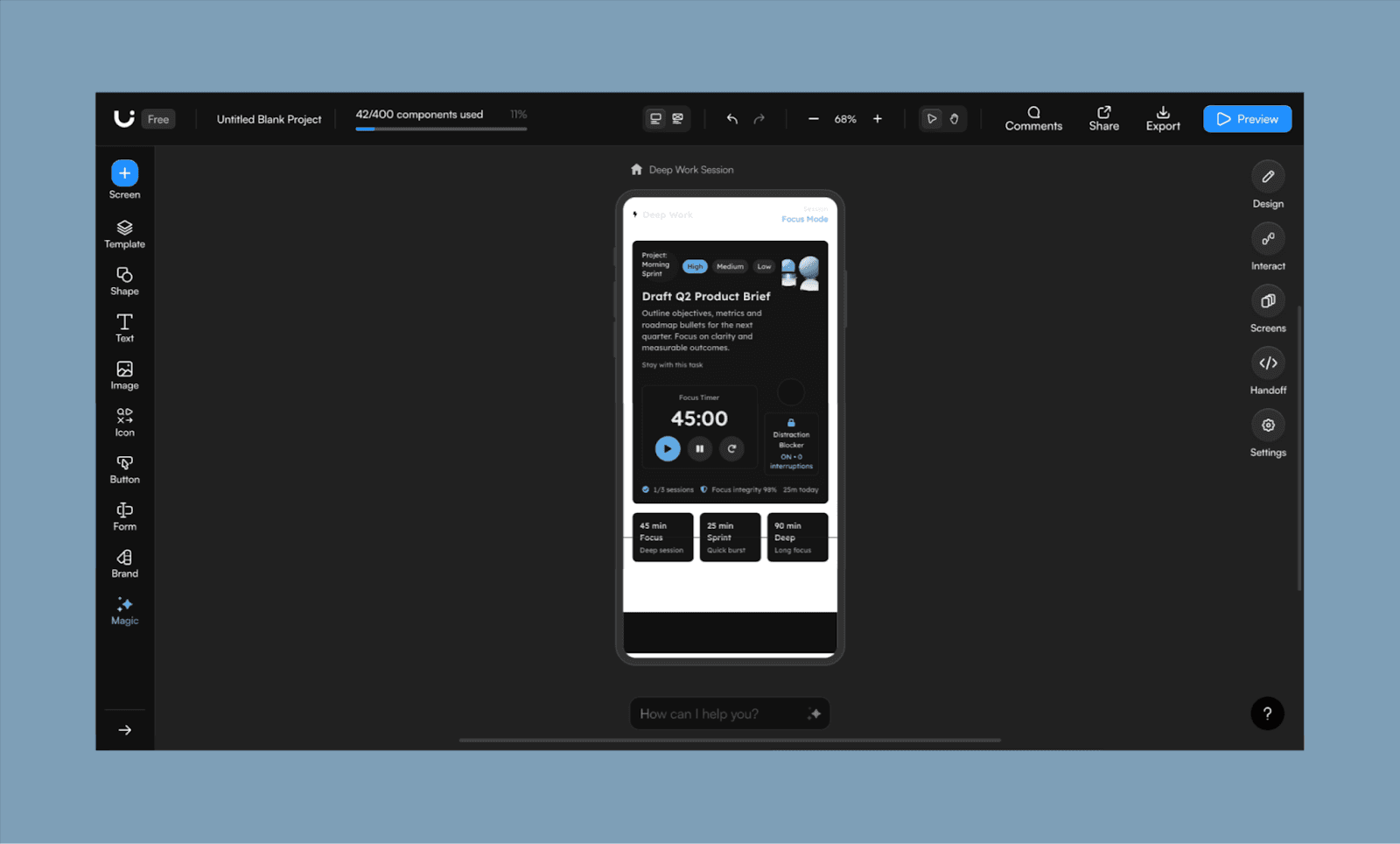
Uizard ist ein weiteres beliebtes AI UI-Generator mit einem firmeneigenen AI-Agenten, den sie Autodesigner nennen. Ähnlich wie Magic Patterns bieten sie eine Design-Leinwand für die Echtzeit-Zusammenarbeit des gesamten Produktteams.
Ehrlich gesagt war ich enttäuscht vom Ergebnis von Uizard für meinen Prompt. Während die Elemente und Farben richtig waren, ist die Ausgabehierarchie falsch, das Design maximal und der Text zu lang. Es hat auch Elemente hinzugefügt, um die ich nicht gebeten hatte, die jedoch für die Ideation gut sind.
Hauptmerkmale von Uizard
Auswahl und Bearbeitung auf Komponentenebene mit AI-Chat
Beliebige Screenshots scannen oder hochladen, um editierbare Mockups zu erzeugen
Design-Themen aus Text-Prompts und Bildern generieren
Warum Uizard statt Magic Patterns wählen
Wähle Uizard, wenn du planst, Zeit in die Entwicklung eines Designsystems mit AI zu investieren und es für das gesamte Projekt oder Team zu standardisieren.
Uizard Preisgestaltung
Kostenlose Stufe: 3 AI-Generierungen pro Monat mit Autodesigner 1.5
Zahlplan: $12/Monat (jährlich abgerechnet) für 500 AI-Generierungen mit Autodesigner 2.0
Für UX-Teams & Produktdenker
UX Pilot vs Magic Patterns
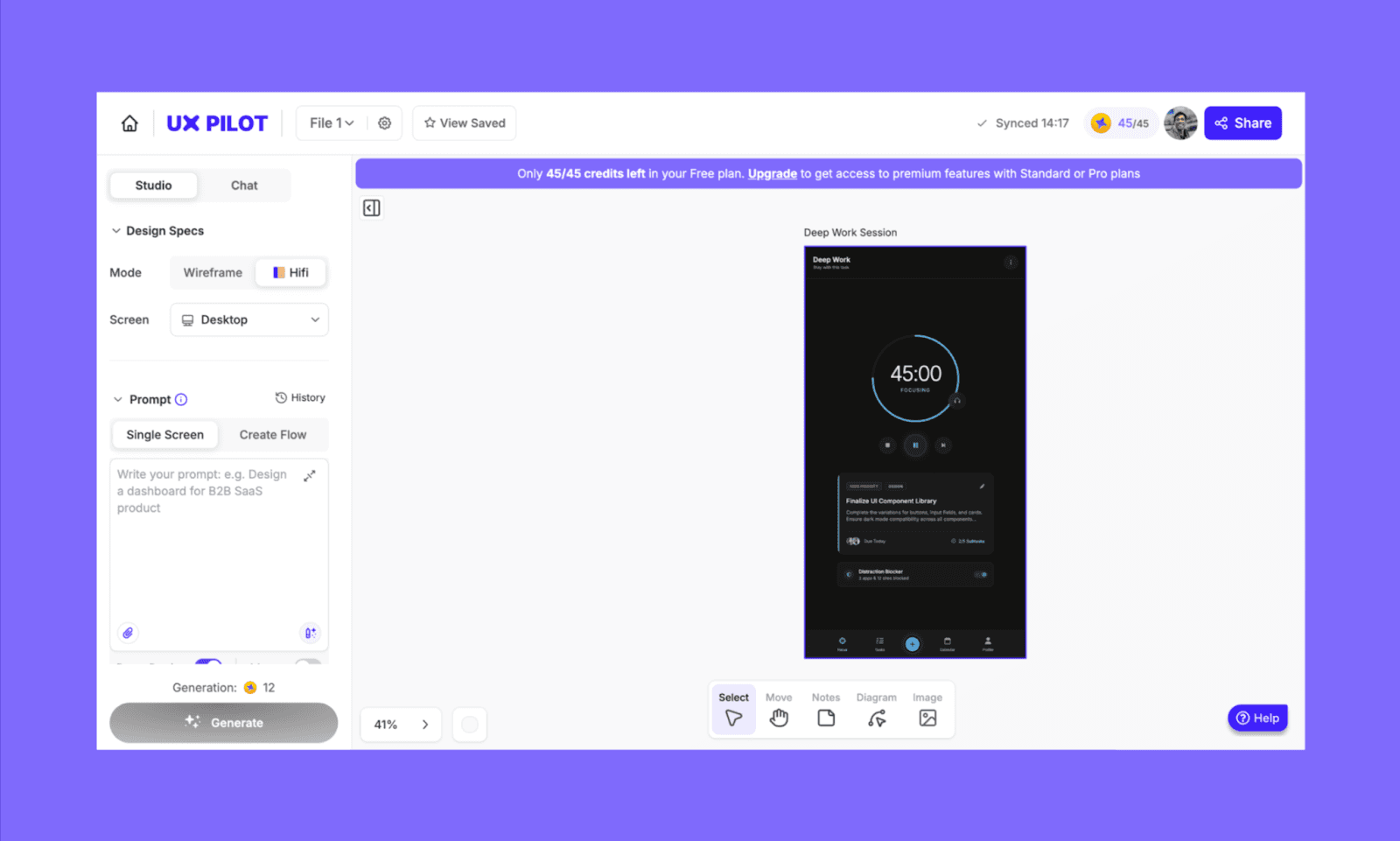
UX Pilot ist eine AI, die den vollständigen UX/UI-Prozess der Web/App-Entwicklung von frühen Konzepten bis zu detaillierten, testbereiten Prototypen unterstützt. Du kannst Wireframes, hochauflösende Mockups für Mobilgeräte und Desktop erstellen und sogar vorhersagende Heatmaps erhalten.
Bei der Bewertung des Outputs für mein To-Do-App-Design fühlte ich, dass sie das UI überdurchschnittlich technisch gestaltet haben. Der Sound-Umschalter und die zusätzlichen Schaltflächen, die hinzugefügt wurden, wirken gedrängt um den Haupt-Timer-Ring. Außerdem wurde es versäumt, die ‚Bleibe bei der Aufgabe‘ als heroische Nachricht zu machen, und das Team-Symbol am unteren Rand. Insgesamt sind das Farbschema und die Hierarchie korrekt.
Warum UX Pilot statt Magic Patterns wählen
Ich würde UX Pilot Designern und PMs empfehlen, die mehr Wert auf UX-Architektur legen als auf visuelle Experimente.
Google Stitch vs Magic Patterns
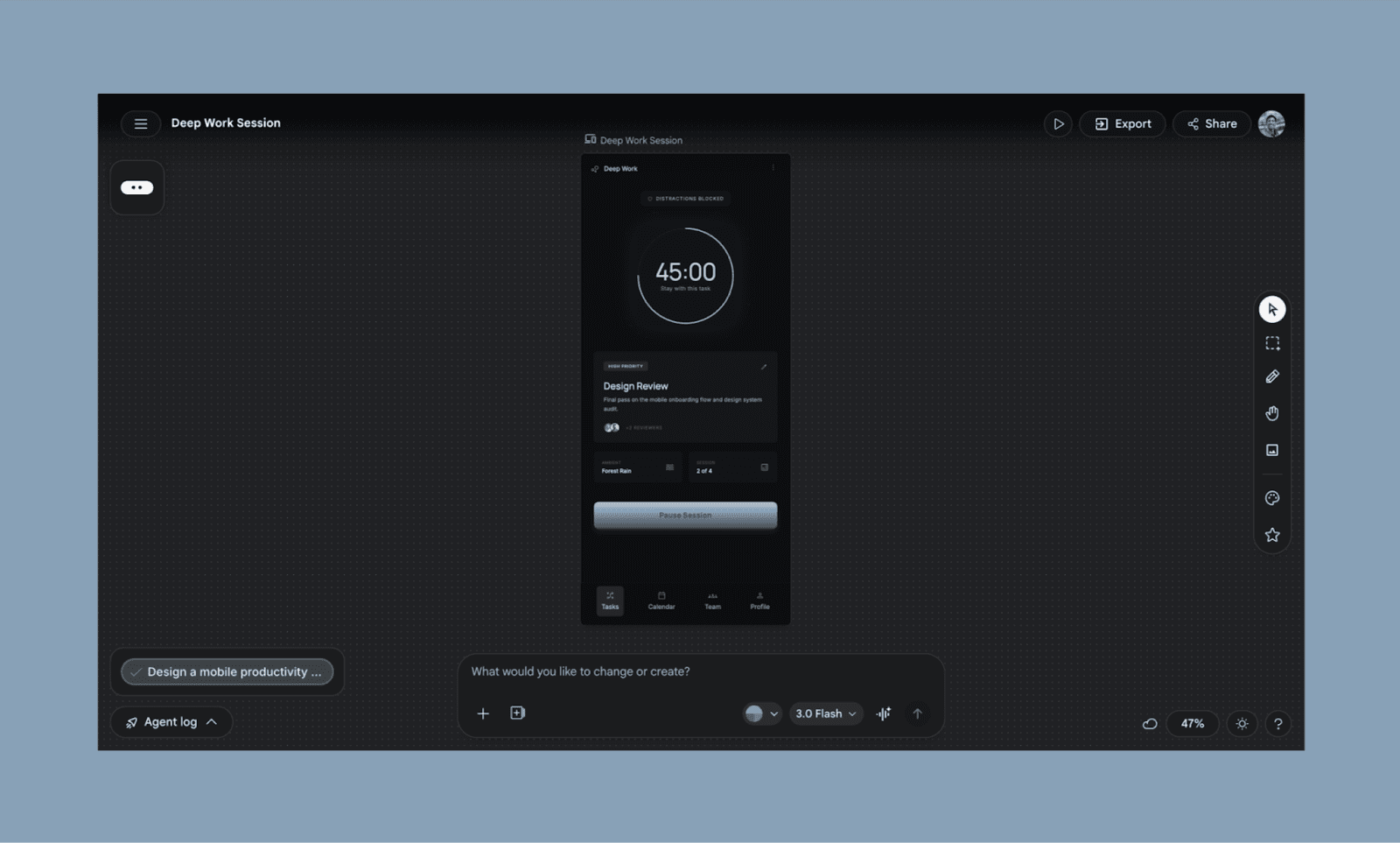
Google Stitch (früher Galileo AI) ist ein Gemini-powered UI-Generator, der Prompts in mehrbildschrige Flüsse mit sauberer Frontend-Ausgabe verwandelt. Mit Stitch neigt Google bemerkenswert zur Vibe-Design-Philosophie und zur schnellen Ablaufleistung über Präzision auf Komponentenebene.
Von meinem Test aus wirkte das Layout zusammenhängend, mit einem starken Fokus auf Hierarchie und Raumaufteilung. Das bedeutet jedoch auch, dass ich das Gefühl hatte, dass es sich leicht auf eine Vollfluss-Denken hin auszudehnen, und Elemente über das Briefing hinaus hinzufügt, was nicht genau das ruhige, minimale UI war, das ich wollte.
Warum Google Stitch statt Magic Patterns wählen
Wähle Stitch, wenn du einen zusammenhängenden Benutzerablauf generieren möchtest, anstatt verschiedene Bildschirme zusammenzustellen.
Für Entwickler & Vibe-Coder
Lovable vs Magic Patterns
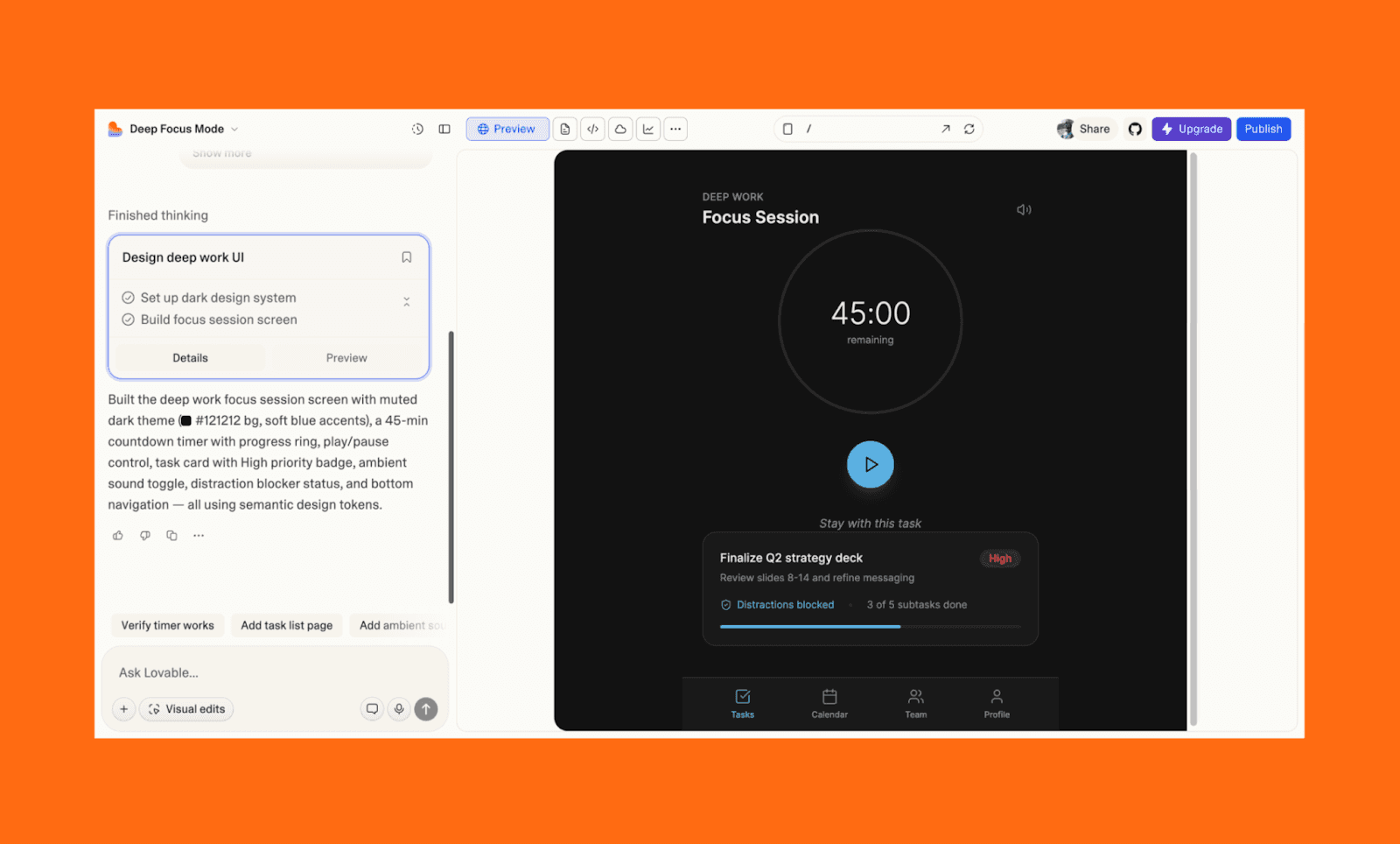
Lovable ist eine Vibe-Coding AI, die Full-Stack-Apps aus Prompts aufbaut, einschließlich Backend-Logik und Deployment. Anders als bei Magic Patterns‘ UI-zuerst Ansatz konzentriert es sich auf funktionierende Produkte, was es besser für das Testen echter Ideen macht als nur das Prototypisieren von Schnittstellen.
Warum Lovable statt Magic Patterns wählen
Entschließe dich zu Lovable, um eine funktionierende MVP zu erstellen oder einen Prototyp zu zeigen, um als proofs of concept für Stakeholder zu dienen oder dein Team auszurichten.
Bolt.new vs Magic Patterns
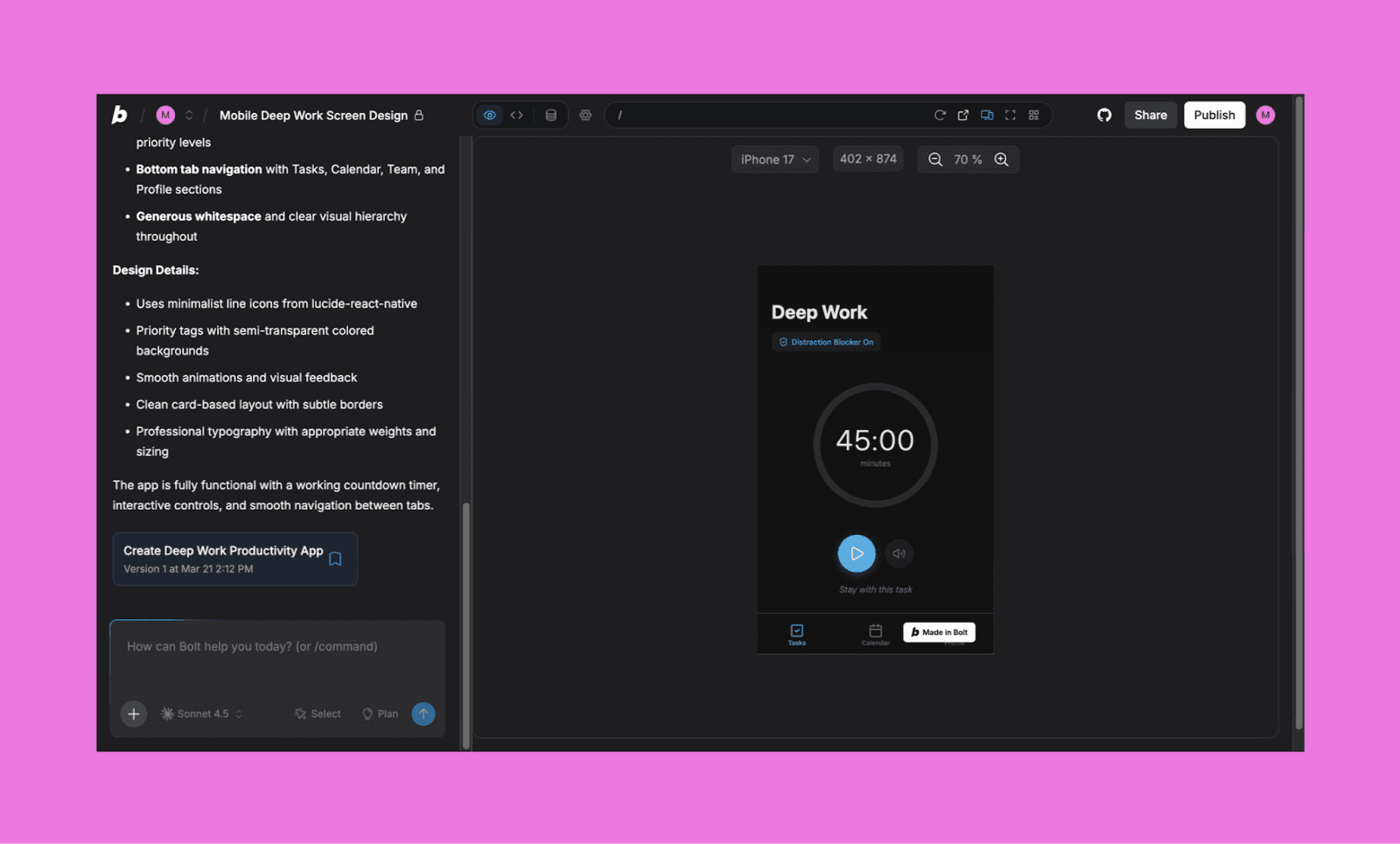
Bolt ist eine webbasierte IDE, die es Ihnen ermöglicht, vollständige React-Apps direkt in Ihrem Browser zu prompten, zu bauen und einzusetzen. Es glänzt mit „Zero-Config“ Entwicklung und bietet eine Echtzeit-Vorschau der Logik Ihrer Anwendung.
Warum Bolt statt Magic Patterns wählen
Ich würde Bolt empfehlen, wenn Sie sich darauf konzentrieren, eine Idee schnell in eine funktionierende App umzuwandeln und das UI-Design nebensächlich zu behandeln.
Replit vs Magic Patterns
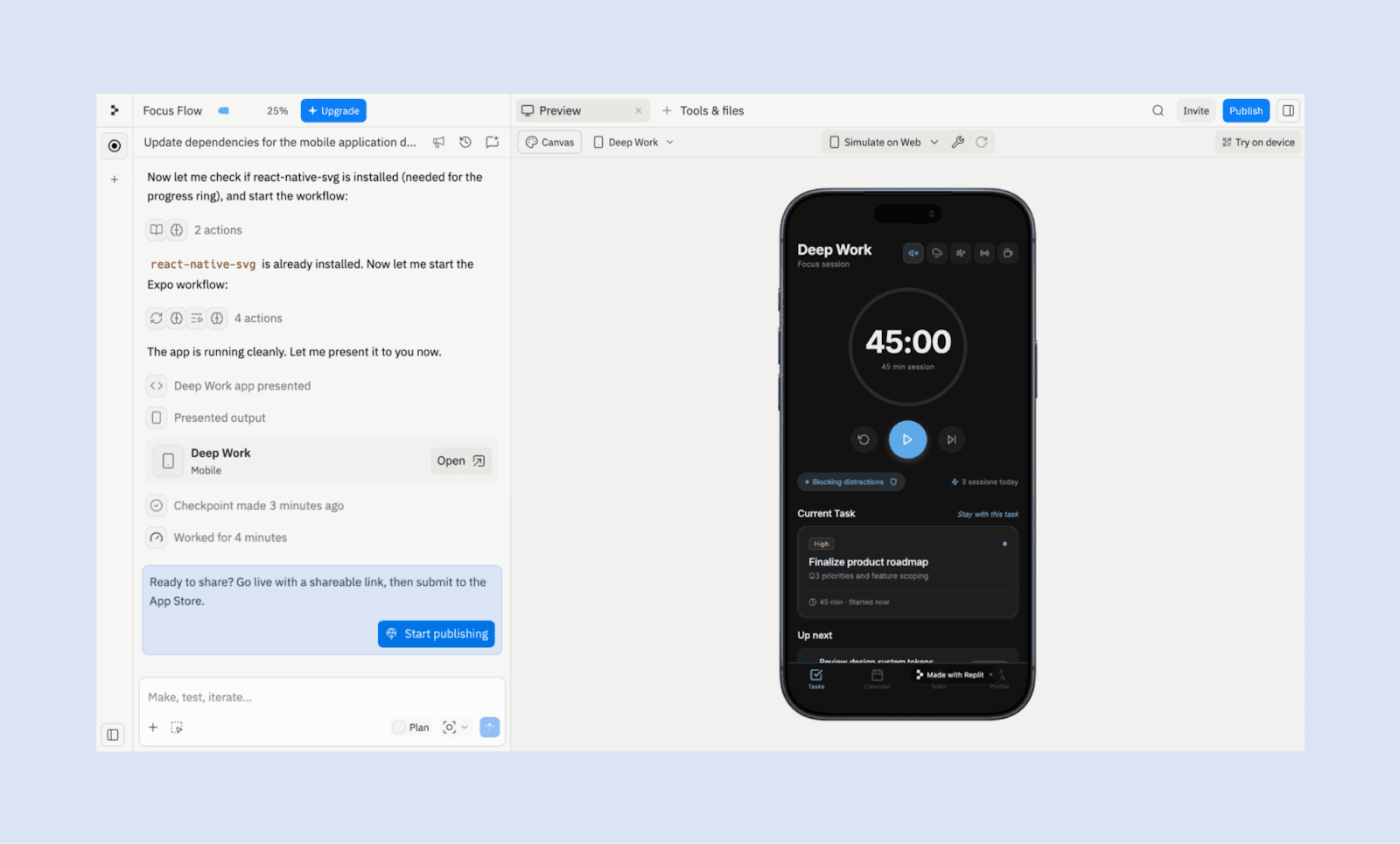
Eine der frühesten AI-Coding-Apps, Replit, kombiniert eine cloudbasierte IDE mit einem AI-Agent. Es behandelt Ihren Prompt als komplettes Projekt und kümmert sich um alles, von der UI bis zur serverseitigen Logik.
Warum Replit statt Magic Patterns wählen
Wenn Sie ein Entwickler sind, der sich beim UI-Tuning über Code wohler fühlt als mit AI-Design-Tools, arbeiten Sie mit Replit.
Experimentelle Substitute
Es gibt eine Handvoll Nischenersatz für Magic Patterns, die ich nicht mit anderen gruppieren konnte, während ich sie rangliste. Aber sie sind es wert, für ihre Design-to-Code-Fähigkeiten und Produktentwicklungssuite erkundet zu werden.
Werkzeuge | Warum experimentieren |
Am besten für Entwickler, es mischt AI-Coding mit UI, um direkt in Ihrer Codebasis zu entwerfen, anzupassen und einen Prototyp zu erstellen. | |
Großartig für frühes Design-Brainstorming, da es Klarheit in Struktur und Flow mit Lo-Fi Wireframes erzwingt. | |
Für Teams, die eine Mischung aus leinwandbasierter Gestaltung und echten Daten und Code verwenden möchten, um schnell von groben Ideen zu funktionierenden Schnittstellen zu gelangen. |
Die beste Alternative auswählen
Es gibt keine einzelne ‚beste‘ Alternative zu Magic Patterns, aber es gibt definitiv die ‚richtige‘ für dich. Idealerweise würde ich sagen, teste so viele Freemium AI UI-Tools wie möglich, um selbst zu sehen. Aber um Zeit zu sparen, kannst du dich selbst bewerten, indem du dir diese Fragen stellst:
Möchtest du hochauflösende UI (Banani, Figma Make) oder Lo-Fi-Ideation (Google Stitch, Balsamiq)?
Iterierst du an einem bestehenden Produkt (MagicPath, Uizard) oder baust du von Grund auf (UX Pilot)?
I st dein Ziel saubere Codes (Lovable, Bolt.new) oder designorientierte Übergabe (Paper.design)?
Überprüfe auch die Preisgestaltung und das Kreditsystem im Voraus, damit du die erforderliche Investition für AI-Design bei Skalierung kennst.
Eine Magic Patterns Alternative ausprobieren
Unabhängig davon, ob du meiner Rangliste der Magic Patterns Alternativen zustimmst oder nicht, gibt es 2026 keinen Mangel an leistungsstarken AI Design Tools, die du ausprobieren kannst. Wenn du noch unsicher bist, wo du anfangen sollst, beginne einfach mit dem Tool, das sich dem am nächsten anfühlt, was du bereits an Magic Patterns magst. Für die meisten Workflows ist das Banani: es spiegelt denselben Text-zu-UI-Fluss wider, bietet jedoch schnellere Iterationen, Designmodelle und eine großzügigere kostenlose Stufe zum Experimentieren.
Kostenlos mit dem Design in Banani starten >


