
Features | Text-to-image and image-to-video generation, Style/Omni Reference, Draft Mode for fast exploration |
Rating | G2: 4.4/5 | TrustPilot: 1.6/5 |
Pros | Fast generation, unmatched aesthetic quality, strong style consistency tools |
Cons | Weak edit-prompt fidelity, privacy locked behind Pro plan |
Pricing | No free tier. Paid plans for $10–$120/month |
Alternatives |
What is Midjourney?

Midjourney[1] is an AI image and video generator, built by an independent research lab of the same name.
A pioneer in prompt-to-visual, since their inception in early-2022, they have released various GenAI models; the latest one of which is Midjourney V8.1. In 2026, they announced their new division called Midjourney Medical for ultrasonic imaging[2].
Midjourney.com vs Midjourney Discord
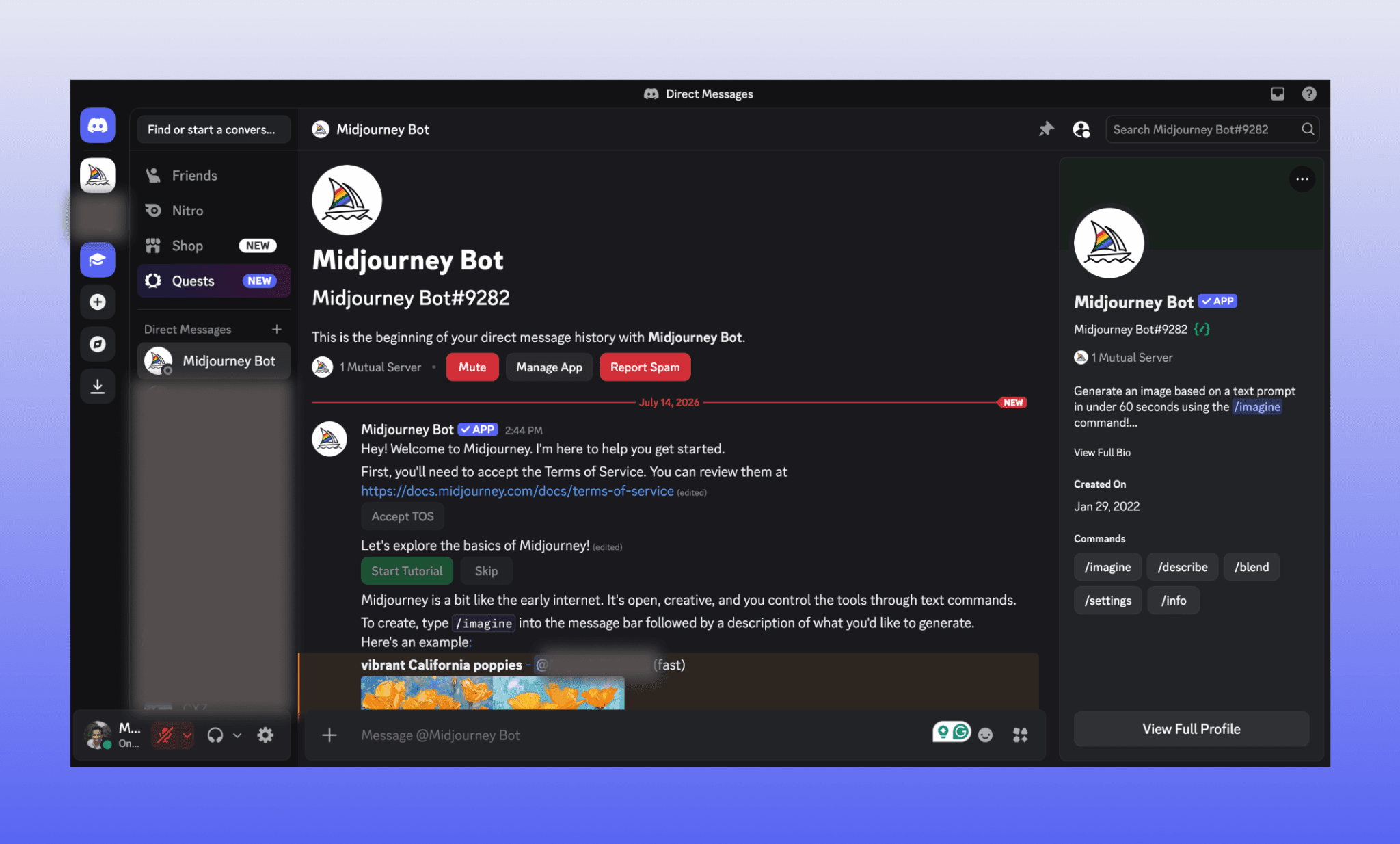
Midjourney launched Discord-only in mid-2022[3] — prompts, results, everything lived in a chat window. And it used to be totally free with some output limitations. However, for some controversial image usage/generation, Midjourney shut their free access entirely, and released a dedicated website in mid-2024 viz. Midjourney.com. And today, the latter is the primary way to use and generate a Midjourney image with more customization features and models.
You can pick their web-based interface for a cleaner workflow, and Discord for the community feed.
Midjourney AI Features in 2026
Text-to-image and Image-to-video generation
Style Reference and Omni Reference for visual consistency
Personalization profiles that learn your aesthetic over time
Built-in Editor with inpainting, panning, and aspect ratio control
Draft Mode for faster, cheaper rapid ideation
What is Flora AI & Fauna Agent >
Testing Midjourney Image Generator
There are various angles to review the image GenAI capabilities of Midjourney and the one that am going with is the one for product teams: create UI assets. I plan to create images for a product photographer’s portfolio website using different features and models of Midjourney AI images. So, this section on my experience of using Midjourney shall also double-up as a guide on how to use Midjourney.
Free to explore, pay to generate
Unlike any other AI image generator in 2026, Midjourney.com offers no free trial. You can only browse the public images for taking photography or UI inspirations.
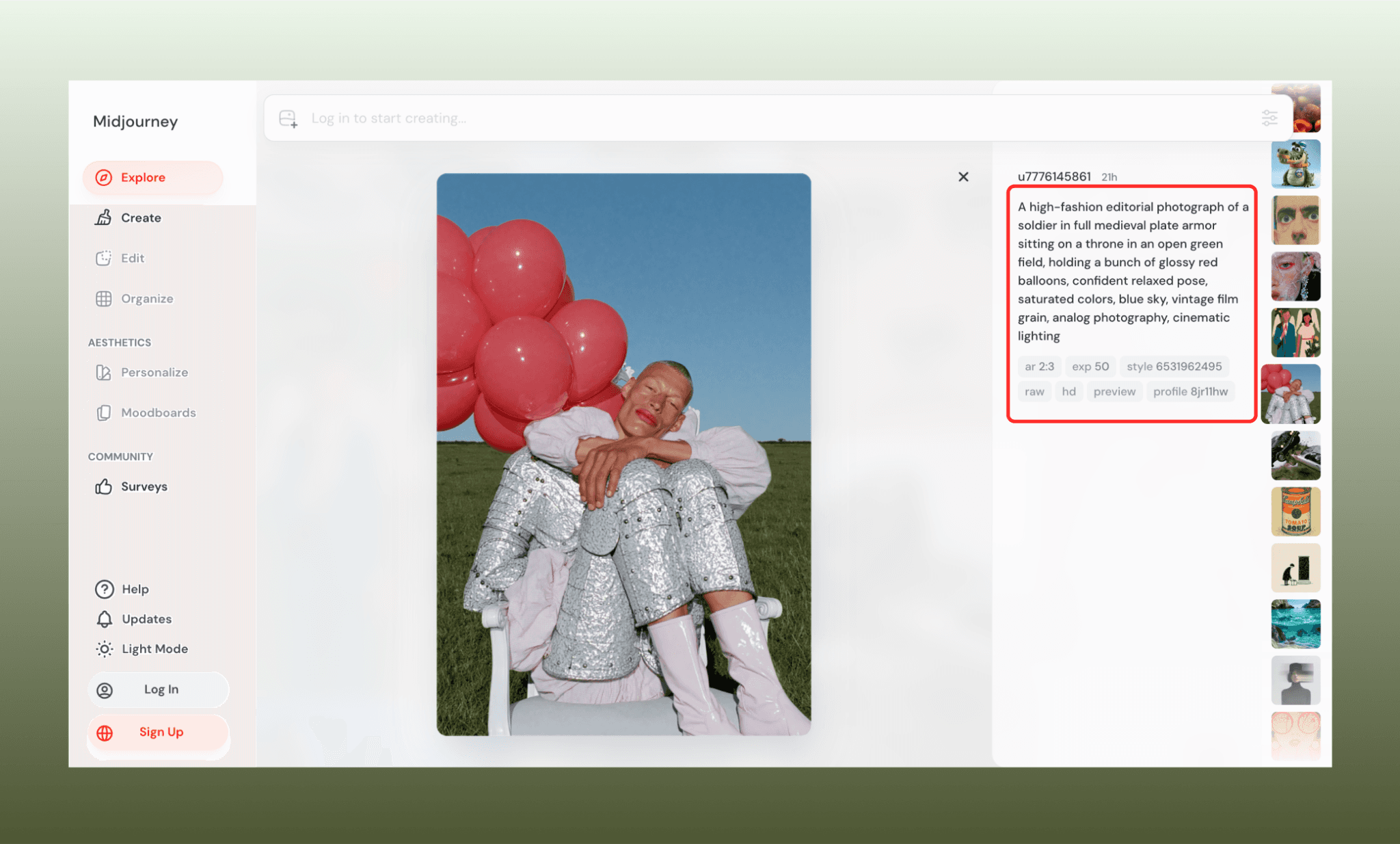
The free exploration feature of Midjourney lets you select an image to see its prompt, aspect ratio, resolution, and more. Gives you an idea of what image is achievable with what.
Subscribing to Midjourney is pretty straightforward and starts at $10/mo minimum.
Why Midjourney Ended its Free Plans >
Prompt to generate AI images
On logging into Mdjourney for the first time, you’ll be prompted to personalize your experience by selecting a range of images. I skipped this part to ensure fairness to assessing Midjourney’s prompt-to-image one-shot intelligence. And went straight to design the homepage of my portfolio website with the prompt:
“A homepage hero image for a product photographer's portfolio website where everyday objects displayed like museum artifacts on either side making way for a center piece at a distance which is an empty frame. A teapot enclosed in a glass
vitrine on a marble pedestal, a shoe half-draped in raw linen, the glasses resting on a velvet cushion. Deep depth of field with focus on the central frame, soft falloff toward the edges. Warm gallery spotlighting from above, cool ambient fill light.”
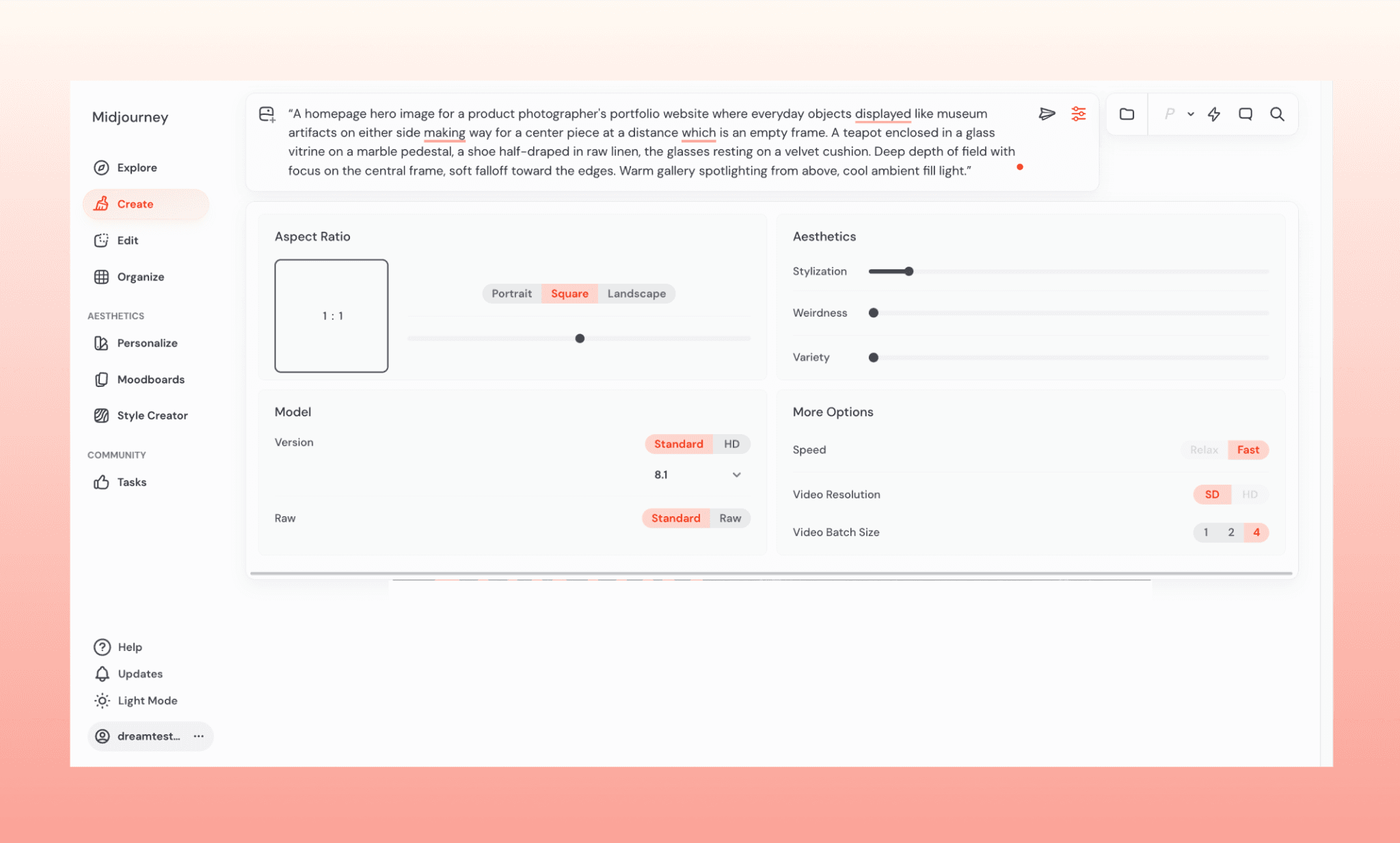
The default setting has the latest Midjourney 8.1 model, and aspect ratio as 1:1. And on pressing enter, the first thing that impressed me was the speed. It took a mere ~10 seconds to produce 4 image variations!
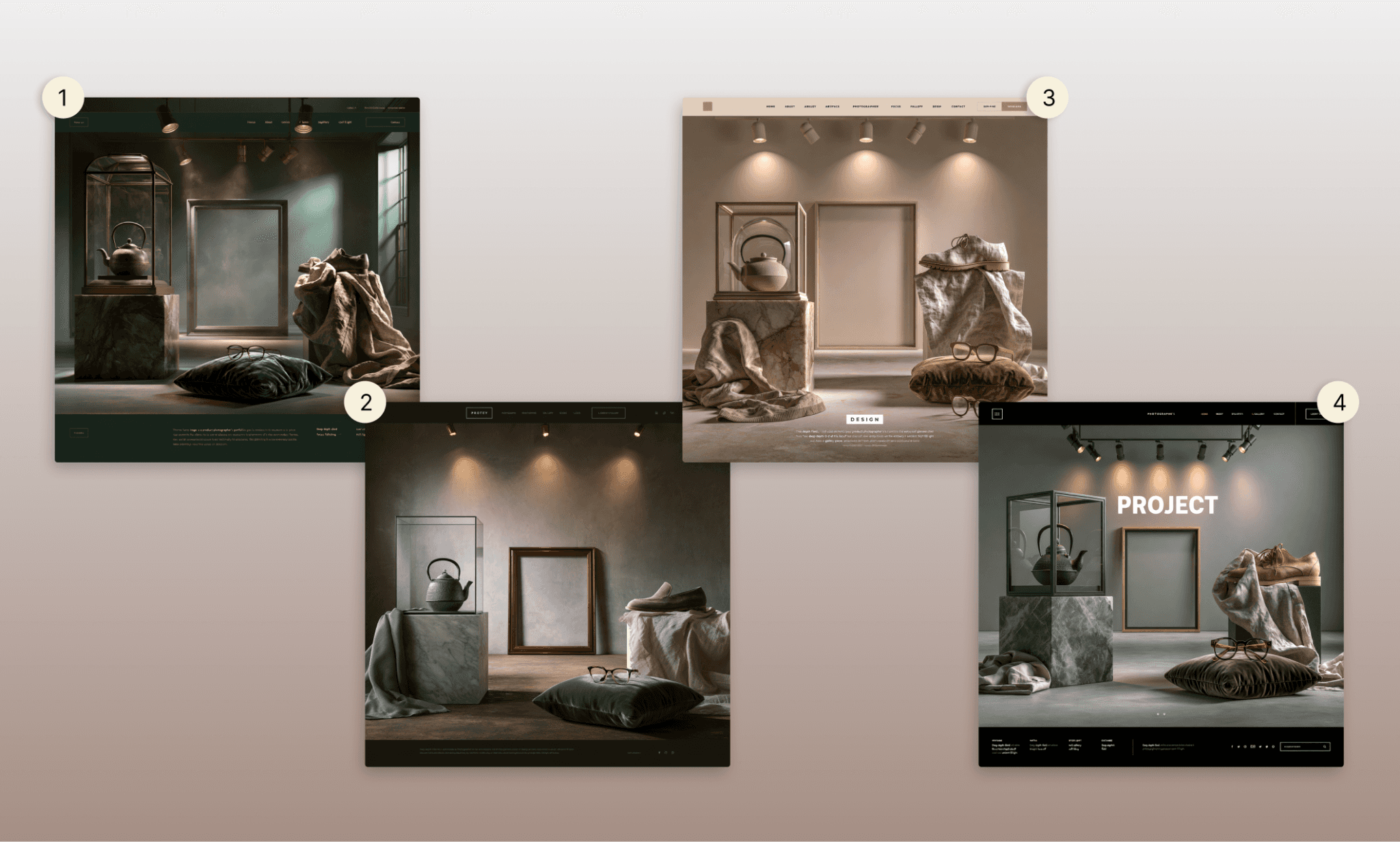
All four of them fantastic. They understood the brief, and gave four directions of color and lighting to set the tone for the entire website. Interestingly, all of them also propose a way of homepage design (by adding header, CTA, etc.) — which were illegible yet I don’t count against them; instead, take as a lesson on how to prompt Midjourney images properly.
Using edit settings to perfect an image
Out of the 4 images, I like the 4th one the most. Yet to make it usable, I needed to remove all texts, change the aspect ratio, upscale resolution and then some.
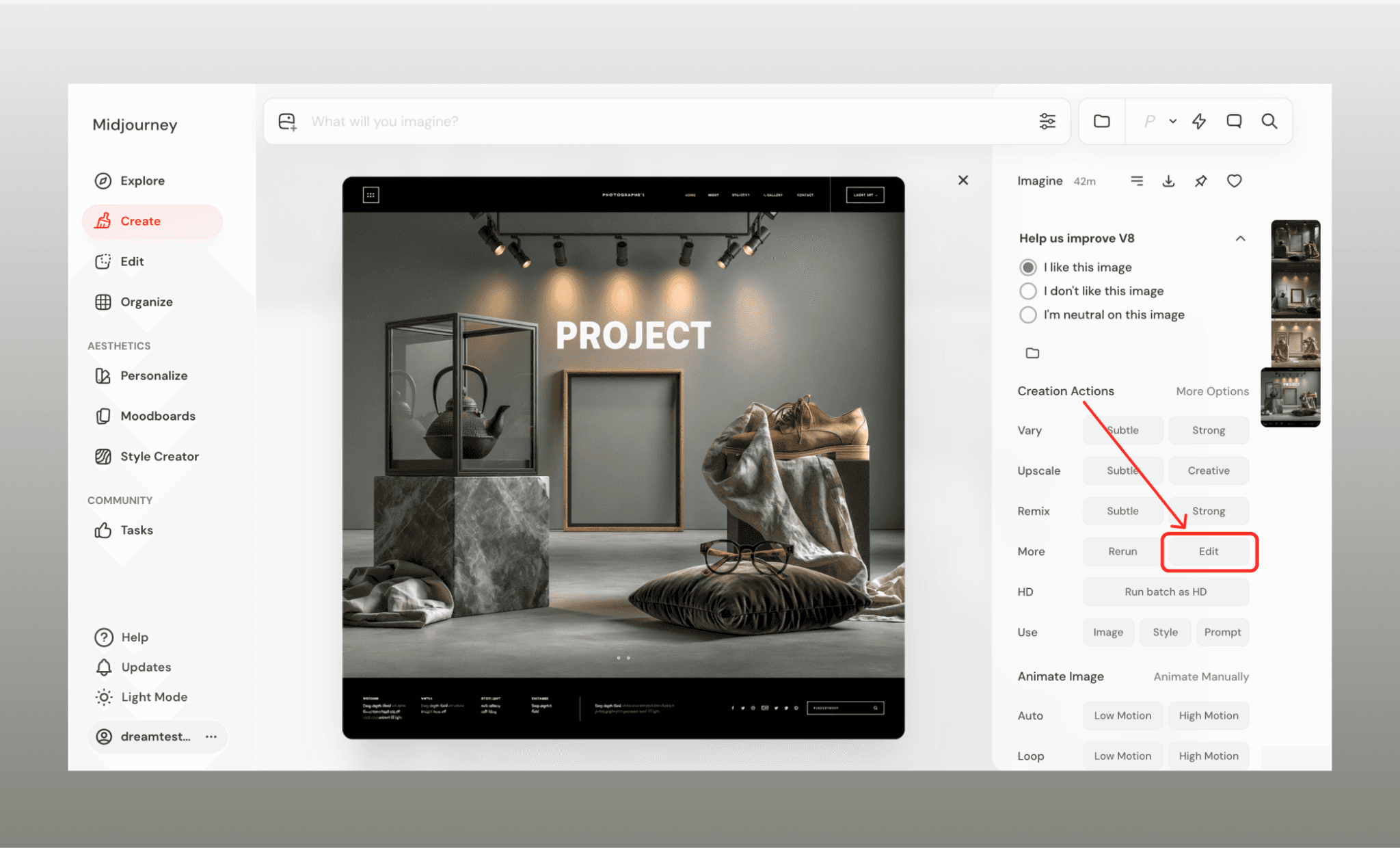
To make an edit, select the desired image, and you’ll see a plenty of pre-defined options to remix. But for prompt-led changes, under ‘Creation Actions’, go to More → Edit; it will open and AI image editing window of Midjourney.
Remove unwanted text with erase brush and prompt
First, I needed to remove the unwanted ‘PROJECT’ from the center. For this I used their Erase brush and prompt:
“Remove the selected header footer and central text to keep only the photograph part.”
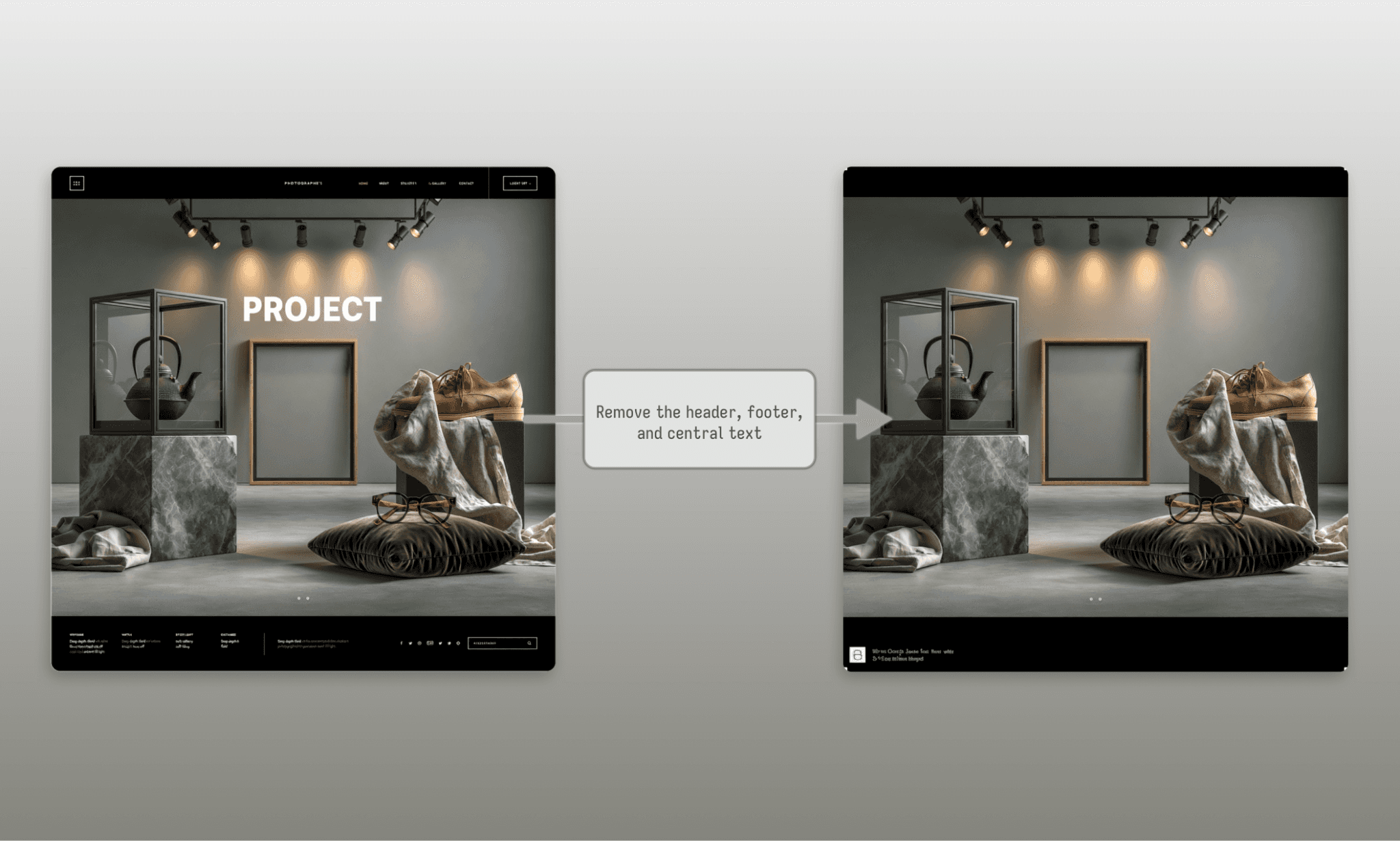
It made the desired changes. Almost. It produced 4 edited images in ~30sec with central text gone, header and footer blackened. But each had some illegible text on the bottom-left corner. I suppose it’s still lingering on to the ‘homepage’ term from the original prompt.
Switch aspect ratio with pre-set modes & prompt
For my homepage, I needed the image in 16:9 landscape mode so I chose it from their Move/Resize bar, cropped the header-footer I didn't need in the new image, and prompted Midjourney to:
“Change the aspect ratio of the selected image area to 16:9. Push the objects on either end of the central frame farther to make more negative space in the center.”
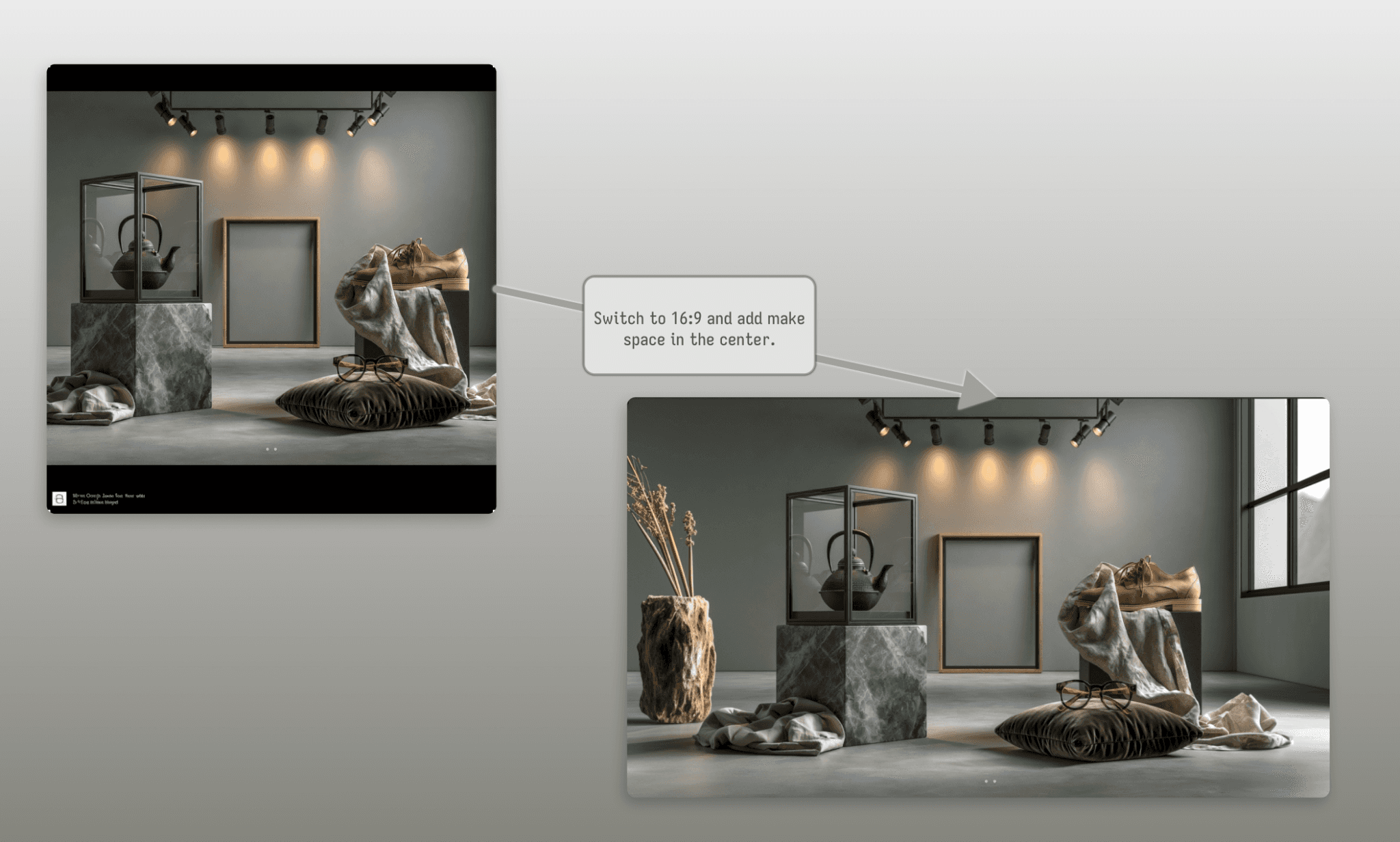
And in ~30 seconds I got four more options – each in 16:9 and the additional area filled with some objects matching the museum vibe and lighting. However, my request to make more space in the center was not followed.
Add elements in the image with prompt
Time for some real image changes. While the Midjourney AI’s choice of object on the side is not bad, but I wanted some specific items. And still not settling with my demand of more negative space in the center:
“Replace the vase from the left with a fancy wooden table lamp. A wine bottle and some glasses on the floor in front of it. On the right side, add a small clay of the thinking man. And increase the distance between the items in the center to make more negative space on either side of the frame.”
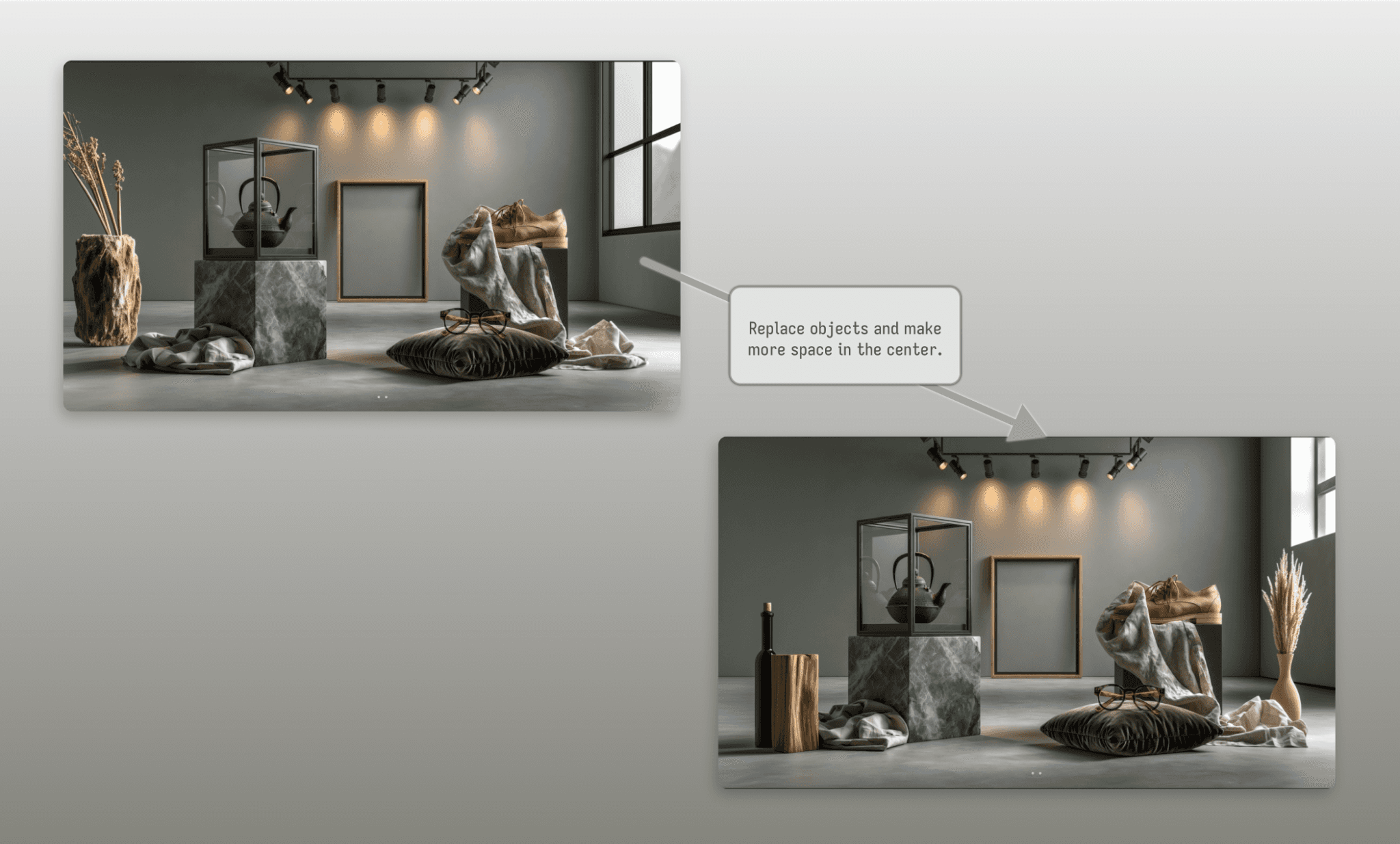
Another 4 versions appear in ~40 seconds, but none follow my requests to the full. The objects on either side were indeed changed but not to glasses or clay statues as asked; plus the distance between the objects in the center remain unchanged – again.
I’ve found Flora AI and Krea AI to do better at prompt fidelity.
Upscale and Remix to finalize image
To finalize the homepage image,I decided to generate an upscaled version, and Strong Remix with the prompt:
“Bring the empty frame and the light setup above it to the center of the image; align all objects around it accordingly. The entire floor has a grass with glistening dew and some small flowers, petals, and berries strewn around sparsely. Add a dreamy soft-focus falloff toward the edges. Diffused hazy gallery lighting from above with a warm golden haze, low contrast, and gentle atmospheric glow.”
I waited excitedly as 4 blank images appeared, but then quickly got the notification that ‘Remixing Editor jobs is not supported.’ The same went for the ‘Vary’ option under Creation Actions.
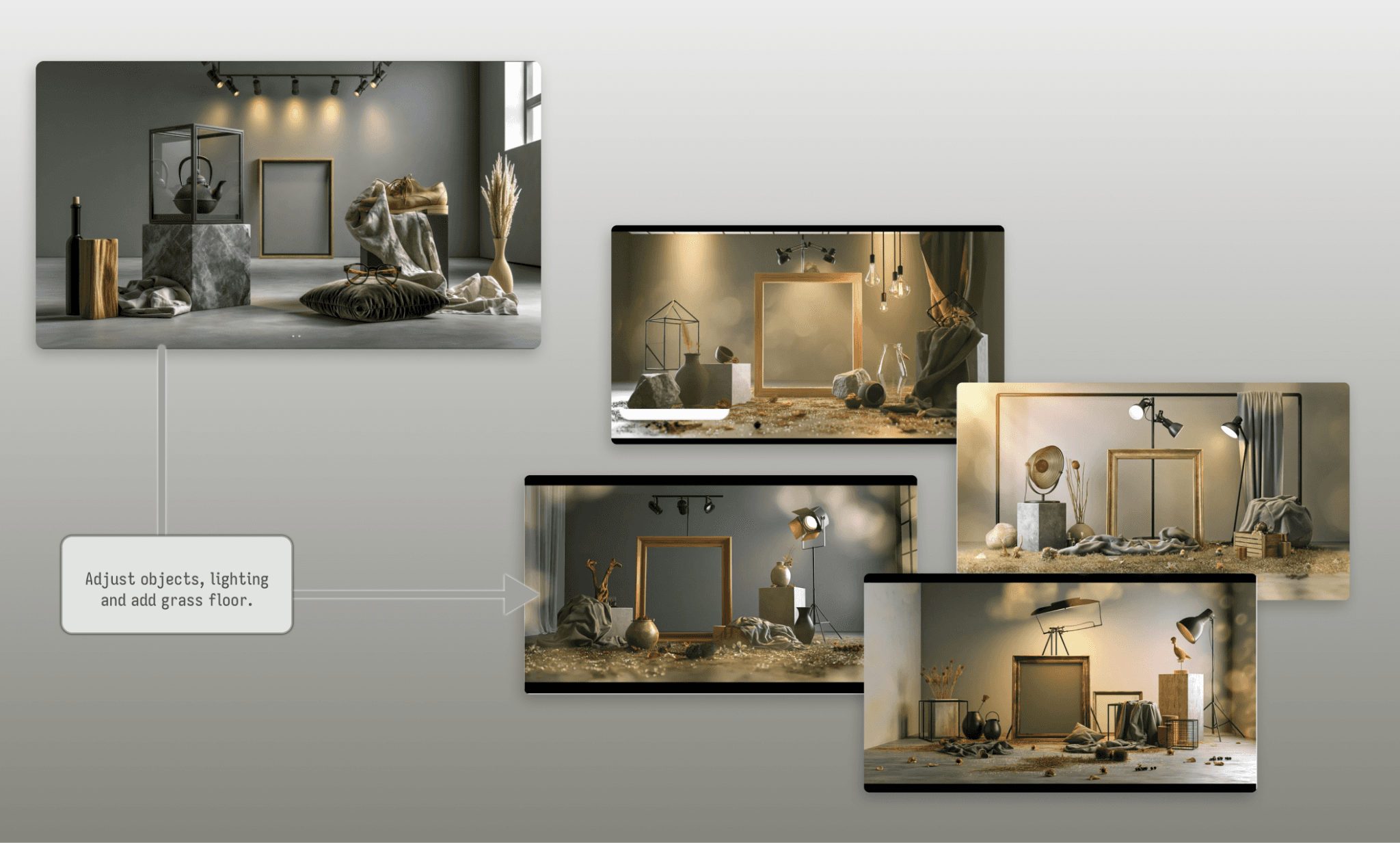
Thought may be uploading the image as a reference and then running the prompt would help, but the outputs are different realm altogether. Again, they are all beautiful, not useful for our homepage though.
So far editing the image in Midjourney has been fast, coherent, but not necessarily following all instructions. With this sentiment, I took my latest homepage image as is and moved on for rest of the UI assets.
How Good is Figma Weave at Image Editing? >
Midjourney V8.1 vs V8 vs V7 at AI image
Next, for my website UI assets, I need various kinds of images to show the range of work. For this I pit various Midjourney AI image models head-on for the same prompt.
Note: Everytime 4 images are generated by each model in a single run. But I am only showing the best of the output in the images.
Product photo: Real + Graphic hybrid
“A single ceramic coffee mug on a wooden table, photographed in realistic studio lighting, but half of the mug dissolves into flat vector-style graphic linework and solid color blocks, seamless blend between photographic and illustrated halves.”
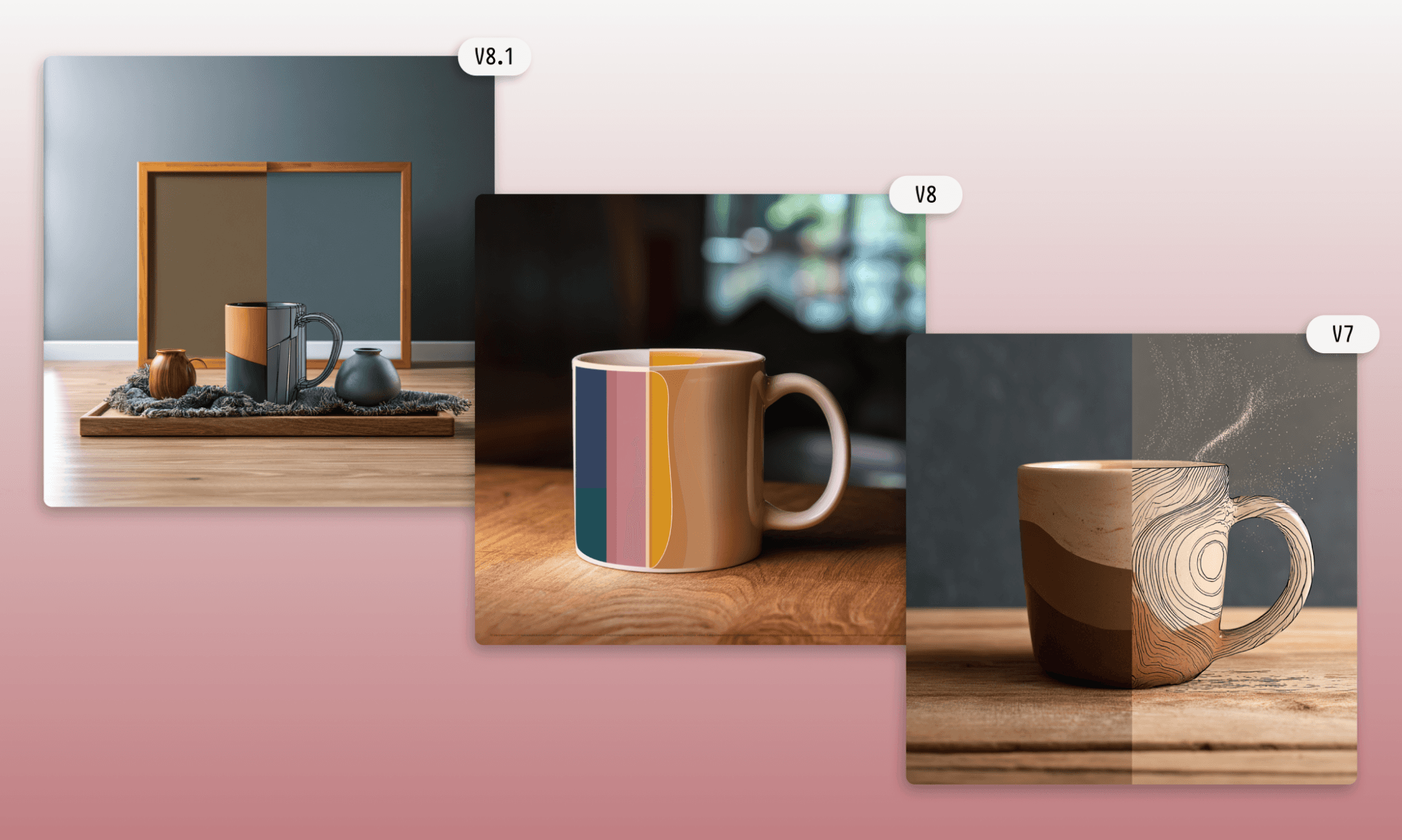
My pick: V7 > V8.1 > V8
Landscape: oil paint
“A sweeping coastal cliff landscape at golden hour, rendered as a textured oil painting with visible brushstrokes and impasto highlights, warm palette”
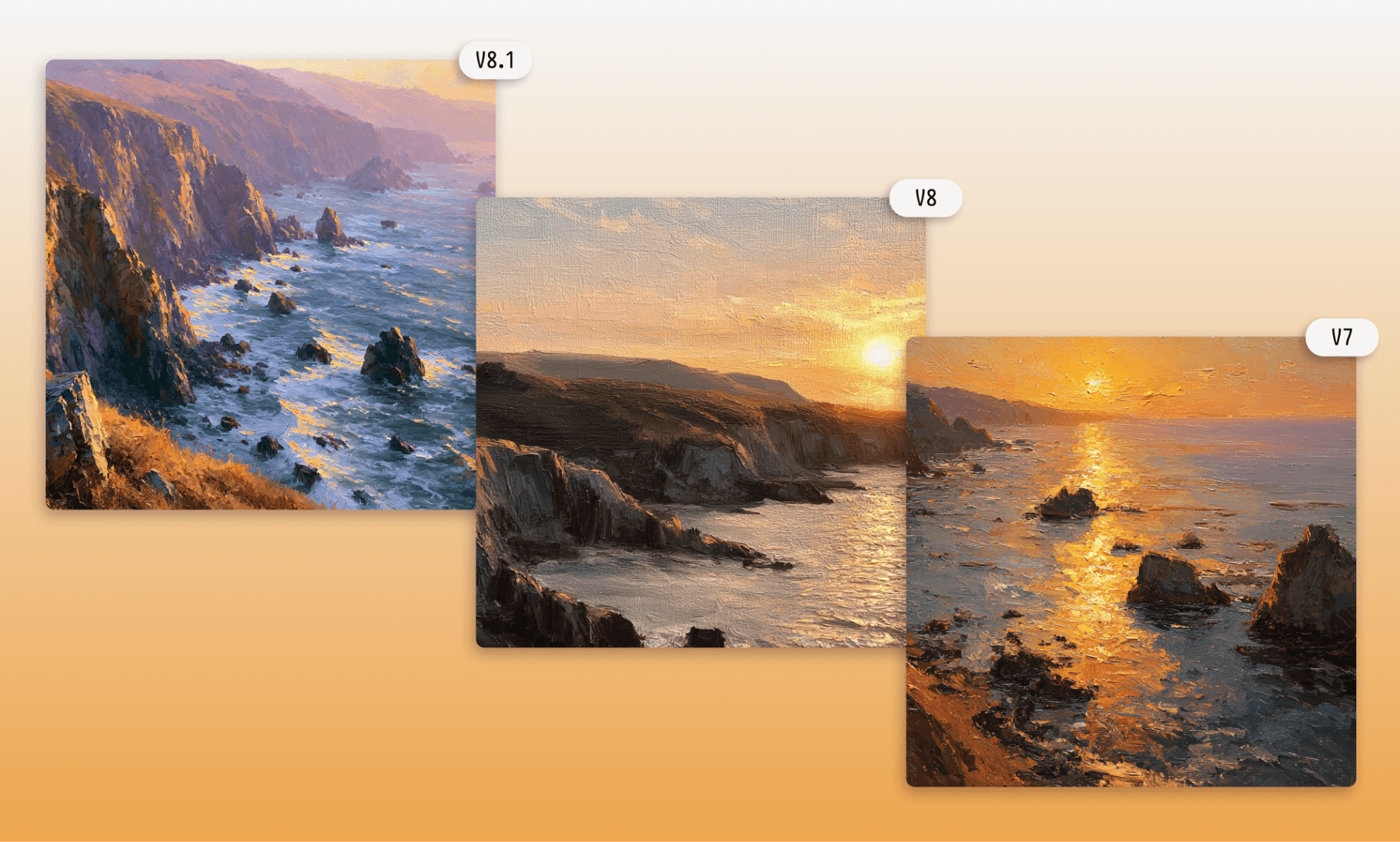
My pick: V8 > V8.1 > V7
Event photo: hyper-realistic
“A candid moment at an outdoor wedding reception, guests laughing mid-toast, hyper-realistic photojournalistic style, natural imperfect framing, shallow depth of field”
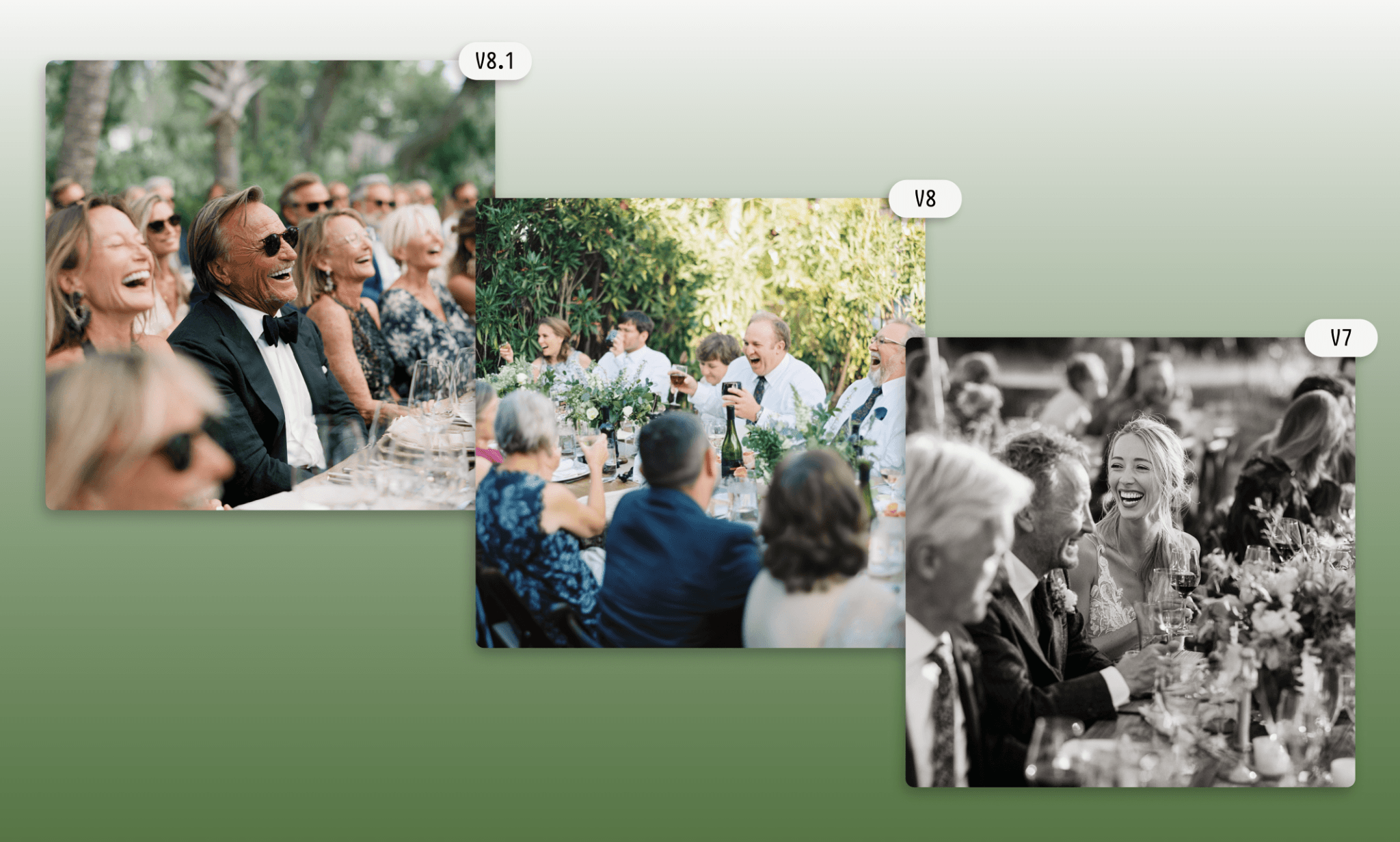
My pick: V8.1 > V7 > V8
V8.1 | V8 (alpha) | V7 | |
Speed of generation | 5/5 | 5/5 | 4.5/5 |
Prompt fidelity | 4/5 | 4/5 | 4.5/5 |
Image Quality | 5/5 | 4.5/5 | 5/5 |
Creativity | 4.5/5 | 4/5 | 5/5 |
Krea AI Image Models Compared >
Midjourney V8.1 vs Midjourney Discord at AI Image
Extending on the image requirements for the collage, I decided to compare the latest V8.1 model of Midjourney and the Midjourney via Discord:
“Centerpieces of home decoration with a stone and marble elephant family statue, pink flower petals in a water bowl fountain on a black rock base, a plant pot nearby”

Both the images are in line with my prompt and actually too close to tell which one is better so just leaning to personal preference I’d say I like Discord’s output more. However, to be clear, Midjourney says a linked Discord account isn't required to use Midjourney, and the best experience is always on Midjourney.com.
Niji 7 vs Midjourney V81. at AI Image
A lesser-known but highly capable image model under Midjourney is the Niji series. In fact, when the former dropped off their free trials, they began to promote Niji as a free alternative to Midjourney (but outside the Midjourney website).
“A model's silhouette built from torn magazine paper textures and bold solid color shapes, editorial fashion collage style, high contrast, off-center composition.”
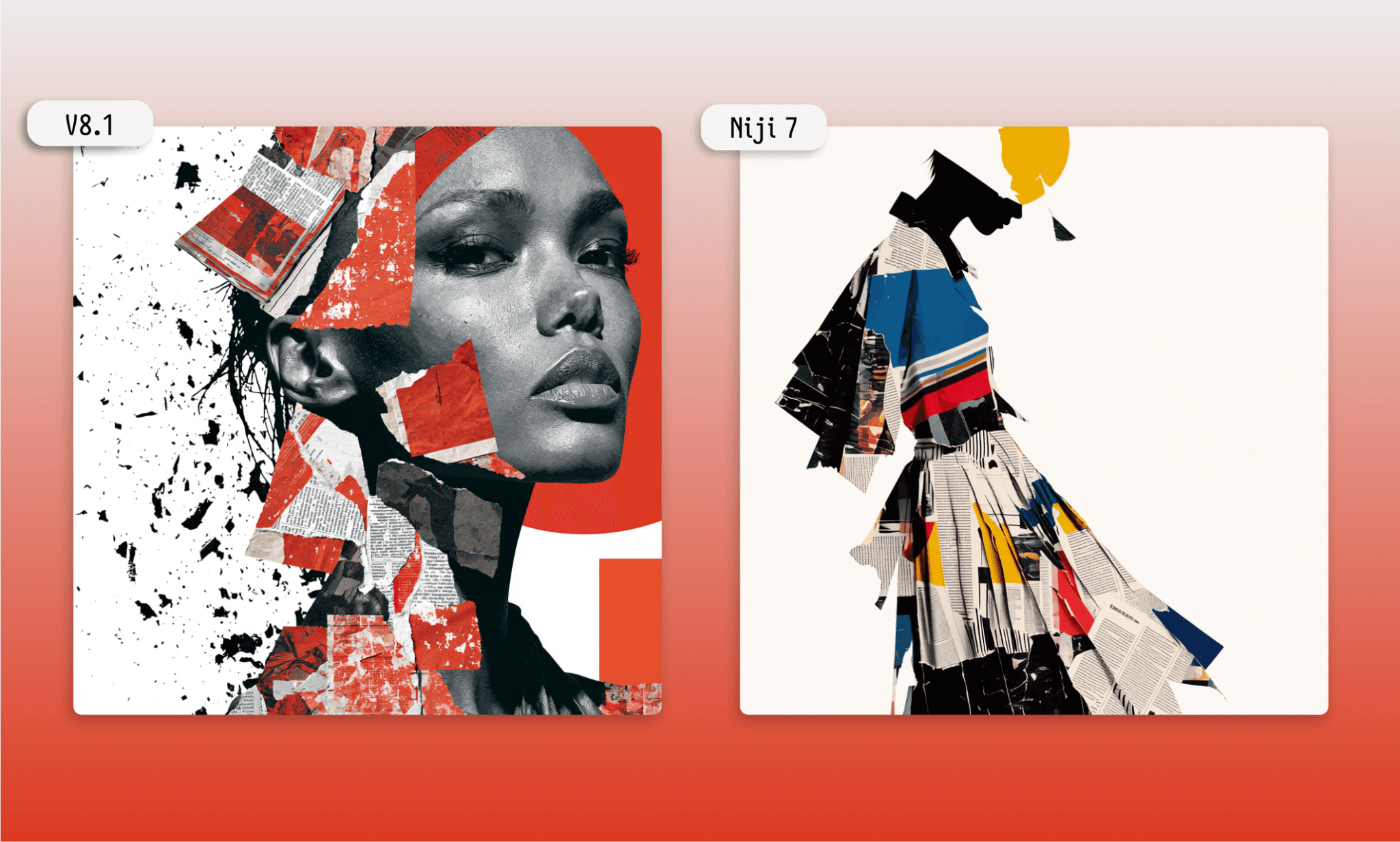
Here, too, both the Midjourney models nailed my image brief. However, all the options provided by V8.1 had a mix of paper-cut and real(-istic) humans while the Niji limited itself to only silhouette. So, would say that the former took some creative liberty as a senior product designer while the latter, like a talented junior graphic designer, delivered on the words.
How Magnific AI Handles Image Brief >
Assembling UI assets with an AI UI Generator, Banani
We have a beautiful set of images for our portfolio website but for a product team, that’s not enough. The next obvious step is to put them together into a UI layout. You can use Banani AI for it. Start off with its free account, upload the images, tell what kind of webpage you want in simple text, and within minutes you’ll have it.
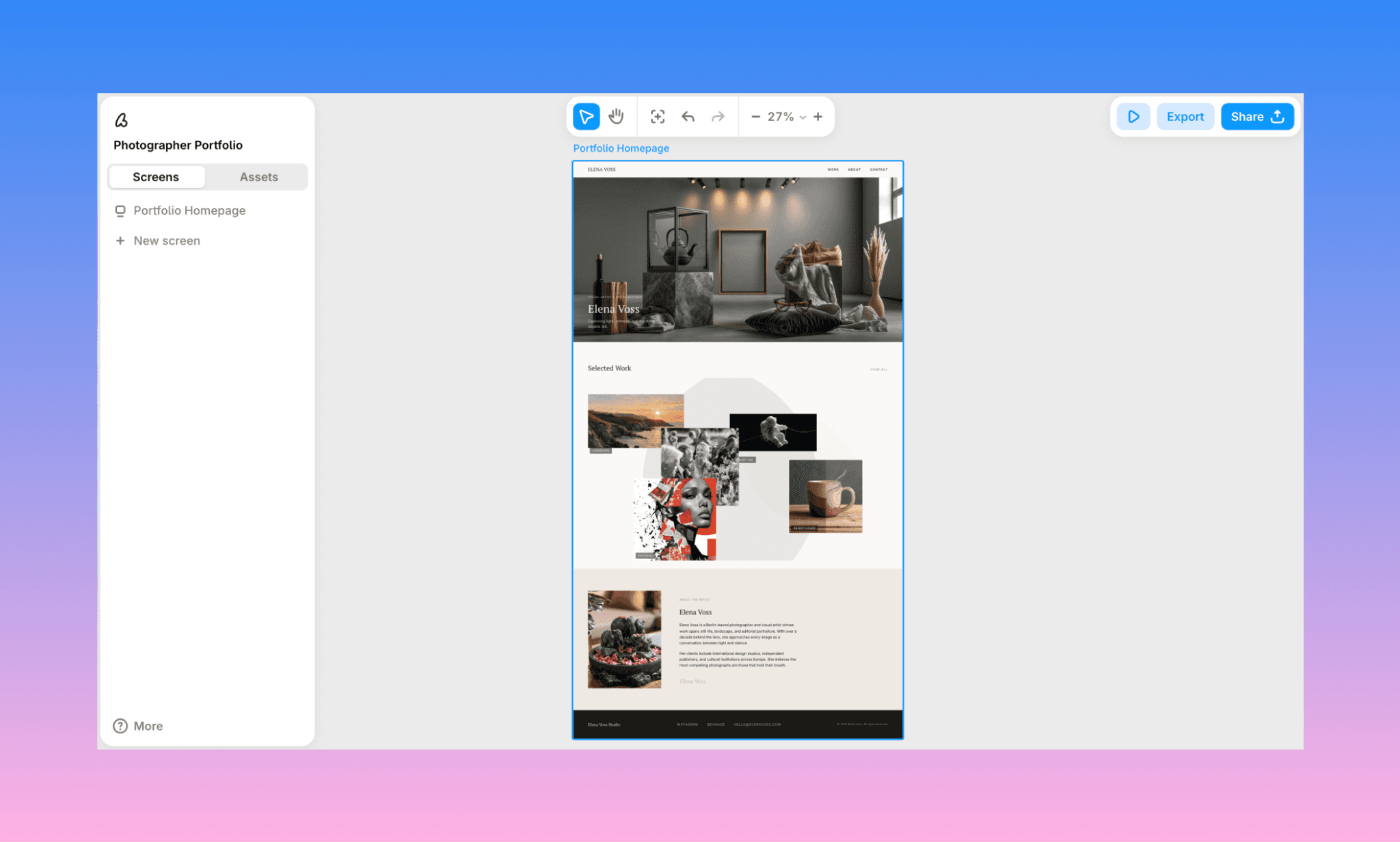
The Midjourney UI assets assembled by Banani AI UI generator are pleasantly laid-out. It not only placed the images where they should be, but also styled the page with color, typography and copy suitable for a minimal, elegant portfolio. The output is editable by AI chat, exportable (as image or to Figma), and ready for dev handoff via MCP.
Try Banani AI UI Generator, Free >
Pros & Cons of Midjourney
Pros | Cons |
Image generations as fast as 4 variations in under 10 seconds | A bit slow to copy or download an image. |
Top tier aesthetic quality across styles and genres | Edit prompts often ignored or only partly followed |
Style Reference and Omni Reference for consistency | Text rendering still unreliable in complex layouts |
Personalization learns your aesthetic over repeated use | Vary and Remix unsupported on Editor-edited images |
Works identically on web and Discord | No free trial; paid plans start at $10/month |
Truth of UI Design with Canva >
Midjourney Pricing
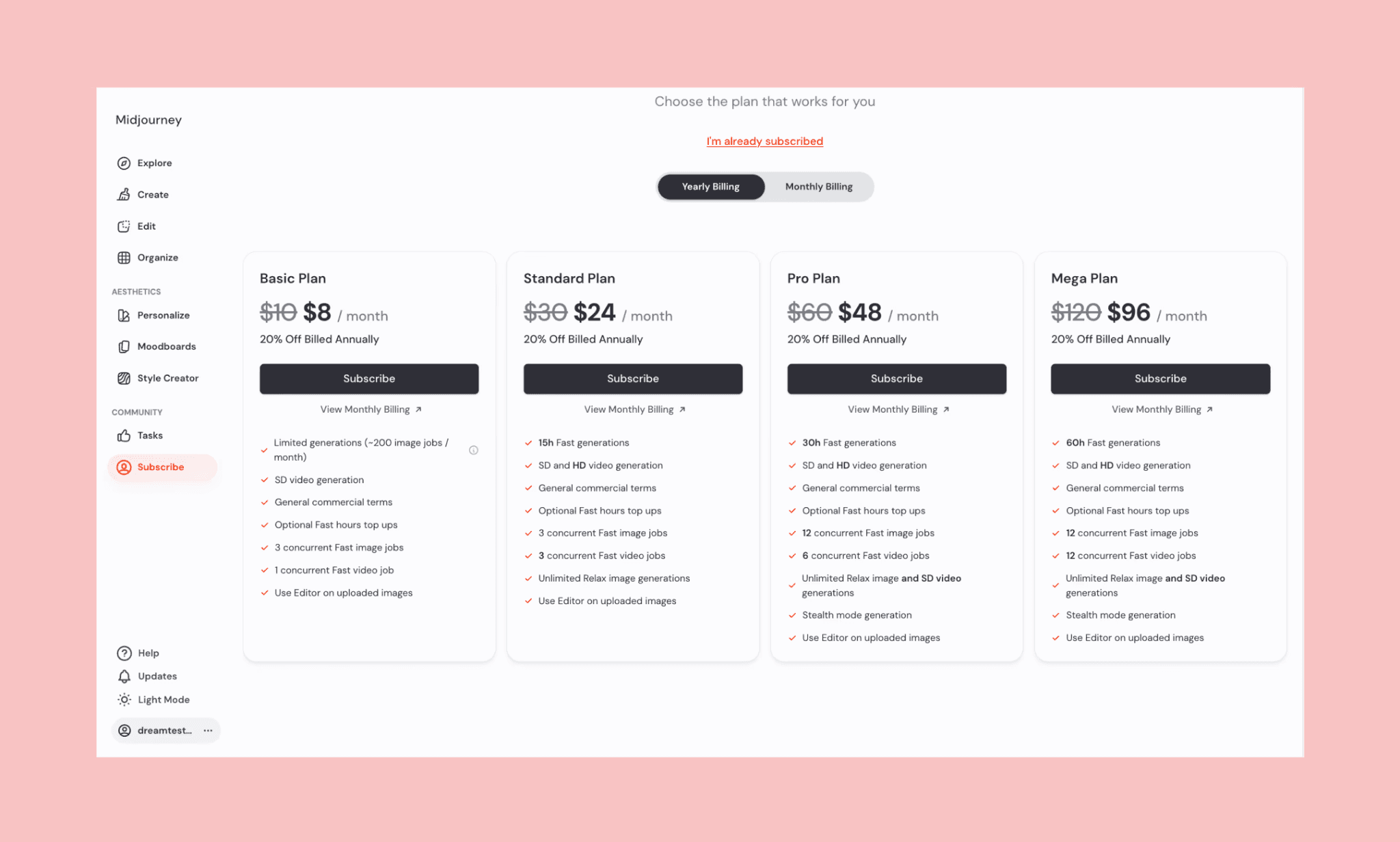
Midjourney has no freemium model. It does not have a free tier; instead, four tiered monthly subscriptions bundle limited Fast GPU hours with unlimited, queue-based Relax mode. You're paying for speed and privacy, not image quality. And every plan includes commercial rights to what you generate, even after you cancel.
Plan | Cost | Best For |
Basic | $10/mo | Casual use, learning prompts, under 200 images/month |
Standard | $30/mo | Regular creators needing 200+ images monthly |
Pro | $60/mo | Client work requiring Stealth Mode privacy |
Mega | $120/mo | Agencies, high-volume batch production |
Is there a way to use Midjourney AI for free?
Not directly. However, there is a workaround to use Midjourney’s image engine. Since Meta partnered with Midjourney in mid-2025, you can generate Midjourney-quality images free at meta.ai; though without advanced style blending[4].
Midjourney Alternatives
Below I’ve listed top alternatives to Midjourney, with their one-shot capability to process the same prompt for our portfolio hero image. Turns out, they compete with Midjourney AI photo generator, and could be better at specific use cases.
Stable Diffusion vs Midjourney
Stable Diffusion is a free, open-source image model you run locally or via cloud GPUs, with full parameter control and thousands of community fine-tuned models. Primarily it runs on GenAI of Yeri.AI.
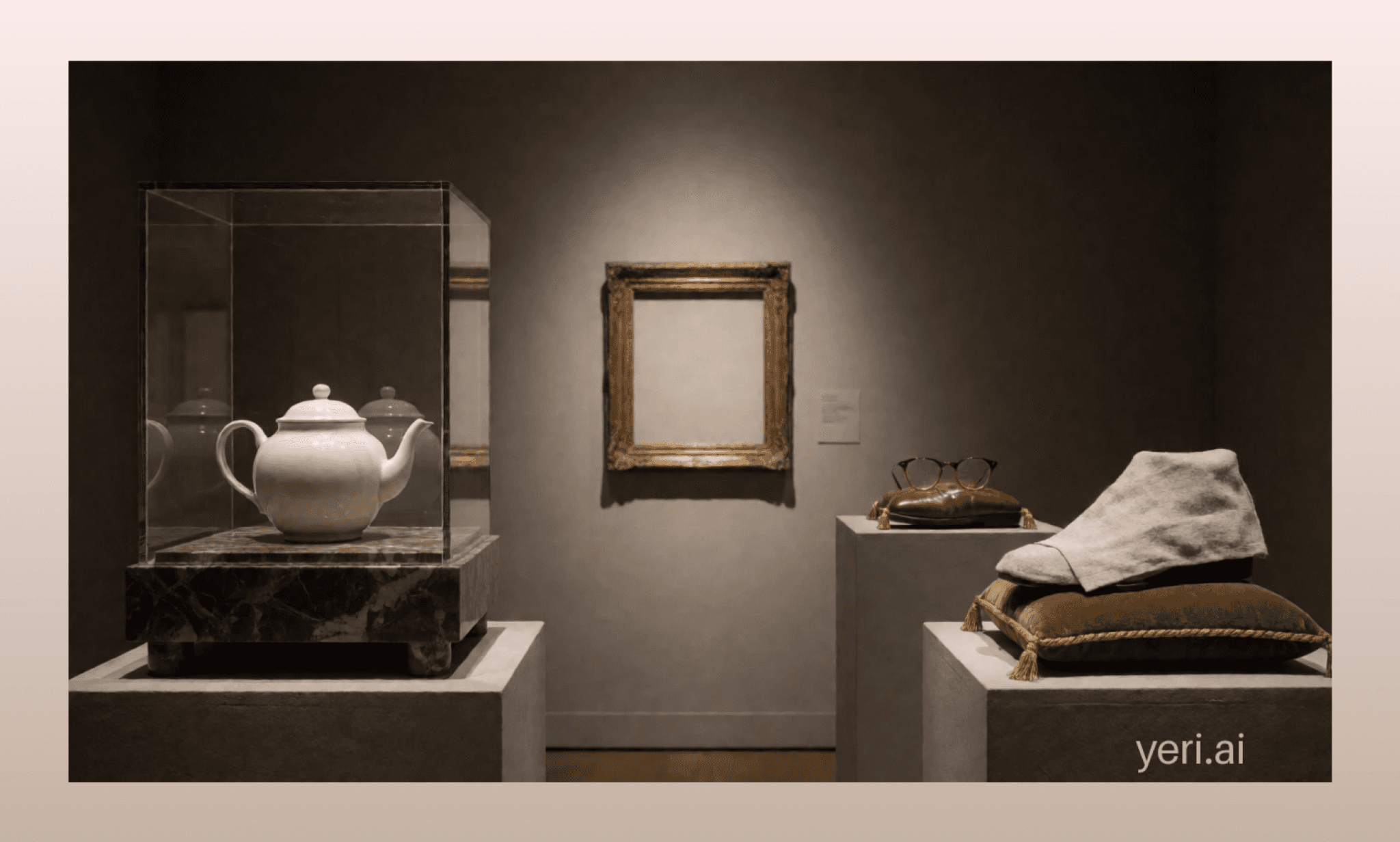
Key features of Stable Diffusion
Fully open-source, runs locally at zero cost
Thousands of community fine-tuned checkpoints available
ControlNet enables precise composition and pose control
No built-in content moderation or restrictions
Why choose Stable Diffusion over Midjourney AI: Free, unlimited local generation with full technical control.
Free Midjourney Alternatives for UI Assets >
GPT Image 2 vs Midjourney
GPT Image 2, released April 21, 2026, is OpenAI's third-generation image model built natively into ChatGPT, replacing both DALL-E 3 and GPT Image 1.5. It uses O-series reasoning — the model plans and self-checks before rendering.
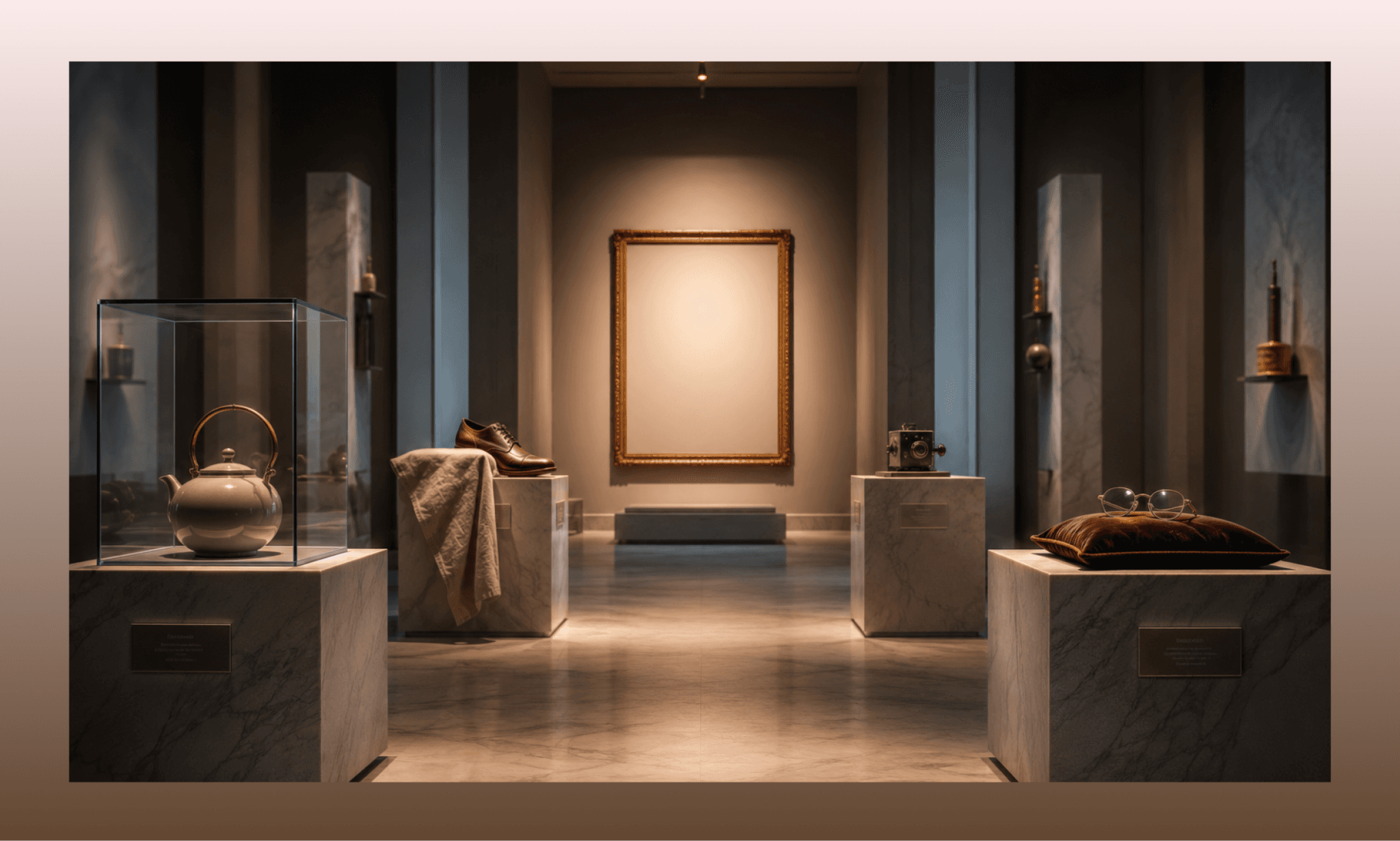
Key features of GPT Image 2
Near-perfect text rendering across multiple scripts Befreed
Native 4K resolution output Befreed
Reasoning-based generation plans before rendering
Conversational, multi-turn editing inside ChatGPT
Why choose GPT Image 2 over Midjourney AI: Far more reliable text rendering and prompt instruction-following.
GPT 5.6 UI/UX Generation Example >
Nano Banana vs Midjourney
Nano Banana Pro is Google DeepMind's Gemini 3 Pro Image model, built for accurate visuals with legible text in multiple languages and up to 4K resolution.
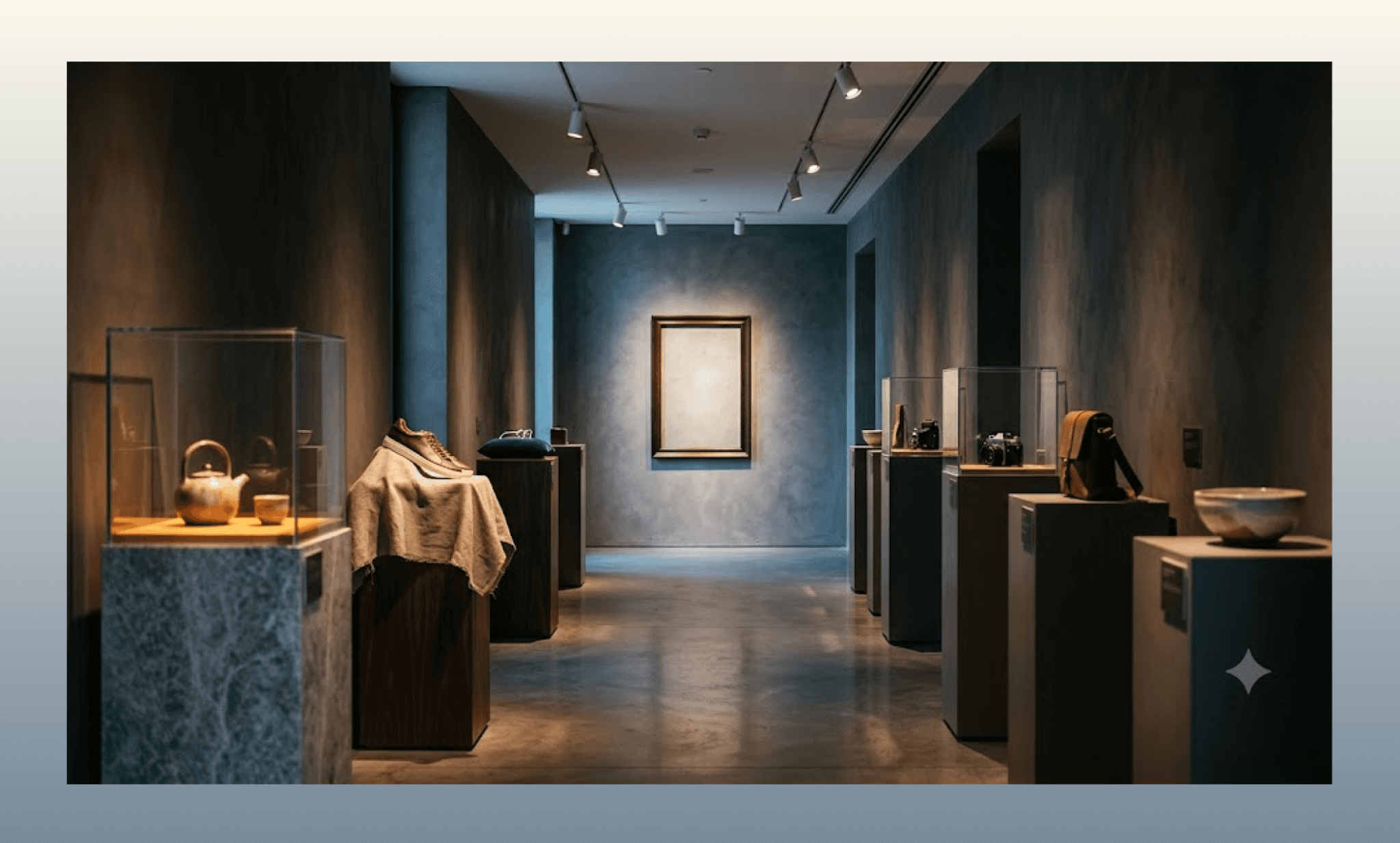
Key features of Nano Banana
Supports up to 8 reference images with 5-person consistency
Grounds generation in real Search data for factual accuracy
4K output with SynthID watermarking for transparency
Why choose Nano Banana over Midjourney AI: Faster, cheaper, and far better at rendering accurate text.
Gemini 3.1 PRO UI/UX Generation Example >
Leonardo AI vs Midjourney
Leonardo AI is a creative platform purpose-built for game art, offering fine-tuned models for specific styles, a Real-Time Canvas, and Universal Upscaler for production-ready assets.
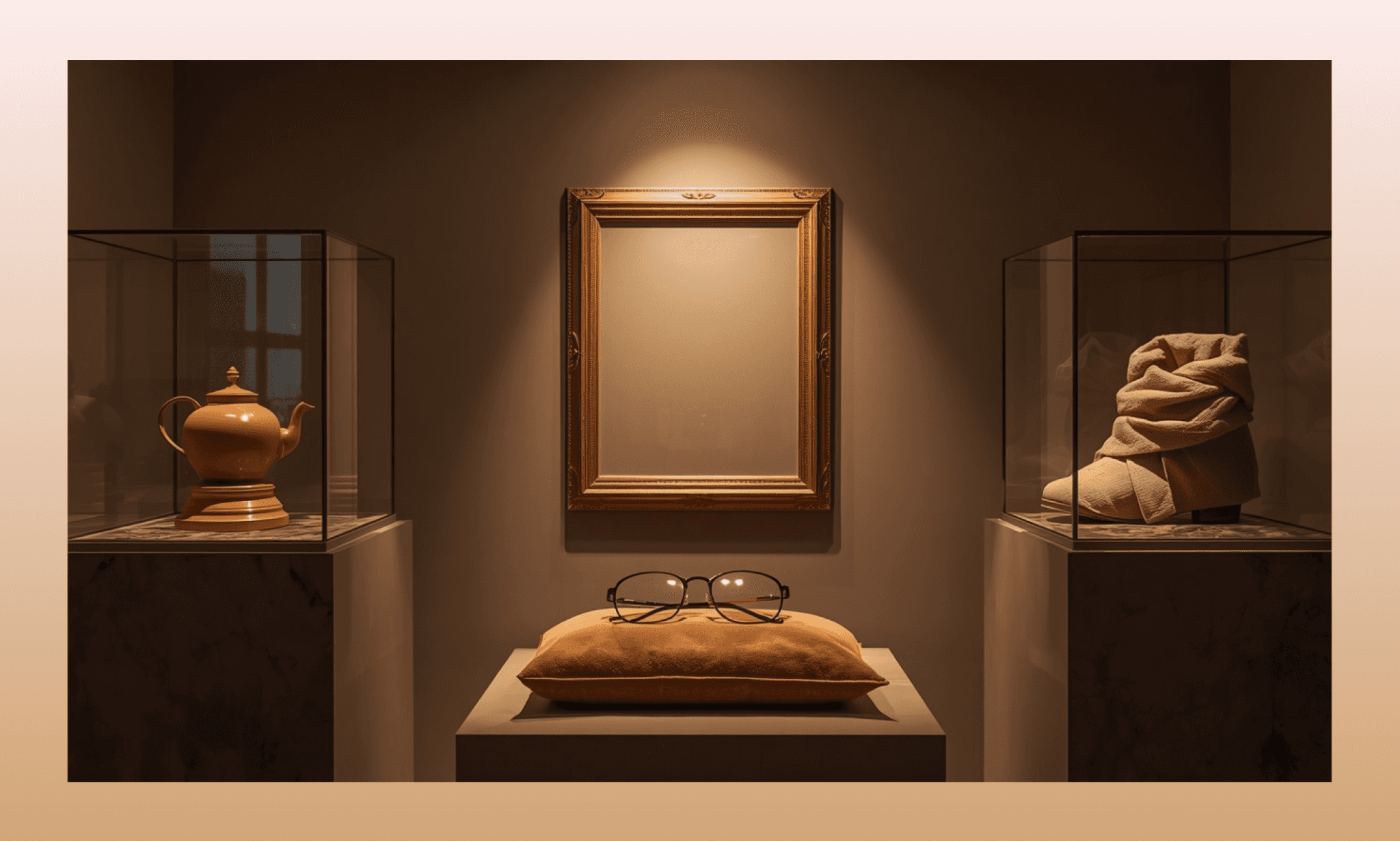
Key features of Leonardo AI
Character Reference maintains consistency across dozens of poses
Real-Time Canvas generates images live as you paint
3D texture generation for game-ready assets
Generous free tier — 150 tokens/day
Why choose Leonardo AI over Midjourney AI: Purpose-built consistency tools for characters and game assets.
How Fable 5 Handles Design Consistency >
Verdict: Is Midjourney Good in 2026?
I say, more than yes. Midjourney maintains its magic as an AI art generator. My review of Midjourney AI image models proves its blazing generation speed and unmatched aesthetic range. However, unavailability of free tier, and some shaky prompt fidelity on edits may pinch.
If you’re in the product team, Midjourney is the great starting point for mood, style, and visual ideation. And from there on, you can develop the design with Banani AI for free.
FAQs on Midjourney AI Image Generator
Is Midjourney AI free to use?
No. There is no free tier of Midjourney as of 2026. However, Meta AI offers free Midjourney-quality image generation without a subscription.
Is Midjourney safe to use?
Yes, it is. Midjourney is a legitimate GenAI tool. Moreover, all its paid plans include commercial rights to what you generate, even after cancellation.
Is Midjourney better than ChatGPT for images?
I’ve found that Midjourney AI image/video generation has a stronger aesthetic quality. However, ChatGPT (via GPT Image 2) offers a better conversational editing and text rendering.
Difference between Midjourney image prompt vs Style Reference vs Omni Reference?
In Midjourney AI, an image prompt nudges overall composition and mood. And Style Reference (--sref) transfers a style signal from one or more reference images. While Omni Reference (--oref) anchors a specific subject or object across multiple generations; which is useful for consistent characters or products.
How to assemble images from Midjourney into an UI layout?
After generating your visual assets in Midjourney, use an AI UI generator like Banani to assemble them into a beautiful, logical UI fast.
References
[1] http://midjourney.com/
[2] https://www.midjourney.com/medical
[3] https://discord.com/invite/midjourney
[4] https://www.reuters.com/business/meta-partners-with-midjourney-license-ai-tech-future-products-2025-08-22/


