
OpenAI GPT-5.6 introduces its design capabilities with a bold pitch: "With only high-level direction, GPT‑5.6 creates tasteful, ergonomic, and functional interfaces."[1] Apparently this step change in design judgment is because it can inspect and correct its own rendered output. Like an indulgent designer like myself would. So I tested GPT 5.6 inside Figma Make to generate common app/web UI, remix existing screenshots, and assess design system fidelity. Then pit it head-to-head against Fable 5 and Gemini 3.1 Pro for one-shotting a prompt. Be a judge for yourself from my examples of UI by GPT 5.6.
Note: Figma Make only shows the model family name viz. GPT 5.6, but not the exact version (Sol, Terra or Luna)[2].
GPT 5.4 UI Design Capabilities with Examples >
Interactive Design of GPT 5.6
OpenAI's own showcase of GPT 5.6 design work leans into interactive design instead of static ones: a video game, a calculator, an animated widget features before the static (and stunning) websites. So, I ran a prompt in Figma Make – with GPT 5.6 set as builder – to make me an interactive travel app homepage.
Prompt
"Design a weather app screen called '2day'. Show current temperature and conditions, an hourly forecast strip, a 5-day outlook, and supporting stats like humidity, wind, and UV index. Fill in the details and copy as suitable. As for aesthetic direction, go for an immersive, cinematic look that reflects the current weather itself — not a generic dashboard. Gradient and translucent surfaces (glassmorphism-leaning) with modern typography and one accent color doing all the work."
Design Output
Time: ~1.5 mins | Credit: 32
In terms of design it doesn’t go far, but in terms of animation it does move around and also has a parallax effect. Nothing dazzling though. Yet am willing to give GPT 5.6 a benefit of doubt here as I feel it was some limitation of Figma Make IDE itself to limit to basic interactivity.
Nonetheless, my hope for GPT 5.6 desing capability remains high.
How to Use Figma Make like a Pro >
Text-to-UI with GPT 5.6
Minimalist Journaling App (Mobile)
Prompt
"Design a minimalist journaling app homescreen for mobile: a quiet, welcoming space with a soft paper-like background, a warm greeting at the top, one inviting 'New Entry' CTA styled as an open box/card (not just a button), and a small streak indicator tucked at the bottom. Keep it airy and nothing competing with the entry CTA."
Design Output
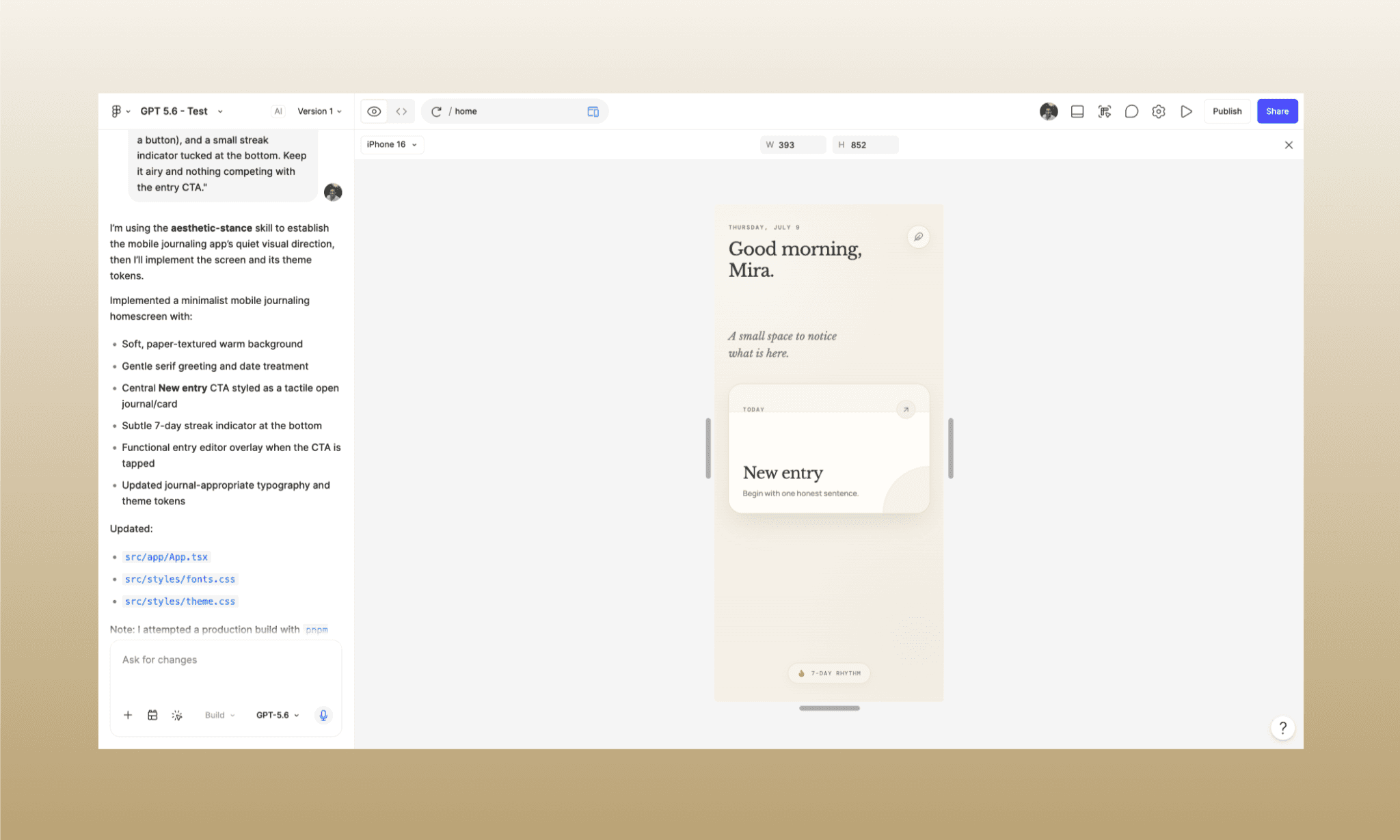
Time: ~1 min | Credit: 26
Pleasantly minimal. Frankly, more minimal than the Calm app UI I had in mind while prompting. GPT 5.6 got my brief right to the T. I was really impressed with its design decision of making the writing box/CTA the centerpiece. Everything else stays in service of that and nothing is included that’s not adding value.
Browse & Edit Calm App UI with AI >
Maximal Social Media Analytics (Desktop)
Prompt
"Design a busy e-commerce seller dashboard for the desktop. It should give a seller instant clarity on how their store is performing today — sales momentum, order pipeline, and anything that needs urgent attention like low stock or returns. Data-heavy, real enterprise-tool density, but organized enough that nothing important gets missed."
Design Output
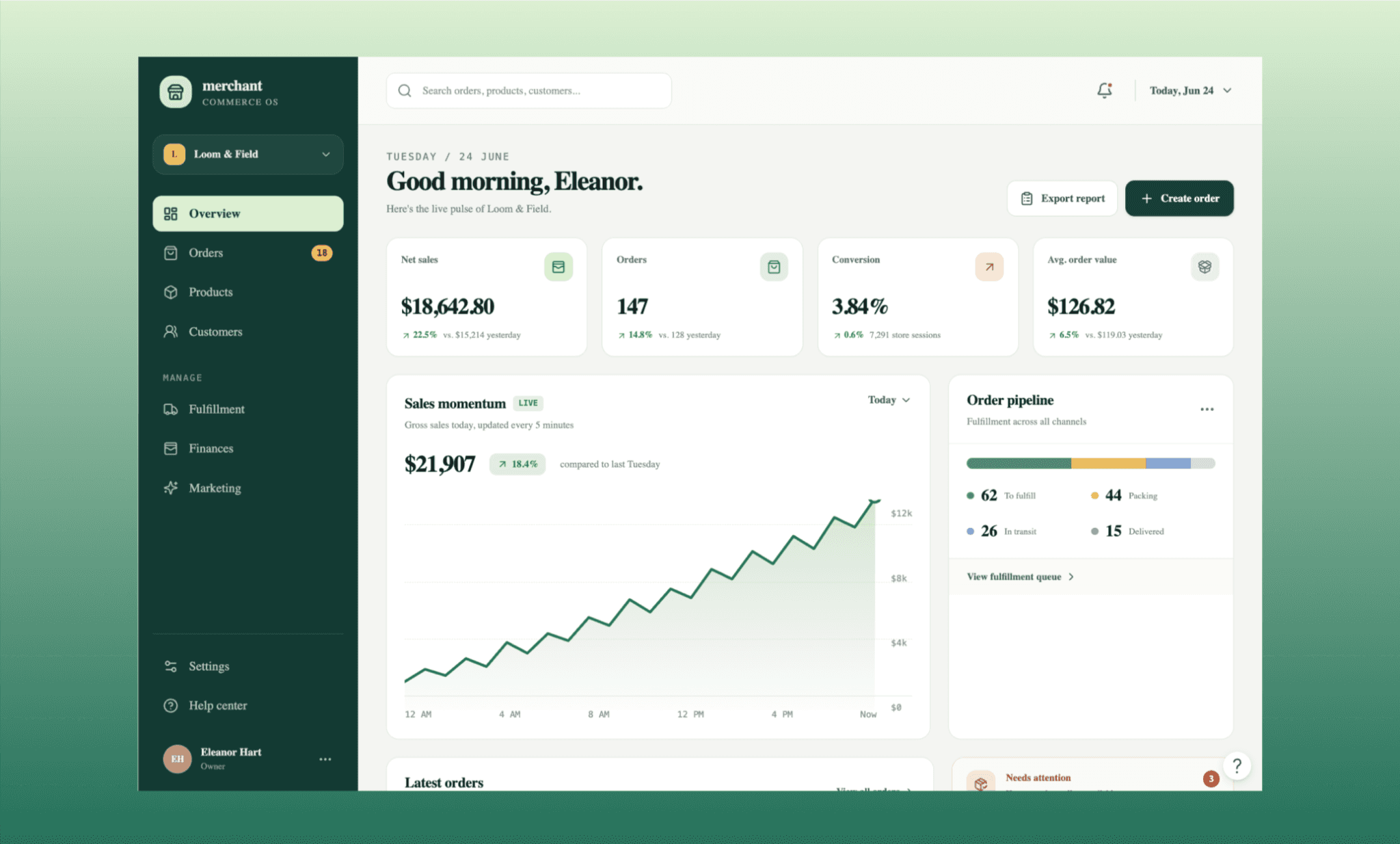
Time: ~2 mins | Credit: 34
Here the GPT 5.6 design gives me mixed feelings. It invented contextually correct datasets without me being explicit. The way it’s arranged the layout is also clean and feels familiar; which I count as positive. However, when I asked for ‘...nothing important gets missed’, I had expectations of a color coded dashboard without being tacky. But the one in front feels like a safe first-draft.
E-shop UI Comparison among Squarespace Alternatives >
Multi-screen onboarding flow
Prompt
"Design a multi-screen onboarding flow - in 5 screens - for an audiobook app, mobile. It should take a new user from 'why this app' to picking their first audiobook to start listening to, building genuine excitement to start. Modern, energetic, but calm enough to feel trustworthy for a listening habit."
Design Output
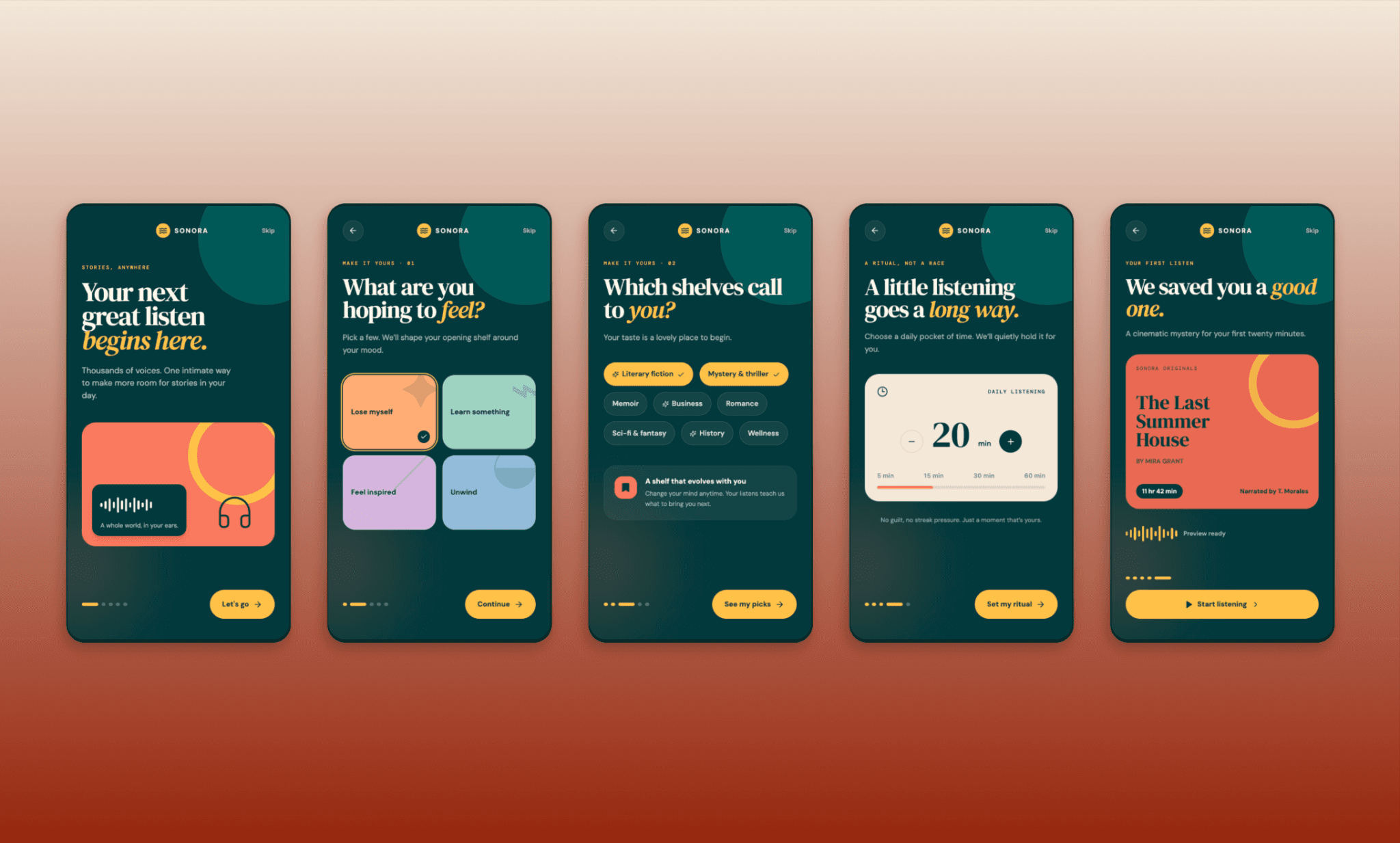
Time: ~5 mins | Credit: 34
This one had me go gaga on the GPT 5.6 UX game. It indeed took a vague brief and nailed every screen of the onboarding flow with the intelligence it advertises. The daily listening commitment screen scores a high point for me. Now, although for an audiobook app it feels dark, I don’t mind as it picked the other accents to convey calm energy.
But am noticing its penchant for circular design elements. It was in the minimal journaling app as well.
Browse & Edit Blinkist Onboarding UI >
Screenshot-to-UI with GPT 5.6
Designers often, instead of designing from scratch, search for inspiration on sites like Mobbin, and remix an existing app UI to make their own. To review how intelligently GPT 5.6 can understand a screenshot, pick up on its design tokens, and edit it, I decided to introduce a new feature screen in Perplexity UI, in dark mode.
Prompt
"Step 1: Convert this Perplexity homescreen to dark mode. Also add a 4th icon to the bottom nav bar for 'Quiz,' matching the existing style.
Step 2: Design the Quiz screen this icon opens: a row of topic pills at the top, opening into today's quiz below — a geography question with a photorealistic image card. Underneath, show a streak, and leader board that’s only partially visible."
Design Output
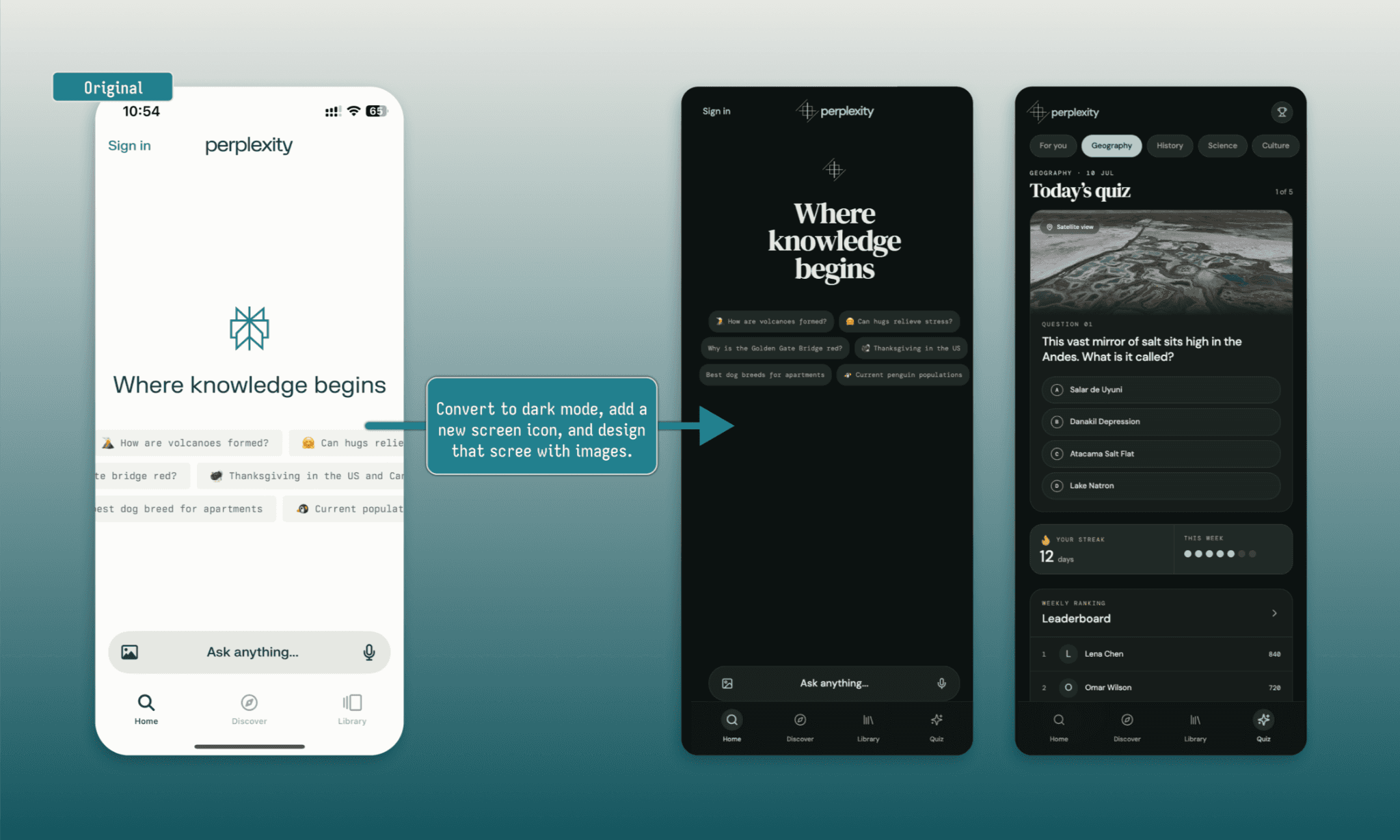
Time: ~3 mins | Credit: 34
Right away I see cracks in GPT 5.6 ability at design fidelity. The homescreen is completely disturbed instead of being replicated. Then it messed up across the board for typography and iconography. The quiz feature screen is cool. The image is also decent. It generated dark screens, too, as asked. But not useful for what I intended, so, sadly, a let down here.
Design System Fidelity of GPT 5.6
In addition to design tools with AI, another design practice becoming a commodity in 2026 is Design MD. A markdown down file that contains the design token of every design decision of a brand. Knowing that GPT 5.6 cannot be entirely relied upon to read a screenshot for design tokens, I decided to hand it one upfront (that of Claude) to build upon (a vibe coding community).
Prompt
"Following the attached design system as a strict reference, design a mobile app called Forge: a community and portfolio network for vibe coders to share projects, find work, and connect. 4 screens: Feed (project updates from the community), Portfolio (a user's own showcased projects), Jobs (listings relevant to vibe coders), and Profile/Settings.
Even where you need to invent new components, do NOT deviate from the design tokens in the MD file given."
Design Output
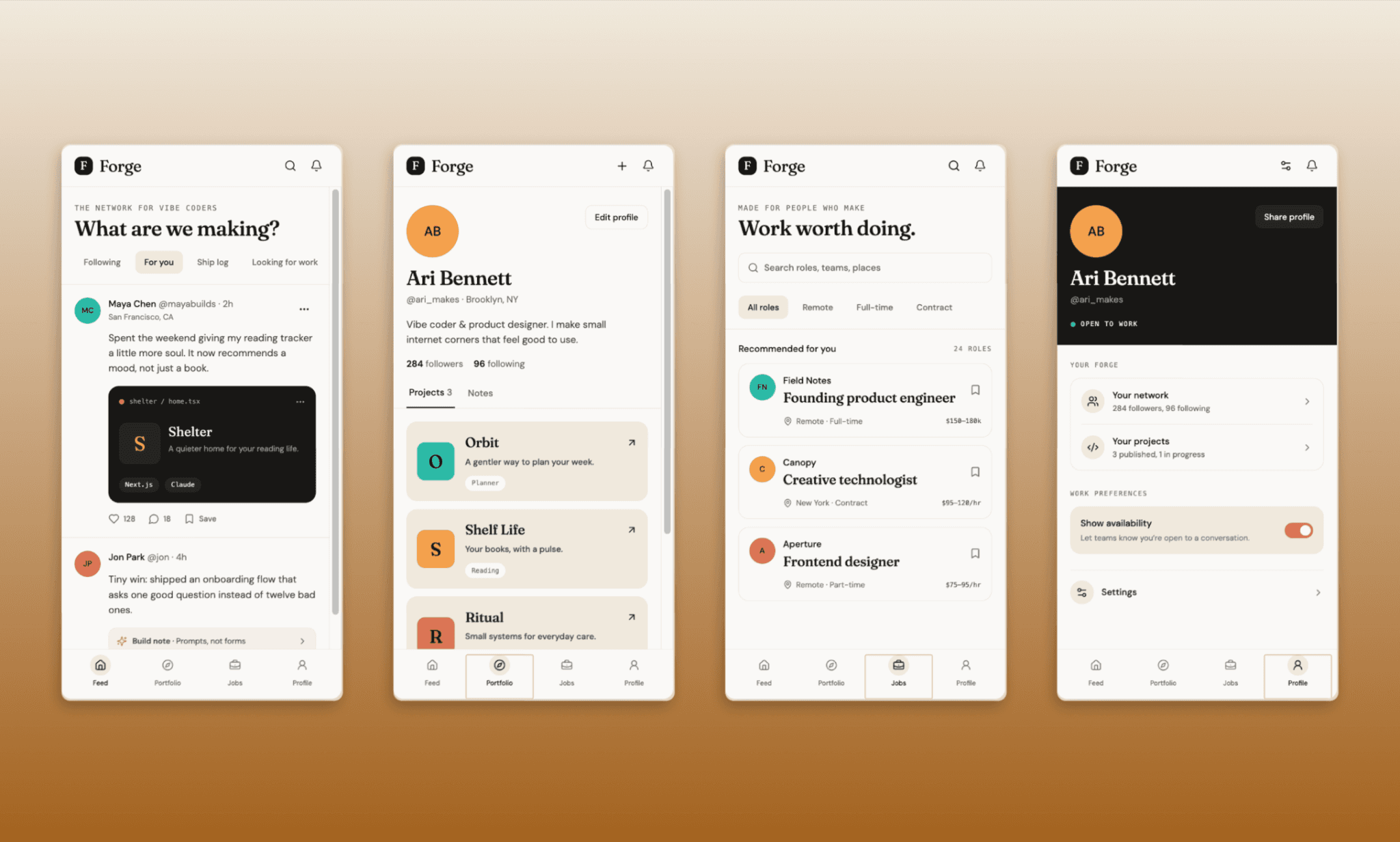
Time: ~2 mins | Credit: 42
The burns I had on the last one, these screens were like balm on them. This time GPT 5.6 understood the design tokens much better and designed in line with the prompt from scratch. Its choice of background color and accents for highlights feel like an app from the Anthropic family. The screen features and layouts are also spot on. That said, it is still not a 100% replica of Claude as we know it.
Use a Design System Generator Free >
GPT 5.6 vs Fable 5 vs Gemini at UI
The two favorite AI models for UI/UX in 2026 have been: Fable 5 by Anthropic and Gemini 3.1 PRO by Google. With the GPT 5.6 by OpenAI entering this race, I excitedly set the stage for all three to prove their one-shot capability to deliver on the same prompt.
Am running GPT 5.6 on Figma Make, Fable 5 on Claude Design, and Gemini 3.1 PRO on Banani AI.
Prompt (identical across all three, no references)
"Design a weather app screen called '2day'. Show current temperature and conditions, an hourly forecast strip, a 5-day outlook, and supporting stats like humidity, wind, and UV index. Fill in the details and copy as suitable. As for aesthetic direction, go for an immersive, cinematic look that reflects the current weather itself — not a generic dashboard. Gradient and translucent surfaces (glassmorphism-leaning) with modern typography and one accent color doing all the work."
Design Output (all three side-by-side)
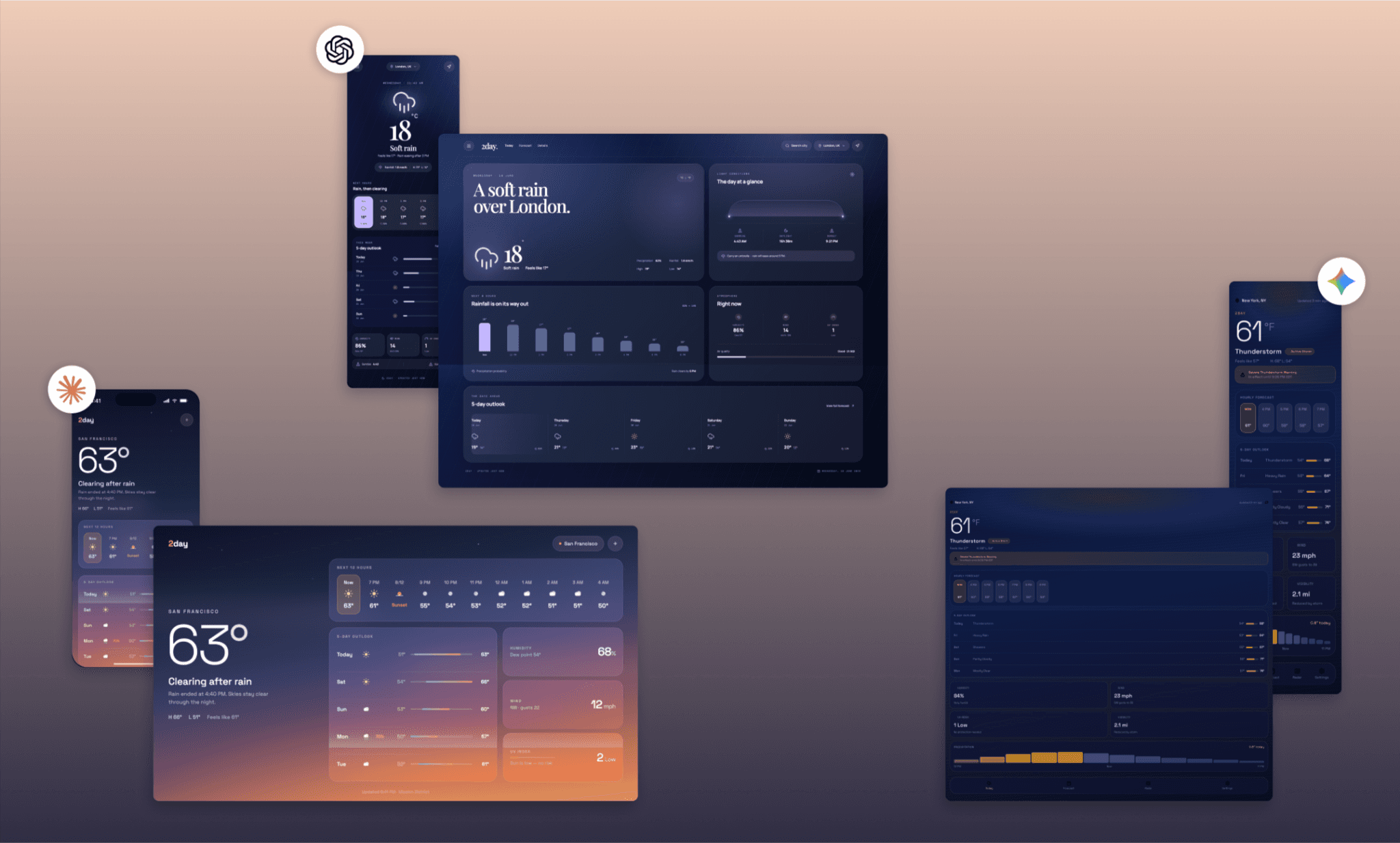
On one hand I take it as a sign that the newly released AI models are better. On the other hand, all three processed the prompts with equal precision. That said, considering the equal ability of the three AI design tools I used, I feel the two latest models (GPT 5.6 and Fable 5) have a clear edge on Gemini 3.1 PRO design output.
Try Banani AI UI Designer Free >
Verdict: Is GPT 5.6 Good for UI/UX?
Yes, from my review of GPT 5.6 for UI/UX I can say it’s genuinely good at the design game. Can design solid from scratch, and handle vague briefs by inventing smart, contextually right details. Has a high aesthetic instinct that holds up well against Fable 5 and Gemini 3.1 Pro. Where it stumbles though is following design fidelity instructions. And some on Reddit call out GPT 5.6’s repetitive card-stuffed layouts[3]. Guess GPT 5.6 is a lone wolf of a designer (a gifted one at that).
Want UI generated fast, free, and closer to on-brief from the first prompt, start with Banani.
FAQs on GPT 5.6 for UI/UX Design
How to access GPT 5.6 in Figma?
In Figma Make, open the model dropdown in the prompt bar and select "GPT-5.6". No separate integration is needed. You can also change the model in between the project from the AI chatbox on the bottom left side.
What is the best way to use GPT 5.6 for UI/UX design?
For genuinely production-grade frontend, OpenAI's suggests using Codex with Sol selected, paired with a frontend skill, a defined design system, and real reference images. For a quick visual mockup, Figma Make's model picker is a fast path.
What’s the cost of using GPT 5.6 for web design?
It depends on where you’re using GPT 5.6 for designing. If you’re using it inside Figma Make it draws from the same Figma AI credit system ($20 minimum). From experience, I’ve noticed a single screen design in Figma Make with GPT 5.6 can cost ~30-50 credits depending on complexity. If you’re using it in Codex, it simply consumes your AI credit pool per your subscription.
References
[1] https://openai.com/index/gpt-5-6/
[2] https://www.figma.com/blog/gpt-5-6-is-now-available-in-figma-make/
[3] https://www.reddit.com/r/OpenAI/comments/1us2t1t/already_disappointed_with_gpt_56_sol_frontend/


