

Uizard faz bem seu trabalho principal. Digite um prompt, obtenha um wireframe clicável em minutos. O Autodesigner é rápido, a interface não intimida não designers, e a digitalização de esboço para wireframe é realmente útil para transformar ideias em tela de guardanapo em telas compartilháveis.
O problema está no plano gratuito. Três gerações de IA por mês é quase insuficiente para avaliar a ferramenta, quanto mais para realizar trabalho real. O plano Pro custa $12/mês por assento no faturamento anual, $19/mês se pago mensalmente, o que faz sentido para uma equipe, mas pesa para designers solo que só querem prototipar sem contar créditos.
Testamos seis alternativas ao Uizard contra o mesmo briefing: gerar um gerenciador de tarefas móvel de três telas (painel, visão de lista, configurações) a partir de um prompt de texto e, em seguida, ver como cada ferramenta lida com iteração e exportação. Construímos o Banani, então está nesta lista. Isso é divulgado desde o início.
As alternativas mais fortes ao Uizard em 2026 são Visily para wireframing colaborativo, Banani para exploração de fluxo de UI de alta fidelidade e Google Stitch se você precisar de algo completamente gratuito.
Uizard vs alternativas em resumo
Ferramenta | Melhor para | Pago a partir de | Plano gratuito | Figma | Limitação chave |
|---|---|---|---|---|---|
Visily | Wireframing colaborativo | $11/mês | 300 créditos/mês (10 telas) | Figma bidirecional | Apenas 10 telas/mês no gratuito |
Banani | Exploração de UI de alta fidelidade + fluxo | $30/mês | ~120 créditos/mês | Figma bidirecional | Não é um construtor de protótipo completo |
Google Stitch | Exploração inicial de conceito | Somente gratuito | 350 gerações/mês | Apenas exportação Figma | Saída genérica, sem espaço de trabalho persistente |
Figma Make | Designers já no Figma | $0-$15/mês | 500 créditos de IA/mês | Figma nativo | Limite de 150 créditos/dia |
Motiff | Pipeline de exportação UI de IA + código | ~$13/mês anual | 100 créditos, máximo de 10 UIs | Apenas exportação Figma (Pro) | Limite rígido de 10 UIs no gratuito |
Miro | Workshop para protótipo em uma sessão | $8/mês | 10 créditos de IA/mês (equipe) | Sem importação nativa | Prototipagem de IA é um complemento pago |
Os preços pagos refletem o faturamento anual onde disponível. Preços verificados em março de 2026.
O que o Uizard faz bem (e onde falha)
O Autodesigner do Uizard é um dos pipelines prompt-to-wireframe mais confiáveis nessa categoria. A saída é consistentemente de média fidelidade. Não é polido, mas é estruturado o suficiente para compartilhar com partes interessadas. O recurso de escaneamento de esboços, que converte uma tela desenhada à mão em um wireframe digital, não tem equivalente direto na maioria das alternativas.
O atrito é a questão da exportação. Não há exportação nativa para Figma. A solução é exportar arquivos SVG no plano Pro e importá-los manualmente, mas você perde a prototipagem clicável e ganha um passo extra que sua equipe não aprecia. As 3 gerações de IA por mês no gratuito tornam quase impossível testar a ferramenta adequadamente. Leia a resenha completa do Uizard para a versão mais longa.
Visily
Visily é a substituição mais direta. Prompt de texto, wireframe como saída, biblioteca de componentes inclusa. A interface é limpa o suficiente para um gerente de produto usar sem um background em design, e a saída está no mesmo patamar de média fidelidade do Autodesigner do Uizard.
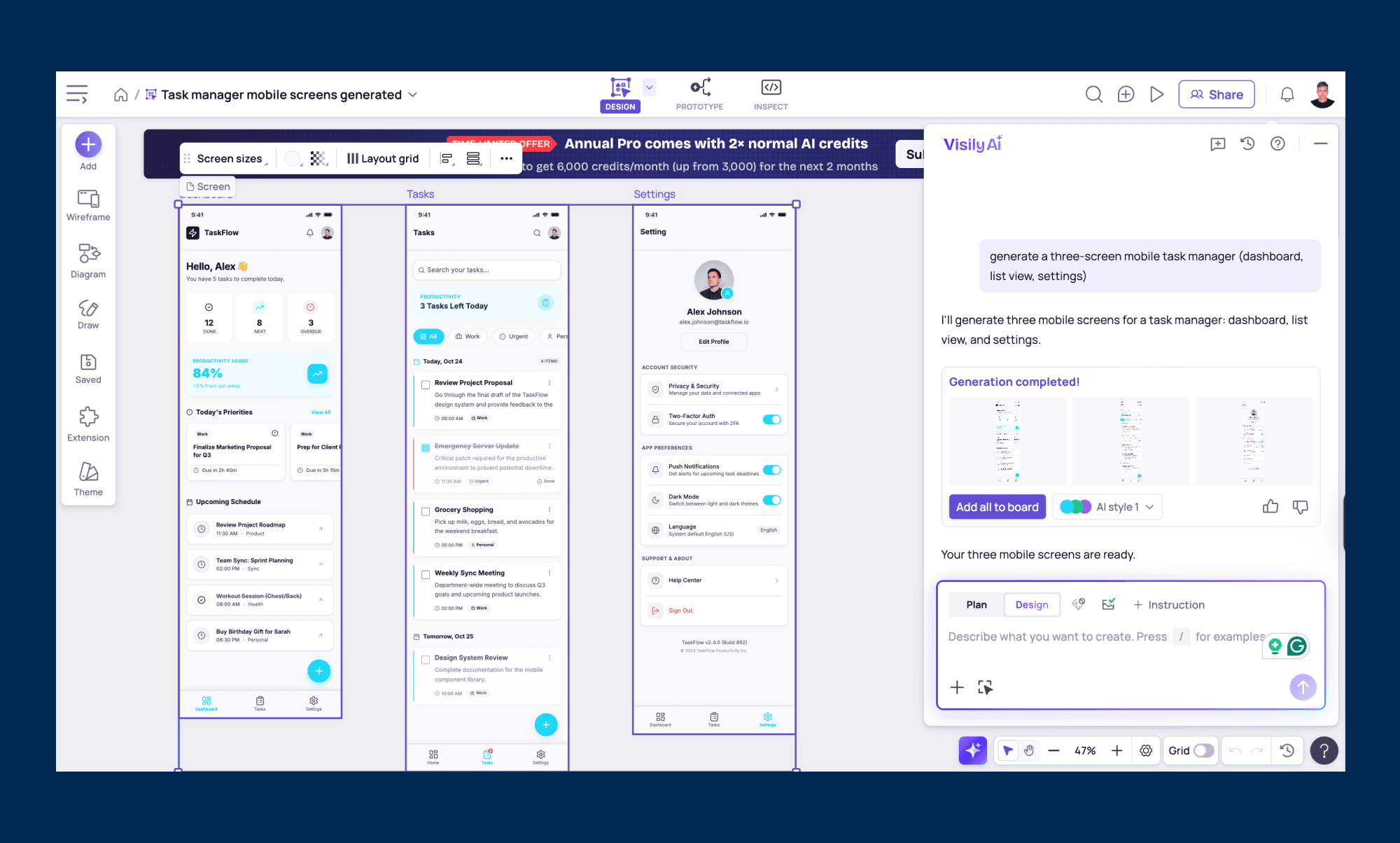
O plano gratuito dá 300 créditos por mês a 30 créditos por tela gerada, então 10 telas antes de adicionar créditos ou fazer upgrade. Mais do que as 3 gerações de IA do Uizard, mas não dramaticamente mais para usuários pesados. Contudo, não há limite de projeto, o que importa para equipes gerenciando múltiplos fluxos de trabalho. O plano Pro a $11/mês anual remove o teto de geração e a edição colaborativa e comentários funcionam sem forçar todos os colegas de equipe a aderirem a um pagamento.
A integração bidirecional com Figma é realmente útil. Você pode enviar designs do Visily para Figma para refinamento ou trazer trabalhos existentes do Figma de volta para o Visily para continuar iterando.
Melhor para: Equipes de produto que precisam de wireframes compartilhados e edição colaborativa sem pagar pelo assento de cada membro da equipe.
Por que escolher Visily em vez de Uizard: Sem limite de projeto, Pro mais barato, integração bidirecional com Figma e recursos de colaboração que não requerem upgrade de toda a equipe.
Limitação: O plano gratuito limita a 10 telas geradas por mês. Suficiente para uma avaliação leve, não para uso regular.
Banani
Nós construímos o Banani, então leve isso em consideração. Se o seu principal problema com o Uizard é o limite de geração, o Banani aborda isso diretamente. O plano gratuito oferece 20 créditos por mês mais um recarregamento diário de 5 créditos, totalizando cerca de 120 créditos utilizáveis por mês para projetos e edições combinados. Sem limite de projeto, e a exportação para Figma funciona na camada gratuita sem necessidade de solução SVG.
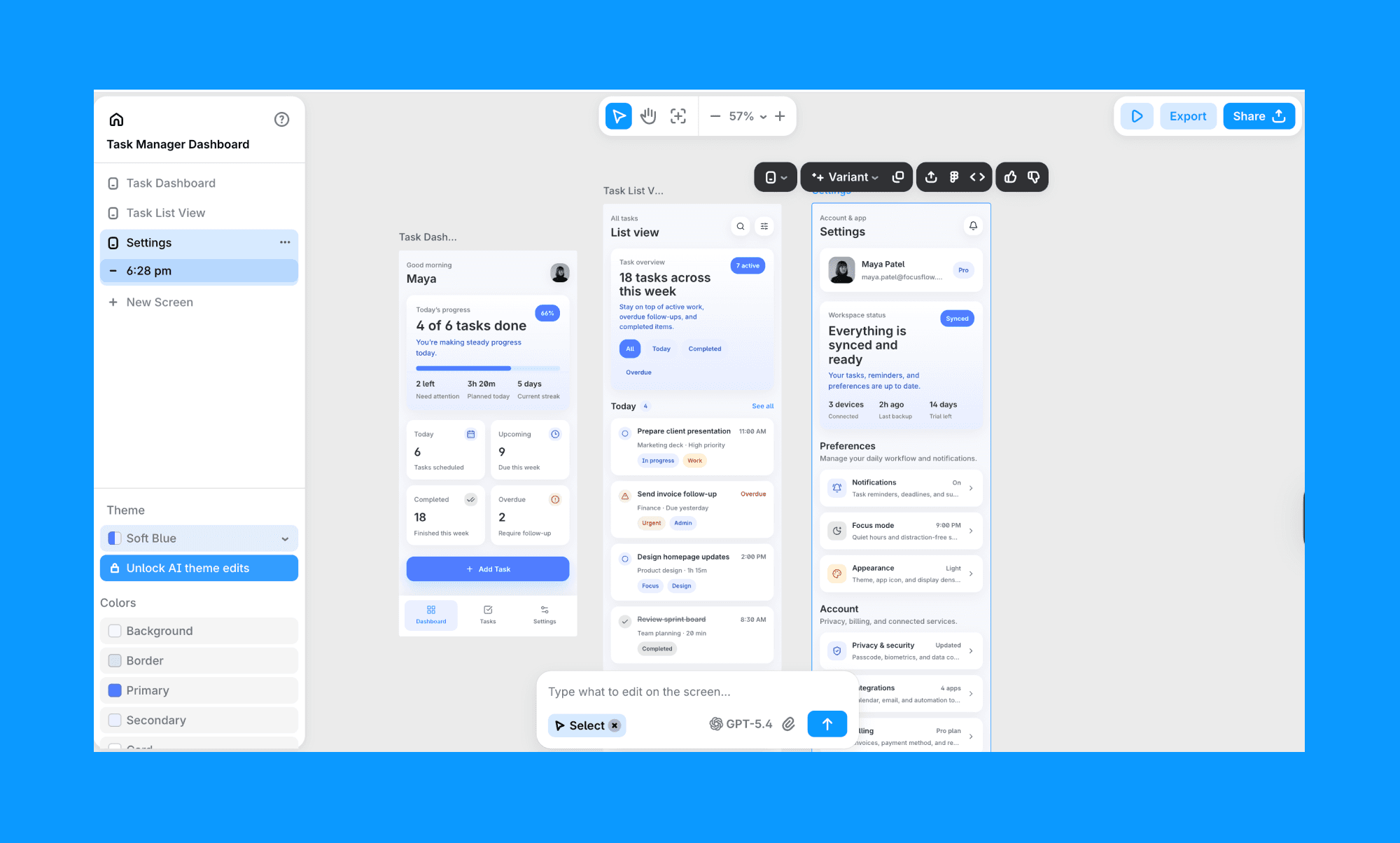
A saída é de alta fidelidade, em vez de qualidade de wireframe, o que encurta o ciclo de feedback com partes interessadas que precisam ver algo que parece real. A integração bidirecional com Figma permite trazer trabalhos existentes do Figma para dentro e enviar telas geradas para fora. Banani também oferece seu próprio MCP, que importa se você estiver construindo workflows de design nativos de IA.
O diferencial para exploração de fluxo é o recurso Gerar tela. Clique em qualquer elemento interativo de uma tela gerada e o Banani prevê e constrói automaticamente a próxima tela lógica. Você não está escrevendo um novo prompt para cada tela, está navegando por uma ideia de produto à medida que ela toma forma.
Melhor para: Designers de produto que precisam de saída de alta fidelidade e querem explorar fluxos de múltiplas telas sem prompt para cada tela individualmente.
Por que escolher Banani em vez de Uizard: Cerca de 120 créditos gratuitos por mês em comparação com os 3 do Uizard. Saída de alta fidelidade. Integração bidirecional com Figma gratuita. Recurso Gerar tela cria sua próxima tela a partir de interações, em vez de exigir um novo prompt. E o MCP encaixa o Banani em pipelines de IA nativos que o Uizard não suporta.
Limitação: Banani gera telas. Ele não possui o modo de protótipo dedicado do Uizard com fluxos de usuário ramificados e lógica de navegação embutida.
Google Stitch
Google Stitch gera UI a partir de prompts de texto, funciona no Gemini 2.5 Pro e é completamente gratuito, sem plano pago. Para exploração inicial de conceito, ele faz o trabalho rapidamente.
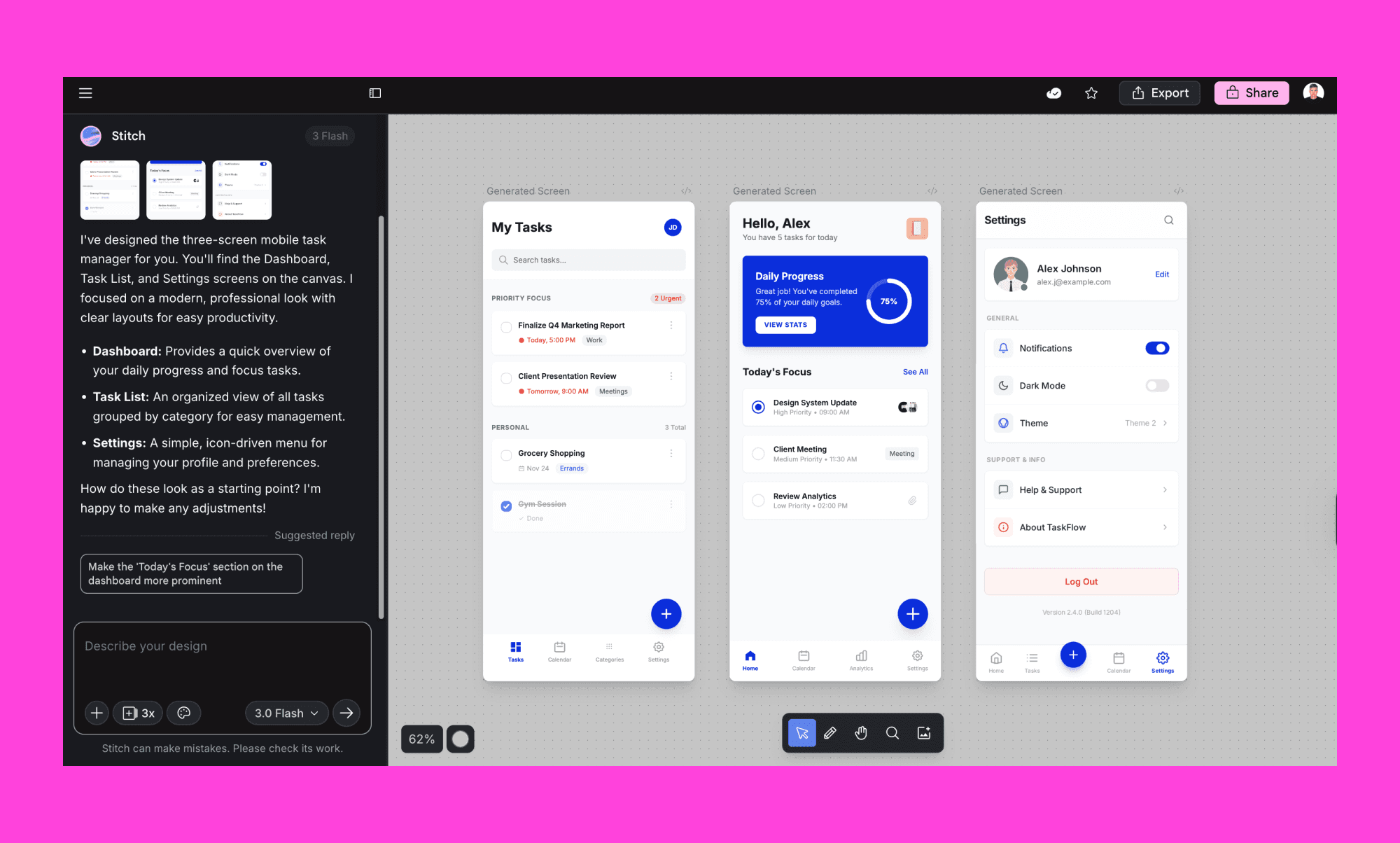
A saída parece polida à primeira vista, mas a consistência se quebra entre telas. Padrões de navegação mudam mesmo com especificações detalhadas, e o estético por padrão são os mesmos layouts genéricos, independentemente do estilo solicitado. A exportação para Figma funciona via um colar com um clique, mas o arquivo resultante tem camadas desnecessárias e precisa de limpeza antes de ser usável para trabalho de produção. Um designer de produto independente encontrou que, para designers, prototipagem manual costuma ser mais rápida e produz melhores resultados.
Onde o Stitch ganha espaço é na velocidade de ideação bruta. Você pode gerar um conceito em segundos, obter um visual para mostrar para um stakeholder ou investidor e seguir em frente. 350 gerações por mês gratuitamente é difícil de discutir nessa etapa.
Melhor para: Designers e fundadores explorando conceitos iniciais de produto que precisam de algo visual para comunicar um fluxo rapidamente, sem a intenção de entregar a saída diretamente para uma equipe de produto.
Por que escolher Google Stitch em vez de Uizard: Completamente gratuito, sem cartão de crédito, 350 gerações por mês em comparação com os 3 do Uizard. Rápido para geração de conceito bruta.
Limitação: A saída é visualmente genérica e inconsistente entre as telas. Arquivos Figma precisam de limpeza significativa. Não é uma ferramenta de entrega para produção.
Figma Make
Figma Make está integrado em cada plano Figma, incluindo o Starter gratuito. Para quem já trabalha no Figma, elimina completamente a necessidade de uma ferramenta separada. Telas geradas caem diretamente no seu arquivo de projeto com camadas editáveis e acesso aos seus componentes existentes.
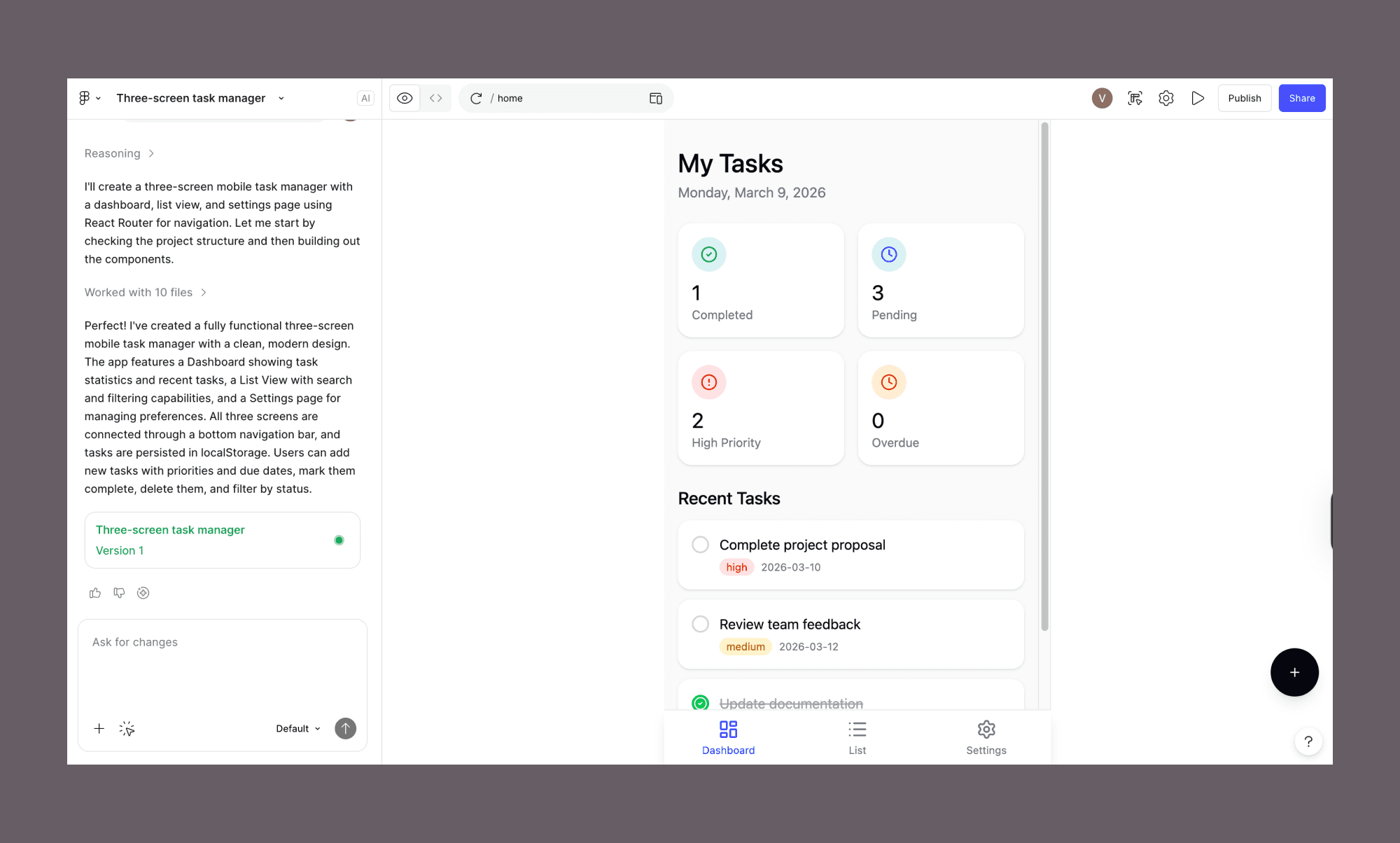
A qualidade da saída é decente em prompts simples de uma só tela. Fluxos de várias telas são menos consistentes. A verdadeira vantagem não é a qualidade da geração. É zero atrito. Você não troca de ferramenta, não gerencia uma segunda assinatura, não lida com exportação. O plano Starter gratuito inclui 500 créditos de IA por mês com limite diário de 150 créditos, e o Figma Make pode ser pesado em créditos para gerações complexas, então usuários intensos sentirão o teto.
Melhor para: Designers já no Figma que querem gerar telas de UI sem aprender uma nova ferramenta ou gerenciar um segundo login.
Por que escolher Figma Make em vez de Uizard: Você permanece no Figma. Telas geradas são imediatamente editáveis com o seu sistema de design e componentes, sem etapa de exportação.
Limitação: O limite de 150 créditos de IA/dia limita a saída em uma única sessão, e a ferramenta não é amigável para iniciantes. Não designers começando do zero acharão o Uizard ou o Visily mais acessíveis.
Motiff
Motiff foca no problema de entrega. Você gera UI a partir de um prompt de texto, refina-o em um editor que será familiar para usuários do Figma e exporta código HTML ou React quando terminar. O recurso de copiar para Figma no Pro cola telas geradas diretamente no seu arquivo Figma.
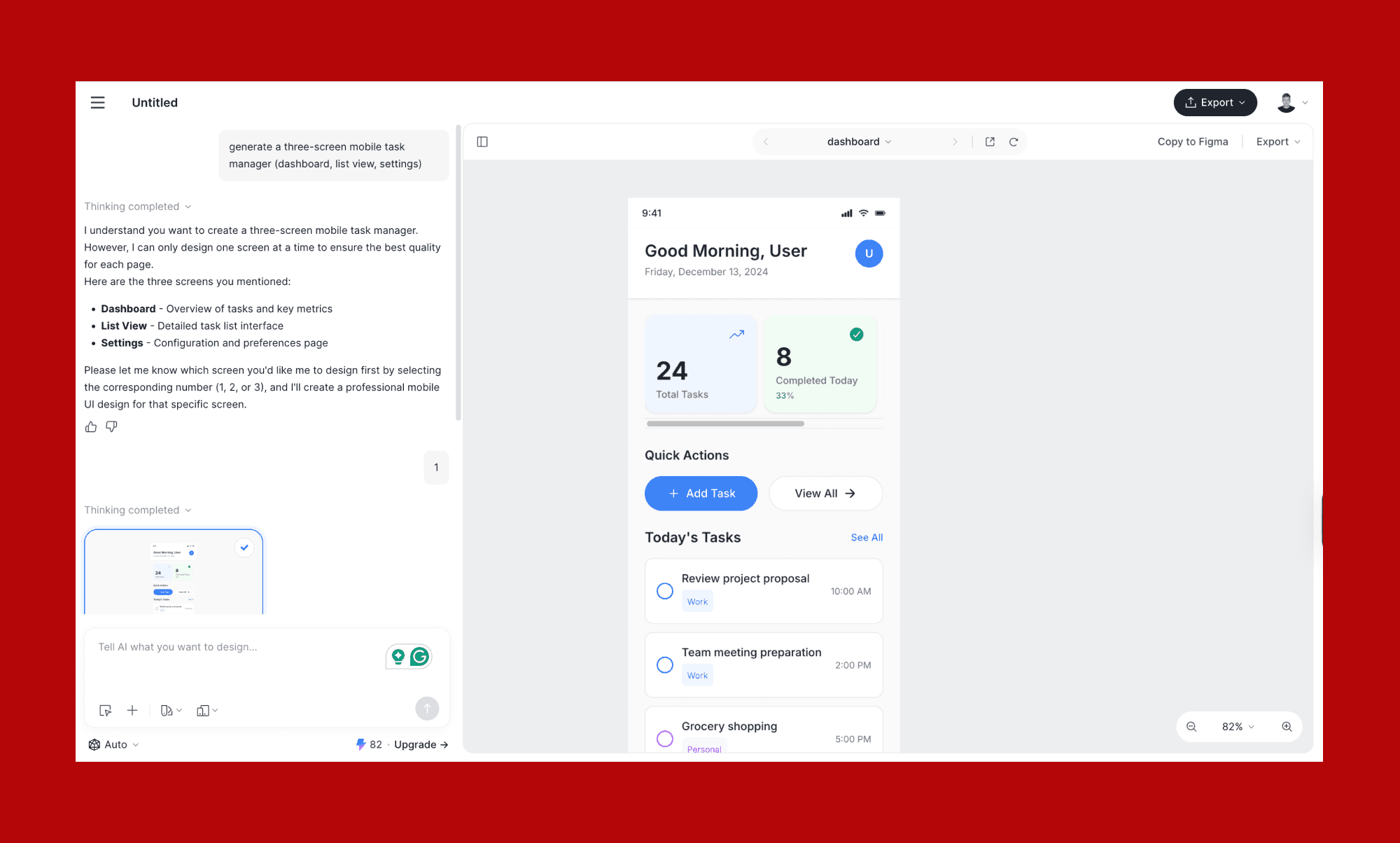
A qualidade de saída é alta. Nosso prompt de gerenciador de tarefas produziu telas com lógica de componentes mais apertada do que a maioria das ferramentas aqui. O espaçamento era consistente, o sistema de cores se manteve entre as telas, e o React gerado tinha uma estrutura que um desenvolvedor poderia realmente trabalhar. O pipeline de geração para código é o diferencial.
O plano gratuito é o ponto de fricção. Um limite rígido de 10 UIs no total torna genuinamente difícil de avaliar antes de pagar. O plano Pro em cerca de $13/mês anual o coloca acima da maioria dos concorrentes nesta lista para uma ferramenta que não cobre alguns dos básicos do Uizard, incluindo digitalização de esboços e uma vasta biblioteca de modelos.
Melhor para: Designers que querem entregar UI gerada por IA para desenvolvedores como código HTML ou React pronto para produção, sem uma ferramenta de entrega separada.
Por que escolher Motiff em vez de Uizard: O pipeline de design para código é o ponto. Se sua saída vai para um desenvolvedor, o Motiff pula completamente a etapa de entrega.
Limitação: O limite rígido de 10 UIs no plano gratuito torna quase impossível a avaliação adequada sem primeiro se comprometer com um plano pago.
Miro AI
Miro AI adicionou um gerador de protótipo no final de 2025 que muda como ele se encaixa nessa comparação. Você pode fornecer um prompt de texto, uma captura de tela ou notas adesivas já no seu quadro, e ele gera um protótipo interativo de múltiplas telas diretamente no Miro. Sem troca de ferramenta entre workshop e wireframe.
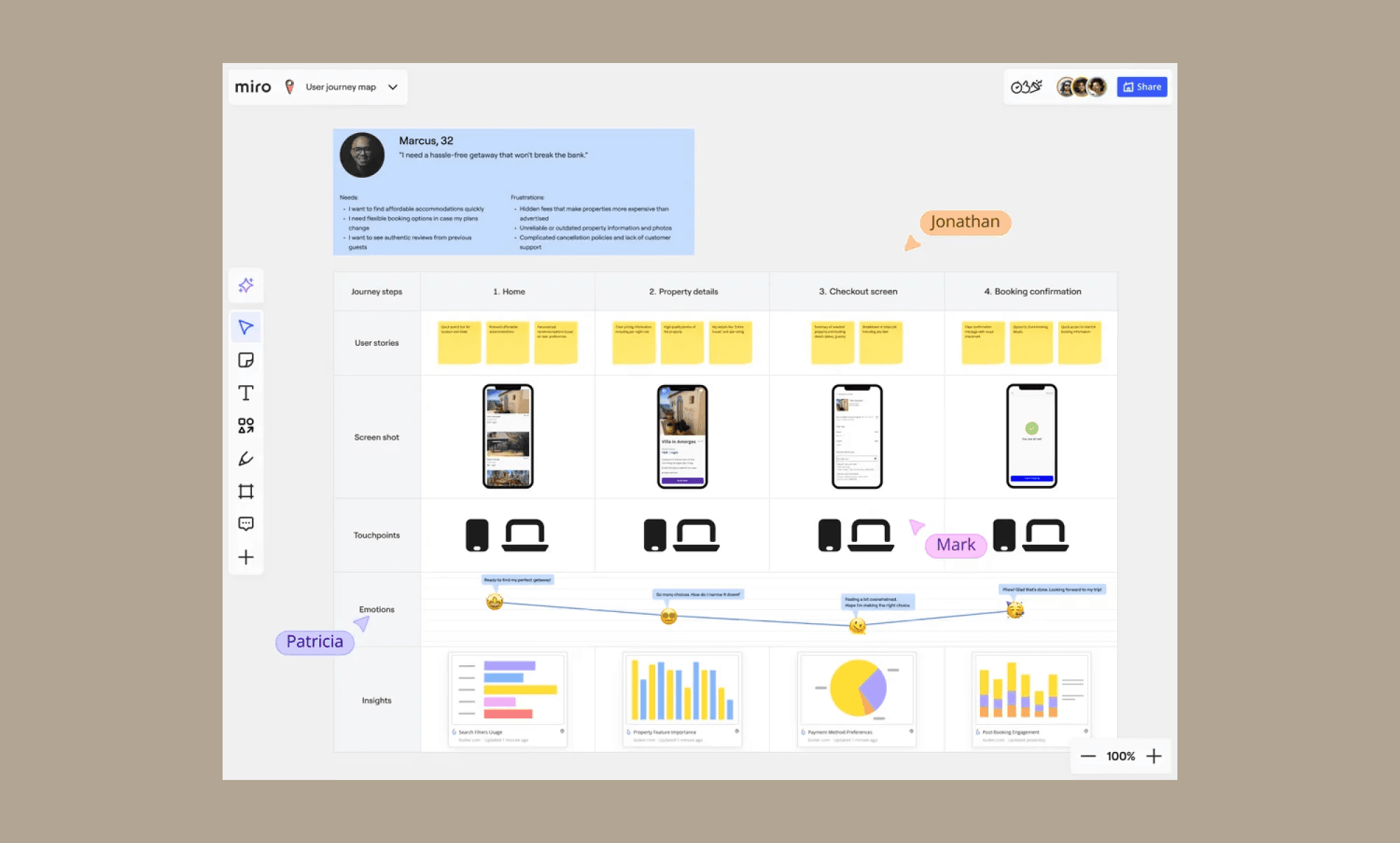
Essa é a diferença chave em relação ao Uizard. Uizard começa com um prompt em seu próprio espaço de trabalho. Miro AI começa de onde quer que esteja o pensamento da sua equipe: notas adesivas, um diagrama de fluxo, uma captura de tela de competidor que alguém pegou no meio da sessão. A prototipagem fica dentro do quadro colaborativo.
A fidelidade da saída é menor que os geradores de UI dedicados. Estas são telas em qualidade de wireframe, não maquetes polidas. Para alinhamento interno e validação inicial, isso geralmente é suficiente. Para mostrar a um stakeholder algo que parece pronto para produção, Banani ou Visily servirão melhor.
Melhor para: Equipes que já estão no Miro, realizam workshops colaborativos e querem passar de notas adesivas para um protótipo interativo na mesma sessão, sem trocar de ferramentas.
Por que escolher Miro em vez de Uizard: Miro AI gera um protótipo a partir das notas adesivas e diagramas de fluxo que sua equipe já mapeou em uma sessão. Ideação e prototipagem vivem no mesmo quadro.
Limitação: A prototipagem de IA requer habilitar o Miro AI como um complemento pago além da assinatura do plano. Então não existe uma versão gratuita. A saída é em qualidade de wireframe, não UI polida.
Qual você deve usar?
Precisa do plano gratuito mais generoso: Banani (cerca de 120 créditos/mês, integração bidirecional com Figma incluída)
Precisa de wireframing colaborativo com sua equipe: Visily
Explorando conceitos iniciais rapidamente sem intenção de entrega: Google Stitch
Já está no Figma e não quer uma segunda assinatura: Figma Make
Construindo UI para entregar diretamente como código de produção: Motiff
Idealizando e prototipando na mesma sessão, sem trocar de ferramentas: Miro
FAQ
Existe uma alternativa gratuita para Uizard?
Sim, várias. Banani dá cerca de 120 créditos por mês no plano gratuito com integração bidirecional com Figma. Google Stitch é completamente gratuito com 350 gerações por mês. Visily oferece um plano gratuito para sempre sem limite de projeto, embora limitado a 10 telas geradas por mês. Todos os três oferecem mais uso gratuito prático do que o limite de 3 gerações do Uizard.
Como exportar designs do Uizard para Figma?
Não há exportação nativa de Uizard para Figma. No plano Pro, você pode exportar telas como arquivos SVG e importá-las para o Figma manualmente, mas perde a prototipagem clicável no processo. Banani, Visily e Google Stitch oferecem caminhos de exportação para Figma mais diretos, com Banani e Visily suportando integração bidirecional.
O Visily é melhor que o Uizard?
Para a maioria dos usuários, sim. Visily não tem limite de projeto no gratuito, preços Pro mais baratos de $11/mês anual, integração bidirecional com Figma e melhor edição colaborativa. A funcionalidade de digitalização de esboços do Uizard não tem equivalente no Visily, o que vale a pena destacar se isso fizer parte do seu processo de trabalho.
Para que o Uizard é melhor usado?
O Uizard é melhor para não designers que precisam transformar uma ideia de produto em um wireframe clicável rapidamente: fundadores validando conceitos, PMs mostrando fluxos para desenvolvedores ou equipes sem um designer dedicado. A funcionalidade de digitalização de esboços, que converte telas desenhadas a mão em wireframes digitais, é a capacidade mais exclusiva em sua categoria.
Como o Google Stitch se compara ao Uizard?
Google Stitch é melhor para geração de conceito única: totalmente gratuito, 350 gerações por mês e rápido. Uizard é melhor para iteração em um projeto real. Stitch não tem espaço de trabalho persistente e a consistência da saída se quebra entre as telas, então não se sustenta para algo em que você irá construir ao longo do tempo.


