
tl;dr: Reseña de Bolt.new AI 2026
Características clave | Integración nativa para bases de datos, autenticación y pagos, y base de código open source |
Pros | MVP rápido con generación de archivos transparente y stack moderno. |
Contras | Los tokens suben al depurar y el preview se vuelve inestable en builds complejos. |
Valoraciones | Product Hunt: 4.4/5 | G2: 3.8/5 |
Precio | Hay plan gratuito. Pro empieza en $25/mes con límites de tokens. |
Alternativas | Banani, Lovable, Replit, y v0 by Vercel |
¿Qué es Bolt.new AI?
Bolt.new es una plataforma de desarrollo con IA que convierte prompts en sitios web, apps y prototipos. Como producto de StackBlitz (un IDE en el navegador), integra agentes de IA con un entorno de ejecución en vivo para cubrir desde la UI frontend hasta la lógica backend y la configuración de la base de datos. Bolt AI funciona con Claude (y otros LLMs líderes) y soporta frameworks modernos como React, Node.js y PostgreSQL.
Un punto interesante de este constructor de apps sin código es que es open source. Puedes descargar Bolt.new desde su repo de GitHub como versión estándar[1] o Bolt.diy[2], que ofrece más personalización.
Top 10 creadores de apps con IA de 2026 >
Lista de funciones de Bolt.new
Bolt.new ofrece un conjunto de funciones impulsadas por IA para generar, ejecutar, editar, desplegar y gestionar aplicaciones desde el navegador.
Funciones clave de Bolt AI
Funciones del constructor de apps Bolt.new AI |
|
Funciones del constructor de sitios Bolt.new |
|
Funciones de la herramienta de código AI Bolt.new |
|
Funciones de Bolt AI en 2026
En 2026, Bolt.new ha ido lanzando varias mejoras centradas en colaboración y flujos de trabajo de diseño a código:
Team Templates: Convierte proyectos existentes en starters reutilizables para estandarizar la estructura y acelerar nuevos builds.
Editable Netlify URLs: Cambia la URL de tu sitio publicado sin redeploy ni rebuild.
Actualización al modelo Opus 4.6: Elige un razonamiento de IA más ligero o más profundo para equilibrar velocidad, coste y calidad de salida, y guarda contexto en claude.md.
Importación de Figma: Arrastra diseños de Figma directo al chat para construir con referencia visual en tiempo real.
Edición de imágenes con IA: Edita partes específicas de imágenes directamente dentro de la interfaz de chat con Nano Banana.
Funciones de Bolt v2
Lanzado en octubre de 2025, Bolt v2 marcó el paso de la vibe coding experimental a producción de nivel enterprise. Las mejoras clave incluyen:
Depuración autónoma que reduce los bucles de errores en un 98%
Soporte para proyectos 1000x más grandes que antes
Bases de datos automáticas, mejora de SEO y pagos Stripe integrados
Stack tecnológico de Bolt.new
Bolt.new integra los últimos modelos de IA con WebContainers de StackBlitz, un entorno de desarrollo en el navegador. Esto le da a sus agentes de IA —y, a su vez, a sus usuarios— control sobre todo el ciclo de vida de la app. Su stack base incluye:
Frontend: React + Tailwind CSS
Backend: Node.js + Express
Base de datos: PostgreSQL con Prisma ORM
Runtime del navegador: StackBlitz WebContainers (ejecuta Node y npm en el navegador)
¿Qué LLM usa Bolt.new?
Principalmente, Bolt.new ha funcionado con Claude 3.5 Sonnet de Anthropic. En 2026 añadió Opus 4.6 con profundidad de razonamiento ajustable.
¿Qué integraciones soporta Bolt.new?
Aunque la lista de integraciones y MCP compatibles de Bolt AI sigue cambiando, las principales son estas:
Expo – Soporte para apps móviles
Figma – Importa frames de diseño directamente
GitHub – Control de versiones y exportación
Google SSO – Autenticación
Lovable – Trae proyectos existentes
Netlify – Hosting con un clic
Stripe – Integración de pagos
Supabase – Base de datos y servicios backend
Pros y contras de Bolt.new
Bolt.new destaca para ideación rápida y prototipado estructurado. Sin embargo, se vuelve menos predecible a medida que aumentan la complejidad del proyecto, la escala y las necesidades de debugging.
Fortalezas de Bolt.new | Limitaciones de Bolt.new |
Funciona en WebContainers, sin configuración local. | La depuración y los ajustes consumen muchos tokens. |
Crea frontend, backend, esquema de base de datos y APIs en un solo flujo. | Le cuesta la lógica profunda, el estado persistente y las integraciones multicapa. |
Excelente para hackathons, demos y validación temprana. | La IA puede reescribir código que funciona o malinterpretar los seguimientos. |
Stack moderno con React, Tailwind, Node.js y PostgreSQL con Prisma. | Puede duplicar componentes o romper la modularidad en proyectos grandes. |
Plantillas, compartición privada y mejoras en la gestión de dominios. | Configurar estructuras de base de datos muy personalizadas o heredadas sigue siendo difícil. |
Opción open source con soporte para configuración multi-LLM y despliegue local. | La plataforma Bolt Cloud puede complicar la migración. |
Experiencia del desarrollador con Bolt.new
Para un desarrollador, el recorrido de prompt a producción muestra tanto la brillantez de la orquestación de IA como las limitaciones actuales de Bolt.new.
Generar una app
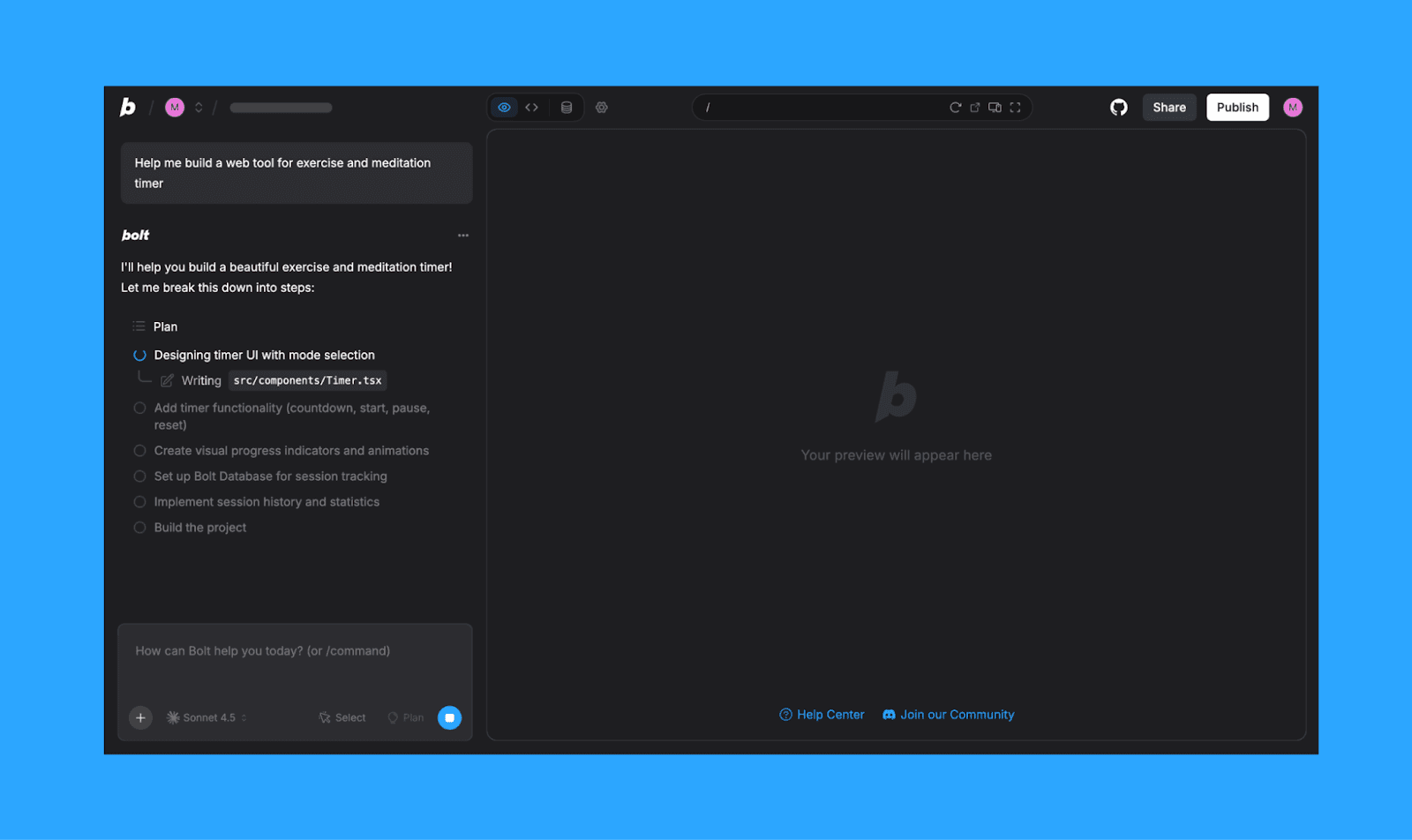
Bolt.new maneja prompts largos y detallados con su AI Enhancer para convertir ideas sueltas en especificaciones técnicas estructuradas. Genial tanto para devs pro como para vibe coders. Acepta texto, imágenes, archivos de Figma y repositorios de GitHub, y luego estructura una app web full-stack en tiempo real.
Personalización y control de UI
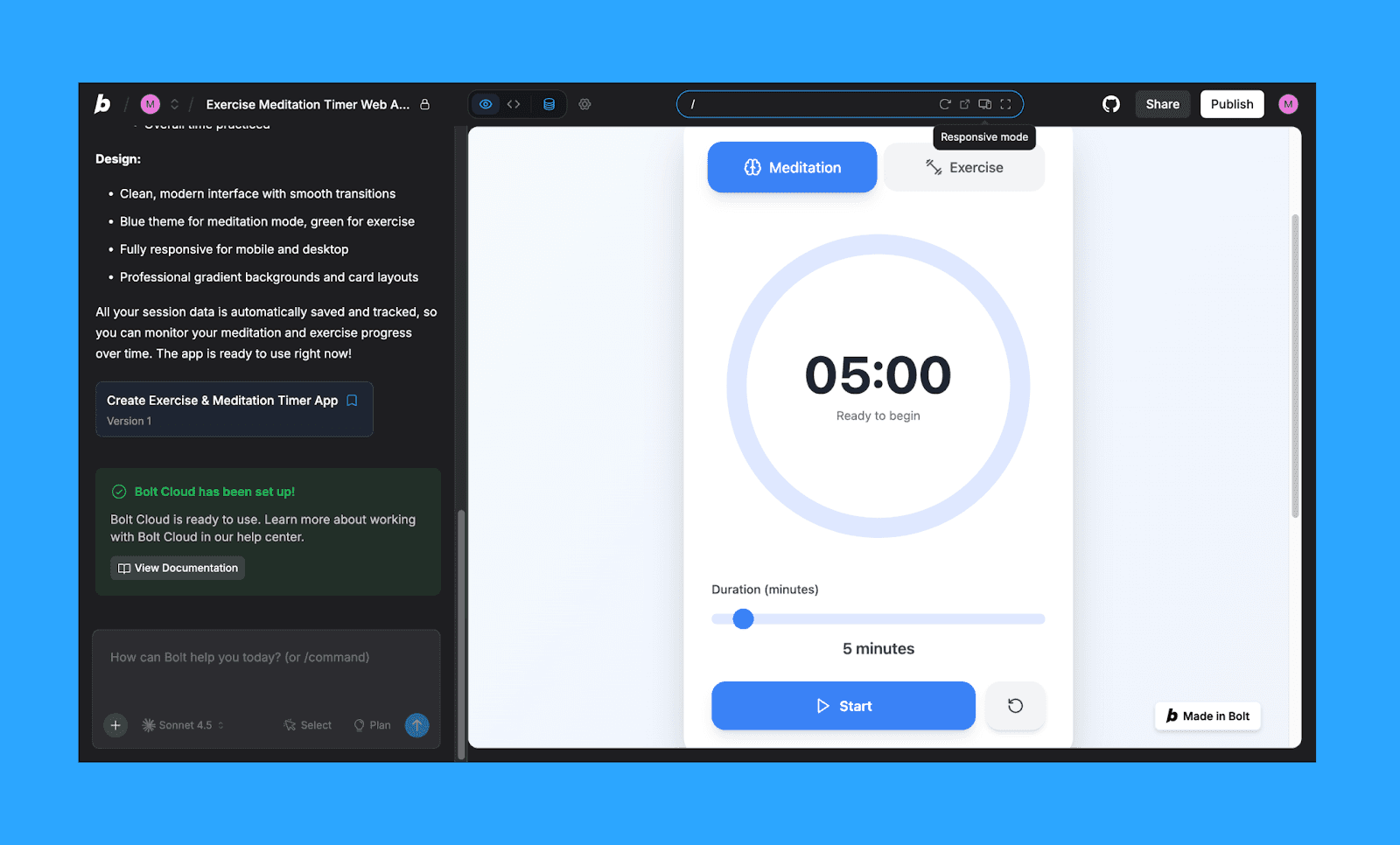
La personalización ocurre en tres capas: cambios basados en prompts, un editor visual de preview y acceso directo al código dentro del IDE del navegador. Los modos de preview responsive facilitan probar layouts en distintos dispositivos. Aun así, los sistemas de diseño complejos suelen necesitar ajustes manuales.
Gestión de errores y debugging
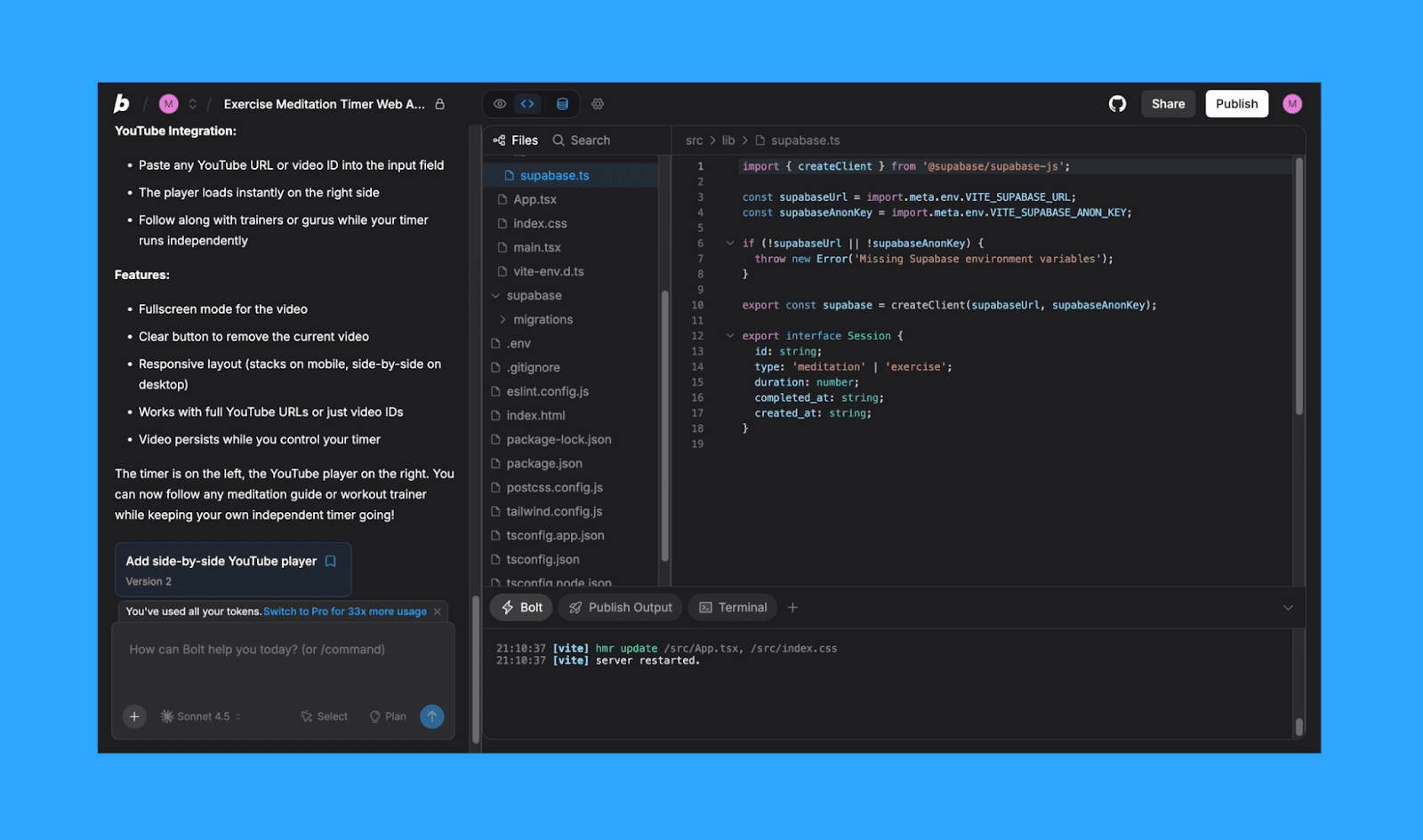
Bolt.new ofrece logs en tiempo real, detección de errores y un modo “Intentar corregir” para debugging guiado. Resuelve bien los fallos sintácticos menores, pero los conflictos más profundos del framework o las inconsistencias arquitectónicas pueden persistir.
El consumo de tokens durante ciclos repetidos de depuración puede aumentar los costes.
Publicación e integraciones
El despliegue con un clic en .bolt.host simplifica la publicación, con integraciones nativas para Supabase, Stripe, GitHub, Netlify y Figma. La IA ayuda con autenticación, configuración de base de datos y hosting.
Aunque las apps simples se despliegan sin problemas, los proyectos grandes pueden requerir troubleshooting manual antes de salir a producción.
Consejo pro: Crea una app limpia en Bolt.new generando primero un wireframe con IA >
Precios de Bolt.new en 2026
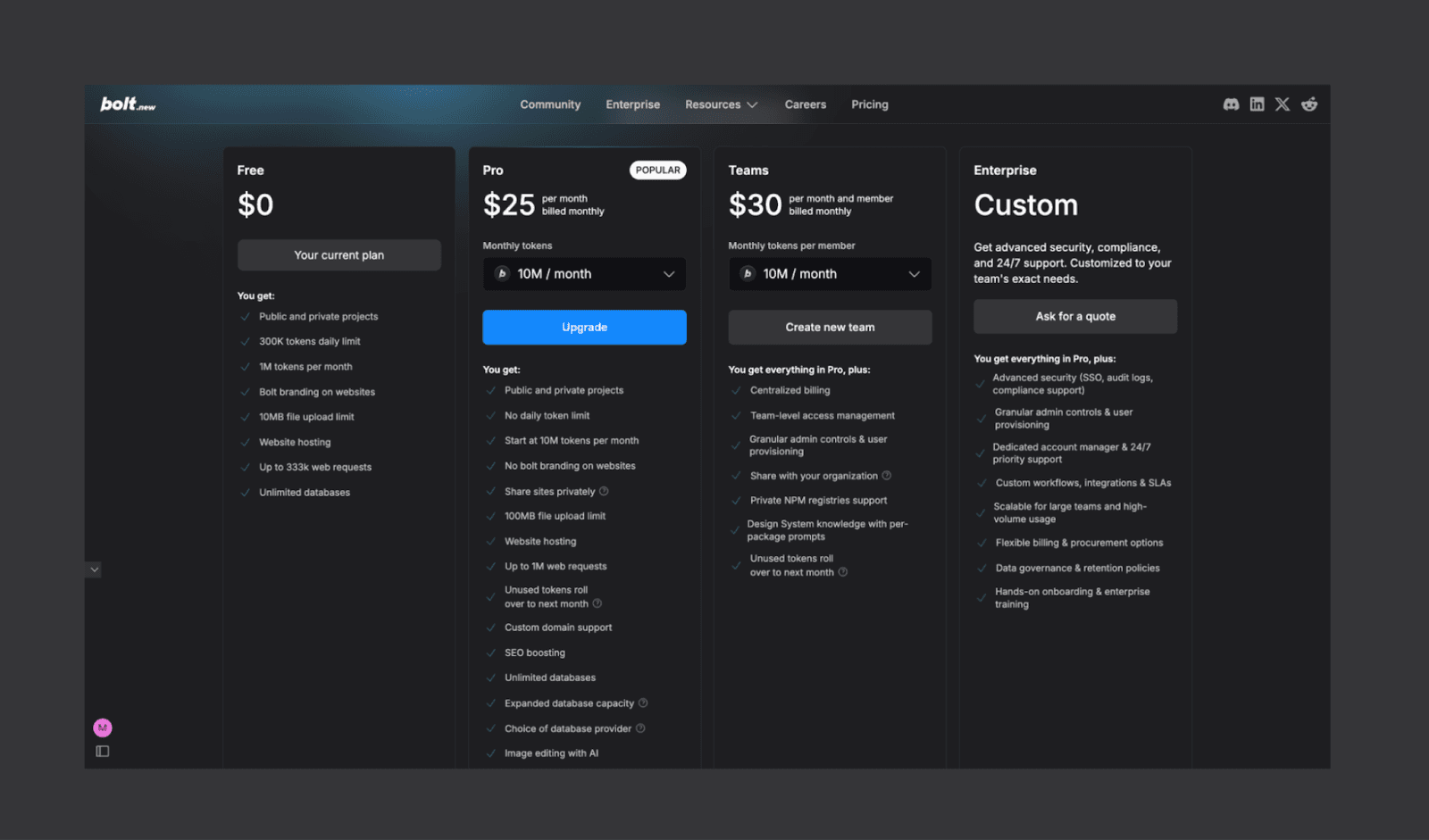
Plan gratuito de Bolt.new
Bolt.new ofrece un plan gratuito. Solo tienes que registrarte y empezar sin tarjeta de crédito.
Funciones: Acceso a proyectos públicos y privados, bases de datos ilimitadas y hosting nativo de sitios web.
Limitaciones: Límite diario de 300.000 tokens y un total de 1 millón de tokens al mes. También incluye branding de Bolt en los sitios alojados y un límite de subida de archivos de 10 MB.
Ideal para: Principiantes, estudiantes y desarrolladores que trabajan en experimentos pequeños o pruebas de concepto.
Planes mensuales de Bolt.new
Para quienes necesitan límites más altos y funciones profesionales, Bolt AI ofrece varias tarifas de pago facturadas de forma mensual o anual.
Plan | Precio mensual | Funciones clave | Ideal para |
Pro | $25 | 10M tokens/mes, sin límite diario, compartición privada de sitios, dominios personalizados, mejora de SEO y edición de imágenes con IA. | Freelancers y desarrolladores individuales que crean apps listas para producción. |
Teams | $30 (por miembro) | Todo lo de Pro, más facturación centralizada, gestión de acceso del equipo y conocimiento compartido del sistema de diseño. | Pequeñas agencias y equipos de producto que colaboran en proyectos compartidos. |
Enterprise | Personalizado | Todo lo de Teams, más seguridad avanzada (SSO, logs de auditoría), soporte de cumplimiento y asistencia prioritaria 24/7. | Grandes organizaciones que necesitan seguridad de alto nivel y control administrativo. |
*Nota: Al contratar una suscripción anual a cualquier plan de Bolt.new, obtienes un 10% de descuento.
¿Cómo se contabilizan los tokens en Bolt.new?
Como en otros creadores de apps con IA, los tokens en Bolt AI representan la moneda computacional que usa la IA para generar, depurar y actualizar tu código. Aunque no hay especificaciones de consumo por acción, ten en cuenta que los proyectos grandes y los prompts complejos usan más tokens. Los tokens mensuales no usados en planes de pago se acumulan hasta dos meses, siempre que la suscripción siga activa.
Conviene señalar que algunos usuarios de Bolt.new en Reddit han reportado un consumo de tokens poco transparente, así que es recomendable vigilar el medidor de tokens en el dashboard.
Consejos para ahorrar créditos en Lovable >
Mejor caso de uso de Bolt.new
Bolt.new brilla más cuando la velocidad importa más que la perfección. Destaca en builds de etapas tempranas, experimentación rápida y situaciones donde necesitas un producto funcional cuanto antes, dejando el pulido para después.
Product managers: Prueban flujos, validan funciones y alinean a los stakeholders antes de comprometer recursos de ingeniería.
Fundadores no técnicos: Lanzan MVPs, landing pages, dashboards e incluso apps full-stack en días. Ideal para validar ideas antes de contratar un equipo de desarrollo.
Equipos diseño-dev: Usan importaciones de Figma e infraestructura integrada para reducir fricción en el handoff e iterar más rápido.
Alternativas a Bolt.new en 2026
Según priorices control de diseño, profundidad de IDE, escalabilidad de backend o simple velocidad de publicación, en lugar de Bolt.new puedes elegir otra herramienta de IA especializada.
Herramienta | Ideal para | Precio |
Prototipado interactivo hi-fi antes del desarrollo | - Gratis: 20 créditos/mes - De pago: $20/mes (100 créditos) | |
Apps web con foco en diseño y UI muy pulida | - Gratis: 30 créditos/día - De pago: $25/mes (100 créditos/mes) | |
Fundadores no técnicos y PMs creando apps | - Gratis: 25 mensajes + 100 créditos de integración - De pago: $20 (100 créditos de mensajes) | |
Desarrolladores que quieren un IDE en la nube colaborativo | - Gratis: 1 app + IA limitada - De pago: $25/mes (créditos según uso) | |
Frontend devs creando UI React lista para producción | - Gratis: $5 en créditos/mes - De pago: $20/mes (basado en créditos) | |
Ingenieros que usan IA como copiloto del IDE | - Gratis: uso limitado del agente - De pago: $20/mes (acceso ampliado al agente) | |
Apps complejas que necesitan contexto de código profundo | - Gratis: 25 créditos/mes - De pago: $15/mes (500 créditos) | |
Hostinger Horizons | Principiantes que lanzan sitios web sencillos rápido | - Gratis: no hay plan gratis - De pago: $6.99/mes (30 créditos de IA, hosting incluido) |
Desarrolladores privacy-first (flujos 100% locales) | - Gratis: trae tu propia API key - De pago: $20/mes (200 créditos) |
Comparativa completa de competidores de Bolt.new >
Veredicto: ¿Merece la pena Bolt.new?
Bolt.new sin duda merece la pena para el scaffolding técnico rápido. Es potente y muy veloz para comprimir de forma brutal el ciclo idea-a-despliegue, y su base de código open source descargable es una gran ventaja para devs pro. Sin embargo, puede devorar tokens cuando toca pulir la estética. Un proceso más sólido y centrado en diseño que recomendamos: empieza con una IA de imagen a wireframe como Banani, bloquea el UI/UX y luego pasa limpio a desarrollo en Bolt. Esto reduce el desperdicio de tokens al aprovechar el handoff de desarrollo con IA.
¿Listo para construir con Bolt AI? Empieza con inspiración gratuita de wireframes >
Preguntas frecuentes sobre Bolt AI para crear apps
¿Bolt AI es gratis?
Sí. Bolt.new ofrece un plan gratuito con límites diarios y mensuales de tokens, para que puedas crear y probar proyectos sin introducir datos de pago.
¿Cómo usar Bolt.new gratis?
Puedes usar Bolt AI dentro de los límites gratuitos de tokens que se ofrecen cada día y cada mes. Para reducir aún más el coste de tokens, puedes buscar online un código promo de Bolt o StackBlitz.
¿Cuál es más barato, Bolt o Lovable?
Como el conteo de tokens/créditos de ambos no es directamente comparable, el más barato entre Bolt y Lovable depende de tu caso de uso. Aun así, si tomamos una cuenta de $25, Lovable parece ofrecer más valor porque en su plan Pro, a diferencia de Bolt, ofrece usuarios ilimitados.
Comparativa completa Bolt vs Lovable >
¿Bolt.new está disponible para todo el mundo?
Claro que sí. Cualquiera puede registrarse en Bolt.new desde cualquier parte del mundo y empezar a crear una app con IA.
¿Bolt.new soporta apps móviles?
Sí, Bolt soporta desarrollo de apps móviles mediante integraciones como Expo y frameworks responsive como React.
¿Puedo exportar mi código desde Bolt.new?
Por supuesto. Bolt soporta la exportación de toda la codebase o la sincronización con GitHub para desarrollo local y despliegue externo.
¿Cuáles son las alternativas más asequibles a Bolt AI?
Las alternativas asequibles incluyen herramientas como Lovable y Replit. Para prototipado centrado en diseño, puedes vibe design antes de vibe coding usando plataformas como Banani. No solo puede reducir los costes iniciales de build, sino también ayudar a que tu app destaque al no verse morada como la de todos los demás.
Referencias
[1] https://github.com/stackblitz/bolt.new/
[2] https://github.com/stackblitz-labs/bolt.diy


