

UI Öğesi | Midjourney Ücretsiz Alternatifler (Freemium) |
Logo tasarımı | |
Görsel oluşturma | |
Vektörler & İkonlar | |
Tipografi düzenlemeleri | |
Yüksek kalitede tüm arayüz öğeleri |
Ücretsiz Claude Design Alternatifleri >
Midjourney, yapay zeka sanatında öncü. Ancak bir ürün ekibinin logo, tipografi ve ikon ihtiyacına yetmiyor. Üstelik denemek için artık ücretsiz görsel sunmuyor. Ben de en iyi ücretsiz Midjourney alternatiflerini aradım. Leonardo AI ve Stable Diffusion gibi popüler isimlerden Vondy gibi gizli hazinelere kadar her şeyi inceledim. Sonunda, hepsini bir arada sunan bir AI UI aracını keşfettim.
Bu Midjourney rakipleri rehberinde, hayali bilgi yarışması uygulamamız Trivvy için favori AI araçlarımla UI öğeleri oluşturuyorum. Sonrasında ise aynı işlemi tek istemle Banani AI UI Oluşturucu kullanarak yapıyorum.
Midjourney'i Ücretsiz Kullanma Yöntemi >
Logo Tasarımı
Logo, bir uygulamanın karakter testidir; renk paletini ve genel tonu belirler. Trivvy için çocuksu olmayan, eğlenceli ve cesur bir tasarım istedim.
İstemim:
“Trivvy bilgi yarışması uygulaması için logo. Eğlenceli, hızlı bilgi savaşları isteyen çocuklara uygun. Canlı renkler, net geometrik şekiller, dost canlısı yuvarlak yazı karakteri.”
Canva AI
Canva her şeyi tasarlayabilen harika bir araç. Milyonların sevdiği editöre artık yapay zeka görsel oluşturma özelliği de entegre edildi.
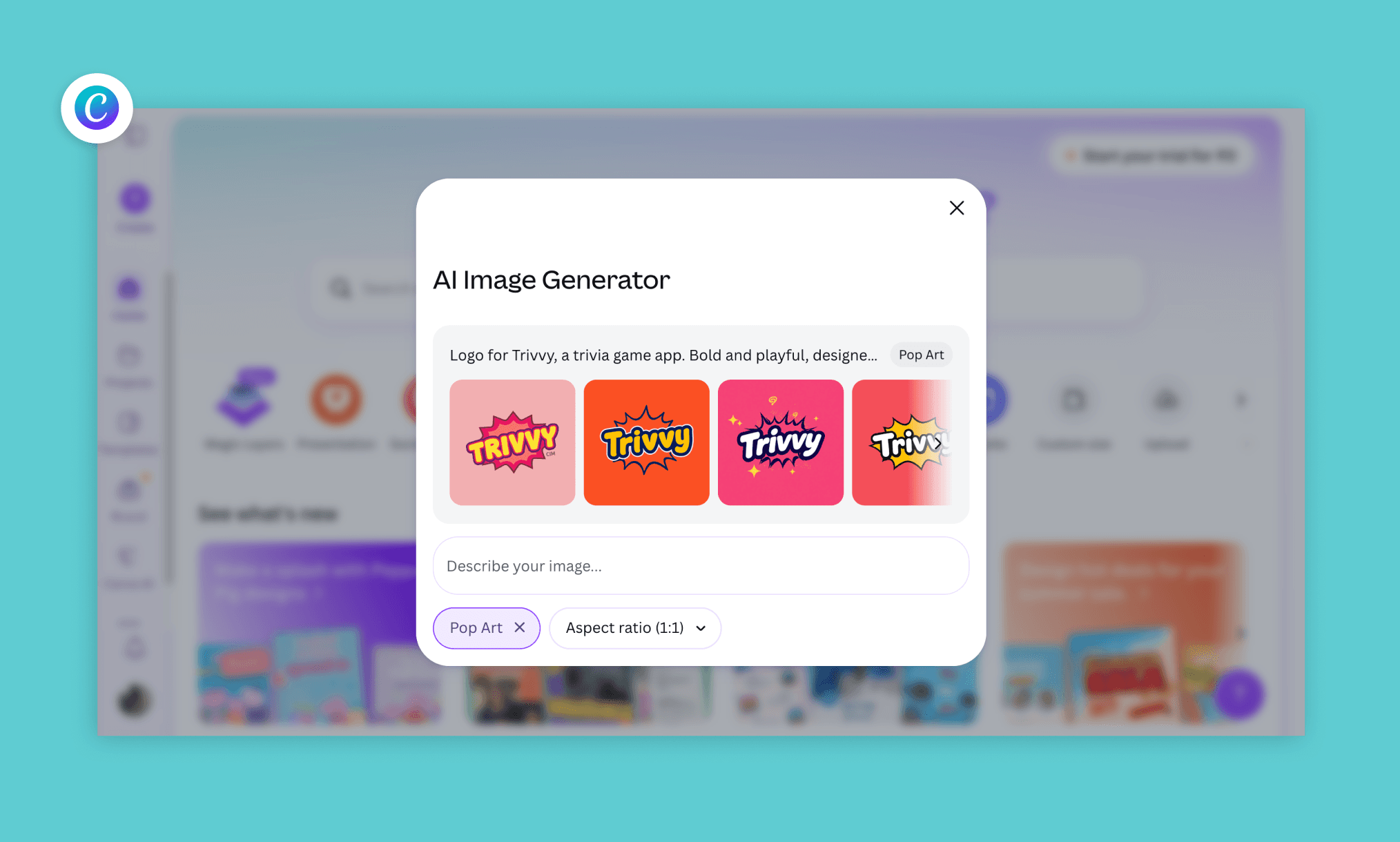
Sonuç Analizi
Canva AI, 30 saniyede 5 logo çıkardı. PNG olarak indirilebilir veya manuel olarak renk/arkaplan düzenlenebilir. Sonuçlar biraz düz olsa da isteme sadık kalması güzel.
Öne Çıkan Özellikler
Ana tasarım editörüne entegre AI logo oluşturucu
İstem başına 5 varyasyon, anında PNG dışa aktarma
Tek tıkla tamamen manuel düzenlemeye geçiş
İnce ayarlar için devasa şablon ve görsel kütüphanesi
Fiyatlandırma
Yılda 200 standart AI kredisini ücretsiz kullanabilirsiniz. Canva PRO ise single kullanıcı için aylık 15$.
Canva AI ile UI Tasarımının Gerçeği >
Adobe Express
Adobe Express, Adobe'nin tarayıcı tabanlı hafif tasarım aracıdır. Firefly GenAI altyapısıyla hızlı pazarlama grafikleri üretmek için harika bir alternatiftir.
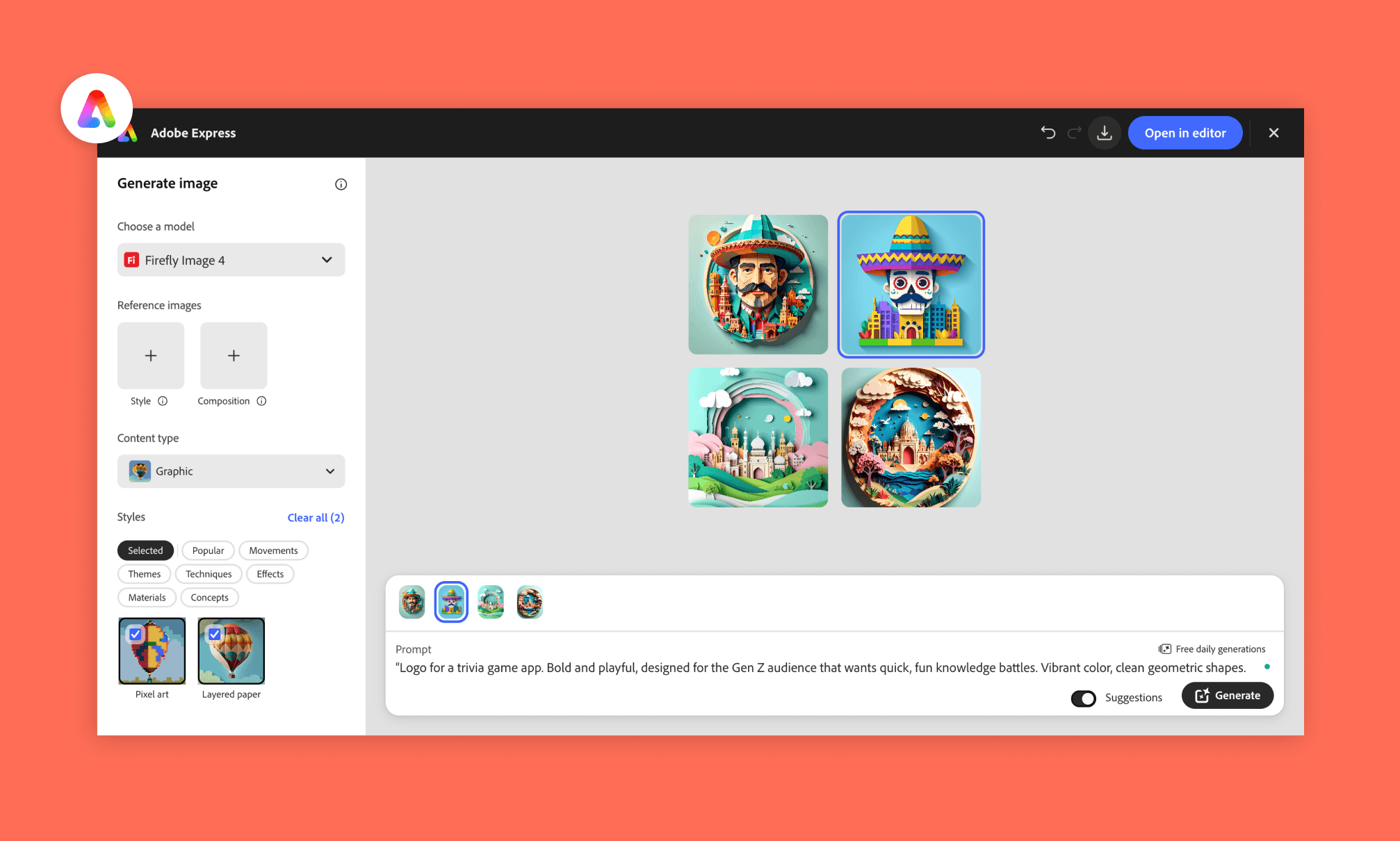
Sonuç Analizi
Adobe 4 varyasyon üretti. Logo yerine daha çok görsele odaklandı ancak manuel/AI düzenleme seçenekleri, görsel referanslar ve stil kontrolleri harikaydı.
Öne Çıkan Özellikler
Adobe Firefly Image 4 altyapısı
Oluşturma öncesi derin stil ve görsel referans kontrolleri
Günlük ücretsiz hak, Creative Cloud üyeliği gerektirmez
Adobe ekosistemine kolay dışa aktarma
Fiyatlandırma
Sınırlı günlük ücretsiz kullanım sunar. Premium bireysel plan aylık 9.99$ (250 AI kredisi).
Freepik (Magnific) AI Tasarım Paketi İncelemesi >
Görsel Oluşturma
Logolar tonu belirler, görseller ise içeriği taşır. Midjourney'in en güçlü olduğu bu alanda en doğru alternatifleri aradım. Trivvy için iki görsele ihtiyacım vardı: eğlenceli bir ana görsel ve gerçekçi soru kartı görselleri.
Ana Görsel İstemi
“Açılan bir hazine sandığından çıkan yıldızlar, renkli hayvanlar ve parlayan moleküller. Canlı renkler, belirgin ana hatlar, çizgi roman tarzı enerji çizgileri.”
Soru Kartı İstemi
“Sık bir kıyı ormanında duran nesli tükenmiş dodo kuşunun fotogerçekçi canlandırması, arkada deniz, detaylı tüyler, vahşi yaşam fotoğrafçılığı tarzı.”
Nano Banana (Gemini İçinde)
Nano Banana, Google'ın Gemini içinden ücretsiz erişilebilen görsel modelidir. Tasarım yetenekleriyle sürekli kendini geliştirmeye devam ediyor.
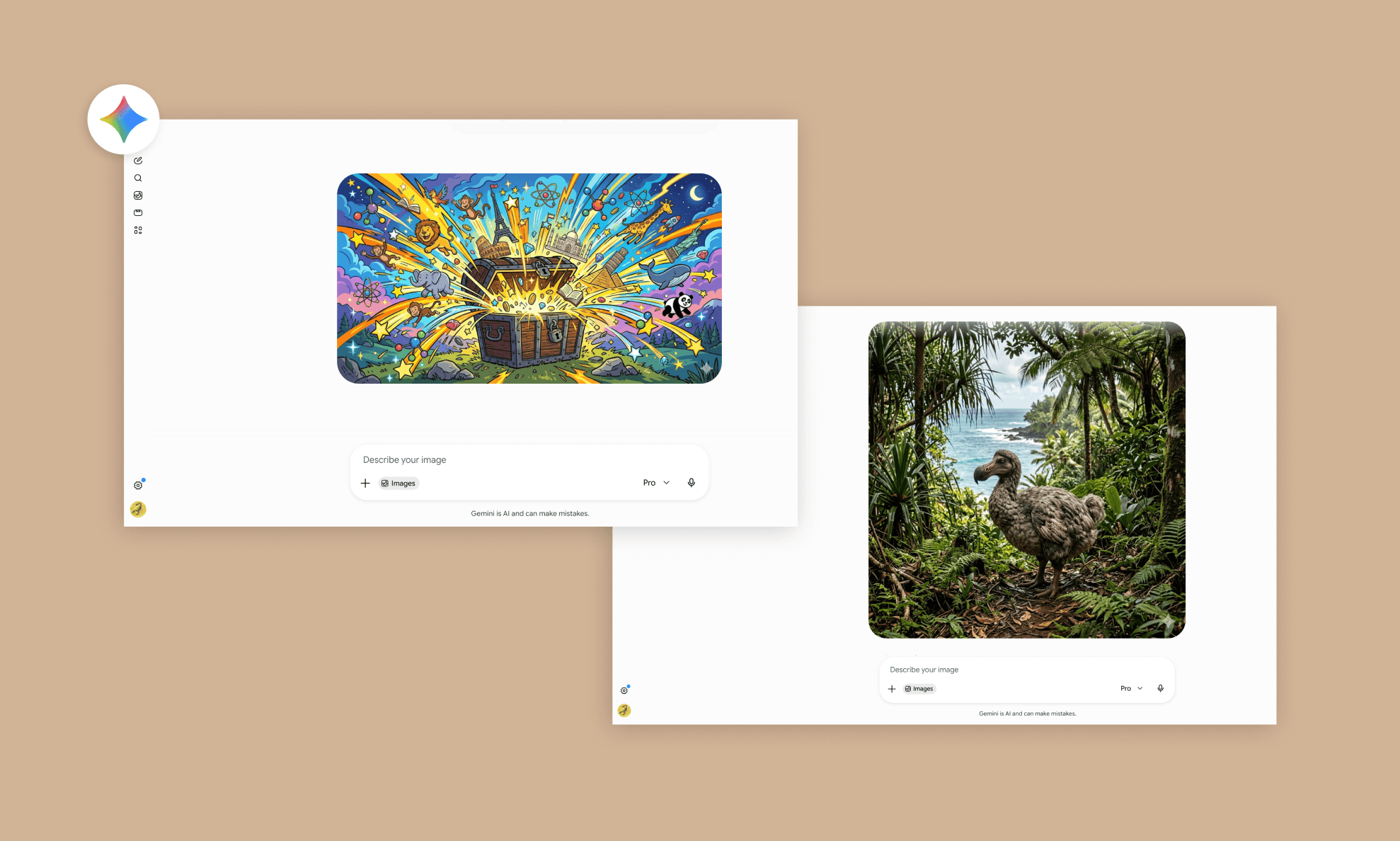
Sonuç Analizi
Gemini 3.1 Pro tabanlı Nano Banana iki istemi de tekte başardı. Hazine sandığı harika bir enerjiye sahipti, dodo kuşu ise gerçek bir fotoğraf gibi duruyordu.
Öne Çıkan Özellikler
Gemini'a entegre, ekstra hesap gerekmez
İlk denemede güçlü isteme sadakat oranı
Hem illüstrasyonlarda hem fotogerçekçilikte başarılı
Hızlı üretim, bekleme sırası yok
Fiyatlandırma
Gemini içinde günlük limitlerle ücretsiz kullanılabilir. Ücretli planlar aylık 4.99$'dan başlıyor.
Gemini 3.1 Planları ile UI Tasarım Örnekleri >
Dall E (ChatGPT İçinde)
DALL-E, OpenAI'ın ChatGPT içinde sohbet ederek görseller üretebileceğiniz ve revizyon verebileceğiniz popüler görsel modelidir.
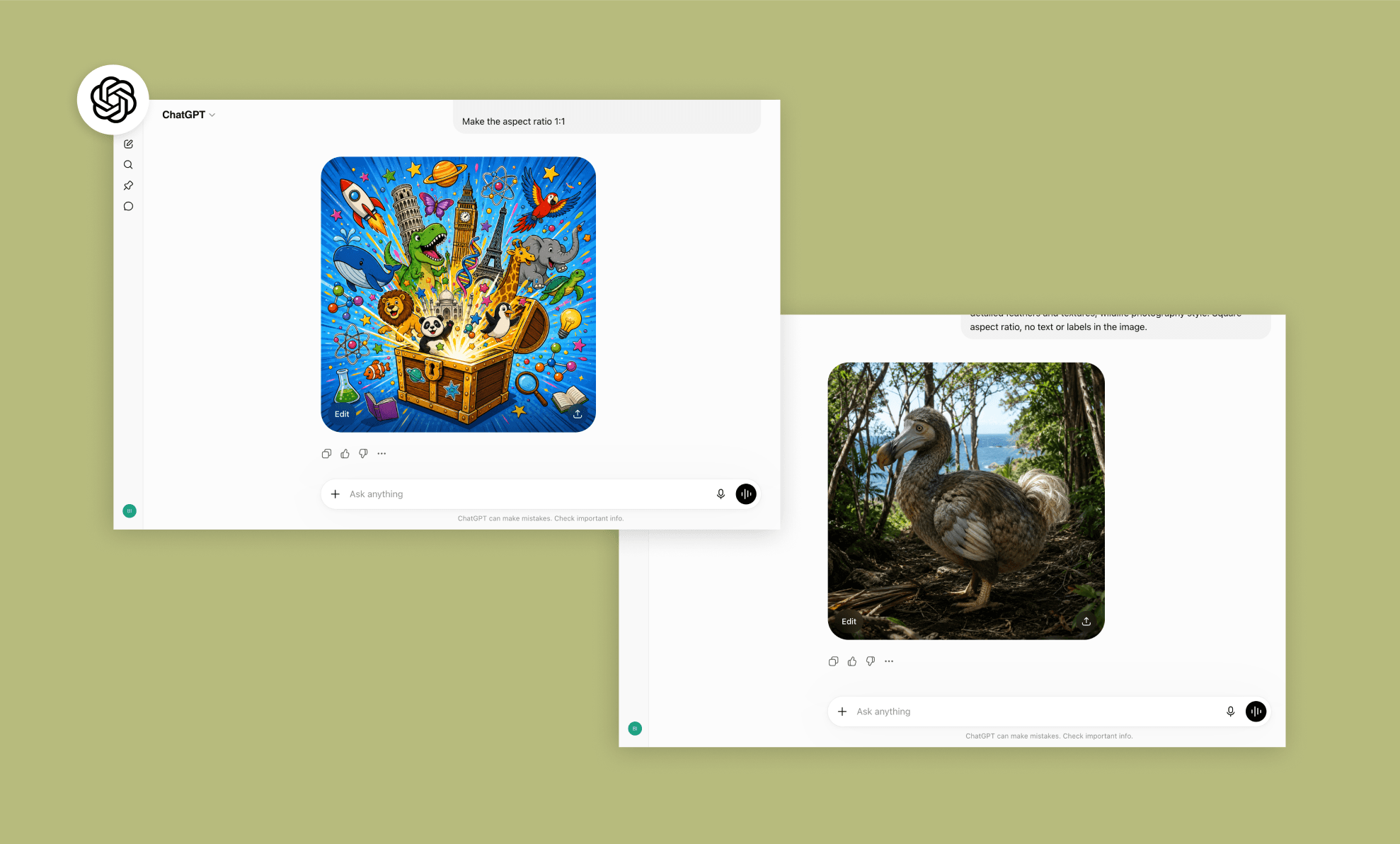
Sonuç Analizi
Üretim için GPT-5.4 kullandım. Sandıktan fırlayan objelerin uyumu ve dodo kuşunun ışık kontrolü oldukça etkileyiciydi. Sonuçları çok beğendim.
Öne Çıkan Özellikler
Hızlı AI düzenlemeleri için sohbet tabanlı ilerleme
Format, renk ve detaylar için kolay revizyon süreçleri
Çoğu kişinin halihazırda kullandığı ChatGPT arayüzü
Doğa ve vahşi yaşam konularında tatmin edici gerçekçilik
Fiyatlandırma
Ücretsiz plan günde 2-3 adet görsel sunar. ChatGPT Plus ise 3 saatte ~50 görsel üretmek için aylık 20$'dır.
UI Tasarımı için GPT-5.4 Testlerim >
Krea AI
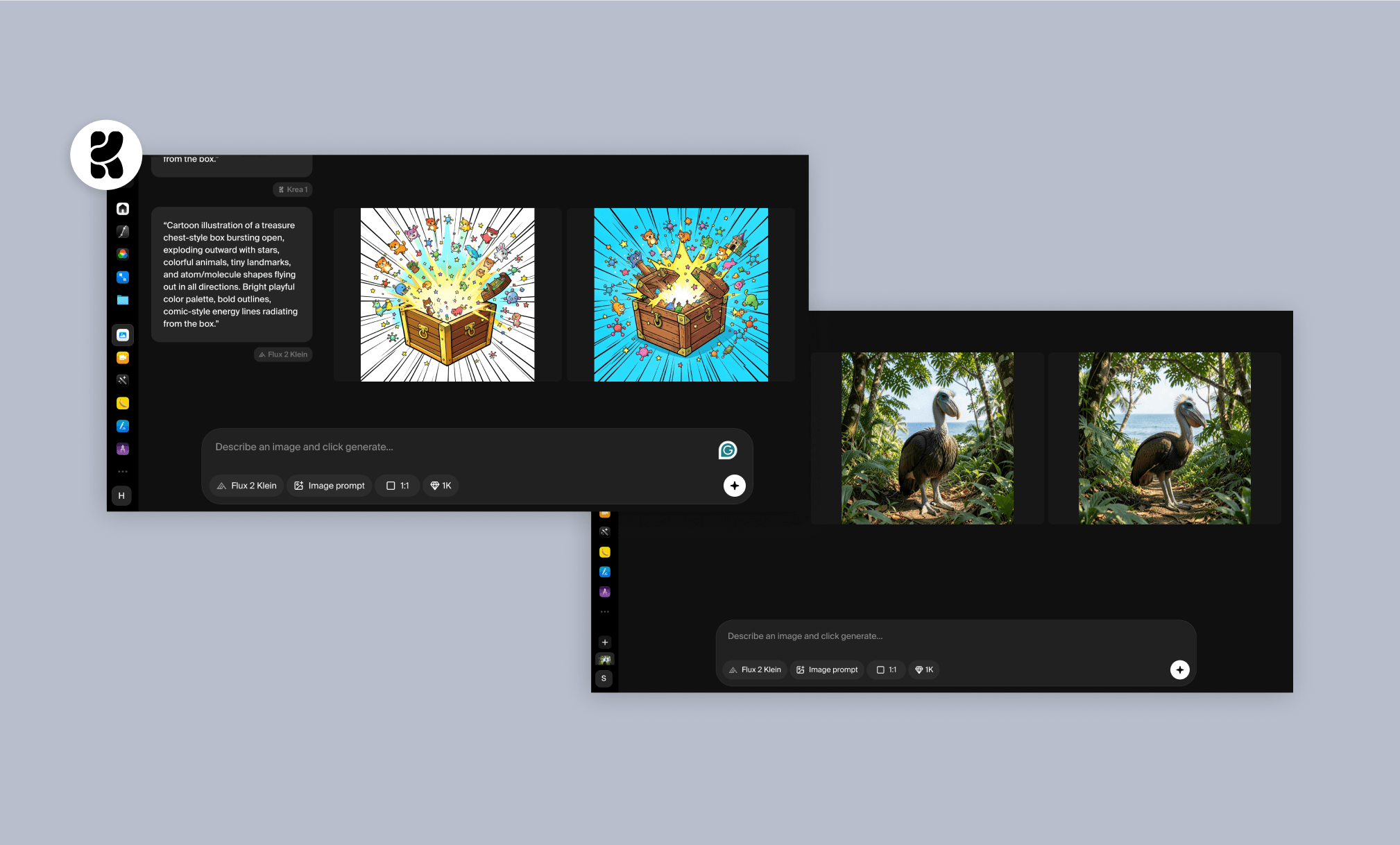
Krea; Flux, Nano Banana gibi üçüncü parti modellerin yanı sıra kendi modelini de barındıran, görsel ve video odaklı gelişmiş bir kreatif AI platformudur.
Sonuç Analizi
Burada Flux 2 modelini seçtim. Karşılaştırma kolaylığı için yan yana 2 varyasyon sundu. Çizgi film tarzı görseller biraz zayıf kalsa da, dodo kuşunun gerçekçi varyasyonları kesinlikle harikaydı.
Öne Çıkan Özellikler
Tek üyelikle 64+'ten fazla modele erişim
Tek üretimde yan yana varyasyon karşılaştırması
Hızlı çözünürlük artırma (upscale) ve düzenleme araçları
Görsel başına ~10 saniye süren yüksek hız
Fiyatlandırma
Ücretsiz plan günlük 100 işlem puanı sunar. Basic plan ise yıllık alımda aylık ~5.25$'dır.
Krea AI Görsel Oluşturma Deneyimim >
Stable Diffusion: Açık Kaynak Alternatifi
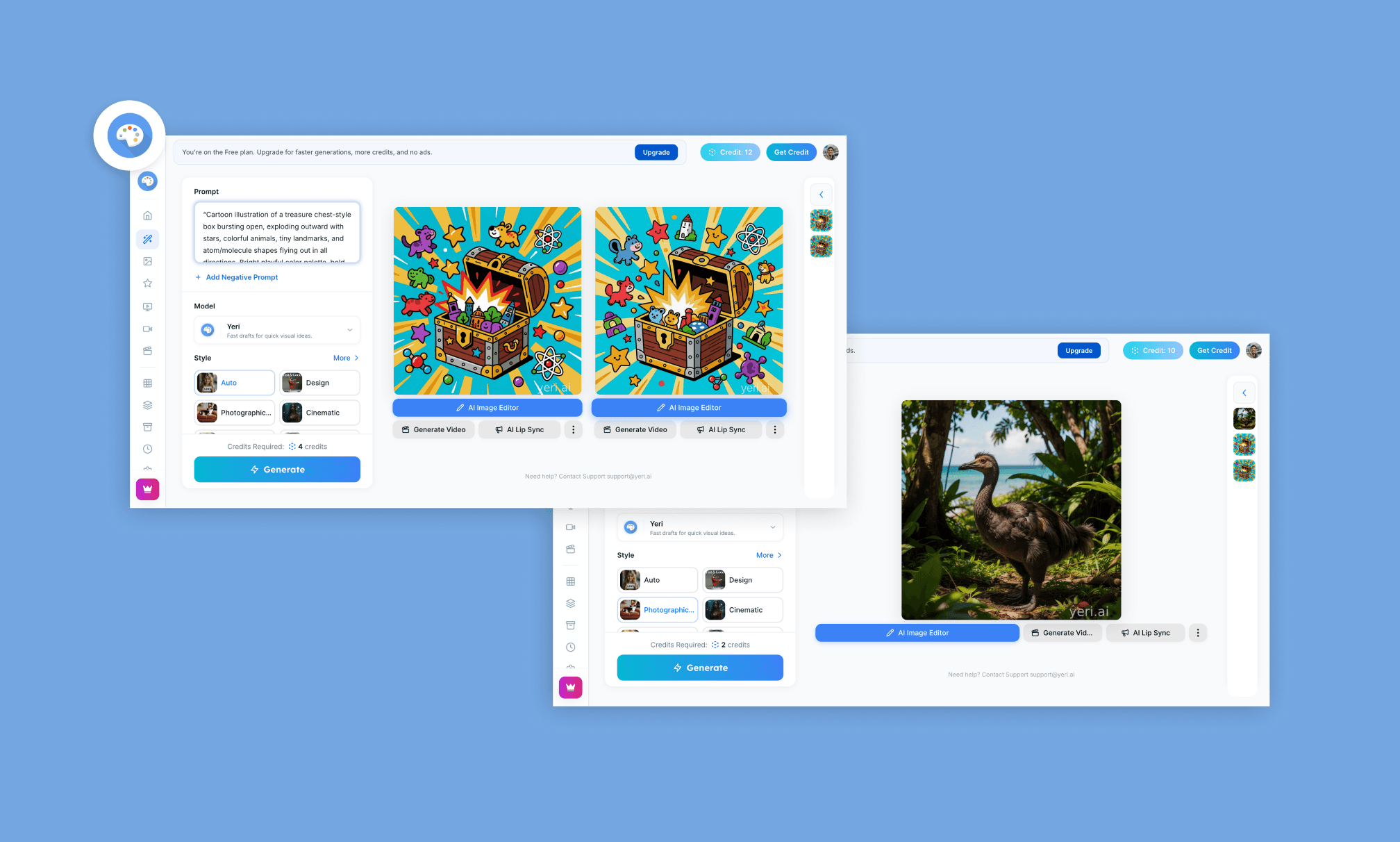
Stable Diffusion, Midjourney için en güçlü açık kaynaklı alternatiftir. Kendi sunucusunu kurmak istemeyenler yeri.ai gibi platformlardan erişebilir.
Sonuç Analizi
Stable Diffusion içinde varsayılan olarak Yeri.ai kullandım. Çizgi film varyasyonları birbirine çok yakındı ve ortalama çıktı. Ancak Dodo kuşu oldukça gerçekçiydi. Görsellerde Yeri AI filigranı bulunuyordu.
Öne Çıkan Özellikler
Açık kaynak kodludur, tam kontrol için kendi donanımınızda çalışabilir
Tek bir şirketin ücretsiz limitlerine bağlı kalmazsınız
İnce ayarlı modellerden oluşan dev bir topluluğu vardır
yeri.ai gibi servisler kurulum zahmetini ortadan kaldırır
Fiyatlandırma
Stability AI tarafından sunulan açık kaynaklı model ücretsizdir. yeri.ai kullanan ücretsiz plan günlük ~10 kredi sunarken, ücretli planlar aylık 20$'dır.
Claude Design Açık Kaynak Alternatifleri >
Vektörler & İkonlar
Vektör ve ikonlar, uygulamalarda az kelimeyle çok şey anlatmanızı sağlar. Ana sayfa için bir vektör grafiğe ve soru kartları için logoyla uyumlu ikon setine ihtiyacım vardı.
Vektör İstemi
“Popüler çizgi roman tarzında üzerinde kupa ve parıltılar uçuşan renkli soru kartları, kalın siyah çizgiler, sıcak sarı ve turuncu renk paleti.”
İkon İstemi
“Çocuk bilgi yarışması için düz vektör ikon seti: pati izi (hayvan kategorisi), alev (zorluk derecesi), geri sayım sayacı, doğru ve yanlış işaretleri. Kalın yuvarlak hatlar, sarı ve turuncu tonlar.”
*İkonları toplu istedim ancak çoğu araç bunları her defasında tek tek üretir.
Recraft
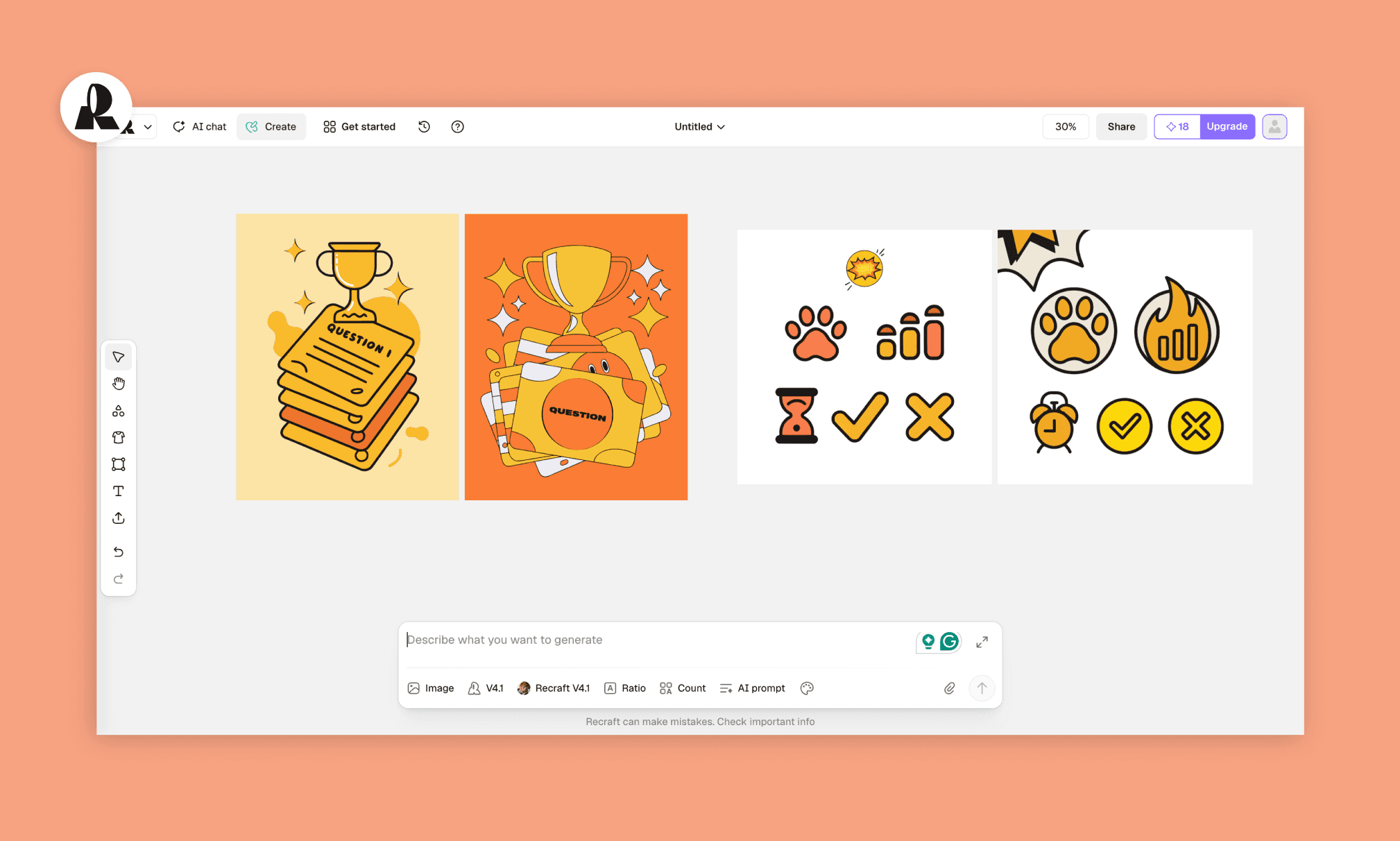
Recraft, özellikle vektör, ikon ve markaya özel illüstrasyonlar için geliştirilmiş, içinde kendi modelini de barındıran profesyonel bir generative AI aracıdır.
Sonuç Analizi
Figma benzeri çalışma alanı sayesinde tek seferde çoklu ikon tasarlayabildik. En son modelleri Recraft V4.1'i kullandım. Çıktılar tutarlı, vektör ve ikon setleri birbiriyle uyumluydu.
Öne Çıkan Özellikler
Tek tuval üzerinde çoklu öğeler üretip yönetme
Sadece piksel değil, orijinal SVG vektör formatında çıktı alma
Tüm ikon seti boyunca mükemmel görsel kararlılık
Tuval dışına çıkmadan hızlıca düzenleme imkanı
Fiyatlandırma
Günlük 30 kredi ile ücretsizdir. Yıllık alımlarda ücretli seçenekler aylık 10$'dan başlıyor.
IconScout
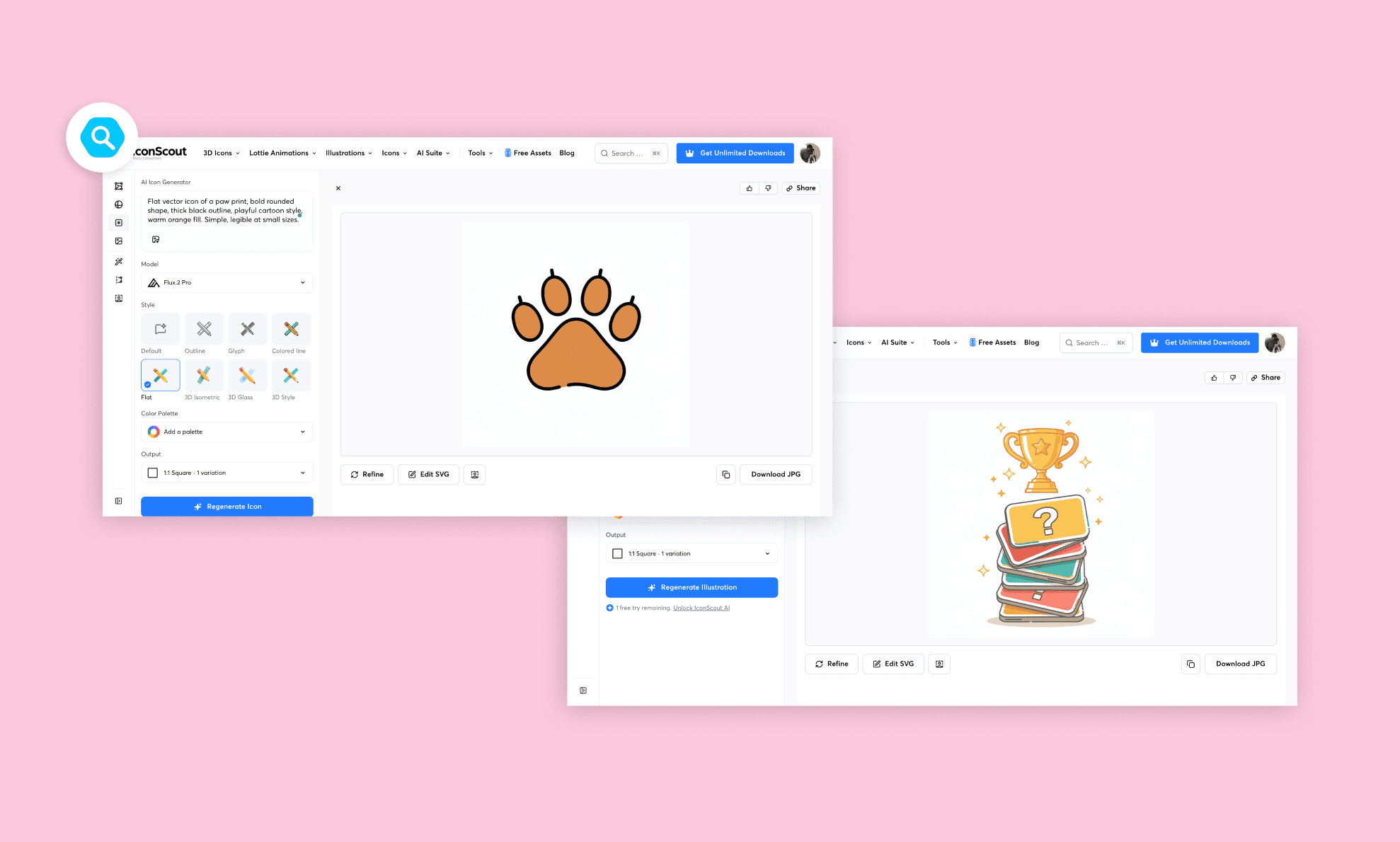
IconScout, devasa ikon havuzunun üzerine popüler Figma eklentisiyle entegre edilmiş güçlü bir yapay zeka jeneratörüdür.
Sonuç Analizi
Tekli ikon üretiminde stil ve detay üzerinde yüksek denetime sahip. Ancak ikonları bir set halinde değil, her birini tek tek üretmeniz gerekiyor.
Öne Çıkan Özellikler
AI üretiminin yanında 14 milyondan fazla hazır ikon kütüphanesi
Figma, Canva ve Adobe eklenti desteği
Stil seçimi (kontur, düz, 3D, izometrik)
Üretim sonrasında hızlı düzenleme yapmak için dahili SVG editörü
Fiyatlandırma
Günlük 3 kredi ile ücretsizdir. Sınırsız indirme ve 500 yapay zeka kredisi içeren bireysel plan aylık 9.99$'dır.
Görsel & İkonlar için Favori Figma AI Eklentilerim >
Tipografi Düzenlemeleri
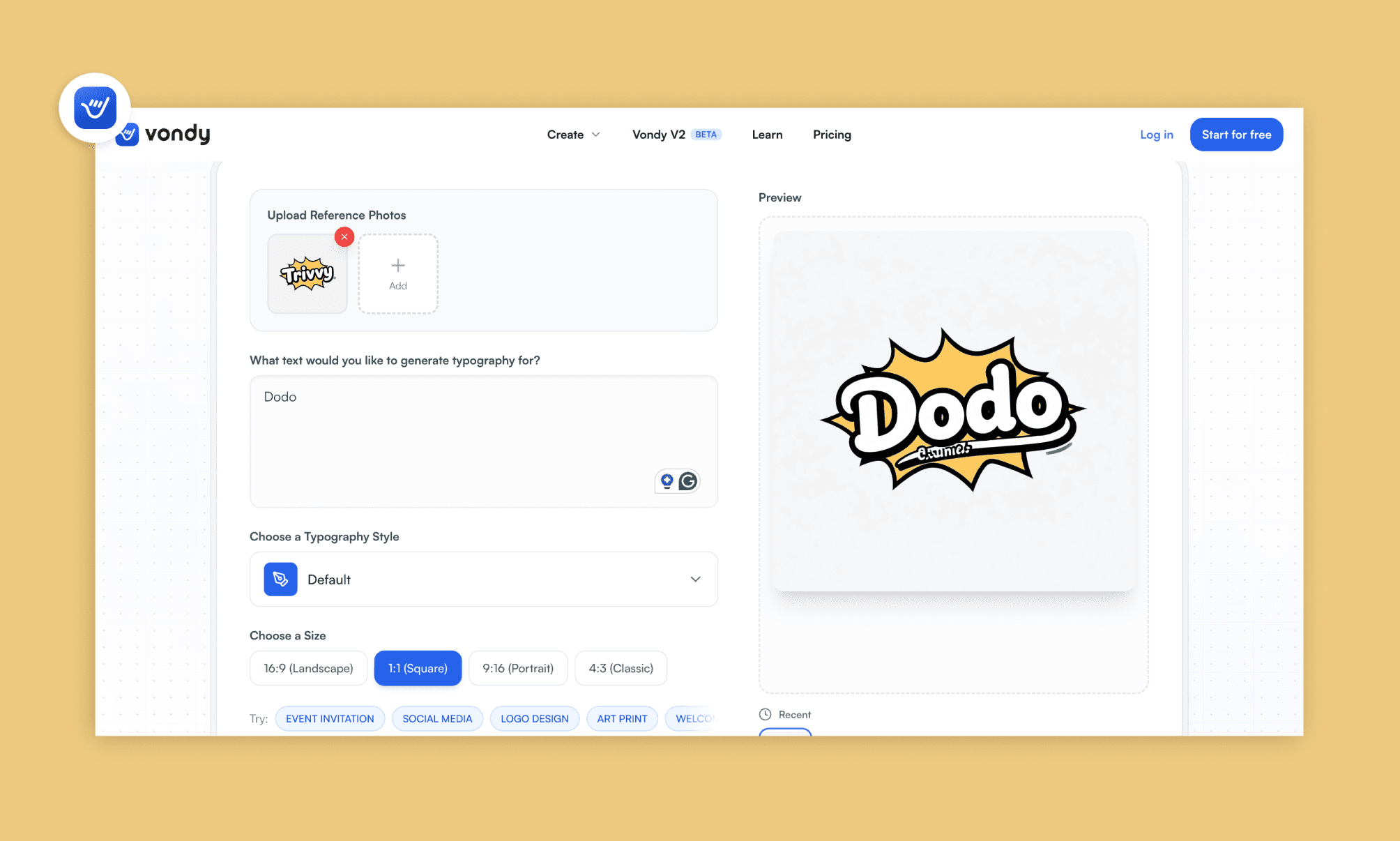
Son olarak, logonun çizgi roman tarzına birebir uyan bir tipografiye ihtiyacım vardı. İdeogram gibi alternatifleri denedim ama basitliği ve doğruluğu ile Vondy öne çıktı.
Tipografi İstemi
“Kalın yuvarlak harfler, siyah konturlu ve sarı-turuncu dolgulu 'Dodo!' yazısı. Ekli görseldeki yazıya uyan, hafif 3D derinlikte kutlama havasında yazı efekti.”
*Referans olarak daha önce Canva AI kullanarak tasarladığımız logoyu ekledim.
Vondy AI
Vondy, binlerce tek amaçlı yapay zeka aracını ve modeli bünyesinde barındıran üretkenlik platformudur. Basitliğiyle benim favorim oldu.
Sonuç Analizi
Sadece referans görseli yükleyip metni yazıyorsunuz; platform tam o tarzda bir font çıktısı veriyor. Karmaşık prompt mühendisliğiyle uğraşmıyorsunuz.
Öne Çıkan Özellikler
Sadece metin değil, görsel referansı da kabul etme
Referans görseldeki renk, kalınlık ve stil detaylarını kopyalama
Farklı çıktı formatları (PNG, SVG, JPEG, PDF)
Hesap kurulumu gerektirmeyen hızlı ve pratik kullanım
Fiyatlandırma
Ücretsiz planda günlük sınırlı kredi vardır. Ücretli planlar 10 bin kredi için aylık 20$'dan başlar.
Öne Çıkan Ücretli Midjourney Alternatifleri
Ücretsiz listemi hazırlarken denediğim birçok yapay zeka modeli oldu. Aşağıdaki güçlü Midjourney rakipleri de kesinlikle radarınızda olmalı.
Yapay Zeka Aracı | En İyi Kullanım Amacı |
Leonardo AI | Tekrarlanan üretimlerde tutarlı karakter ve oyun sanatı esnekliği |
Adobe Firefly | Creative Cloud iş akışları için telifsiz ve güvenli üretimler |
Higgsfield | Sinematik görsel ve yaratıcı video oluşturma süreçleri |
Playground AI | Yüksek hacimli üretimler için cömert günlük ücretsiz kota |
Mevcut görsellere ince detaylar ekleyerek ölçekleme (Upscale) | |
Tekrarlı üretimler için düğüm (node) tabanlı, esnek iş akışları |
Midjourney Rakipleri Fiyat Karşılaştırması >
AI ile Tüm Arayüzü Üretmek
Gördüğünüz gibi tek bir Midjourney alternatifi her şeyi çözemiyor ama uzman araçlar var: Logo için Canva, görseller için Nano Banana, ikonlar için Recraft ve yazı için Vondy.
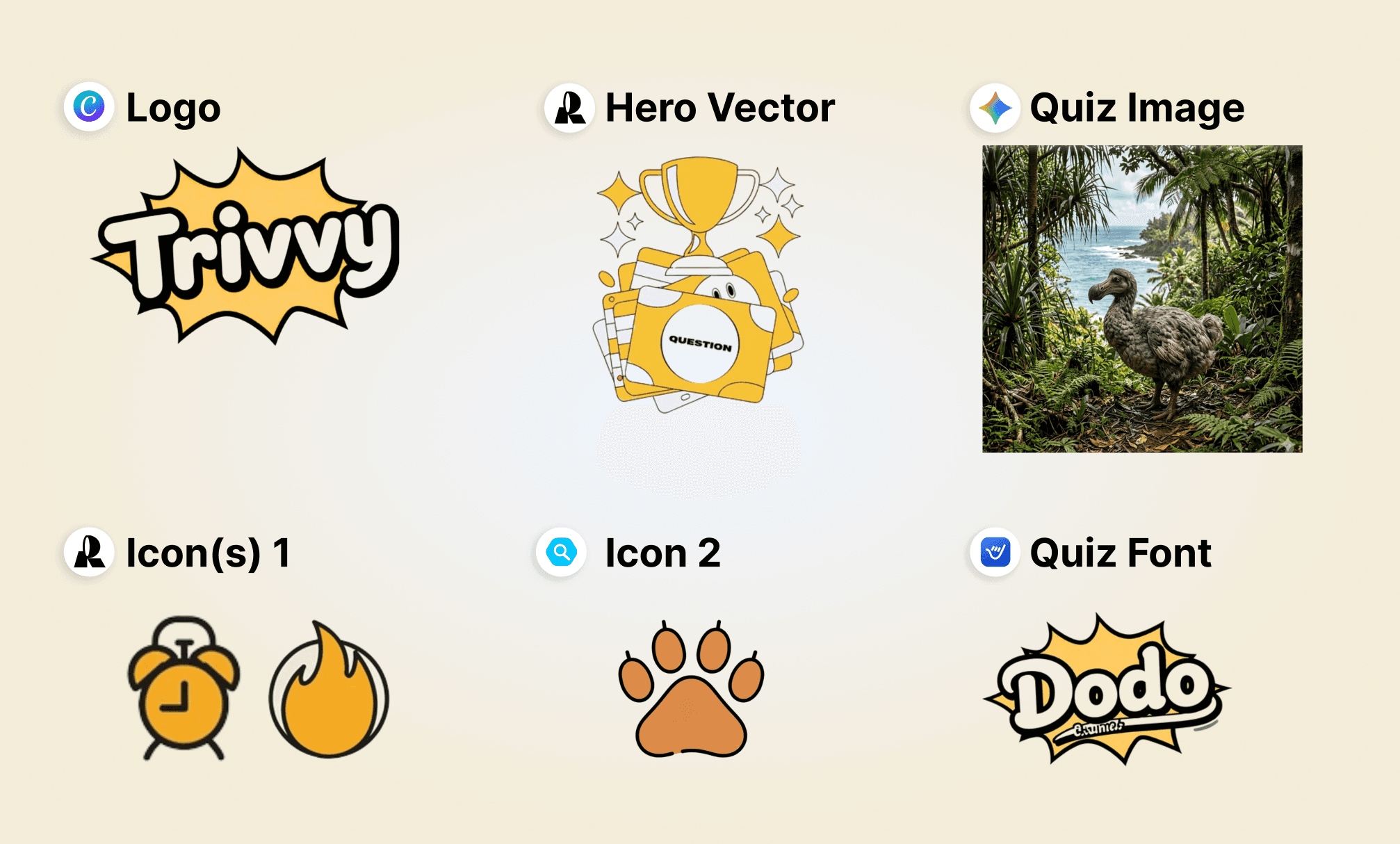
Peki tüm bu arayüz bileşenlerini tek bir seferde bir araya getiren kestirme bir yol yok mu? İşte burada devreye bir AI UI tasarım aracı giriyor; Banani AI bu alandaki en popüler ve bütçe dostu araçlardan biri.
Bu testi iki şekilde yaptım: İlkinde yukarıdaki kendi ürettiğim görselleri referans verdim; ikincisinde ise sadece metin girdim.
Referans Tasarımlarla Banani AI Trivvy Uygulaması
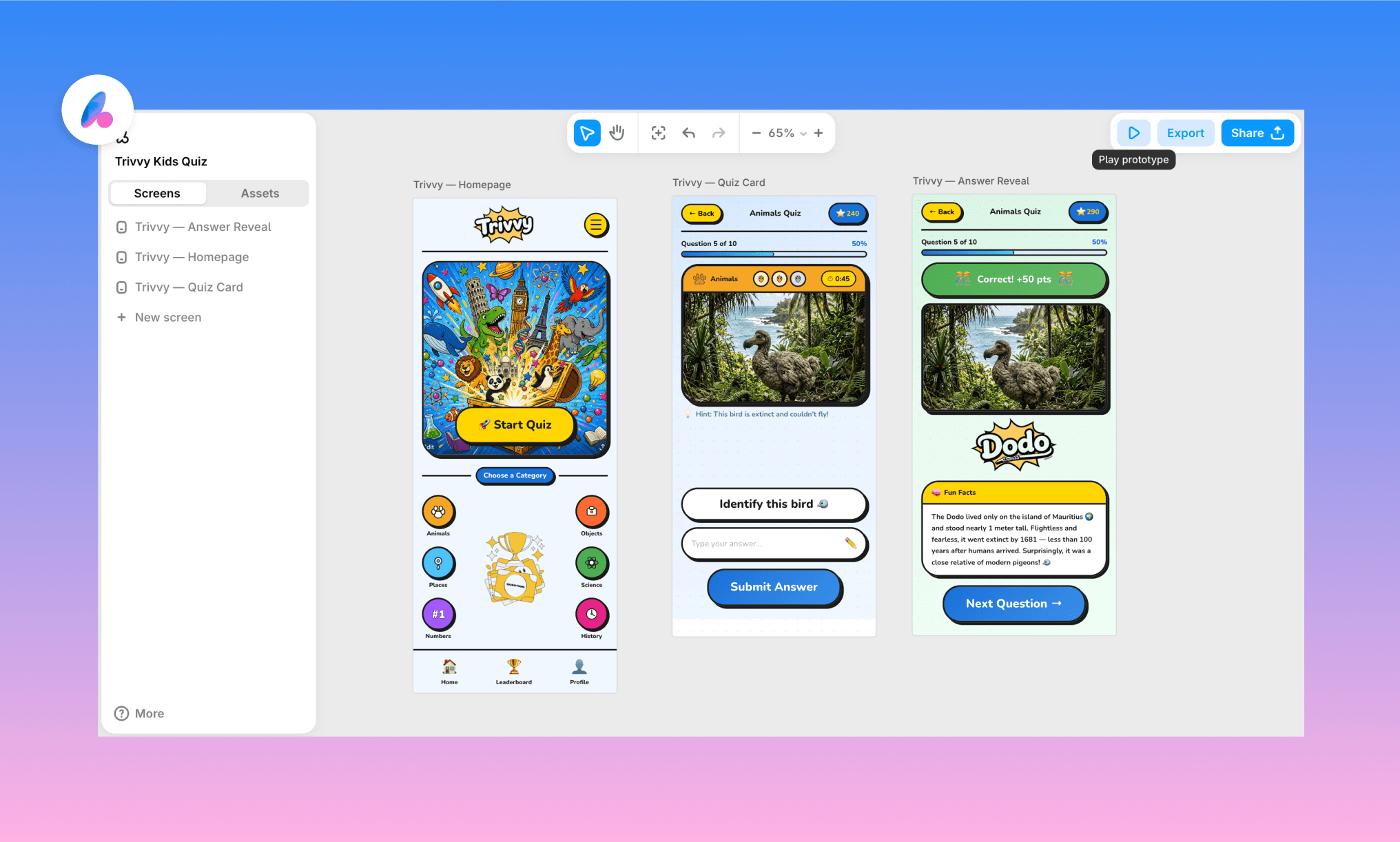
Üstteki ücretsiz Midjourney alternatifleri ile oluşturduğum logo ve görselleri yükleyerek Banani'den mobil arayüzü çizmesini istedim.
İstem:
“Çizgi roman tarzında, sarı-turuncu tonlarda Trivvy mobil uygulaması için 3 ekran tasarla. Kalın çizgiler ve yuvarlak şekiller kullan. Ekli görselleri tasarıma referans al.
Ekran 1 — Ana Sayfa: En üstte Trivvy logosu. Altında açılan hazine sandığı ana görseli (ekli görsel). Onun altında 'Yarışmaya Başla' butonu.
Alt kısımda kupa grafiklerini göster (ekli görsel). Peşinden oyun kategorileri dairelerini listele: Hayvan (ekli pati ikonu), Coğrafya vb. Tüm ikonlar pati ikonu tarzında ama farklı renklerde olsun.
Ekran 2 — Soru Kartı: Gerçekçi dodo kuşu fotoğrafı (ekli görsel) içeren bir soru kartı. Pati ikonu, zorluk seviyesi alevleri (ekli görsel) ve geri sayım sayacı olsun. Kartın altında 'Bu kuşu tahmin et' sorusu ve cevap kutusu yer alsın.
Ekran 3 — Cevap Ekranı: Aynı dodo fotoğrafı altında 'Dodo!' tipografisi (ekli görsel) ile doğru cevap teyidi. Altında kuş hakkında ilginç bilgiler ve 'İleri' butonu.
Tüm ekranlar görsel olarak uyumlu bir mobil uygulama düzeninde olmalı.”
Ücretsiz inceleyin, düzenleyin veya kopyalayın >
*Boşlukları ayarlamak için ufak tefek değişiklikler yapmam gerekti
Sıfırdan Banani AI ile Trivvy Mobil Uygulaması
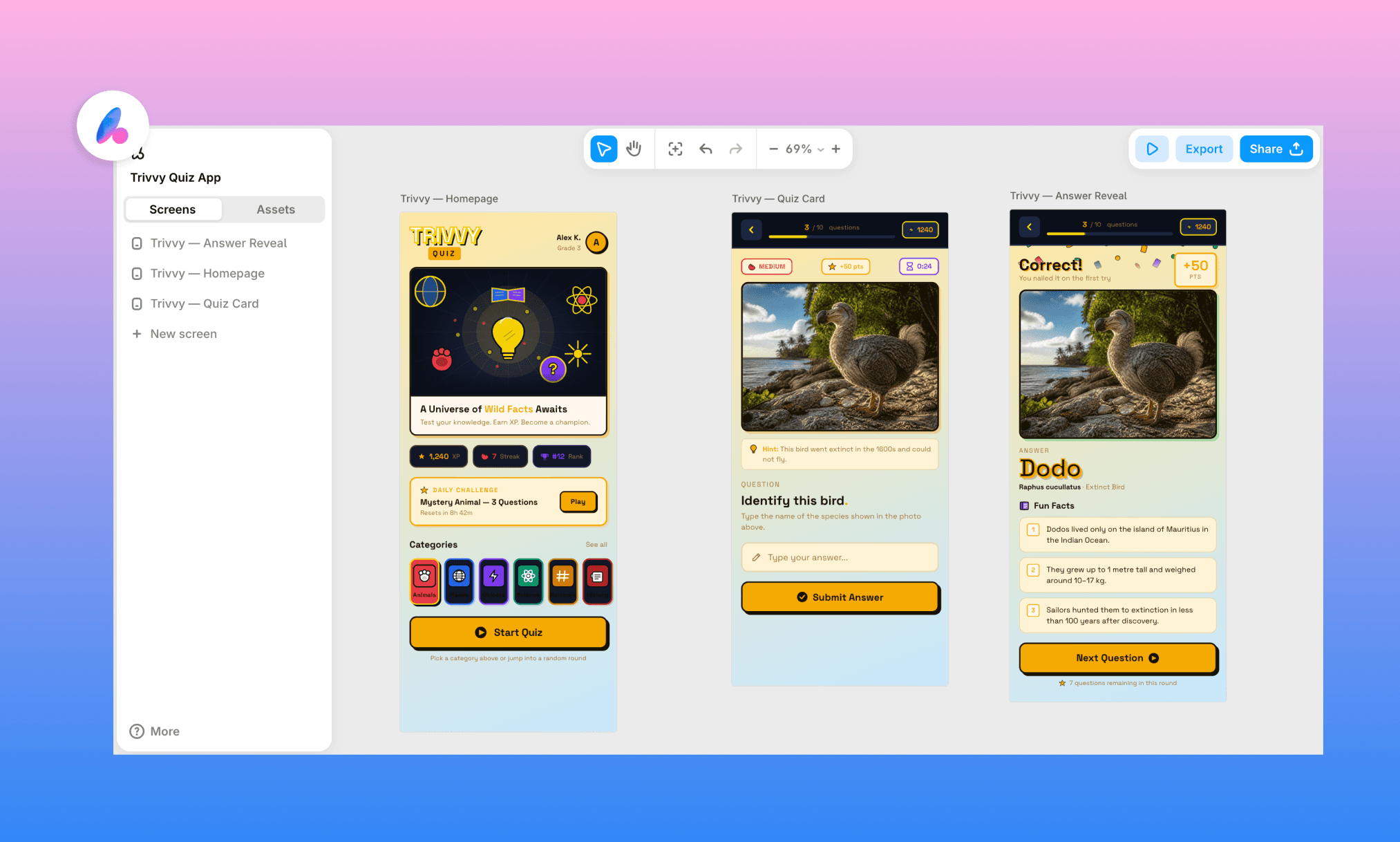
Burada ise Banani AI UI jeneratörünü kendi haline bıraktım. Hiçbir referans görsel veya renk kodu vermeden sadece hissetmesini istediğim duyguyu ve ekran yapılarını tarif ettim.
Ücretsiz inceleyin, düzenleyin veya kopyalayın >
Her iki sonuç da beni gerçekten şaşırttı. Referans görsellerle Banani, Trivvy uygulamasını tutarlı bir mobil şablona dönüştürdü. Sıfırdan çizdiği versiyon ise sadece his tarifinden harika bir karakter yakaladı. En iyi yanı, her çıktının tamamen düzenlenebilir olması, Figma'ya doğrudan aktarılması ve Claude Code gibi kodlama araçlarına hazır olmasıdır. Üstelik Banani, aynı tuval üzerinde yeniden kullanılabilir bileşenleri (bir nevi Design MD dosyası) paralel olarak üretir.
İşte böyle! En iyi 9 Midjourney alternatifi yapay zeka ve harika kestirme yol Banani AI. Tek tek görsel toplamak istemiyorsanız, Banani sizi tek bir istemle nihai tasarıma ulaştırır.
Midjourney Alternatifleri Hakkında SSS
Midjourney en iyi AI görsel üreticisi mi?
Midjourney özellikle sanatsal çizimlerde en iyilerden biri. Ancak 'en iyi' tanımı ihtiyacınıza ve bütçenize göre değişir.
Midjourney, DALL-E'den daha mı iyi?
Midjourney çok daha stilize ve sanatsal işler çıkarırken, ChatGPT içindeki DALL-E istemleri kelimesi kelimesine anlamada ve revizyonlarda daha başarılıdır.
Midjourney'in açık kaynaklı bir alternatifi var mı?
Evet, yeri.ai gibi platformlar üzerinden de erişilebilen Stable Diffusion en popüler açık kaynaklı alternatiftir.
UI tasarımları için en iyi ücretsiz Midjourney alternatifi hangisidir?
Parçaları tek tek tasarlamak için yukarıdaki uzman araçlar harika. Ancak hepsini tek bir arayüz tasarım şablonunda toplamak için Banani AI en iyi kısayoldur. İstemi yazın ve düzenlenebilir çıktıyı dakikalar içinde alın.
Referanslar
[1] midjourney.com
[2] canva.com/ai-logo-generator
[3] adobe.com/express/create/logo
[4] gemini.google.com
[5] chatgpt.com/images
[6] krea.ai
[7] stablediffusionweb.com
[8] recraft.ai
[9] iconscout.com/ai-suite/icon-generator
[10] vondy.com/ai-typography-generator


