
Reseña de Freepik AI Image Generator (2026)
Características | Generación de imágenes multimodelo (Flux, Mystic, etc.), ajustes preestablecidos de estilo, integración de stock + IA |
Pros | Excelente alineación con el prompt, resultados muy atractivos visualmente y un flujo de trabajo todo en uno con herramientas de edición |
Contras | Tipografía y renderizado de iconos deficientes; resultados inconsistentes para prompts complejos o de UI |
Precios | Sistema basado en créditos. El plan gratuito está limitado al modelo 'Auto'. Los planes de pago comienzan desde $7.5 / mes con facturación anual. |
Alternativas |
La evolución de Freepik hacia Magnific AI
Un directorio de referencia para vectores y fotos de stock freemium desde 2010, la trayectoria de Freepik cambió en 2023 durante la primera ola de IA. Freepik evolucionó a 'Freepik AI Suite', combinando sus más de 200 millones de recursos de stock con GenAI y herramientas de edición para imágenes, videos, audios y diseño; impulsado por Flux, Kling, ChatGPT, ElevenLabs y más[2].
A partir de mayo de 2026, Freepik ha cambiado de marca a Magnific. Esto se debe a que quieren alinear su evolución: pasaron de ofrecer acceso creativo a construir infraestructura creativa. Las suscripciones de los usuarios actuales, los recursos, los proyectos, etc., se trasladan con ellos.
Evolución de MidJourney: de gratis a solo de pago >
Mis pruebas con la generación de imágenes de Freepik
Primeros pasos: Interfaz, modelos y configuración
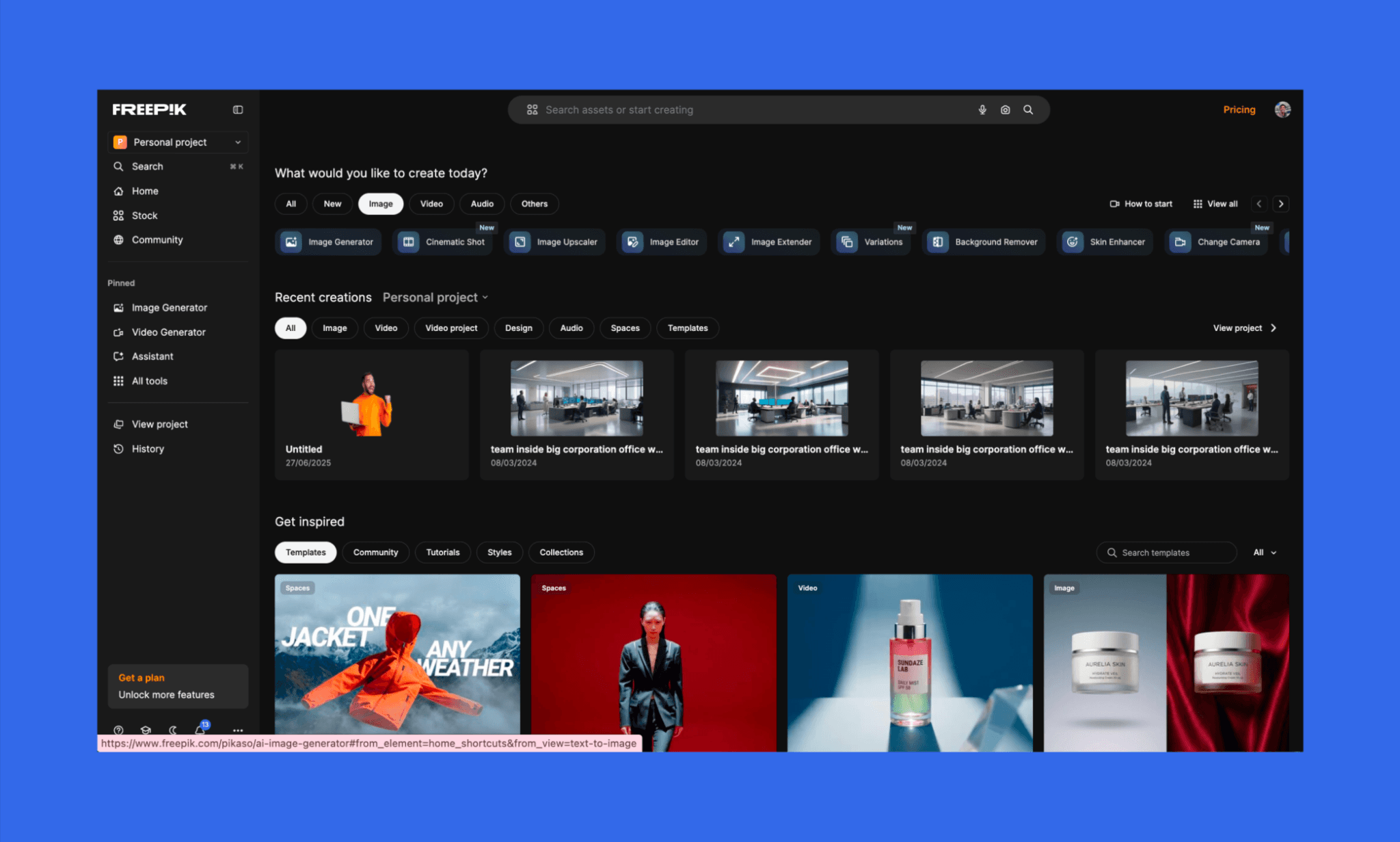
Comenzando mi reseña de Freepik con el propio onboarding, descubrí que la experiencia de bienvenida fue fluida y nada intrusiva (sin pop-ups pidiéndome actualizar antes de probar la herramienta). Y de entrada, se podían ver dos opciones para comenzar a generar imágenes con IA: desde el botón superior o desde la barra lateral izquierda.
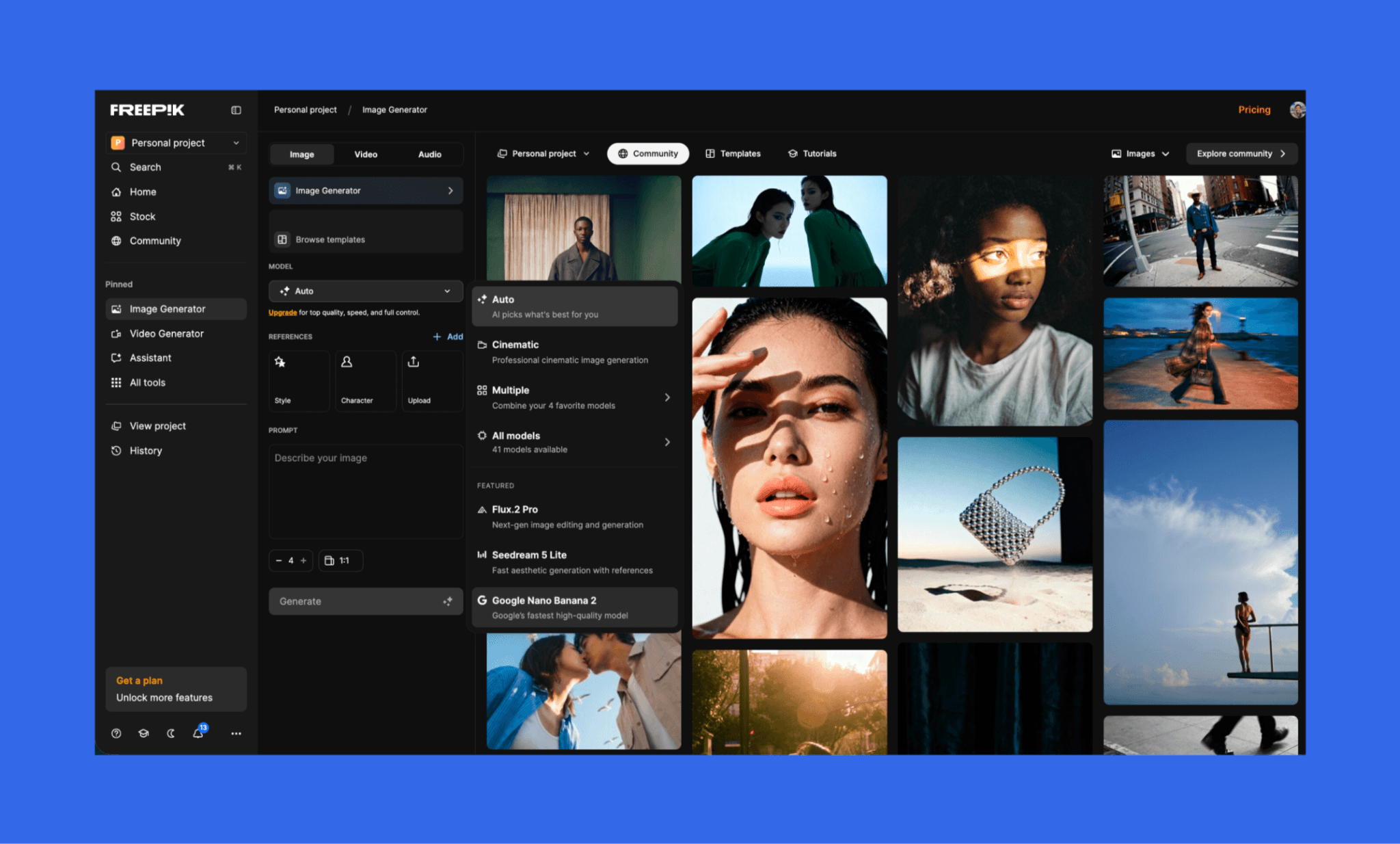
Una vez que abres el Generador de Imágenes de Freepik, hay un montón de configuraciones para ajustar los resultados. Puedes elegir qué hacer con una imagen (escalar, eliminar fondo, etc.), elegir una plantilla (sesión de moda, producto tecnológico, estilo documental, etc.) y seleccionar entre más de 41 modelos de GenAI, incluyendo Flux.2 Pro, Mystic 2.5 Fluid y Nano banana.
Generación de texto a imagen
Primero, utilicé un prompt sencillo y configuré el modelo en 'Auto' para que eligiera el más adecuado de forma automática. Elegí generar solo una variación en formato 1:1. (Ofrece hasta 4 variaciones en 10 formatos o aspect ratios distintos).
Mi prompt para la generación de imagen:
“Un smartphone flotando que muestra la pantalla de inicio de una app moderna de meditación con profundidad de campo reducida, fondo de naturaleza verde y con niebla.”
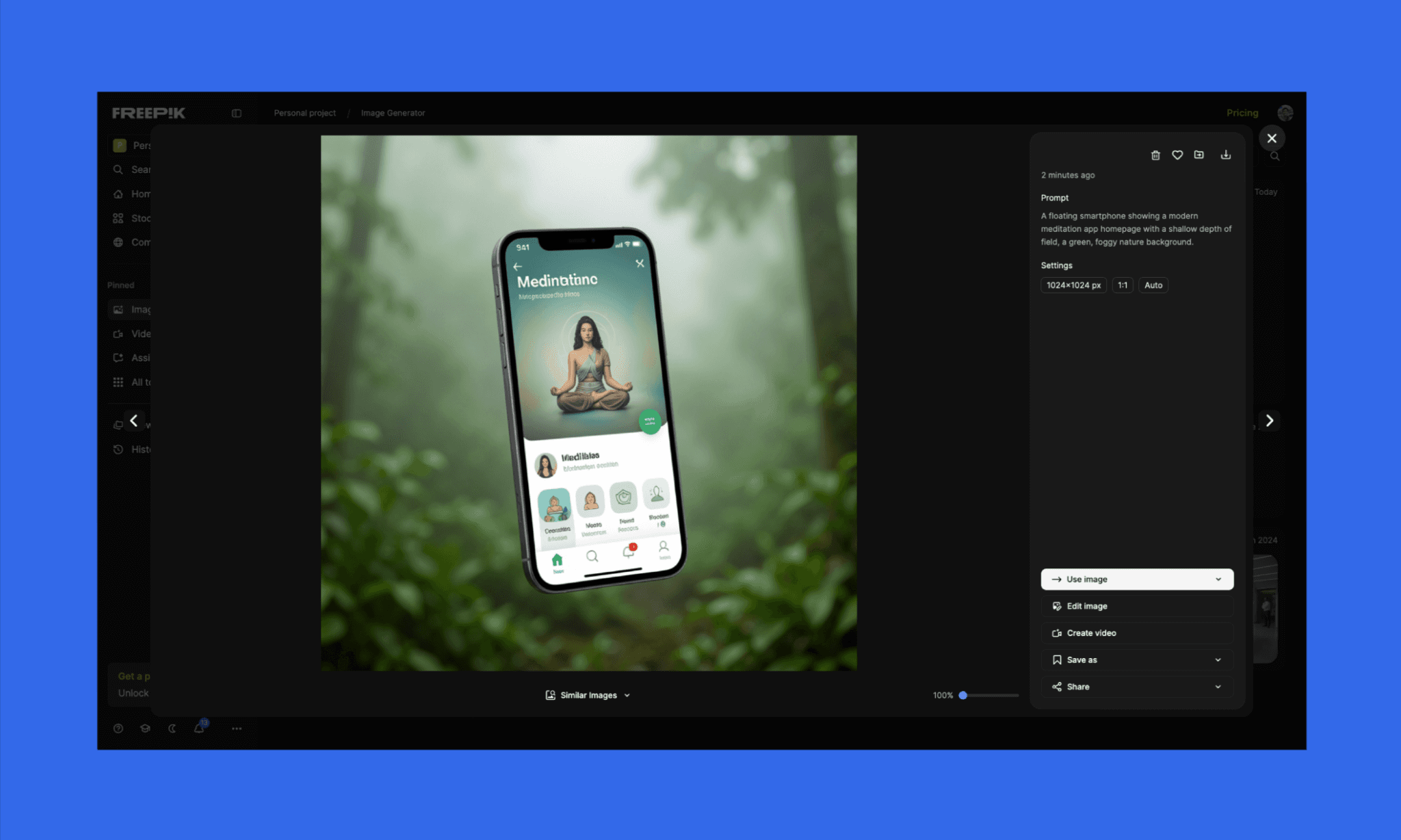
Me complació ver que la imagen coincidía bien con mi prompt y que se generó en calidad 4K. Pero me decepcionó ver la tipografía y los iconos poco definidos. El texto de relleno también es incomprensible, aunque no me importó en ese momento. Además, no se mencionaba qué modelo de GenAI había seleccionado de forma automática, lo que se sintió un poco opaco.
Lo bueno es que mantuvieron la opción de 'Editar imagen' muy a mano y visible.
Edición y prueba de estrés de múltiples elementos
Tras un comienzo decente, decidí pedir ediciones específicas para conseguir un resultado listo para producción.
Mi prompt para la edición:
“Refina esta imagen para convertirla en un visual promocional de la app pulido. Reemplaza el nombre de la app por ‘ZenFlow’. Añade un logo limpio y minimalista en la parte superior (un icono de hoja simple). Usa una tipografía sans-serif clara y legible. Corrige todos los iconos para que se vean nítidos y consistentes.
Actualiza el texto del encabezado por: ‘Encuentra Tu Calma’
Añade el subtexto: ‘Meditaciones guiadas para el enfoque, el sueño y el alivio del estrés’Ajusta el teléfono a una ligera inclinación de 3/4 para un aspecto más dinámico.
Añade un botón de CTA con estilo de Instagram en la parte inferior de la pantalla del teléfono que diga ‘Iniciar Prueba Gratis’, en un botón verde sólido con alto contraste.
Mantén el fondo natural de niebla y verde suave y la estética minimalista. Asegúrate de que la interfaz de usuario parezca una pantalla de app real, lista para producción, sin texto ni iconos distorsionados.”
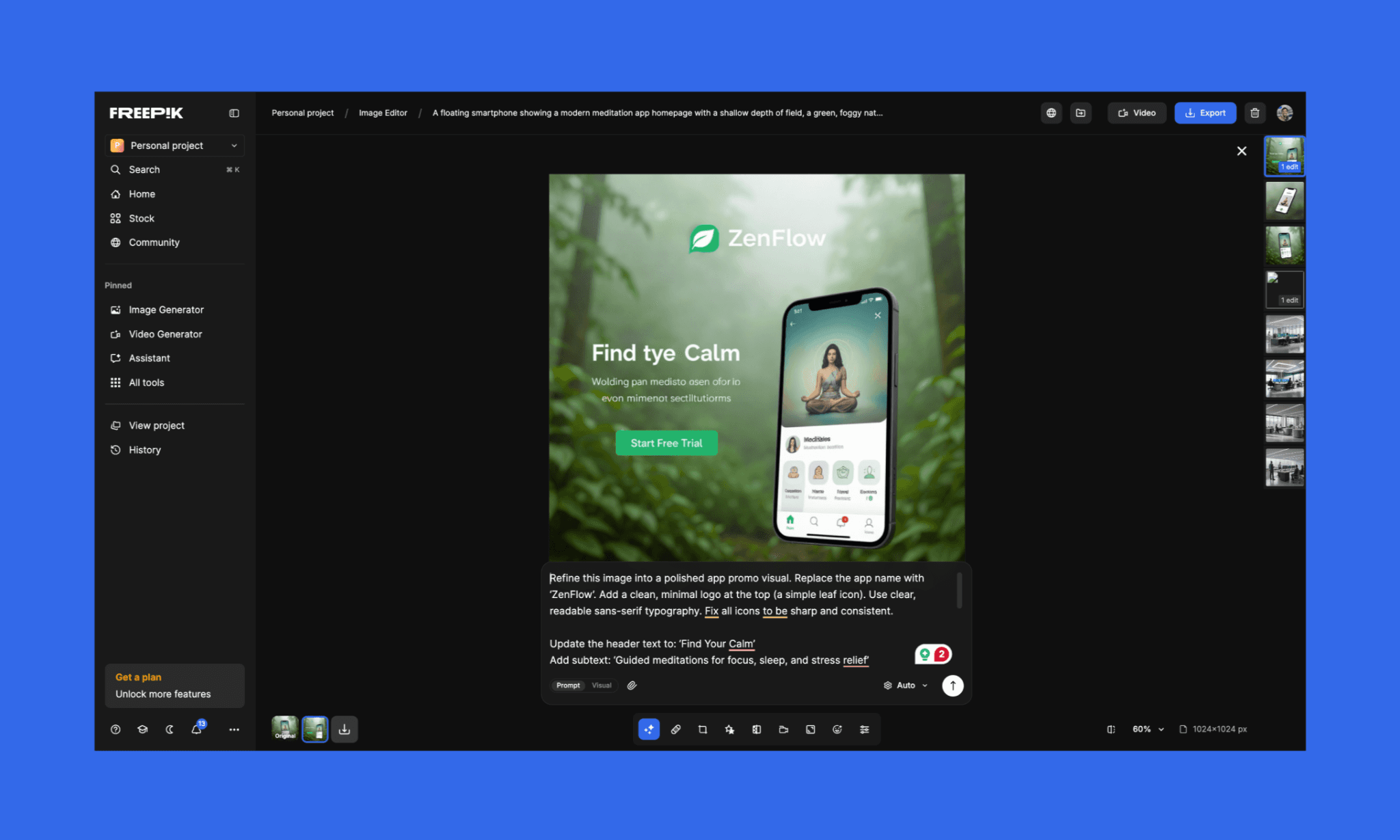
Esta vez también acertó en los elementos seleccionados, pero lamentablemente y para mi disgusto, la calidad general disminuyó aún más. (Y eso que pasé por alto los textos erróneos).
Comparativa de modelos de GenAI de imagen
Llevando mi reseña de Freepik AI al siguiente nivel, decidí probar los resultados de la generación de imágenes de las últimas versiones de sus tres modelos más populares: Mystic 2.5 Fluid, Flux.2 Pro y Seedream 5 lite.
Mi prompt 1:
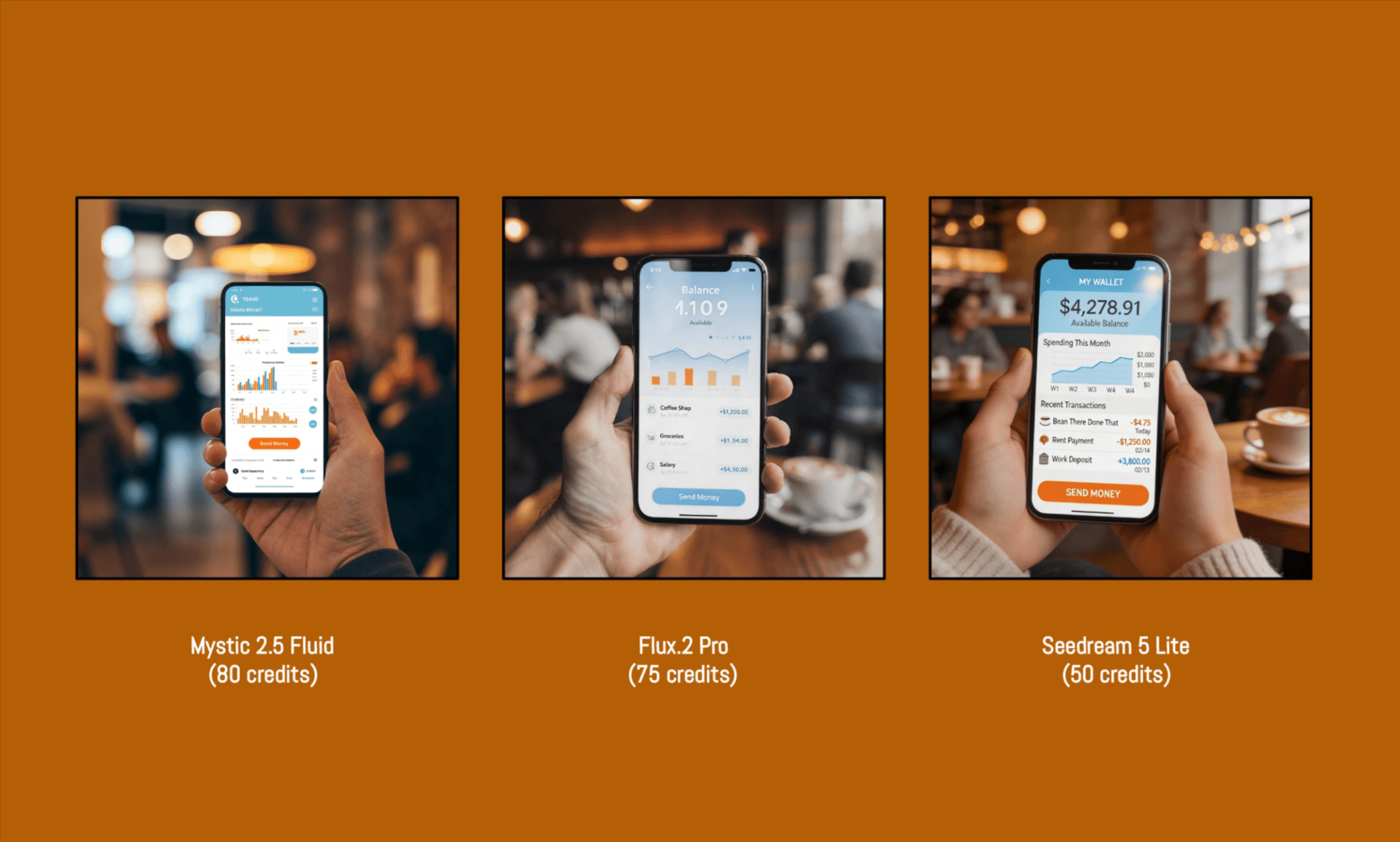
“El dashboard de una app móvil fintech moderna mostrado en un smartphone que sostiene una persona con la mano, de pie en un entorno de café concurrido. La pantalla muestra una interfaz limpia con gráficos, una lista de transacciones y un botón de ‘Enviar dinero’. El fondo incluye personas desenfocadas, tazas de café e iluminación cálida. Reflejos realistas en la pantalla, perspectiva precisa, iconos nítidos, texto limpio y legible, profundidad de campo reducida, estilo cinematográfico.”
Imágenes resultantes 1:
Prompt 1 (Sencillo) | ||||
Fidelidad a las instrucciones | Calidad de la imagen | Iconografía y Tipografía | Créditos consumidos | |
Mystic 2.5 Fluid | Media | Alta | Baja | 80 |
Flux.2 Pro | Alta | Alta | Alta | 75 |
Seedream 5 Lite | Media | Media | Media | 50 |
Los tres superaron con nota mi prueba de estrés de múltiples elementos y se sintieron bastante realistas, con variados matices.
Antes de dar mi veredicto, decidí hacer otro intento; esta vez con algo más abstracto.
Mi prompt 2:
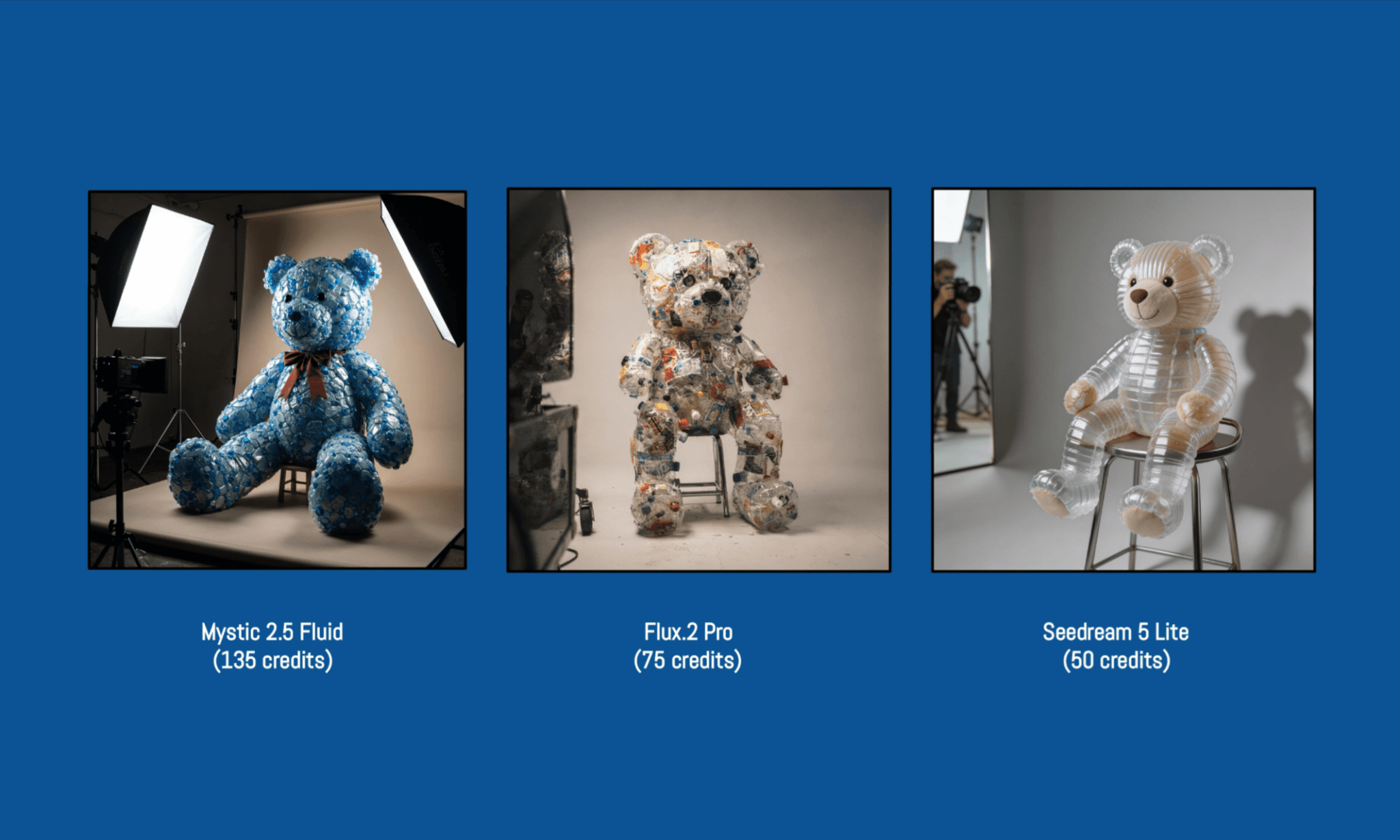
“Un oso de peluche de tamaño real hecho completamente de residuos plásticos reciclados (botellas, envoltorios, tapones), posando en una sesión de fotos de estudio de alta costura, sentado en un taburete. Texturas altamente detalladas que muestran diferentes materiales plásticos.
Fondo neutro y minimalista que realce los colores, las sombras y la silueta del sujeto. Iluminación de estudio profesional con softboxes, creando sombras dramáticas pero limpias.
Toma de un ángulo de 3/4 ligeramente bajo con profundidad de campo reducida, desde la perspectiva de un miembro del equipo de producción. Sutil reflejo de parte del equipo de cámara visible en una superficie reflectante en el lado izquierdo.
Foco ultra realista y nítido, colores vibrantes pero equilibrados, estilo de fotografía de moda editorial.“
Imágenes resultantes 2:
Prompt 2 (Complejo) | ||||
Fidelidad a las instrucciones | Calidad de la imagen | Inteligencia del color | Créditos consumidos | |
Mystic 2.5 Fluid | Media | Alta | Alta | 135 |
Flux.2 Pro | Alta | Alta | Alta | 75 |
Seedream 5 Lite | Baja | Alta | Media | 50 |
El segundo prompt era bastante complejo y puso a prueba la capacidad de los modelos para seguir instrucciones. También noté que los créditos consumidos varían según la complejidad del prompt en el caso de Mystic 2.5 Fluid (de 80 a 135), mientras que en la descripción emergente muestra un número fijo (lo que se sintió un poco engañoso).
En general, descubrí que Flux.2 PRO es el claro ganador en la comparativa de modelos de generación de imágenes de Freepik.
Mis plugins de Figma favoritos para generación de imágenes >
Consumo de créditos
Crear una cuenta gratuita no requirió tarjeta de crédito ni mostró banners emergentes para actualizar. Tenía disponibles 20 generaciones gratuitas de imágenes por día, pero esto solo era válido para modelos configurados en 'Auto'; no para modelos específicos como Mystic o Flux.
Una vez que compré el plan de pago ($10 por 8k créditos), pude ver un panel claro con mis créditos restantes, pero cuántos créditos consumiría cada modelo por prompt solo quedaba claro después de generar la imagen. Aunque los modelos muestran una estimación de créditos que cambia según la complejidad; lo que significa que el sistema de precios de Freepik puede volverse algo complejo si intentas presupuestar tus créditos con antelación.
La verdad sobre el diseño de UI con Canva AI >
Precios y Créditos de Freepik
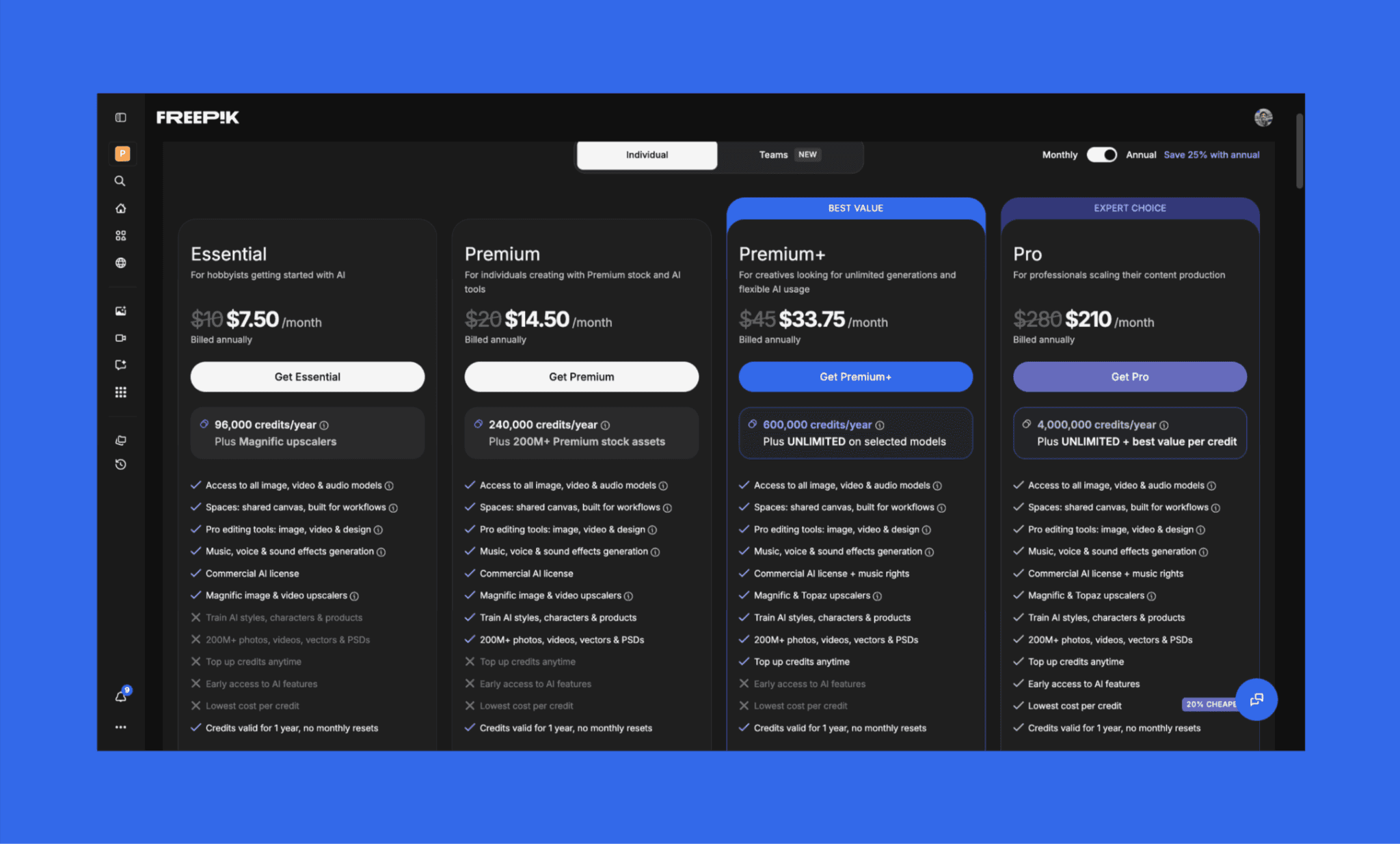
Freepik ofrece acceso freemium a su Suite de IA. Para su generador de imágenes, ofrece 20 generaciones gratuitas al día, pero solo puedes elegir el modelo 'Auto', no los más avanzados. Aunque aprecio la economía de Freepik AI, al mismo tiempo me pareció sorprendentemente cara.
El plan más barato de Freepik AI cuesta $7.50/mes (facturado anualmente con 96k créditos al año); o $10/mes de forma mensual.
Planes de precios de Freepik AI Suite
Plan | Precio (Anual) | Créditos | Funciones de Imagen | Otras funciones de IA | Ideal para |
Essential | $7.50/mes | 96K créditos/año | Acceso a todos los modelos (sin uso ilimitado) | Modo edición básico, escalador de Magnific, stock limitado | Aficionados probando herramientas de IA |
Premium | $14.50/mes | 240K créditos/año | Acceso a todos los modelos (sin uso ilimitado) | Librería de stock completa (200M+), entrenamiento de estilos, suite de edición | Freelancers y creadores de contenido |
Premium+ | $33.75/mes | 600K créditos/año | Uso ilimitado en ~30 modelos + acceso total | Escaladores Topaz + Magnific, derechos de música, herramientas prioritarias | Usuarios intensivos de IA, marketers |
Pro | $210/mes | 4M créditos/año | Uso ilimitado + máxima eficiencia de créditos | Límites elevados, uso para equipos, acceso anticipado a funciones | Equipos y producción de alto volumen |
*Nota: Estos precios corresponden a la facturación anual de Freepik. El pago mensual es aproximadamente un 25% más caro en cada plan.
Sistema de créditos de Freepik AI
Los créditos de Freepik AI se cobran de forma distinta según los modelos de IA y las tareas (como generación o edición de imagen, video o audio). Las descargas son gratuitas. Los créditos se restablecen mensual o anualmente según tu plan, pero no se acumulan.
Solo los usuarios de los planes Premium+ y Pro pueden comprar recargas de créditos; estos créditos extra se quedan guardados incluso si cancelas la suscripción.
Costo de la generación de imágenes con MidJourney >
Pros y Contras de Freepik AI
Basado en mi exhaustiva prueba de la generación de imágenes con Freepik AI, aquí está el desglose de dónde destaca y dónde se queda corta para los creadores de productos:
Pros | Contras |
Excelente fidelidad a las instrucciones para prompts sencillos y moderados | Falta de precisión en tipografía e iconos en visuales cargados de interfaz de usuario |
Imágenes visualmente atractivas de alta calidad y excelente composición | Resultados inconsistencies en prompts muy complejos o de múltiples elementos |
Acceso a múltiples modelos (Flux, Mystic, etc.) que ofrecen flexibilidad y comparación | Los retoques con las herramientas de edición a veces degradan la calidad del visual |
Flujo de trabajo centralizado con herramientas integradas de creación y edición | El consumo de créditos varía de forma impredecible según la complejidad del texto de entrada |
Amplia librería de recursos de stock e IA que aporta un valor práctico enorme |
Alternativas a Freepik AI
Krea AI frente a Freepik AI
Krea AI es una suite creativa basada en la web que ofrece más de 64 modelos, incluyendo su propio Krea 2 junto a Flux, Nano Banana y Kling, para generación de vídeo, imagen y 3D. A diferencia de Freepik, no cuenta con biblioteca de stock.
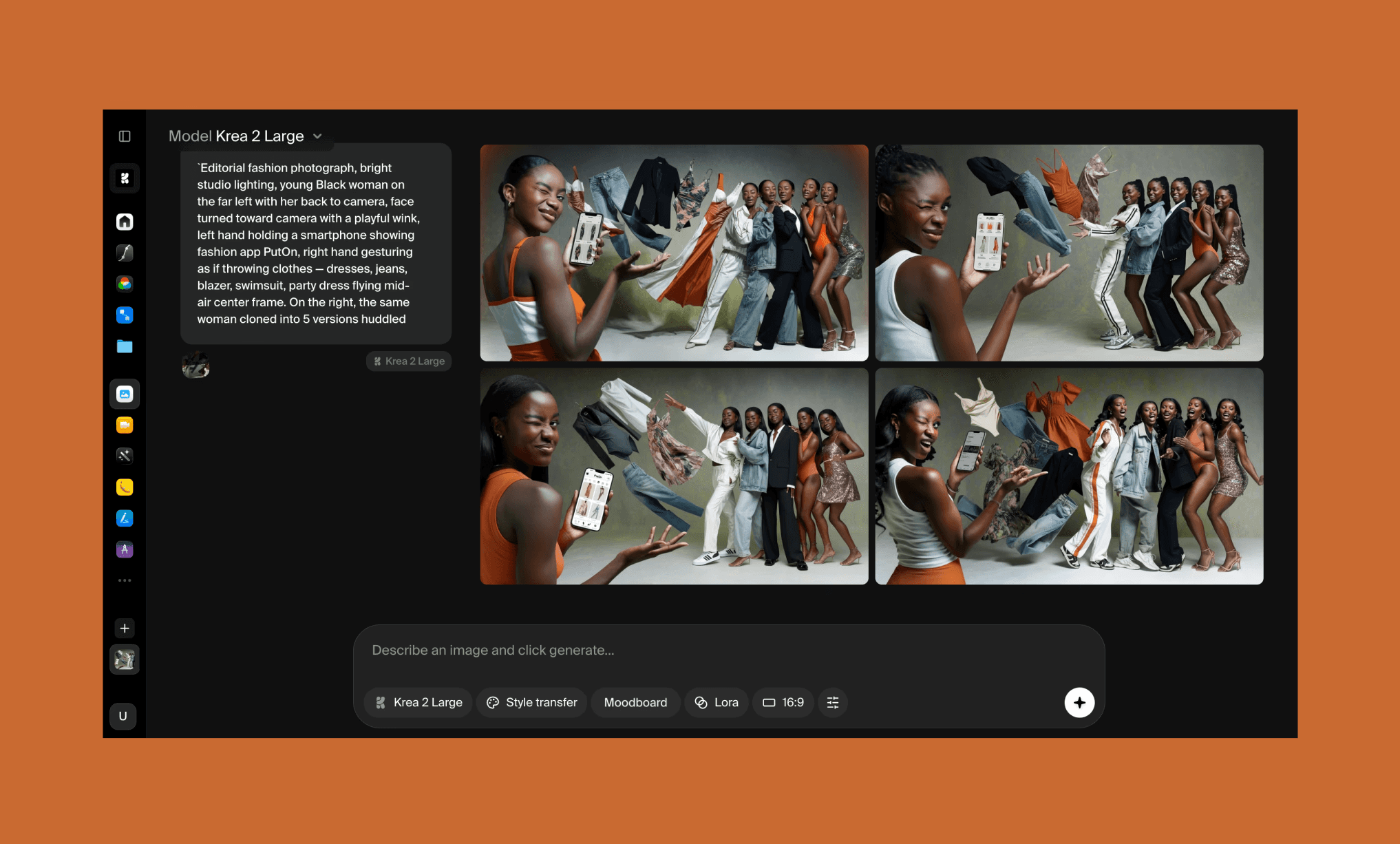
Por qué elegir Krea AI: Generación más rápida, un lienzo interactivo en tiempo real y una función dedicada a cambiar de ropa (


