

En İyi Magic Patterns Alternatifleri
Kategori | AI Tasarım Araçları |
En iyisi | |
AI tasarım araçları | |
UX odaklı AI | |
Geliştirici odaklı yazılım | |
Deneysel uygulamalar | Cursor, Balsamiq, Google Labs |
Magic Patterns AI Nedir?
Magic Patterns, AI ile sohbet ederek düzenlenebilir web/app arayüzleri üreten bir AI UI tasarım aracıdır. Ürün ekiplerinin mevcut tasarım sistemleri ve ürün bağlamını kullanarak yeni özelliklerin prototiplemesini sağlamak için özel olarak geliştirilmiştir. Ana özellikleri arasında ortak bir çok oyunculu tuval, web bileşenlerini yakalamak için Chrome uzantısı ve Figma ve GitHub ile sorunsuz senkronizasyon yer alır.
Magic Patterns Seçeneklerini Neden Arayalım?
Öncelikle, hiçbir AI tasarım aracı herkese uyan bir çözüm değildir. Magic Patterns bile değil. Gerçekten daha güçlü AI tasarım araçlarından biri olsa da, sadece plug-and-play iş akışları için uygun. Ve karmaşık etkileşimlere (çok adımlı akışlar, koşullu mantık, uç vakalar) girdiğinizde AI sarsılabilir. Ardından, kredi sisteminden kullanım tabanlı fiyatlandırmaya geçişi bütçelemeyi zorlaştırır.
Sorun Magic Patterns iyi mi değil, sizin belirli iş akışınıza uygun olup olmadığıdır. Bu sıralamada, o belirli iş akışlarını inceleyeceğiz. Daha pratik hale getirmek için, her alternatifi Magic Patterns‘a karşı denemek için bir komut (bir verimlilik araç UIı için) çalıştırdım ve ilk taslaklarını karşılaştırdım.
"Derin çalışma oturumları için mobil verimlilik uygulama ekranı tasarla. Muted koyu tema ve yumuşak mavi vurgular kullan. Yüksek/Orta/Düşük öncelik etiketli görev kartları, 45 dakikalık odaklanma sayaç, yalnızca ikon olan ortam sesi geçişi ve görülebilir dikkat dağıtıcı engelleyici durumu içer. Hassas ilerleme halkası, minimalist çizgi ikonlar ve "Bu göreve odaklan" gibi sakin mikro yazılar ekle. Alt gezinme: Görevler, Takvim, Takım, Profil. Beyaz alana ve açık görsel hiyerarşiye öncelik ver."
Magic Patterns Rakipleri Sıralandı
Sıralama | Araç | Anahtar Özellikler | En İyi Kullanım İçin | Fiyat (ücretsiz aylık & yıllık faturalama) |
1 | Metin/görüntülerden çok ekranlı tasarım; yüksek tanımlı taslaklar; Figma/MCP dışa aktarma. | Hızlı uçtan uca prototipleme ve hava tasarımı. | - Ücretsiz (170 kredi) - $12/ay'dan başlayan ödemeli (400 kredi) | |
2 | Yerli Figma AI üretimi; sohbet tabanlı düzenleme; sorunsuz geliştirici teslimi. | Tasarımlarını Figma içinde yaşayan ve tasarım sistemi tutarlılığına önem veren tasarımcılar. | - Ücretsiz sınırlı AI kredileri - $16/ay'dan başlayan ödemeli (3k kredi) | |
3 | Yapısal UI üretimi; tekrar kullanılabilir bileşen kütüphaneleri; Chrome uzantısı ile üretilmiş. | Mevcut tasarım sistemlerini ve yapılandırılmış düzen mantığını korumak. | - Ücretsiz (120 kredi) - $14/ay'dan başlayan ödemeli (400 kredi) | |
4 | Autodesigner AI ajanı; ekran görüntüsünden taslak; tasarım teması üretimi. | AI ile tasarım sistemlerini standartlaştıran ekipler; erken aşama fikir oluşturma. | - Ücretsiz (3 AI üretimi) - $12/ay'dan başlayan ödemeli (500 AI üretimi) | |
5 | UX mimarlık desteği; tel çerçeveler ve yüksek tanımlı taslaklar; öngörücü ısı haritaları. | Görsel deneylerden çok UX mimarlığına öncelik veren tasarımcılar ve ürün yöneticileri. | - Ücretsiz (45 kredi, zamanında) - $14/ay'dan başlayan ödemeli (420 kredi) | |
6 | Çok modelli çıktı; renk şema önerileri; düzenlemek için bileşeni işaretle | Erken aşama UX keşfi ve tam kullanıcı akışlarını hızlı oluşturma | - Ücretsiz: Sınırlı krediler | |
7 | Hava kodlama AI; arka uç mantığı ve dağıtım dahil tam yığın uygulama oluşturma. | Fonksiyonel MVP'ler veya kavram kanıtı projeler oluşturma. | - Ücretsiz (30 kredi/ay) - $25/ay'dan başlayan ödemeli (100 kredi) | |
8 | Web tabanlı IDE; prompt-to-deploy React uygulamaları; gerçek zamanlı mantık önizleme. | İdeaları hızla çalışan uygulamalara dönüştürme ve UI'yi ikincil tutma. | - Ücretsiz (300k token) - $18/ay'dan başlayan ödemeli (10M token) | |
9 | AI ajanlı bulut IDE; UI ve sunucu tarafı proje mantığını yönetir. | UI'yi kod ve otonom ajanlar aracılığıyla ayarlamaktan rahatlık duyan geliştiriciler. | - Ücretsiz sınırlı AI kredileri - $17/ay'dan başlayan ödemeli ($20 değerinde krediler) |
Banani: Magic Patterns için en iyi genel alternatif
En yakın Magic Patterns AI olan Banani AI UI tasarım aracını buluyorum, hava tasarımı için avantaj sağlıyor. Hızlı metin-to-UI tasarımı hızlı bir AI sohbet botu ile birleştirmek (ilk taslağı sonuna taşıması çok pratik söylemeliyim) onu uygulama veya web arayüzlerini prototiplemede uçtan uca mükemmel hale getiriyor.
Teste verdiğimde, Banani odak ve sakinlik fikrini beklentilerime göre en iyi anladı. Çıkışında temiz bir hiyerarşi, çok fazla beyaz alan ve birkaç odaklanmış buton vardı. Ayrıca keşif için birkaç tıklama ile daha fazla varyasyon da üretti.
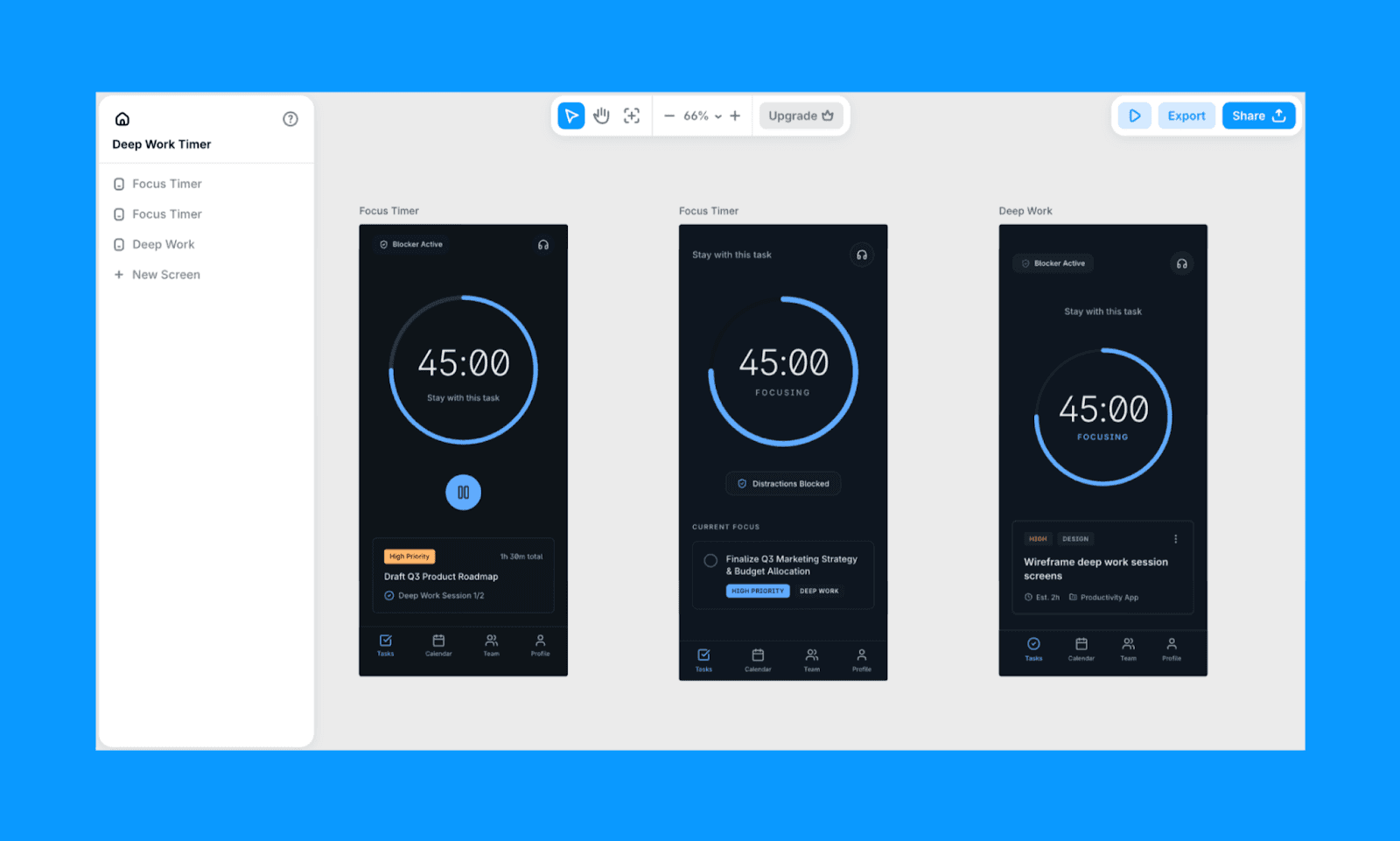
Banani AI'nin anahtar özellikleri
Metin, görüntü veya referanslardan çok ekranlı UI oluşturma
Çalışan Figma içe aktarması
Hızlı varyasyonlar ile düzenlenebilir yüksek tanımlı UI taslakları
Figma uyumlu dışa aktarma (otomatik düzen korunur) ve MCP tasarım teslimi için
Banani'yi Magic Patterns üzerinden neden seçmelisiniz?
Güzel tasarımlar oluşturmak, tasarım sistemini kolayca değiştirmek ve hepsini hızla yapmak istiyorsanız, Banani Magic Patterns'e göre daha iyi bir seçimdir.
Banani fiyatlandırması
Ücretsiz seviye: Aylık 170 krediye kadar
Ödemeli plan: Yıllık faturalandığında 400 kredi için $12/ay
Magic Patterns Gibi AI Tasarımcılar
Figma Make vs Magic Patterns
Figma Make, klasik Figma Design üzerine bir AI katmanıdır ve size tanıdık bir tasarım ortamında kalırken istemlerle UI ekranları oluşturma imkanı verir. React/Tailwind kodu hemen dışa aktarmak yerine tasarım sistem tutarlılığına öncelik verenler için tasarlanmıştır.
İstemimin sonuçlarını oldukça düzgün buldum, katman odaklı görünüm ve doğru renk uygulaması sağladı ama biraz kalabalık hissettim. Ekranın bir fold'dan daha uzun olduğunu görmek beni şaşırttı çünkü ‘Sıradaki’ altında başka görev kartları vardı (odaklanma için iyi olup olmadığı konusunda gülümsetti). Sonraki taslak için iyi bir fikir.
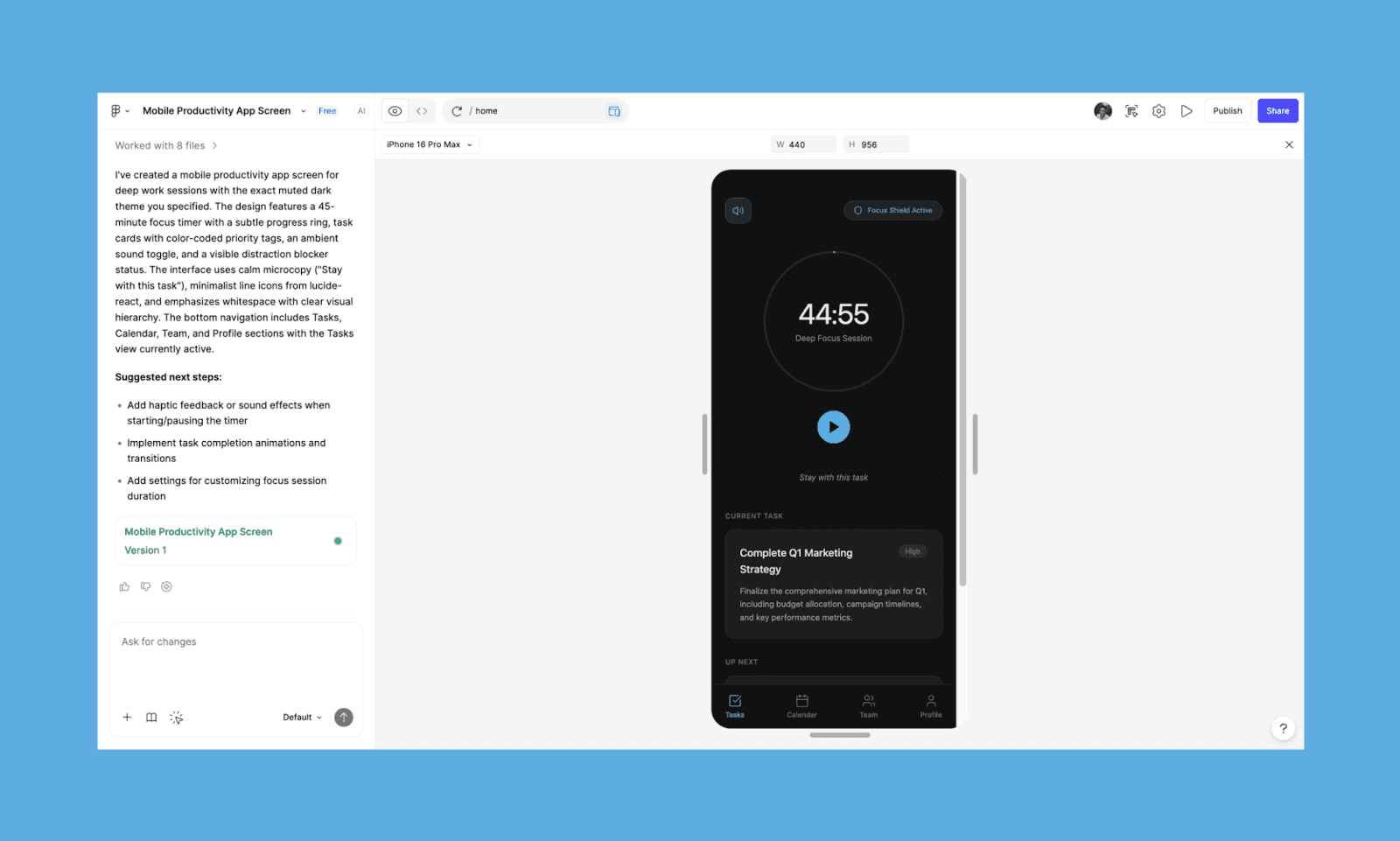
Figma Make'in anahtar özellikleri
Figma içinde metin veya görüntülerden UI ekranları oluşturun
Sohbet ederek düzenleyin veya öğe değişiklikleri için ‘Point & Edit’
Figma'nın yerel geliştirici araçlarını kullanarak sorunsuz teslim
Figma Make'i Magic Patterns üzerinden neden seçmelisiniz?
Magic Pattern’ın Figma eklentisine rağmen, zaten Figma içinde yaşayan tasarımcılar ve ekipler için Figma Make’in kaçınılmaz olduğunu söylüyorum.
Figma Make fiyatlandırması
Ücretsiz seviye: Sınırlı AI kredileri ve Figma Make içinde kilitli tasarım.
Ödemeli plan: Yıllık faturalandığında, 3,000 AI kredisi için $16/ay ve tasarım Figma Make ve Design arasında taşınabilir.
Magic Path vs Magic Patterns
Magic Path, istemleri AI ile yapılandırılmış bir UI'ya dönüştürmeye odaklanan harika bir Magic Patterns seçeneğidir. Her yerde eskiz, ekran görüntüleri veya fikirler ekleyebileceğiniz AI ilk tuval sunar.
UI testimden, Magic Path iyi yapılandırılmış bir düzen oluşturdu, ancak ikincil öğeler (özellikle metin ve butonlar) biraz fazla dikkat çeken gibiydi. Bunları basitleştirerek minimal, daha odaklanmış bir hiyerarşi yaratabileceğimi düşündüm.
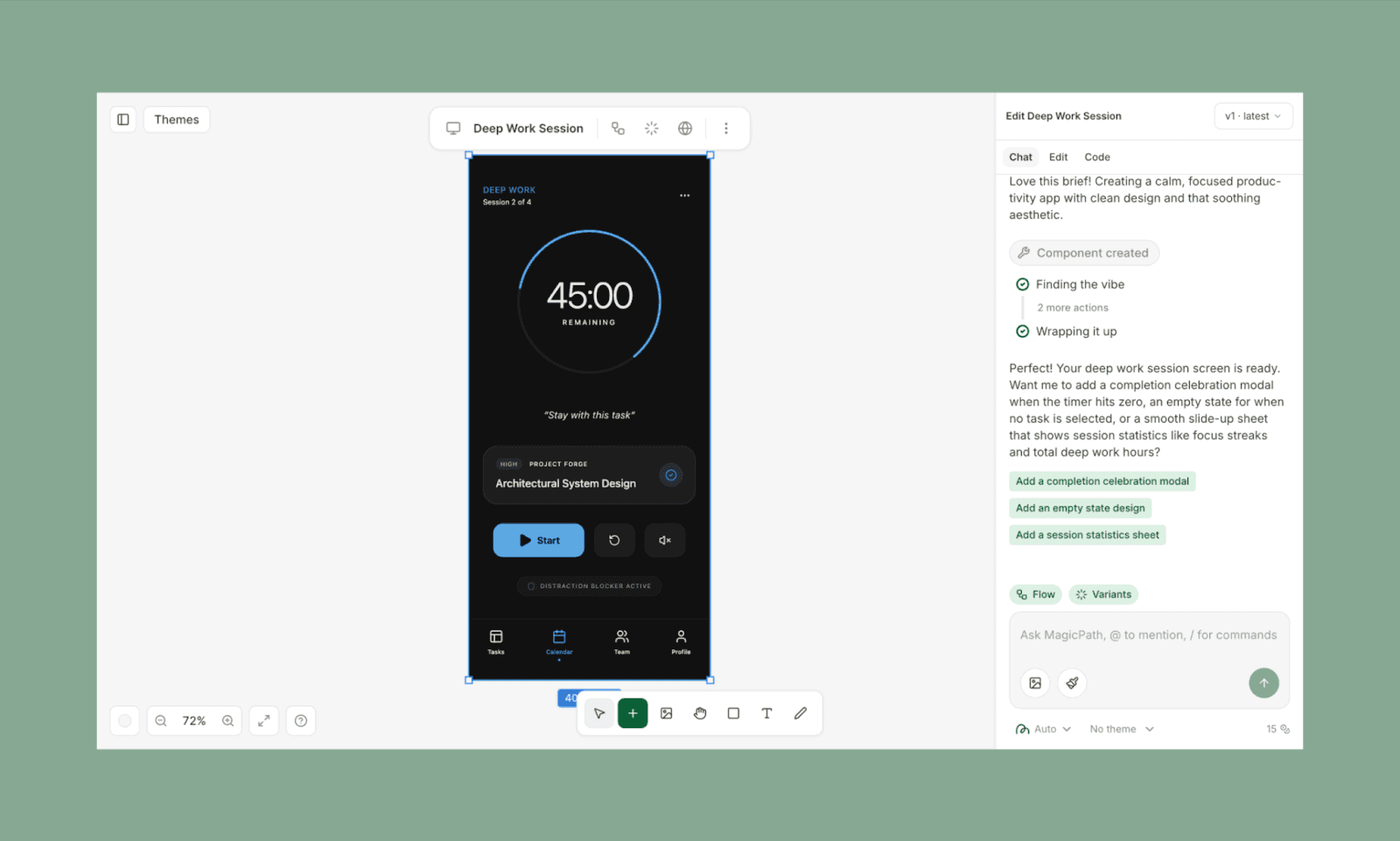
Magic Path'in anahtar özellikleri
Tek bir istem veya ekran görüntüsünden çoklu varyasyon oluşturma
Paylaşılan projelerde tekrar kullanılabilir bileşenler oluşturma
Chrome uzantısı ekran görüntülerini MagicPath dosyalarına dönüştürmeye yardımcı olur
Magic Path'i Magic Patterns üzerinden neden seçmelisiniz?
Magic Path AI, mevcut bir tasarım sistemine sahip olduğunuzda onu taşımak istiyorsanız daha iyi bir seçimdir.
Magic Path fiyatlandırması
Ücretsiz seviye: Aylık 120 kredi ve 5 Figma içe aktarma
Ödemeli plan: Yıllık faturalandığında 400 kredi ve 25 Figma içe aktarma için $14/ay
Uizard vs Magic Patterns
Uizard başka bir popüler AI UI üretici olup Autodesigner adını verdikleri özel bir AI ajan
Dürüst olmak gerekirse, Uizard'ın testim için çıkışı beni hayal kırıklığına uğrattı. Öğeler ve renk doğruyken, çıkış hiyerarşisi yanlıştı, tasarım maksimal ve yazı kopyası fazlaydı. İstemediğim bazı öğeler ekledi, ancak bunlar fikir oluşturma için iyi.
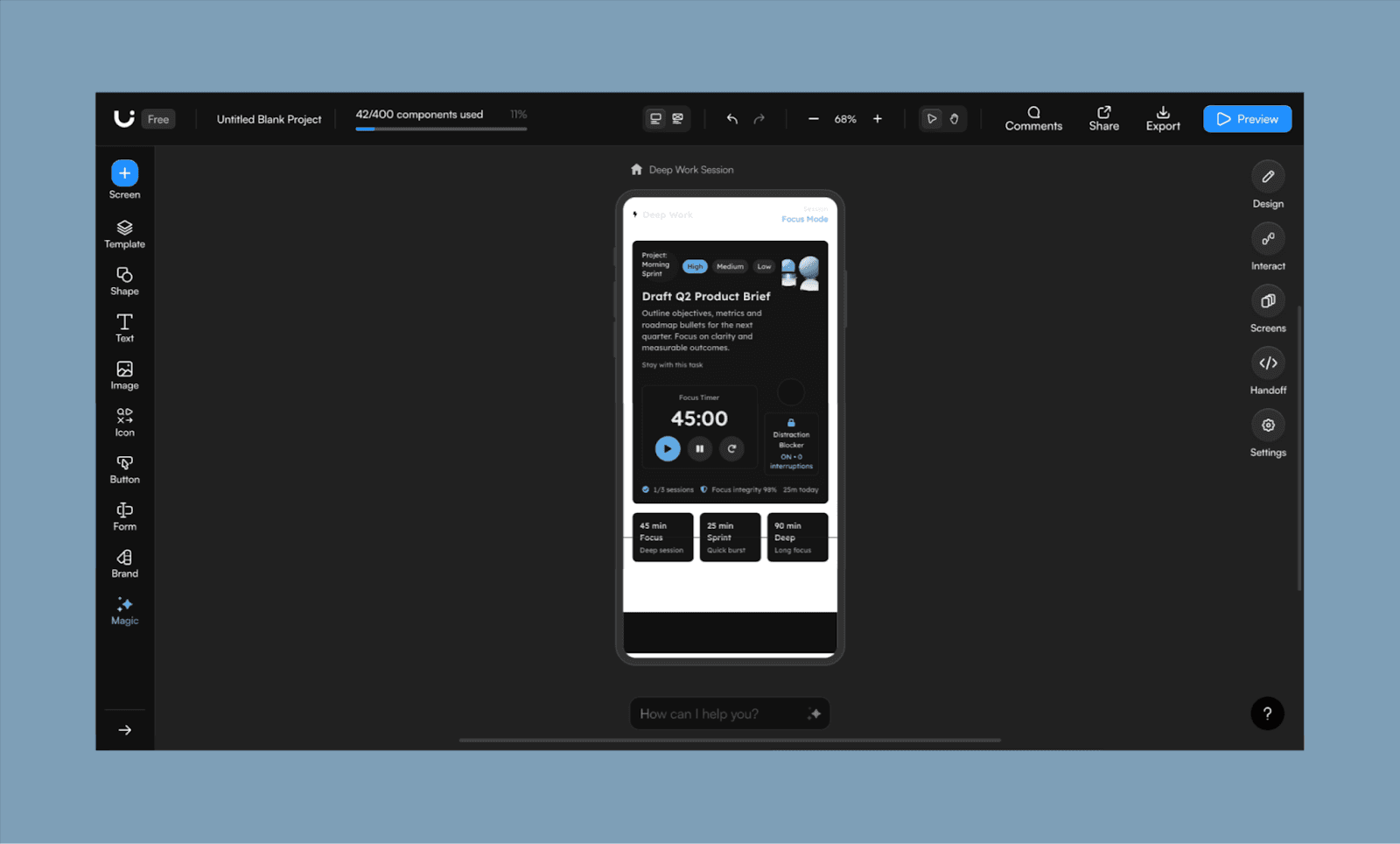
Uizard'ın anahtar özellikleri
AI sohbet ile bileşen düzeyinde seçim ve düzenleme
Herhangi bir ekran görüntüsünü yükleyerek veya tarayarak düzenlenebilir taslaklar oluşturma
Metin istemlerinden ve görüntülerden tasarım temaları oluşturma
Uizard'ı Magic Patterns üzerinden neden seçmelisiniz?
AI ile bir tasarım sistemi geliştirmeyi ve bunu tüm proje veya takım için standartlaştırmayı planlıyorsanız Uizard'ı seçin.
Uizard fiyatlandırması
Ücretsiz seviye: Autodesigner 1.5 ile aylık 3 AI üretimi
Ödemeli plan: Yıllık faturalandığında Autodesigner 2.0 ile 500 AI üretimi için $12/ay
UX Ekipleri ve Ürün Düşünenler İçin
UX Pilot vs Magic Patterns
UX Pilot, web/app geliştirme sürecinde erken konseptlerden detaylı, test hazır prototiplere kadar tam UX/UI sürecini destekleyen bir AI'dir. Tel çerçeveler, mobil ve masaüstü için yüksek tanımlı taslaklar oluşturabilir ve hatta öngörücü ısı haritalarına sahip olabilirsiniz.
Görev uygulama tasarımım testi için değerlendirdiğimde, UI'sini fazla mühendislik olarak hissettim. Ana sayaç halkası etrafında biriktiği ses geçişi ve ekstra butonlar sıkışık görünüyor. Ayrıca ‘Görevle kal’ yazıyı ana metin olarak yapmayı ve alt kısmındaki takım ikonunu kaçırdı. Genel olarak, renk teması ve hiyerarşi doğru.
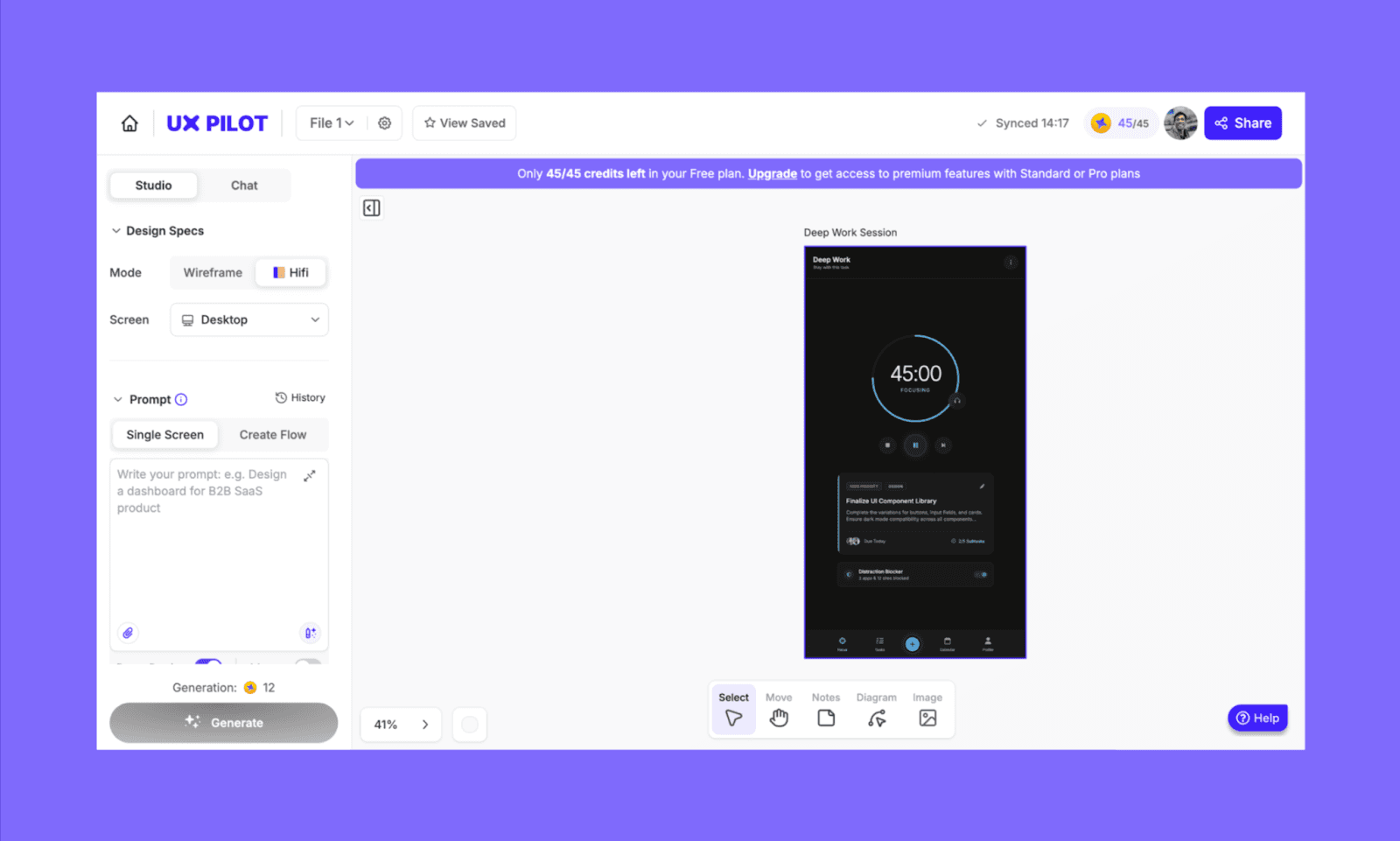
UX Pilot'ı Magic Patterns üzerinden neden seçmelisiniz?
Görsel deneylerden çok UX mimarlığına öncelik veren tasarımcılar ve PM'ler için UX Pilot'u öneririm.
Google Stitch vs Magic Patterns
Google Stitch (eski Galileo AI) bir Gemini destekli UI üretici olup istemleri temiz ön uç çıktısı ile çok ekranlı akışlara dönüştürür. Stitch, Google'ın hava tasarım felsefesi ve hızlı akış oluşturmayı bileşen düzeyinde hassasiyet üzerine olan odaktan daha çok önceliklediği yönde ağırlık verdiği dikkatle not ediliyor.
Testimden, düzeni uyumlu hissettim, hiyerarşi ve boşluk üzerine güçlü bir odaklanma ile. Bununla birlikte, öne doğru tam akış düşüncesi biraz fazla genişlemiş gibi hissettim, brieften ötesinde işleyerek, istemediğim sakin, minimal UI'ı oluşturdu.
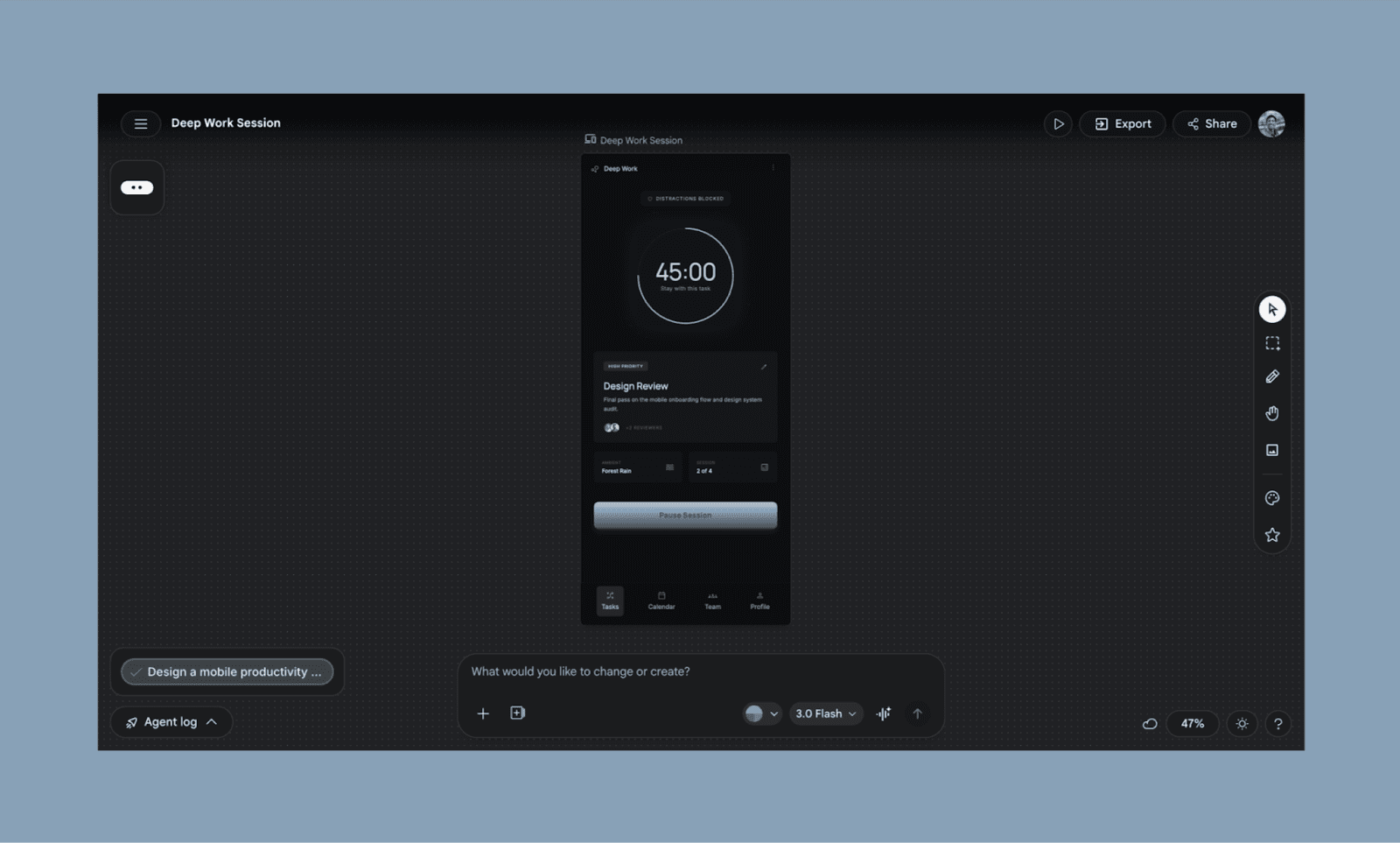
Google Stitch'ı Magic Patterns üzerinden neden seçmelisiniz?
Ayrı ekranlar oluşturmaktansa birleşik bir kullanıcı akışı oluşturmak istediğinizde Stitch'i seçin.
Geliştiriciler ve Hava Kodlama Yapanlar İçin
Lovable vs Magic Patterns
Lovable, istemlerden tam yığın uygulama oluşturan ve arka uç mantığı ve dağıtımı da içeren bir hava kodlama AI'dir. Magic Patterns'in UI-öncelikli yaklaşımından farklı olarak, çalışan ürünlere odaklanır, sadece arayüz prototiplerinden ziyade gerçek fikirleri test etmek için daha iyidir.
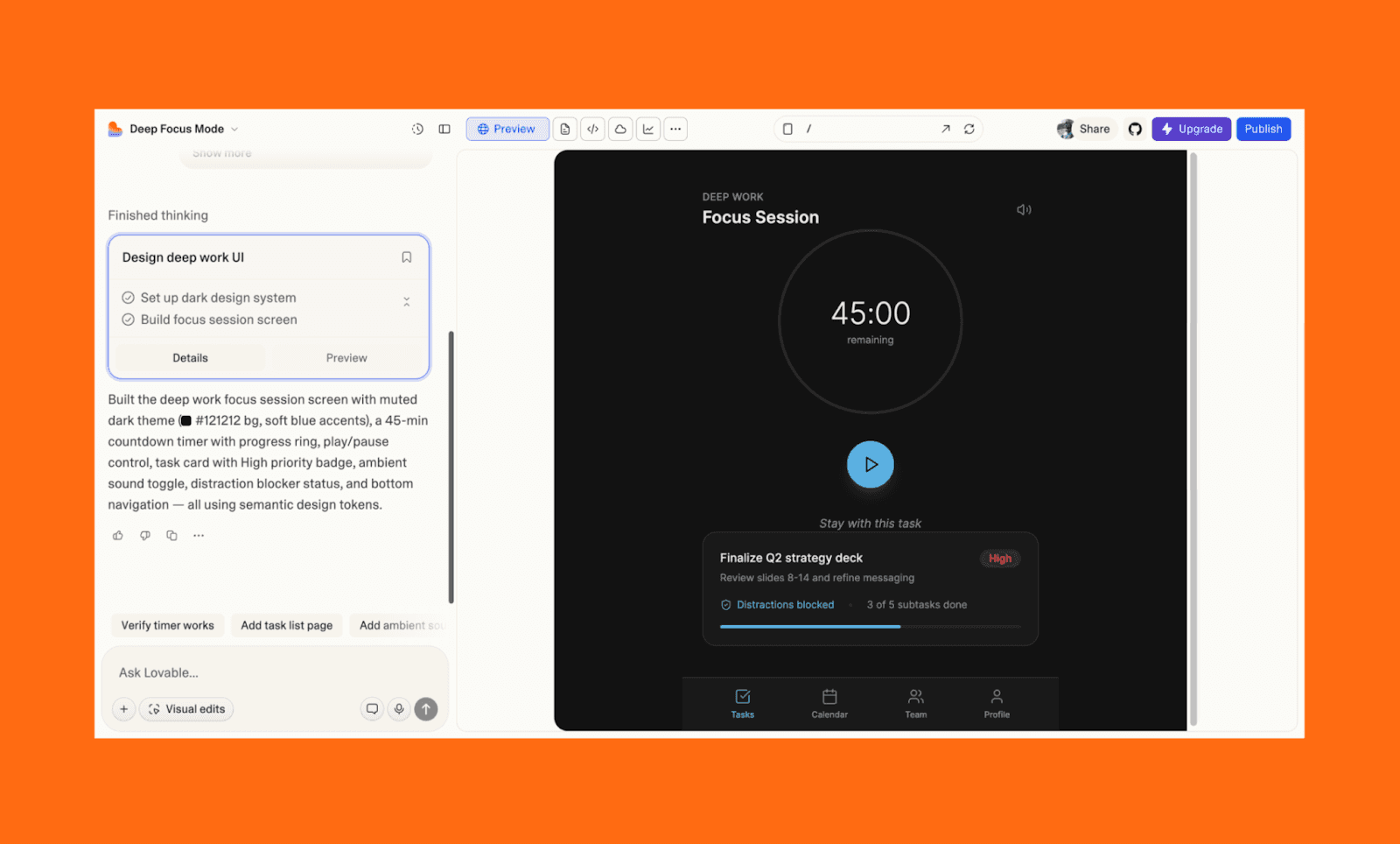
Lovable'ı Magic Patterns üzerinden neden seçmelisiniz?
Fonksiyonel bir MVP veya kavram kanıtı prototipi oluşturmak için Lovable ile gidin, kullanmak için hazırlayın.
Bolt.new vs Magic Patterns
Bolt, tarayıcınızda doğrudan tam yığın React uygulamalarını prompt edilerek oluşturmayı ve dağıtmayı sağlayan web tabanlı bir IDE'dir. "Sıfır yapılandırma" geliştirme konusunda mükemmeldir ve uygulamanızın mantığının gerçek zamanlı ön izlemesini sağlar.
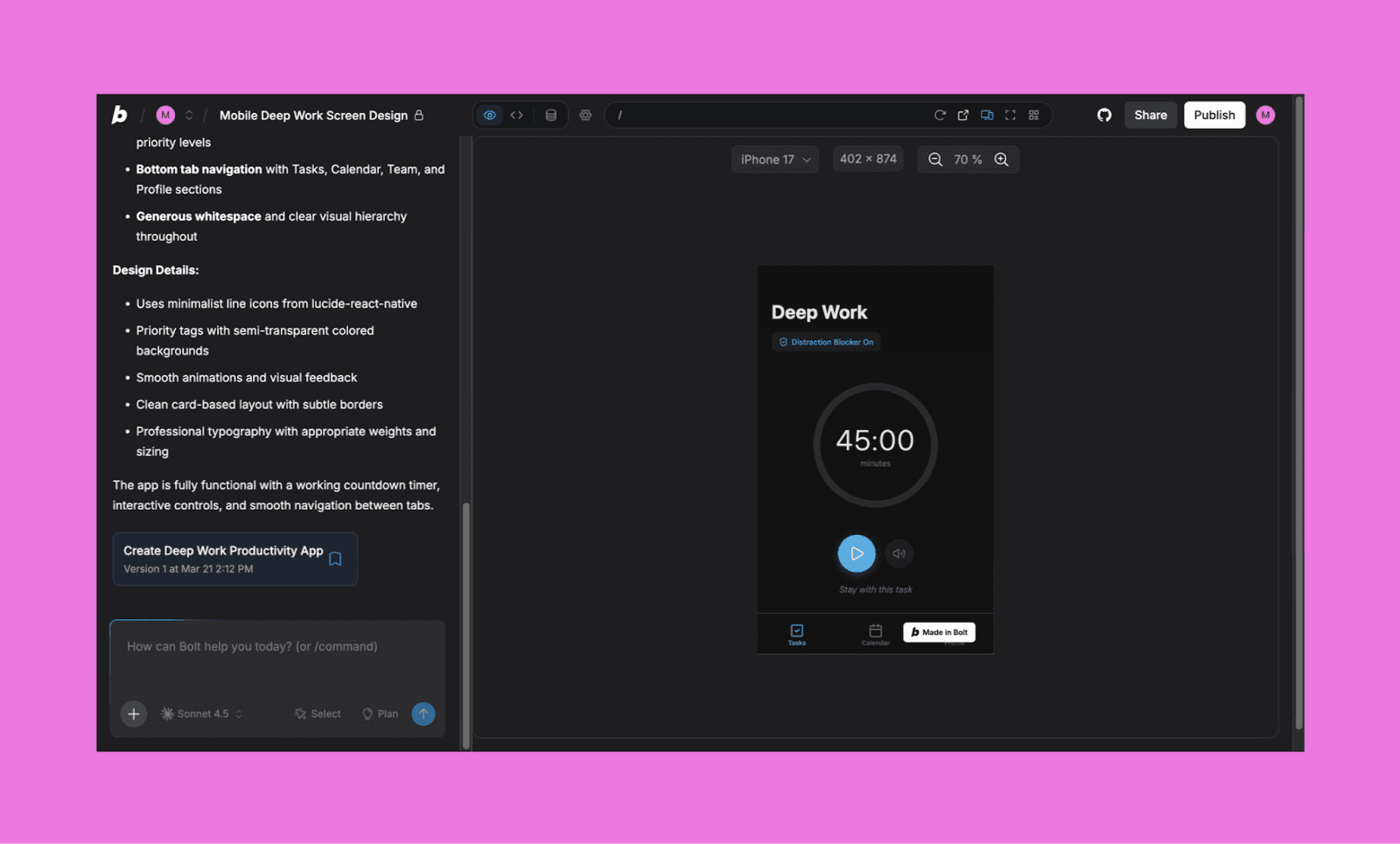
Bolt'u Magic Patterns üzerinden neden seçmelisiniz?
Bir fikri hızla çalışan bir uygulamaya dönüştürürken UI tasarımını ikinci sıraya koymak istediğinizde Bolt'u öneririm.
Replit vs Magic Patterns
AI kodlama uygulamalarının en eski olanlarından biri olan Replit, bulut tabanlı bir IDE'yi AI ajanı ile birleştirir. İsteğinizi komple bir proje olarak ele alır ve UI'den sunucu tarafı mantığına kadar her şeyi yönetir.
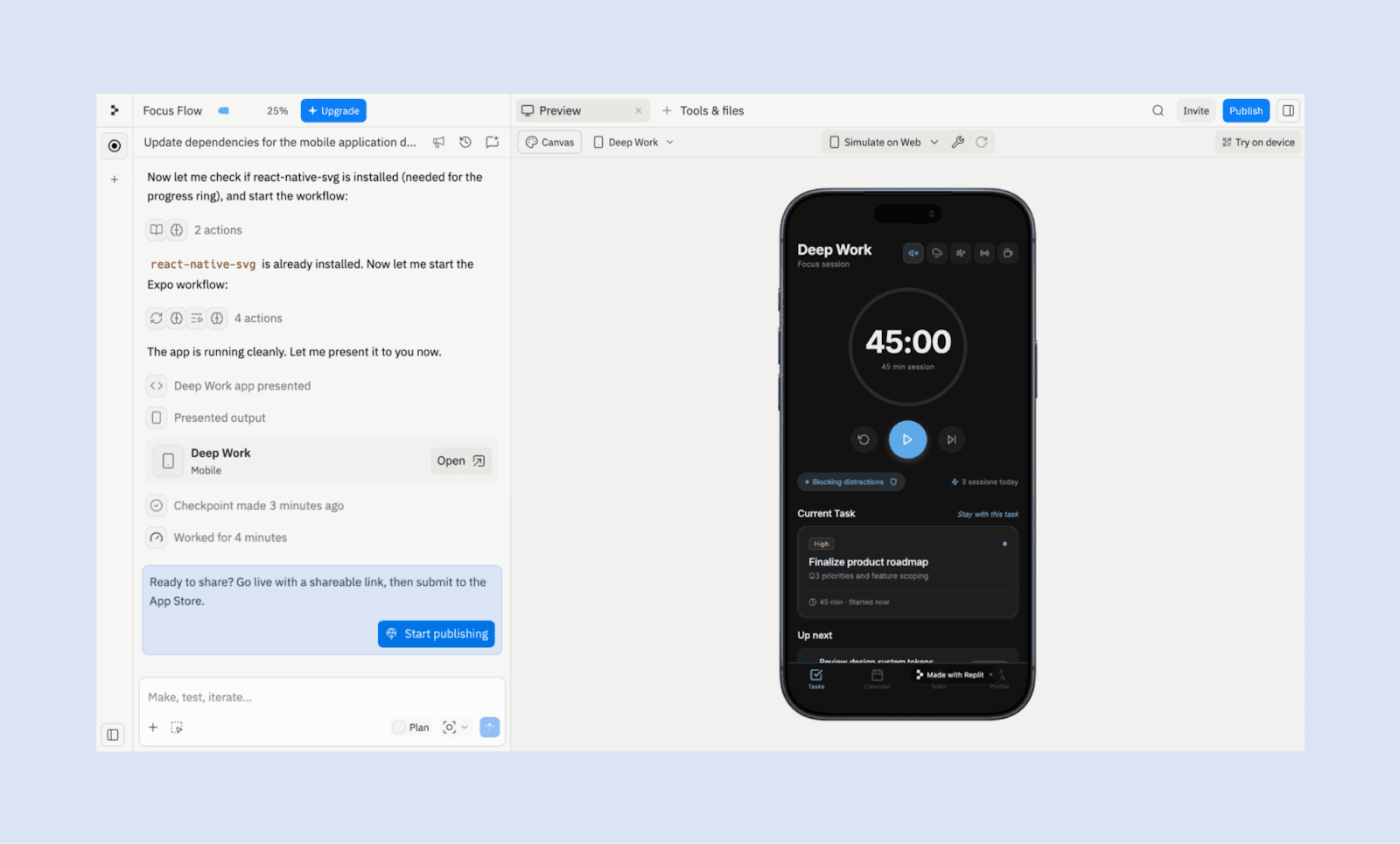
Replit'i Magic Patterns üzerinden neden seçmelisiniz?
Kod aracılığıyla UI'yi ayarlamak konusunda AI tasarım araçlarından daha rahat olan bir geliştiriciyseniz, Replit ile çalışın.
Deneysel Alternatifler
Magic Patterns'ın birkaç niş alternatif seçeneği var ki sıralama yaparken diğerleriyle grup yapamadım. Ancak bunlar tasarım-to-kod yetenekleri ve ürün geliştirme paketi için keşfetmeye değer.
Araçlar | Neden Deneyin |
En iyi geliştiriciler için, AI kodlamayı UI ile harmanlayarak doğrudan kod tabanınız içerisinde bir prototipi tasarlamak, ayarlamak ve göndermek için. | |
Erken tasarım beyin fırtınası için harika çünkü lo-fi tel çerçevelerle yapıyı ve akışı açık bir şekilde zorlar. | |
Ekiplerin tuval tabanlı tasarımı gerçek veri ve kod ile harmanlayarak kaba fikirlerden çalışan arayüzlere hızlı ilerlemek için. |
En İyi Alternatifi Seçmek
Magic Patterns için 'en iyi' alternatif yoktur, ancak sizin için kesinlikle 'doğru' olanı olabilir. İdeal olarak, kendiniz görmek için mümkün olduğunca çok freemium AI UI araçını test edin derim. Ancak zaman kazanmak için, kendinize şu soruları sorarak kendinizi değerlendirebilirsiniz:
Yüksek tanımlı UI (Banani, Figma Make) mi istiyorsunuz, yoksa lo-fi fikir üretimi (Google Stitch, Balsamiq) mi?
Mevcut bir ürün üzerinde mi yineleme yapıyorsunuz (MagicPath, Uizard) yoksa sıfırdan mı yapıyorsunuz (UX Pilot)?
Amacınız temiz kod mu (Lovable, Bolt.new) yoksa tasarım-öncelikli teslim mi (Paper.design)?
Ayrıca, AI tasarımı ölçeklendikçe gereken yatırımı bilmek için önceden fiyatlandırma ve kredi sistemini kontrol edin.
Magic Patterns Alternatifini Deneyin
Magic Patterns alternatifleri sıralamamla hemfikir olsanız da olmasanız da, 2026'da denemeniz için güçlü AI tasarım araçları yok değil. Nereden başlayacağınıza hala karar veremiyorsanız, Magic Patterns'de zaten beğendiğiniz özelliklere en yakın hissettiren araçla işe başlayın. Çoğu iş akışı için bu Banani: aynı metin-to-UI akışını yansıtır ancak daha hızlı yineleme, tasarım modelleri ve daha cömert bir ücretsiz deneme seçeneği ekler.
Banani ile ücretsiz tasarım yapmaya başlayın >


