
Hauptfeatures | Sprachmodus, Multi-Agenten-Orchestrierung, Ein-Klick-Deployment |
Bewertung | TrustPilot: 2.7/5 |
Vorteile | Autonome Selbstheilung und vollständiger Code-Export |
Nachteile | Generische UI-Prototypen und langsame Rebuilds |
Preise | Kostenlos mit 10 Credits/Monat. Bezahlter Plan ab $20/Monat |
Alternativen |
Was ist Emergent AI?
Emergent AI ist ein Agenten-basierter App-Builder, der Full-Stack-Web- und Mobile-Apps sowie Landingpages aus Text-Prompts, Bildreferenzen oder Sprache generiert. Die Plattform nutzt mehrere KI-Agenten, um Architektur, Coding, Testing, Deployment und sogar Änderungen an den Builds zu übernehmen. Zu den Modellen dahinter gehören Claude Opus 4.5, GPT 5.4 und Gemini 3 PRO.
Eine typische Emergent AI App basiert auf einem React- oder Next.js-Frontend, einem Node.js- oder FastAPI-Backend und nutzt MongoDB als Datenbank.
Meine Erfahrung mit Emergent AI
Account erstellen

Das Onboarding ist extrem simpel. So sehr, dass der allererste Screen direkt nach dem Login fragt, statt dich erst einen Prompt eingeben zu lassen, wie es konkurrierende Vibe Coding-Tools tun. Neben den üblichen Login-Methoden (E-Mail, Google, GitHub etc.) stach die Facebook-Option direkt ins Auge.
Fun Fact: Beim Onboarding wirst du direkt gefragt, welche anderen Vibe Coding-Tools du nutzt. Ziemlich selbstbewusster Blick auf die Konkurrenz.
Build-Optionen wählen

Im Prompt-Eingabefeld siehst du alle unterstützten Optionen: Full-Stack-App, Mobile App und Landingpage. Du kannst Bilder hochladen (z. B. einen UI Screenshot), ein PDF deines PRD oder ein GitHub-Repo verknüpfen. Außerdem lassen sich die LLMs auswählen, die Emergent AI für das Projekt nutzen soll.
In den Advanced Controls kannst du das Credit-Budget pro Projekt festlegen – extrem praktisch, um die Emergent AI-Nutzung zu deckeln.
Unten im Feld werden einige Trending App-Prompts gelistet, um beispielsweise einen Moltbot zu bauen.
Prompt abschicken

Speziell für PMs wollte ich die KI-Design- und Prototyping-Fähigkeiten testen. Ich habe mich entschieden, eine mobile Tracker-App für Gesundheit und Gewohnheiten zu bauen. Prompt wurden die Agenten-Konfigurationen automatisch für mich angepasst.
Top KI-Prototyping-Tools für 2026 >
Der Emergent AI App Builder in Aktion

Zuerst analysierte das Tool den Prompt, wechselte in den Browser-IDE-Modus und begrüßte mich. Während des Prozesses wurden alle Schritte live angezeigt: Prompt-Analyse, Pfade, Bildgenerierung, Package-Installationen und mehr.
Es dauerte etwa 10 Minuten, bis Emergent AI die erste Version meiner App fertiggestellt hatte.
Richtig stark: Während der Generierung machte die KI selbstständig Screenshots zur Überprüfung, korrigierte Fehler eigenständig und fixte die UI-Navigation. Bei Unklarheiten stellt der Emergent AI-Agent Rückfragen oder bittet um Freigabe.
Am Ende gab es direkt Vorschläge für die nächsten Backend- und Design-Iterationen sowie einen Deployment-CTA.
Vorschau bewerten

Beim Bauen von Webtools oder Landingpages läuft das Review direkt im Browser. Bei mobilen Apps mit Emergent AI wird die Vorschau per Expo Go App geliefert. Allerdings: Die Browser-Vorschau ist auf 30 Minuten limitiert, was bei längeren Sessions echt unpraktisch sein kann.
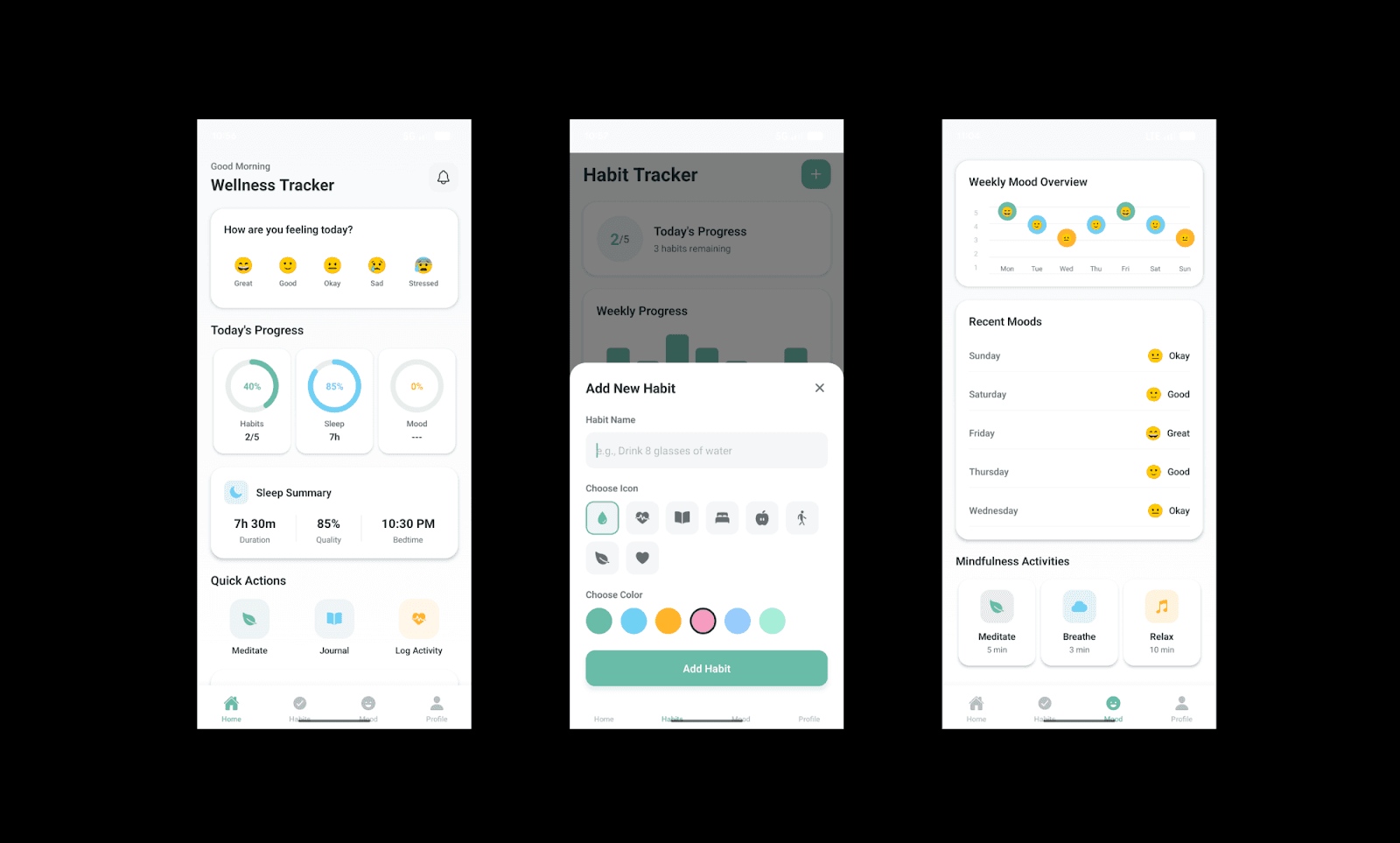
Die Output-Qualität der mobilen UX hat mich absolut überzeugt. Alle Screens waren da, die Bereiche sinnvoll aufgebaut und die meisten Klicks und Mikro-Interaktionen liefen flüssig.
Enttäuschend waren jedoch die visuellen Details. Es wirkte zwar minimalistisch, aber nicht Premium. Der „Get Started“-CTA überlagerte die Features, und einige Icons und Texte waren unschön verschoben.
Visuelle Anpassungen machen

Ich wollte es genau wissen und habe 4 Änderungen verlangt: Farbe, Icons, Text und eine neue Section. Text und Custom-Sektion klappten perfekt. Bei Farben und Icons geriet der Agent ins Stolpern: Meine Anweisung für 3D-Icons endete in 2D-Icons mit Schlagschatten, was alles andere als modern aussah.
Mein Eindruck hierzu: Für ein absolut designfokussiertes Produkt ist Emergent AI (noch) nicht die ideale Wahl.
Und der Rebuild dauerte wieder knapp 5 Minuten.
Deployen und Teilen

Du kannst deine mobile App in Emergent über drei Wege deployen:
Dauerhafter App-Zugriff via Expo Go
iOS (IPA) Build-Downloads
Android (APK & AAB) Downloads
Ein aktives Deployment kostet 50 Credits/Monat. Vorab kannst du einen System-Check durchführen lassen; das Setup der Produktivumgebung übernimmt die Plattform vollautomatisch.
Um an den Code zu kommen, verbindest du einfach deinen GitHub-Account und hast sofortigen Zugriff auf alle Repositories.
Features, die mir bei Emergent AI gefallen haben
Das Highlight beim Emergent AI App Builder ist der Multi-Agenten-Ansatz, der Architektur, Code, Testing und Deployment Hand in Hand (und teils parallel) löst.
Mobile App Entwicklung: Support für React Native + Expo mit Echtzeittests per QR-Code direkt auf dem Handy.
GitHub-Integration: Exportiere Projekte direkt zu GitHub für volles Code-Eigentum.
Ein-Klick-Deployment: Apps blitzschnell auf der Emergent-Infrastruktur inklusive Domain-Support hosten.
Hohe Kontextlimits: Größere Tarife bieten enorme Token-Fenster für komplexe Full-Stack-Projekte.
Team-Kollaboration: Team-Pläne ermöglichen geteilte Workspaces für mehrere User parallel.
Mehr Drittanbieter-Integrationen: Nahtlose Verknüpfung mit Shopify, Webflow, Attio, Zendesk und vielen weiteren Tools.
Die besten Features im Base44 App Builder >
Vor- & Nachteile von Emergent AI
Vorteile | Nachteile |
Unterstützt Full-Stack, Mobile und Landingpages mit Multi-Agenten-Orchestrierung. | Rebuilds für kleine optische Korrekturen dauern ~5 Minuten und bremsen schnelle Iterationen aus. |
Auswahl aus Premium-Modellen wie Claude 4.6, GPT 5.2 Codex und Gemini 3 Pro. | Mobile Apps müssen via Expo Go statt direkt im Webbrowser getestet werden. |
Transparenter Build-Prozess mit Einblick in Prompt-Parsing, Package-Installationen und Debugging. | High-End-LLMs setzen in höheren Tarifen teilweise einen eigenen "Universal Key" voraus. |
KI fragt proaktiv nach, wenn Prompt-Instruktionen unklar oder unvollständig sind. | Vorschaulinks im Webbrowser verfallen bereits nach 30 Minuten. |
Sofortiges Testen via Expo Go und QR-Code. | Aktives Deployment verbraucht monatlich 50 Credits. |
Automatische Fehlerdiagnose, Verifizierung via UI-Screenshots und klärende Rückfragen. | |
Flexibler Export über Expo Go, iOS (IPA) oder Android (APK/AAB). |
Vor- & Nachteile von Blackbox AI >
Der beste Use Case für Emergent AI
Dank der starken No-Code-Entwicklungsmöglichkeiten ist Emergent AI ideal für Startups, Entwickler und Tech-PMs, die Ideen in Rekordzeit in funktionierende Prototypen verwandeln wollen.
Startup-Gründer können MVPs rasant bauen, um Marktideen zu validieren, bevor sie teure Entwickler anstellen.
Entwickler generieren damit schnell Full-Stack-Boilerplates und APIs, um die frühe Phase extrem zu verkürzen.
Tech PMs können Produktkonzepte testen, um Machbarkeit und Workflows direkt mit dem Engineering-Team zu besprechen.
Die Design-Limits von Emergent AI
In puncto Logik hält Emergent locker mit führenden Vibe Coding-Tools mit. Aber visuell stößt es schnell an Grenzen. UI wird hier primär als funktionales Nebenprodukt verstanden – das Resultat ist oft ein sehr generischer Standard-Look.
Für PMs bedeutet das weniger Design-Kontrolle und zeitintensive Iterationen für minimale Style-Anpassungen im Vergleich zu reinen KI-Design-Tools.
UI kostenlos mit KI designen >
Preise von Emergent AI

Emergent AI nutzt ein Freemium-Modell. Mit dem Free-Tarif bekommst du 10 Credits/Monat und Basiszugriff. Die monatlich abgerechneten Pläne sehen so aus:
Standard: $20/Monat für 100 Credits, GitHub-Integration, privates Projekt-Hosting etc.
Pro: $200/Monat für 750 Credits, 1M Kontextfenster, eigene KI-Agenten etc.
Bei jährlicher Zahlung sparst du ~15% pro Monat. Für große Teams gibt es zudem maßgeschneiderte Enterprise-Pläne.
Pro-Tipp: Um Credits zu sparen, designe das Produkt erst mit Banani und ziehe das Design danach rüber zu Emergent für das finale Vibe Coding.
Versteckte Kosten bei Lovable >
Alternativen zu Emergent AI
Base44 vs. Emergent
Base44 ist ein No-Code KI-App-Builder, der auf das schnelle Erstellen von Web-Apps und internen Tools per Prompts und Visual Editor spezialisiert ist. Hosting und Datenbank-Management sind direkt an Bord – ideal für nicht-technische Gründer.

Warum Base44 statt Emergent AI? Wähle Base44 für extrem schnelles KI-Prototyping, wenn du als Solo-Gründer Einfachheit über tiefgreifende Architekturkontrolle stellst.
Einschränkung von Base44: Bietet weniger Kontrolle über Code-Architektur und Custom Builds als Emergent AI.
Lovable vs. Emergent
Lovable ist eine KI-gestützte Vibe-Coding-Plattform für produktionsreife React- und Supabase-Apps. Sie setzt auf sauberen, editierbaren Code und glänzt mit einem genialen Visual Editor für sofortige Design-Tweaks.

Warum Lovable statt Emergent AI? Vibe Coder greifen zu Lovable, wenn exzellenter UI-Feinschliff und sauberer, entwicklerfreundlicher Code-Export Priorität haben.
Einschränkung von Lovable: Erfordert weiterhin Entwickler-Expertise für sehr komplexe Backend-Anpassungen und Infrastruktur-Setups.
Lovable-Alternativen ansehen >
Banani vs. Emergent
Banani ist ein KI-basiertes UI-Design- und Prototyping-Tool, das High-Fidelity Web- und Mobile-App-Interfaces aus Prompts macht. Der Fokus liegt ganz klar auf Designqualität, interaktiven Prototypen und dem Export von sauberem Frontend-Code oder Figma-Files.
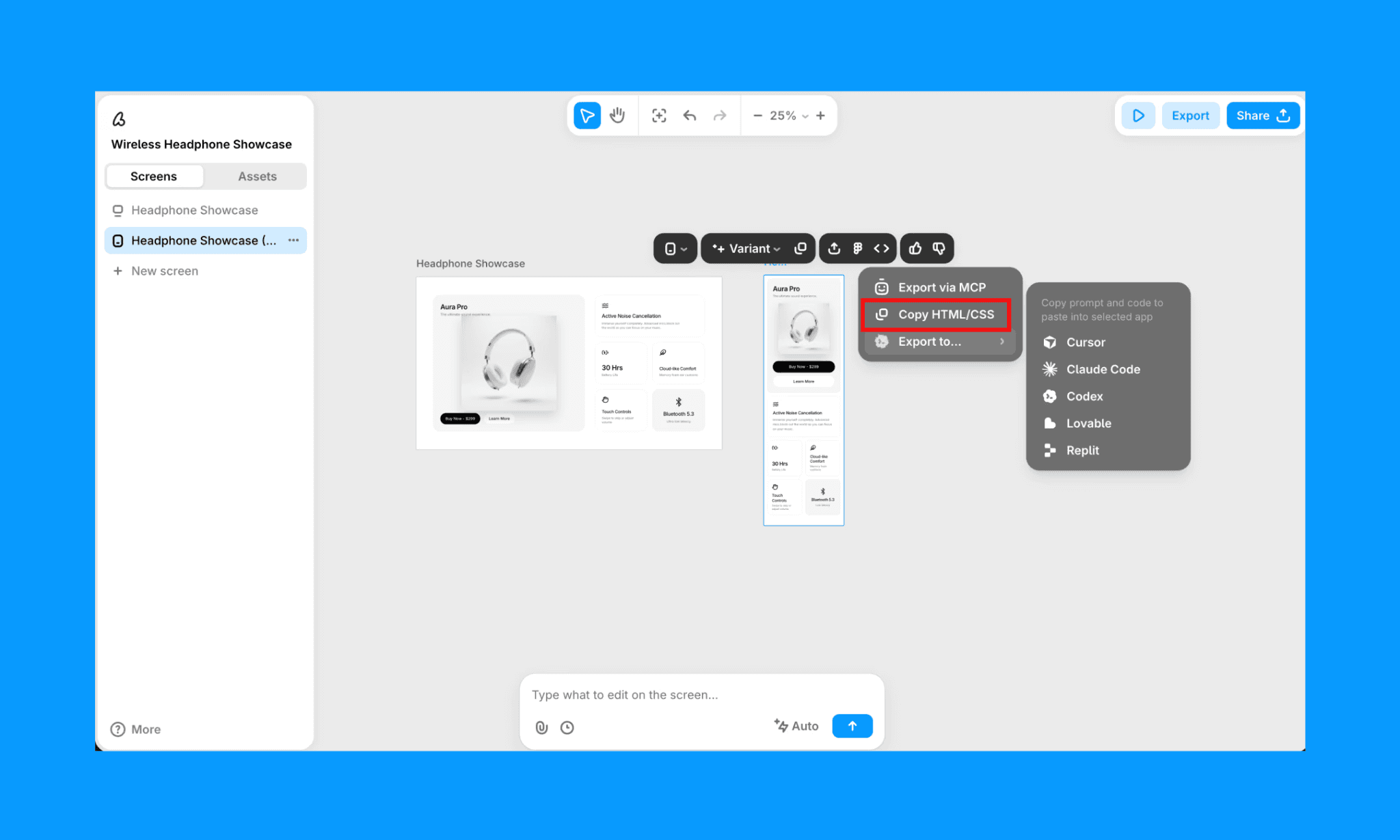
Warum Banani statt Emergent AI? Banani ist perfekt für Designer und PMs, um den UI/UX-Prototyp auf Hochglanz zu bringen, bevor Code generiert wird.
Einschränkung von Banani: Kann keine komplette Backend-Logik nativ abbilden (obwohl es via MCP mit Coding-Tools verbunden werden kann), ganz im Gegensatz zu den Full-Stack-Fähigkeiten von Emergent.
KI-Prototyp mit Banani bauen >
Fazit: Lohnt sich Emergent AI?
Ja, der Emergent AI App Builder ist ein hervorragendes Vibe Coding-Tool, um funktionale Web- und Mobile-Apps zu launchen – besonders, wenn Logik vor Design geht. Es ist jedoch ziemlich Credit-hungrig (Deployments kosten 50 Credits monatlich). Das macht die Entscheidung für Hobby-Bastler nicht ganz leicht.
Wenn du jedoch als PM oder Designer maximalen Wert auf den Look legst, solltest du vorab KI-UI-Generatoren wie Banani testen, um das Interface perfekt abzustimmen, bevor es ans Coding geht.
Jetzt kostenlos UI für deine App-Idee generieren >
FAQs zum Startup Emergent AI
Taugt Emergent AI etwas?
Ja, für Full-Stack-Webtools, Apps und Landingpages ist es genial. Kleine Abstriche muss man aktuell noch bei Detail-Design-Anpassungen machen.
Ist Emergent AI kostenlos?
Es gibt einen Free-Tarif mit 10 Credits/Monat. Perfekt für Landingpages und erste Tests, für komplexe Builds und Deployments brauchst du jedoch die Vollversion ab $20/Monat.
Ist Emergent AI ein indisches Unternehmen?
Ja, Emergent AI wurde 2024 von indischen Gründern gestartet und betreibt sein Operations Center in Bengaluru, Indien. Der Hauptsitz liegt jedoch in San Francisco, gefördert durch renommierte globale und indische VCs wie YC und SoftBank[2].
Wo liegt der Unterschied zwischen Base44 und Emergent AI?
Base44 setzt auf visuelle No-Code-Entwicklung, während Emergent vollautomatisiert mit Multi-Agenten-Workflows echte Full-Stack-Apps erzeugt.
Welche Alternativen gibt es zu Emergent AI?
Für die App-Generierung sind Base44 und Lovable starke Optionen. Steht das UI-Design und Prototyping an erster Stelle, ist Banani die bessere Wahl.
Quellen
[2] https://www.businessinsider.com/emergent-vibe-coding-funding-khosla-softbank-2026-1


