
Replit fiyatlandırma sayfası "Replit ne kadar?" sorusuna oldukça net yanıt veriyor. Ancak sanırım siz "Replit aboneliği almaya değer mi?" veya "Replit kredileri en verimli nasıl kullanılır?" soruları için buradasınız. Özellikle de Reddit'te bir kullanıcının 20$'lık Replit Core aboneliği yerine bir günde 350$ fatura ödediğine dair isyanlarından sonra![1]
İşte karşınızda Replit'in efor tabanlı fiyatlandırma sistemi. Dürüst olmak gerekirse, lokal kurulum cehenneminden kaçan vibe coder'lar için bu platform pahalı değil. Ancak VS Code'un ücretsiz olduğunu bilen profesyoneller için tam bir soygun. (Tıpkı 2026'daki çoğu Yapay Zeka Uygulama Geliştiricisi gibi.)
Bu rehberde, Replit'in adeta bir kumar makinesi olan fiyatlandırma planlarını, kredi sistemini, tasarruf ipuçlarını parçalara ayırıyor ve rakiplerin maliyetleriyle karşılaştırıyorum.
Replit İncelememin Tamamını Oku >
2026 Replit Fiyatlandırma Planları
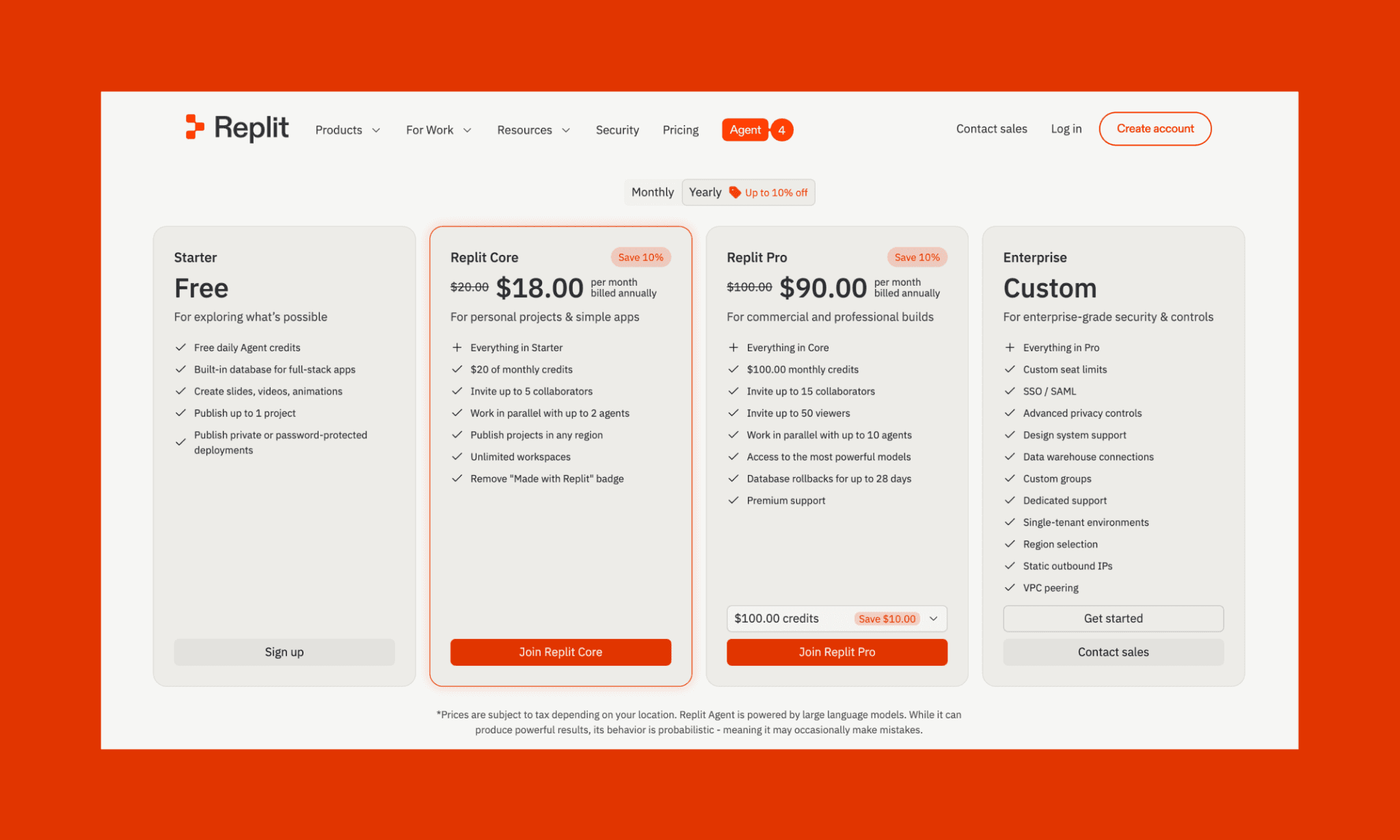
Replit Ücretsiz Plan
Replit, 2026'da freemium modelini izliyor. Ücretsiz sürüm keşif ve öğrenme odaklıdır, prodüksiyon için değildir; öğrenciler ve hobi olarak kod yazanlar için uygundur. Replit'te ayda 0$'a şunları alırsınız:
Günlük ücretsiz Agent kredisi (her gün sıfırlanır)
Full-stack uygulamalar için yerleşik veritabanı
En fazla 1 proje yayınlama
Slaytlar, videolar, animasyonlar oluşturma
Gizli/şifre korumalı dağıtımlar (deployment)
Replit Ücretli Planlar
En ucuz Replit planı, aylık 20$'lık Replit Core ile başlar. Bunun üzerinde aylık 100$'dan başlayan daha kapsamlı Replit Pro ve büyük ölçekli özel hizmetler için Enterprise planı bulunur.
Plan | Aylık Maliyet | Krediler | Önemli Özellikler |
Replit Core | $20/ay | $20/ay | Tam Agent erişimi, 5 ortak çalışan, 2 paralel agent, sınırsız çalışma alanı, özel dağıtım bölgeleri |
Replit Pro | $100/ay | $100/ay | Core'daki her şey, 15 ortak çalışan, 10 paralel agent, premium yapay zeka modelleri, veritabanı geri yükleme, öncelikli destek |
Enterprise | Özel | Özel | Pro'daki her şey, SSO/SAML, gelişmiş güvenlik, özel destek ekibi, özel altyapı, özel ağ iletişimi |
Not: Yıllık faturalandırıldığında Replit Core ve Pro %10'a kadar daha ucuzdur.
Lovable Fiyatlandırması - Detaylı Özellik Analizi >
Hangi Replit aboneliği en iyisidir?
Bence tek bir "en iyi" Replit aboneliği yoktur. Sizin kullanım senaryonuza, iş akışınıza ve bütçenize en uygun olanı vardır.
Şu durumlarda Replit Free veya Starter seçin:
Sadece kodlamayı öğreniyor ve keşfediyorsanız.
Replit özelliklerini risksiz test etmek istiyorsanız.
Gündelik kodlama için günlük kredi sınırı sizin için uygunsa.
Ücretli planlara henüz taahhüt vermek istemiyorsanız.
Şu durumlarda Replit Core seçin:
Kişisel projeler ve basit web uygulamaları geliştiriyorsanız.
Çok para harcamadan tam Agent erişimi istiyorsanız.
Küçük ekiplerle (5 kişiye kadar) ortak çalışmanız gerekiyorsa.
Yerel kurulum zahmetinden kaçınıp pratiklik istiyorsanız.
Şu durumlarda Replit Pro seçin:
Müşteriler için ticari veya profesyonel projeler yürütüyorsanız.
Aktif kod yazan ekibinizi 5 kişinin üzerine çıkarıyorsanız.
Güvenlik için güçlü modeller ve veritabanı geri yükleme seçeneği arıyorsanız.
Teslim tarihleri yaklaştığı için öncelikli desteğe ihtiyacınız varsa.
Şu durumlarda Replit Enterprise seçin:
Şirketiniz SSO, SAML ve uyumluluk kontrolleri gerektiriyorsa.
Yazılım entegrasyonu öncesi güvenlik incelemeleri zorunluysa.
Özel desteğe ve size tahsis edilmiş altyapıya ihtiyacınız varsa.
Organizasyon genelinde birden fazla ekip Replit kullanıyorsa.
Replit'in Tüm Özellik Listesini Görün >
Replit Kredileri ve Efor Tabanlı Fiyatlandırma
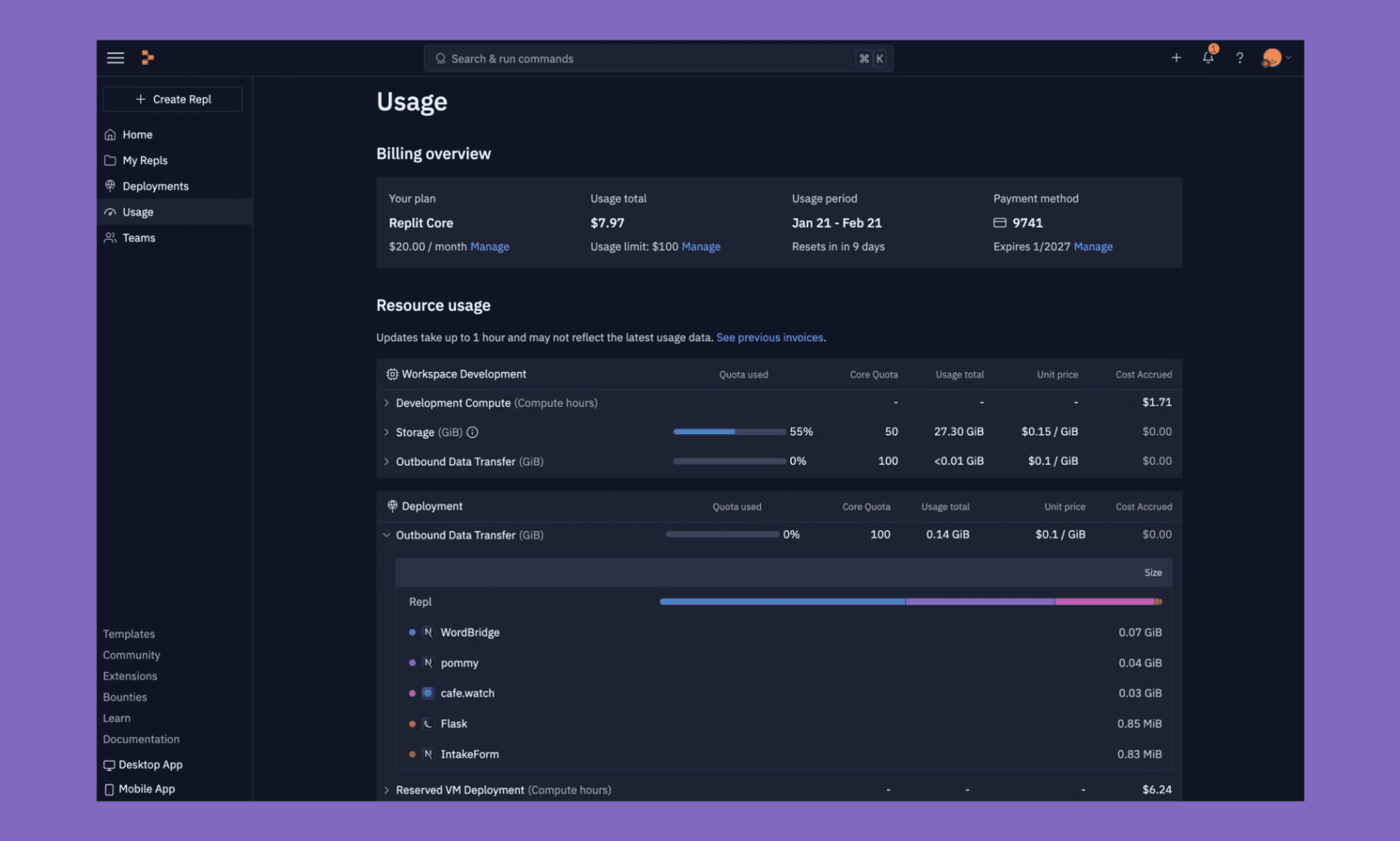
Replit Kredileri, platformun evrensel para birimidir. Herhangi bir Replit planı satın aldığınızda, genellikle bir ay geçerli olan belirli bir kredi alırsınız. Replit Agent'larını tetikleyen her komut, düzenleme, dağıtım, veritabanı sorgusu, depolama veya bant genişliği kredi tüketir. Tüketilen kredi miktarı ise efor tabanlı fiyatlandırmayla belirlenir.
Replit, efor ve kredi tüketimi oranı hakkında resmi bir dokümantasyon sunmuyor. Şeytan tam da bu detayda gizli. En kötüsü de, aylık krediniz bittiğinde kartınızdan limit sınırı olmaksızın ve onay alınmadan doğrudan çekim yapılmasıdır!
Yine de Replit faturanızı anlamanıza yardımcı olacak bazı önemli noktalar şunlardır:
Tek bir ortak havuz: Agent işlemleri, hosting, veritabanı sorguları ve trafik aynı aylık kredi havuzundan harcanır.
Öngörülemeyen işlem maliyetleri: Basit düzenlemeler 5-20 kredi; karmaşık özellikler 150-300+ kredi harcar. Maliyeti ancak işlem bittikten sonra görürsünüz.
Tüm Agent etkileşimleri ücretlidir: Plan Modu sohbetleri, kod üretimi, hafif derlemeler ve hatta kod değişikliği yapmayan tavsiye yanıtları bile kredinizden düşer.
Belirsiz komutlar daha pahalıdır: "Sıralama butonu ekle" gibi net istekler, Agent kapsamı kendi belirlediği için "arayüzü iyileştir" gibi belirsiz isteklere göre daha az kredi harcar.
Krediler devretmez (Pro hariç): Ay bittiğinde kullanılmayan krediler silinir. Aboneliği aktif tutmak için yapılan bu tasarımda sadece Pro kullanıcıları 1 aylık devir hakkına sahiptir.
Replit'te kullanılmayan aylık krediler devreder mi?
Hayır, aylık krediler sonraki aya devretmez. Ancak Pro aboneleri, kredilerini yalnızca bir sonraki aya özel olarak devredebilirler.
Replit beklenmedik derecede pahalı bir işlem için iade yapar mı?
Replit'te bu tür iadeleri destekleyen resmi bir açıklama bulamadık. Ancak, harcamaları yönetmek için bütçe limitleri ve özel uyarılar ayarlayabilirsiniz. Kalan kredinizi de profilinizden her zaman görebilirsiniz.
Replit aboneliğinde krediler biterse ek kredi satın alınabilir mi?
Evet. Ücretli Replit kullanıcıları ek kredi satın alabilir. Ancak bu krediler geçicidir; satın alma tarihinden itibaren 6 ay boyunca geçerlidir.
Replit Fatura Şokundan Kaçınma Yolları
Senaryo 1: Müşteriler için çalışan solo geliştirici
Core abonelikle ayda 2-3 müşteri projesi geliştirmek. Her projenin ay boyunca tonlarca Agent işlemini tetikleyen özellik talepleri ve revizyonları olur.
Aşırı ücretlendirme riski: Üst üste binen işlemler ve müşterinin belirsiz talepleri pahalı yeniden yazımlara yol açar; 20$'lık bütçe kolayca 120-150$'a fırlar.
Bütçe koruma ipuçlarım:
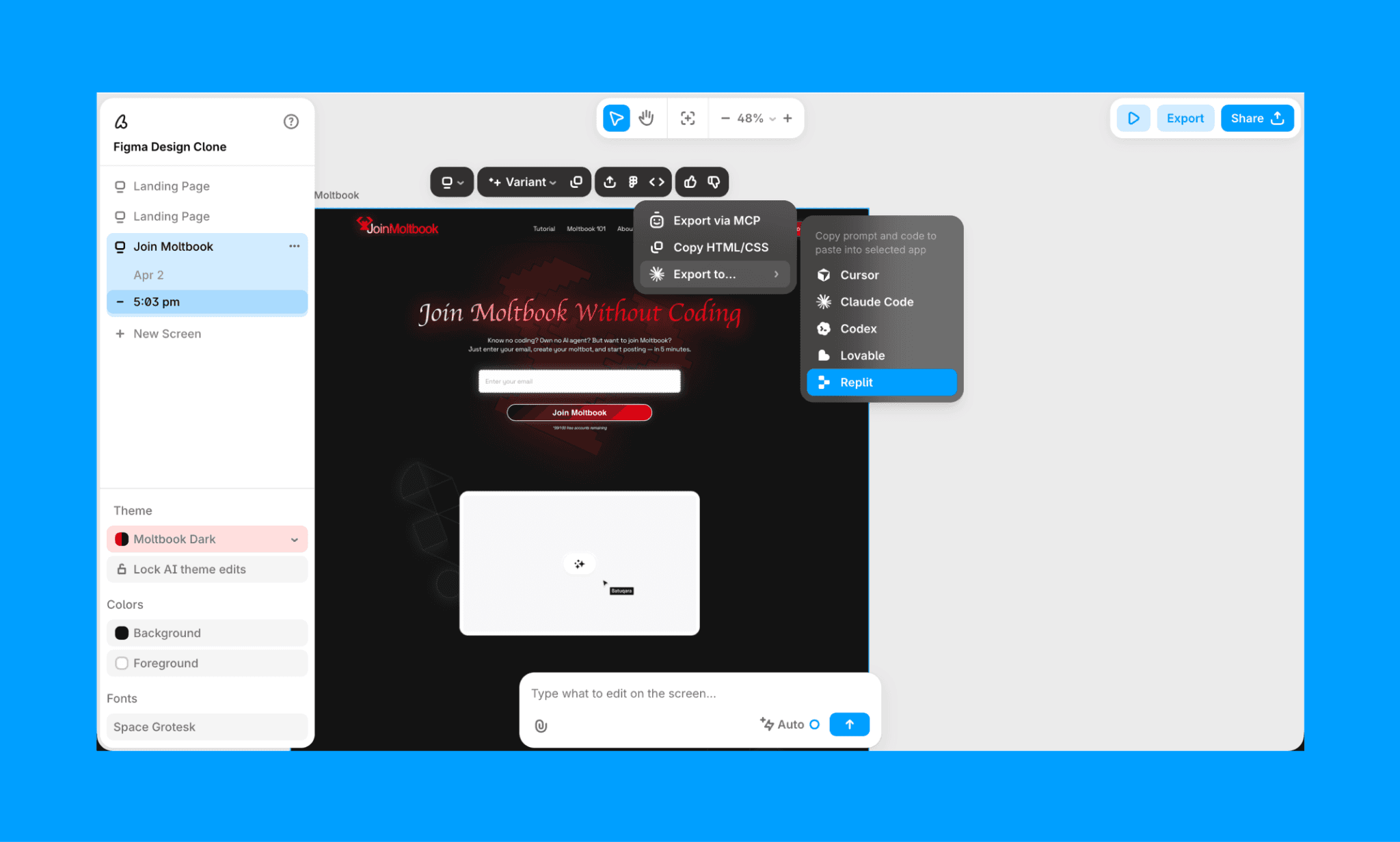
Önce arayüzü vibe design ile tasarlayın (Banani AI ile) ve ardından vibe code için Replit'e aktarın.
Genel istekler yerine ("arayüzü düzelt") spesifik taleplerde ("sıralama butonu ekle") bulunun.
Agent sekmesinden maliyetleri günlük takip edin; bütçe azalırsa çalışmayı duraklatın.
Senaryo 2: MVP yetiştirmeye çalışan startup ekibi
Birden fazla proje için tek bir Pro aboneliğini paylaşan küçük bir ekip (3-5 kişi). Ekip üyeleri harcamalarını takip etmez ve ortak kredi havuzu fark edilmeden tükenir.
Aşırı ücretlendirme riski: Paralel geliştirmeler kredileri hızla tüketir; kişi başı harcama görünmez ve aşım ücretleri fark edilmeden şirket kartına yansır; ay 300-500$ fatura ile biter.
Bütçe koruma ipuçlarım:
Kullandıkça öde sınırını açmadan önce kesin bir harcama limiti belirleyin.
Kullanım panelini özellikle yoğun dönemlerde düzenli olarak kontrol edin.
Öncelikle temel özelliklere odaklanın; deneme ve parlatma işlerini sonraya bırakın.
Senaryo 3: Departmanlar arası ölçeklenen Enterprise yapısı
15'ten fazla çalışanı, çoklu ekibi ve projeleri olan bir organizasyon. Ekipler arasında yoğun Agent kullanımı; merkezi bütçe denetimi eksikliği; uyumluluk ve maliyet kontrolü zorunlulukları.
Aşırı ücretlendirme riski: Ölçek büyüdükçe belirsizlikler artar; 10 ekip × günde 3 işlem = 30 işlem = sürpriz aylık fatura; kimin ne harcadığına dair denetim geçmişi yoktur.
Bütçe koruma ipuçlarım:
Lisansları, izinleri ve AI erişimini merkezi olarak yönetmek için Enterprise araçlarını kullanın.
Ekipler kullanımı artırmadan önce organizasyon genelinde bütçeler ve harcama uyarıları tanımlayın.
Çok harcayanları ve gereksiz harcamaları tespit etmek için kullanım raporlarını düzenli inceleyin.
Arka planda sessizce maliyet üreten kullanılmayan entegrasyonları ve servisleri kapatın.
Lovable AI'da Nasıl Daha Az Kredi Harcıyorum >
Replit ve Rakip Fiyatlandırmaları

Araç | Ücretsiz | Ücretli (Giriş) | En İyi Kullanım |
Günlük limit, 1 adet yayınlanmış uygulama (30 gün) | Core: $18/ay (yıllık), Pro: $90/ay (yıllık) | Yapay Zeka Agent ile full-stack web uygulamaları; yeni başlayanlar için vibe coding | |
~170 arayüz tasarımı/ay | $12/ay (yıllık); $20/ay (aylık) | Kodlama öncesi UI/UX prototipleme; tasarımdan koda iş akışları | |
Günlük 5 kredi (~30/ay); $25 ücretsiz geçici Cloud hosting | Pro: $25/ay (100 kredi/ay) | Hızlı prompt ile MVP full-stack uygulamalar; teknik olmayan geliştiriciler | |
Aylık 25 mesaj kredisi veya 100 entegrasyon kredisi | $16/ay (yıllık); $20/ay (aylık) | Veritabanı ve yetkilendirme (auth) içeren full-stack yapay zeka uygulamaları | |
Aylık 1M token (Günlük 150K token) | Pro: $20/ay (10M token/ay) | Hızlı prompt-to-app geliştirme; tasarımdan yayına hızlı geçiş | |
5$ değerinde kredi; günlük 7 mesaj | $20/ay (20$ aylık kredi) | Prompt'lar ile frontend bileşenleri ve React tasarımları oluşturma | |
Cursor | Sınırlı Agent istekleri | $16/ay (yıllık); $20/ay (aylık) | Büyük kod tabanlarıyla çalışan profesyonel yazılımcılar |
GitHub Codespaces | Sınırsız genel/özel depo; 500MB depolama | Kullanıcı başına $4/ay (Team planı) | Versiyon kontrollü, GitHub odaklı ortaklaşa geliştirme |
Eclipse Che | Tamamen ücretsiz ve açık kaynak | Kendi sunucunuzda (SaaS ücreti yok) | Kendi host ettiğiniz bulut IDE; Kubernetes üzerinde enterprise çözümler |
2026'daki En İyi Replit Alternatiflerini Görün >
Peki, Replit Ücretini Ödemeye Değer mi?
Evet, Replit'i sihirli bir kutu olarak değil, bir üretkenlik aracı olarak gördüğünüz sürece ödemeye değer. Çünkü aksi takdirde bu vibe coding yazılımı size bir vibe vergisi keser; güçlü özelliklerini görürsünüz ama fiyatlandırmasını çözmeye çalışırken saç baş yolarsınız.
Küçük bir not olarak; buton kaydırmak, boşlukları ayarlamak gibi ufak isteklerin zamanla ciddi krediler tükettiğini gözlemledim. Bu yüzden Replit kredisi tasarrufu için altın kuralımı tekrarlıyorum: Önce vibe design, sonra vibe code. Prompt ile hızlı ve ucuz şekilde UI/UX tasarlamak için Banani AI app designer kullanın. Sonra bunu görsel olarak ya da doğrudan MCP entegrasyonuyla Replit'e aktarın.
Replit Fiyatlandırması SSS
Replit tamamen ücretsiz mi?
Hayır, ancak Replit'in ücretsiz bir Starter planı vardır. Deneme yapmak için yeterli günlük ücretsiz Agent kredisi sunar, ancak limitlere hızla takılırsınız.
Replit aylık ne kadar?
Replit freemium modeliyle çalışır. 0$'lık Starter planının yanı sıra aylık 20$'lık Replit Core ve aylık 100$'lık Replit Pro ücretli alternatifleri mevcuttur.
Replit öğrenciler için ücretsiz mi?
Öğrenciler indirimli tarifelerden yararlanabilir ancak tamamen ücretsiz değildir. .edu veya eşdeğer öğrenci e-postası olanlara ilk 6 ay boyunca Core planında aylık 15$ indirim (20$ yerine 10$/ay) sunuluyor.
Replit startup'lara kredi sağlıyor mu?
Evet. Replit for Startups programı ile 25 bin dolara kadar kredi imkanı sunuluyor. Genellikle VC ortaklıkları ve hızlandırıcı programlarının bir parçası olan erken aşama girişimler destekleniyor[2].
Tasarımcılar için ücretsiz bir Replit alternatifi var mı?
Bir uygulamanın UI/UX tasarımına odaklanan tasarımcılar ve ürün ekipleri, Replit yerine Banani'yi tercih edebilir. Ayda 170 adet düzenleme hakkı sunan harika bir Yapay Zeka Arayüz Oluşturucudur. Tasarımları Banani'den Replit'e kolayca aktarabilirsiniz.
Kaynaklar
[1] https://www.reddit.com/r/replit/comments/1lrbv36/replits_new_pricing_model_350_in_a_single_day/


